An alert is irreversible the moment it sends, so the design question is precision and volume rather than recall.
ConceptWhat it is
An alert is model output that arrives uninvited, interrupting someone. That interruption is the whole value — a system that notices something and tells the right person is worth more than one that waits to be asked — and it is also the whole risk.
Two properties distinguish it from every other exit. It cannot be unsent, and it consumes a finite resource: the recipient's willingness to keep reading alerts. A system tuned for recall will spend that resource in a fortnight and then be ignored when it is finally right.
How it worksThe mechanics
A trigger condition is evaluated, the model composes or classifies, and a delivery layer sends. The parts that decide whether it works sit around that core: a threshold tuned for precision, deduplication so one underlying event produces one message, and rate limiting so a cascade cannot produce a hundred.
Every alert carries what the recipient needs to act — what happened, why it was flagged, what to do, and a link to the evidence. An alert that says something looks wrong without saying what or where is a task assigned to the reader, and it is how a channel gets muted.
At a glanceSee it
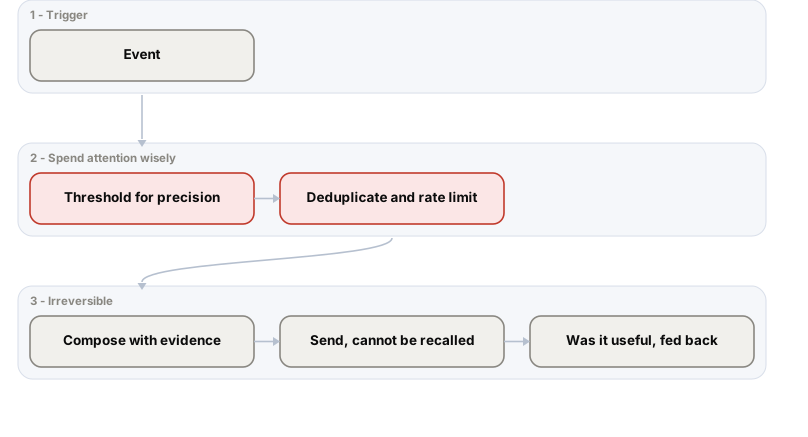
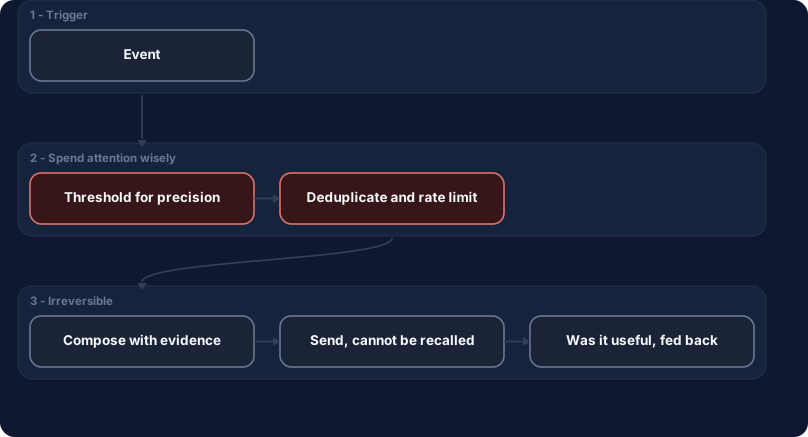
Precision is tuned ahead of recall because the scarce resource is attention. The feedback edge is what keeps the threshold honest over time.
When to use itWhere it fits
- Conditions genuinely worth interrupting someone for, where the cost of a late response is real.
- Low-frequency, high-consequence events — the profile alerting is actually good at.
- When the recipient can do something immediately; an alert with no available action is just news.
- Where a digest would arrive too late to matter, which is the honest test for choosing an alert over a report.
When NOT to use itLimits & anti-patterns
- Anything that can wait for a scheduled digest, which is most things.
- High-frequency or low-confidence signals, which train recipients to ignore the channel.
- As a hedge for an uncertain model — sending everything and letting people filter moves your problem to them.
- Where recall matters more than precision, in which case a reviewed queue serves better than an inbox.
Trade-offsAdvantages & costs
Advantages
- Reaches people where they already are, with no new surface to adopt.
- Very cheap per message and trivial to integrate.
- Latency to a human is as low as any exit available.
- Delivery, open and click data give an unusually direct read on whether the output was useful.
Trade-offs & costs
- Irreversible — a wrong alert to the wrong list is not recallable and may itself be a disclosure.
- Alert fatigue is the dominant failure and it is gradual, so it is noticed only after trust is gone.
- Email is a poor place to review nuance, so subtle output is misread.
- Deliverability and spam classification are real operational concerns once volume rises.
ExampleIn the real world
A contract-review assistant emails the legal team whenever it spots a non-standard indemnity clause. Tuned for recall it flags four in five contracts, including every boilerplate variation. Within a month the rule is a folder nobody opens, and the one genuinely unusual clause that quarter sits unread in it. Re-tuned for precision it fires perhaps twice a month, and it is read every time.
ToolsHow to implement it
- Transactional email servicesSendGrid, SES or Postmark, for deliverability you are not going to solve yourself.
- Slack or Teams webhooksusually better than email for team-scoped operational alerts with a thread for response.
- Deduplication keyed on the underlying eventthe control that stops one incident becoming forty messages.
- A feedback affordance in the messagea useful or not-useful action, which is the cheapest precision data you will ever collect.
Cost & effortWhat it takes
Fractions of a cent per message and one small model call. The meaningful cost is human attention, which does not appear on any invoice and is exhausted quickly. Engineering effort is low; the sustained work is threshold tuning, which needs the feedback signal to be collected from the first day rather than added once complaints start.