A scheduled report removes the human who was silently acting as your last guardrail, so the checks have to move into the job.
ConceptWhat it is
A scheduled report runs the model on a timetable and delivers the result to people who did not ask for it just then — a Monday summary, a nightly digest, a monthly roll-up. It is the cheapest way to turn an assistant that answers questions into something that arrives before the question is asked.
The property that changes everything is absence. In an interactive system a person reads each answer and quietly discards the bad ones. Nobody counted that as a control, but it was one, and a scheduled job removes it.
How it worksThe mechanics
A scheduler triggers a job that assembles its own inputs — a time window, a data pull, a fixed prompt template — runs the model, and renders the result into a document or message. Because there is no interlocutor, the input assembly has to handle its own edge cases: an empty window, a partial data load, a source that failed to refresh.
The checks that a person performed implicitly become explicit gates. Does the output contain the sections it should? Are the figures inside plausible ranges? Did the underlying data actually update? A job that cannot answer those questions should skip and say so, because a report that silently summarises stale data is worse than an absent one.
At a glanceSee it
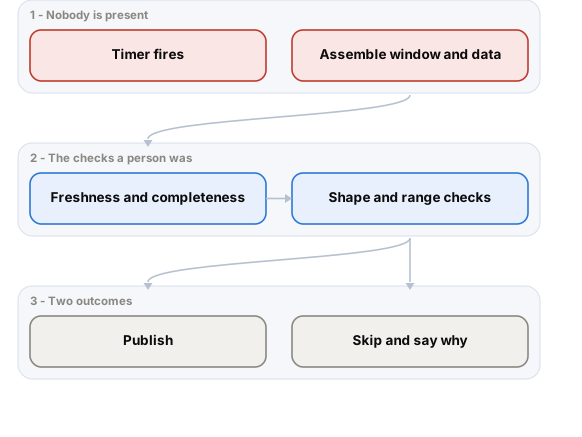
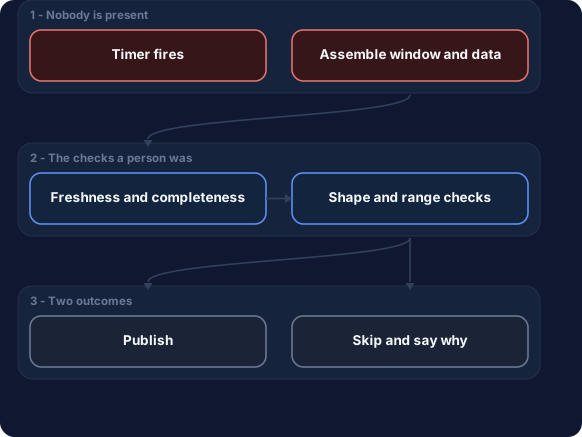
Two gates the interactive path never needed. Skipping with a reason is a valid outcome, because a confident summary of stale data is worse than nothing.
When to use itWhere it fits
- Recurring summaries whose value is being ready before anyone asks.
- Digests over data that changes on a predictable rhythm — weekly metrics, overnight batches.
- When many people need the same synthesis and asking individually would be waste.
- As a low-risk first production use of a model, since output is reviewed before it is acted on.
When NOT to use itLimits & anti-patterns
- Anything time-critical, where a fixed schedule is the wrong trigger and an event should fire it.
- Where recipients will act on the content immediately without reading critically.
- When the underlying data is not reliably fresh at the scheduled moment, which is more often than teams assume.
- As a way to look busy — an unread recurring report is pure cost with a reputational tail.
Trade-offsAdvantages & costs
Advantages
- Amortises one generation across many readers, so cost per person is very low.
- Runs off-peak, where latency does not matter and cheaper capacity may be available.
- Predictable spend, because the call count is a property of the schedule rather than of traffic.
- Failures are visible and recoverable — a missed run can be re-run before anyone acts.
Trade-offs & costs
- No human in the loop at generation time, so every implicit check has to be built.
- Silent staleness is the characteristic failure and it looks exactly like success.
- Recipients habituate quickly, and an unread report keeps costing while delivering nothing.
- Prompt or data drift goes unnoticed for longer, because nobody is comparing against a question they just asked.
ExampleIn the real world
A Monday operations digest summarises the previous week's incidents. A holiday weekend means the upstream export never ran, and the job faithfully summarises the week before that, in the present tense. Nothing errored and the report looked normal. The freshness gate that would have skipped the run with a one-line explanation was three lines of code and was added after the second occurrence.
ToolsHow to implement it
- Cron, Airflow or Temporalscheduling with retry and alerting, so a failed run is noticed rather than missed.
- A freshness assertion on every inputthe check that separates a real summary from a confident stale one.
- Templated rendering to HTML or PDFdeterministic structure around the generated prose, so shape checks are possible.
- Golden-output comparisondiffing against last period's report to catch a collapse in length or a missing section.
Cost & effortWhat it takes
Very cheap per reader — one generation serves the whole distribution list, so the model cost is trivial next to interactive use. Engineering effort is moderate and concentrated in the gates. Watch the quiet cost of reports nobody opens; measuring open rates is worth more than optimising the prompt.