Each telecom invoice line sits beside a usage total, duplicate suspects, late traffic and an analyst's note that can point the wrong way. This app reads the line, names why the bill and the usage differ, and flags lines that owe a customer a credit.
PresenterOpens the private repo. Visible to admins only.
For revenue assuranceCross-domain · Telecommunications
Why it matters
Today's manual process, and the same job with the app
Revenue assurance and billing operations at a telecom carrier, checking each invoice line against the usage records behind it.
✕Today's manual process
1Open each invoice line beside its usage summary in a spreadsheet.
2Take out last month's late traffic and the confirmed duplicates, but keep the unrated usage in.
3Round up to the service's billing unit, then decide what the leftover gap is.
4Grab the loudest number and the reason is wrong, and an over-billed customer is never credited.
A minute per line, every line
✓With the app
1Each line is read with its usage summary, and every figure is pulled out.
2The sums are done in order: late traffic and confirmed duplicates out, unrated usage kept in.
3The reason is named from the numbers, not from the analyst's note.
4Over-billed lines on issued invoices are flagged for a credit. Your team raises it.
People review reasons and raise the credits
See it work
One real case, read by the app, step by step
Line TL-RA-64456 on an issued May data invoice: the analyst blames late traffic, but the numbers say duplicate records.
Check a telecom invoice line against its usageReference appBuilt to be shaped to your process
5
1The invoice line TL-RA-64456, a data line on the May bill.
2The usage and the bill 1,170,495 used, 1,143,808 billed. That gap needs a reason.
3The blocks that change the sum last month's late traffic and the confirmed duplicates, each read separately.
4What does not count the analyst's note blames late traffic. The numbers say duplicate records.
5A credit is owed over-billed on an invoice already issued. Your team raises the credit.
For engineers
How it is built, and how we measured it
All fourteen steps of the build are written up, from the business case to running it in your own environment.
A small, forkable project that does one job end to end. Run once for real, and every figure on these pages captured from that run.
PresenterOpens the private repo. Visible to admins only.
The business caseThe problem this solves
Deciding why an invoice line's charged quantity differs from the usage behind it is arithmetic with a priority order — which blocks come out of the mediated total, which one deliberately stays in, what the billing increment is for THIS service, and only then what the remaining gap can be blamed on. The record puts four louder things next to that arithmetic: a duplicate-suspect figure that review already cleared, a late-arrival figure that belongs to last month's invoice, a suspense bucket that is still owed, and the billing analyst's own note, which is the one part of the record that is nobody's measurement. Someone opening each invoice line beside its mediated-usage summary, subtracting the previous period's late arrivals and the CONFIRMED duplicates (not the larger suspect figure beside them), leaving the suspense bucket IN because unrated usage is still owed, rounding what is left up to that service's own billing increment, and only then deciding what the remaining gap is. It is a minute per line and it is every line, and the part that goes wrong is not the subtraction: it is reaching for the loudest number on the page — the duplicate suspects, the late-arrival figure, the heavy suspense bucket — each of which produces a confident, well-formed, wrong answer.
Audience
Telecom billing operations, revenue assurance and interconnect settlement teams who reconcile mediated usage against invoiced charges, and anyone deciding which variances owe a customer a credit today. Every number on these pages came from one real run of this code, not from a vendor page.
The inputThe actual reconciliation records
The corpus is 55 reconciliation records, 0.03 MB (txt 55). Plain text, one format, invented rather than fetched — a real usage-to-invoice reconciliation record carries a named customer's line, the call-detail traffic behind it and a billing analyst's own note about that specific account, and there is no public corpus of (mediated usage, invoiced quantity, correct cause) triples for the same reason there is no public corpus of bank statements. Generating it also makes the label mechanical: gold is the arithmetic, not somebody's reading of the note.
The corpus
The 55 reconciliation recordsgenerated from a fixed seed, so no real record, person or institution appears in it.
Where each came fromwritten for this kit rather than collected — the corpus is generated in the kit's own repository, so there is no third-party data in it.
Swap this folder for your own material and the kit is pointed at your reconciliation records. That is the whole change — there is no database to migrate.
One reconciliation record, as the model receives itTLV-0001.txt · 1 of 55
Invoice Line
------------
TL-JH-61326

Rating Domain
-------------
MED-CALDERA-03

Service Type
------------
data

Billing Period
--------------
2026-11

Mediated Usage
--------------
535715 KB

Invoiced Quantity
-----------------
536576 KB

Unrated Usage
-------------
0 KB

Prior Period Usage
------------------
0 KB

Duplicate Suspects
------------------
23714 KB

Confirmed Duplicates
--------------------
18595 KB

Invoice Status
--------------
issued

Analyst Note
------------
Duplicate session records on this line; it looks double-charged to me.
The outcomeWhat a good result looks like
An eleven-field extracted record per invoice line, plus one pure-code routing decision taken from two of those fields: a line that OVER-billed the customer on an invoice already issued is the one that goes to billing today. Nothing here issues a credit, reverses a charge, re-rates a suspense bucket or contacts a customer.
And when it cannot
The fast tier produced no field miss and no wrong cause, so the model-side failure worth publishing is the free floor's, measured on the same 55 records: reading the analyst's note instead of doing the arithmetic gets 22 causes wrong, and its credit flag falls to 0.875 recall and 0.6364 precision even though it reads invoice_status perfectly by regex every single time. The RUN-side failure is real and is published as one: the deliberating tier lost a document to a transport timeout and covers 54 of 55.
Where it fitsWhat did work
Every line below is a measured result from this kit's own runs, with the figure that supports it. The headline above is not softened by any of them.
Screening a billing cycle for lines with an actionable variance, before a revenue-assurance analyst opens them — either tier on quality — they are identical on every line both reached 100 pct six-way cause accuracy on the fast tier over all 55 records, against the free analyst-note floor's 60.0 pct (22 wrong, including 3 real variances called clean and 9 false alarms).
Deciding the two tiers on cost, speed or accuracy — the fast tier About 5 pct cheaper per record ($0.0026305 vs $0.0027734), 32 pct lower p50 latency (4824 ms vs 7125 ms), and identical on every published grader over every record both reached. It also completed all 55; the deliberating tier's run completed 54.
At a glanceHow the whole thing runs
100%extraction accuracy
4,824 msp50, end to end
$2.63per 1,000 reconciliation records · Google Gemini 3 Flash
Run once, for real, on 2026-08-22. Every figure on these pages was captured from that run — nothing is written from intent.
14 steps, grouped by the question that sends you to them rather than by build order. Each tile carries the one figure that step is about, and opens the page behind it.
Check a telecom invoice line against its usage14 steps · 4 questions · run once, for real · 2026-08-22
Every tile is a linkall 14 steps · no step without a page
Should you use this?What you bring, where it stops, and when not to use it
Before you commit an afternoon to this, these are the answers that decide it. Each one is rendered from the record it lives in — and links the page that holds it in full.
What do I have to bring?
Replace data/corpus/*.txt, write your own data/fields.json, and supply a gold record per line. Every score on this page was measured on quantities that were already aggregated correctly.Corpus lens →
When is this the wrong choice?
Avoid: The analyst-note floor for the cause specifically — reading the note is exactly what the planted ambiguity is built to defeat, and it is worst on the class that matters most here (duplicate_records, 2 of 8). That is the case against the best-fitting scenario (“Screening a billing cycle for lines with an actionable variance, before a revenue-assurance analyst opens them”). 2 scenarios scored in all, each with its own.Eval lens →
Where does it stop working?
Raw usage records rather than aggregates. Every quantity here arrives pre-summed; a real reconciliation starts from millions of call-detail records and does the aggregation itself, which is the step most likely to be wrong and the one this kit never touches. 4 recorded failure modes, each from a run rather than a guess.Corpus lens →
What was never verified?
Whether either tier would still score 55 of 55 on a larger or adversarially-constructed set. All 22 note-mismatched records and all three numeric decoys resolved correctly on the fast tier, and on the 21 of them the deliberating tier reached — TLV-0014, the record it lost, is itself one of the 22 — and 55 records is not enough to rule out a harder confusion this corpus did not think to plant. 5 items this kit says it could not check.Eval lens →
Can I run this on a model I control?
Yes — any OpenAI-compatible endpoint, including one on your own hardware. The shipped adapter takes its host from BASE_URL and its model from MODEL, so nothing in src/ changes. The published figures come from 2 models on the fast tier and the deliberating tier, one provider, one key. Prompt lens →
And if it fits — what do I stand up?
4 artifacts with a stated home and a stated egress, and 3 decisions each with what you provision past its ceiling — plus what was not measured. That is the next page, not this one.step 14 — Run it in your environment →
Not asked of this kit — 2 questions: clone (a fresh clone of this kit runs with nothing fetched); judge (nothing here is graded by a model).
Last verified 2026-08-22 — r001-usage-variance. Every figure on these pages was captured from that run.
Run itHow this reaches your data
Every result on this page was produced by pure code over checked-in files, with no API key — which is why you can read the numbers before anyone spends anything.
Run this on your own data
The pipeline, its eval harness and the runs behind every numberdeployed inside your environment, on your own model endpoints, against your own documents.
The corpus above is the shape, not the limitit is a folder swap, and there is no database to migrate.
Checked before this shipped — Checked on a fresh checkout with API_KEY left blank: python -m src.app starts, the 55-record picker populates and the field table draws its eleven empty rows; clicking Extract returns the no-key sentence rather than a stack trace. python -m evals.check_labels passes with no network access at all.
PresenterOpens the private repo. Visible to admins only.
Step 01 of 14Business case
Written for: product manager · Measured during the eval run. Never estimated, never quoted from a vendor page.
In brief
100.0%rows answered
4,824 msp50, end to end
9,342 msp95
2 minclone to first result
What the clock covers. model call only, one per reconciliation record
Current processWhat it replaces
Someone opening each invoice line beside its mediated-usage summary, subtracting the previous period's late arrivals and the CONFIRMED duplicates (not the larger suspect figure beside them), leaving the suspense bucket IN because unrated usage is still owed, rounding what is left up to that service's own billing increment, and only then deciding what the remaining gap is. It is a minute per line and it is every line, and the part that goes wrong is not the subtraction: it is reaching for the loudest number on the page — the duplicate suspects, the late-arrival figure, the heavy suspense bucket — each of which produces a confident, well-formed, wrong answer.
Where it is not good enough
THE FAST TIER SCORED EVERY PUBLISHED FIGURE PERFECTLY — 605 of 605 extracted cells, 55 of 55 variance causes named exactly, 8 of 8 credit flags with no false alarms, on 55 calls. THAT IS THE PROBLEM WITH IT AS EVIDENCE, NOT THE PROOF OF IT. A corpus nothing gets wrong has stopped discriminating: it can tell you the note shortcut fails (the free analyst-note floor gets 22 of 55 causes wrong) and it cannot rank the two tiers, because nothing either model did separated them. The one thing that DID separate them was not a model behaviour at all: the deliberating tier's run lost TLV-0014 to a TLS handshake that never completed ("<urlopen error _ssl.c:1011: The handshake operation timed out>"), so r002 covers 54 of 55 records and every rate on it is over what survived. The adapter's retry policy keyed entirely on HTTP status codes and a handshake that never completes has none — that hole is closed in the shipped code now, and it was closed AFTER the run rather than before it, so nothing here measures the fix. Beyond that: the corpus hands the model five quantities somebody else already aggregated, which is the step most likely to be wrong in production; the credit rule is one enum test and one boolean this kit invented, scored against a gold built from the same enum test and boolean, so a perfect score means the code agrees with itself about lines the model read correctly; and 55 records of confusions we thought of is a floor test, not a hard one.
One question, end to end. Colour on the fan-in is the corpus format; a red hook marks every station with a recorded failure, and the words — every sub line, failure and report field — are in the ledger beneath. Every station is a link — click one to jump to its row, and each row links to the lens that explains it.
→Sources
txt55
55 usage-to-invoice reconciliation records, 1 format
The guardrail is a BUSINESS condition, not a check on the model: it routes a line when the variance OVER-billed the customer and the invoice has already been issued. It needs labels to score, which is the honest half of shipping one — 8 of 8 fired with no false alarms. It deliberately routes none of the 11 under-billed lines, which is defensible as a credit rule and indefensible as the only rule. The fast tier produced no miss on 605 cells, so the failures worth naming are elsewhere: the free analyst-note floor (evals/baseline.py, which reads the note and never does the arithmetic) gets 22 of 55 causes wrong and its credit flag down to 0.875 recall and 0.6364 precision, and the deliberating tier's own run lost a record to a TLS handshake the retry policy could not see. No red-team run exists for this kit; this footer names that absence rather than a resistance rate it does not have.
The swap seams
Seam
File
What changes
SECTION_HINTS
src/select.py
map fields to your own reconciliation report's headings; unmatched falls back to the whole document
PROVIDERS
src/adapters/__init__.py
any OpenAI-compatible host, or Anthropic's Messages API
increment
src/extract.py
the per-service billing increment — this kit ships 60 seconds for voice, 1024 KB for data and 1 for SMS, and a real carrier's rating configuration is per tariff and often per destination. It is one dict and it is read by the corpus generator, the prompt and the scorer together
classify
src/extract.py
the variance rule itself — which blocks leave the billable total and in what priority order. Stated once and used by three readers, so changing it here changes gold, the prompt and the grade together
compute
src/extract.py
the credit rule — this kit ships "over-billed AND already issued", and a real desk weighs the dollar size, the dispute window and any contracted tolerance. It is deliberately NOT the same function as classify(), so changing WHO GETS A CREDIT does not change WHAT THE VARIANCE IS
the field schema
data/fields.json
a different set of fields entirely, with its own types and allowed values
Components
Component
File
Role
segment
src/segment.py
cut the reconciliation record into addressable sections, pure code
select
src/select.py
pick which sections carry each field, pure code — the Rating Domain section is mapped by nothing and never sent, while Duplicate Suspects is mapped IN on purpose, because a kit that hid the decoy would have solved the problem for the model
prompt
src/prompt.py
assemble one call for all eleven fields, with the whole rule stated — the per-service billing increment, which blocks leave the mediated total, that unrated usage stays in, and that rounding is checked before any cause is named
extract
src/extract.py
the AI layer, one provider one key — plus the pure-code business-condition check downstream: an over-billed line on an invoice already issued is routed for a credit
judge
evals/judge.py
score field accuracy, the six-way cause grade, the actionable/not confusion matrix and the credit flag separately, pure code
Where it breaks at scale
One call per invoice line, no concurrency and nothing shared between lines: 55 records took 296.5 seconds of wall clock on the fast tier and 566.2 on the deliberating one, so a monthly reconciliation at a carrier with a million active lines is not hours, it is weeks, before anything is parallelised. There is no batching, no caching of the fixed prompt (which is 1588 of 1799 input tokens, 88 pct of every call), and no persistence — the routing decision is computed and returned, never written anywhere. AND THE FAILURE MODE AT SCALE IS ALREADY ON THE RECORD: r002 lost a document to a TLS handshake that never completed. One transport failure in 110 calls is invisible at 55 records and is thousands of lost lines at a million; the retry policy now covers it, and nothing here has measured that it works.
PresenterOpens the private repo. Visible to admins only.
Step 03 of 14App UI
Written for: anyone, in 5 seconds · Screenshots of the running app taken during the run.
SuccessesWhen it works
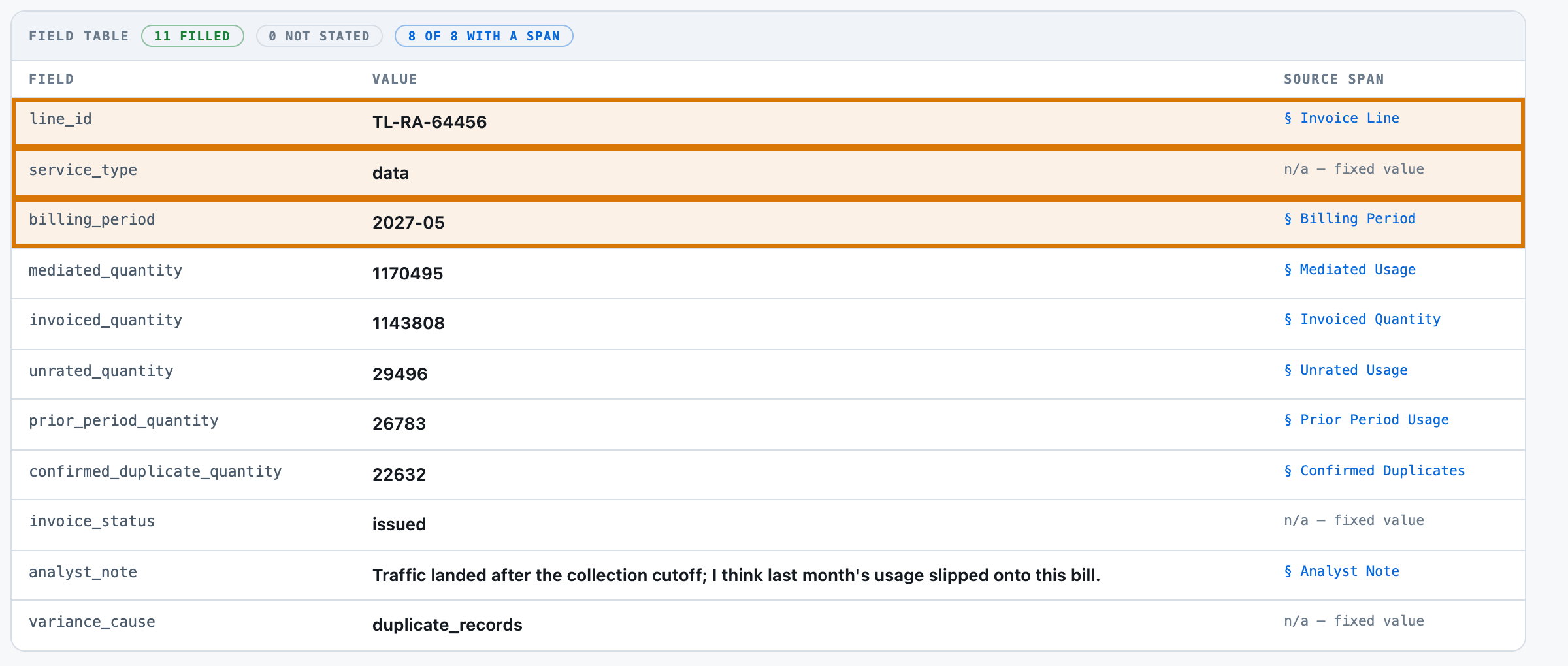
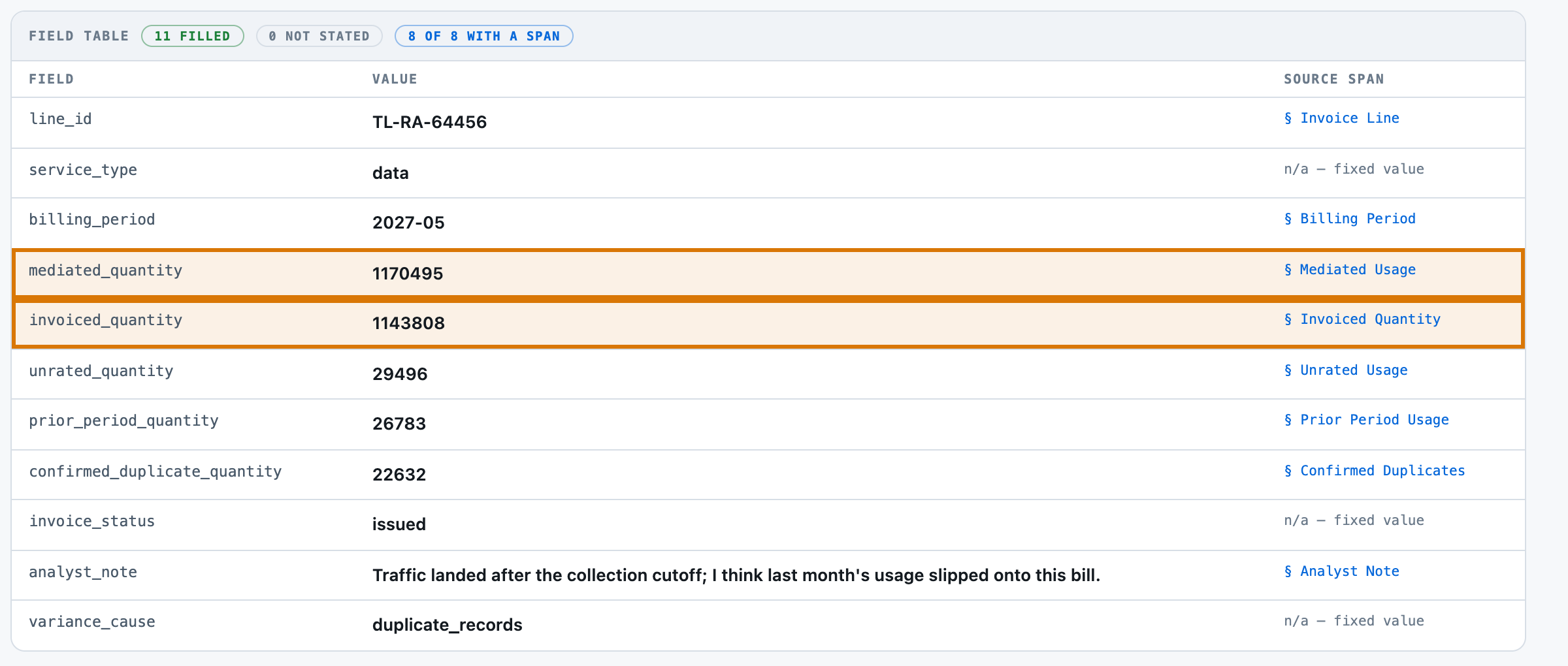
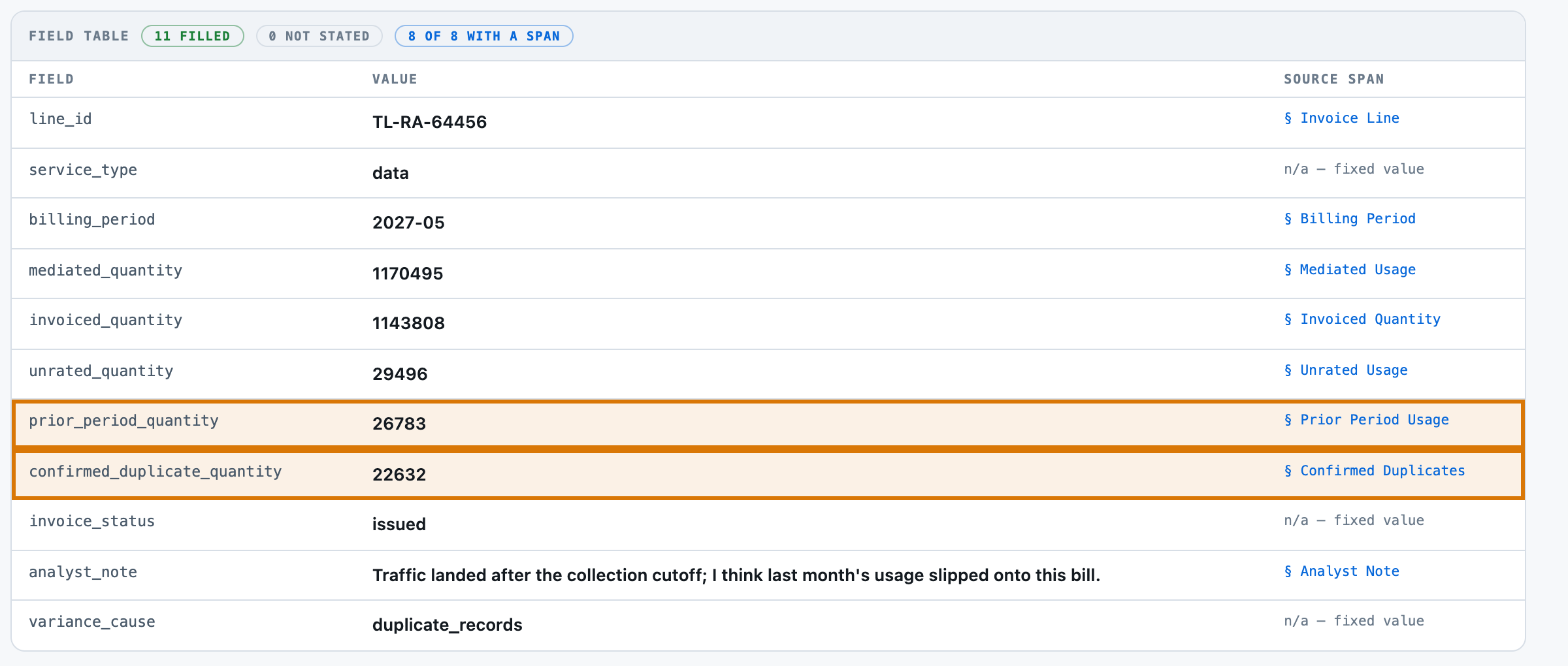
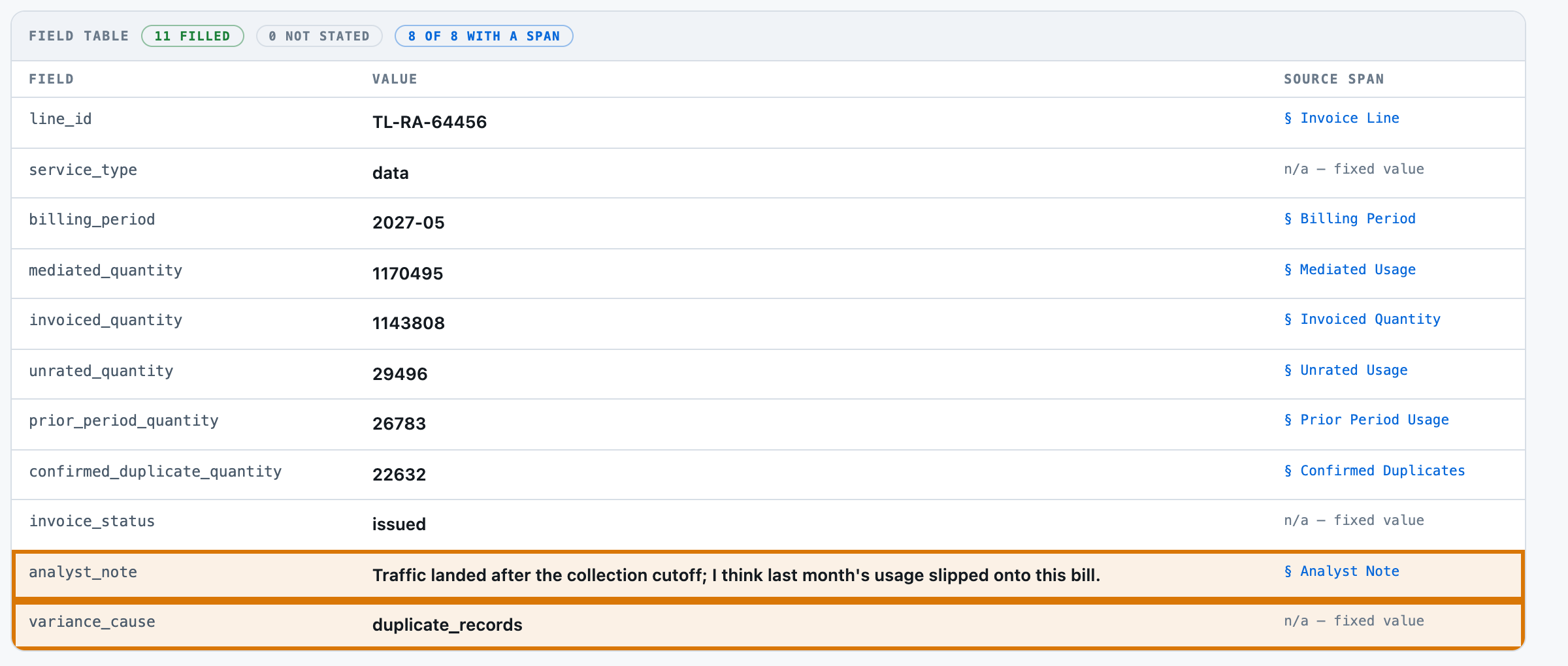
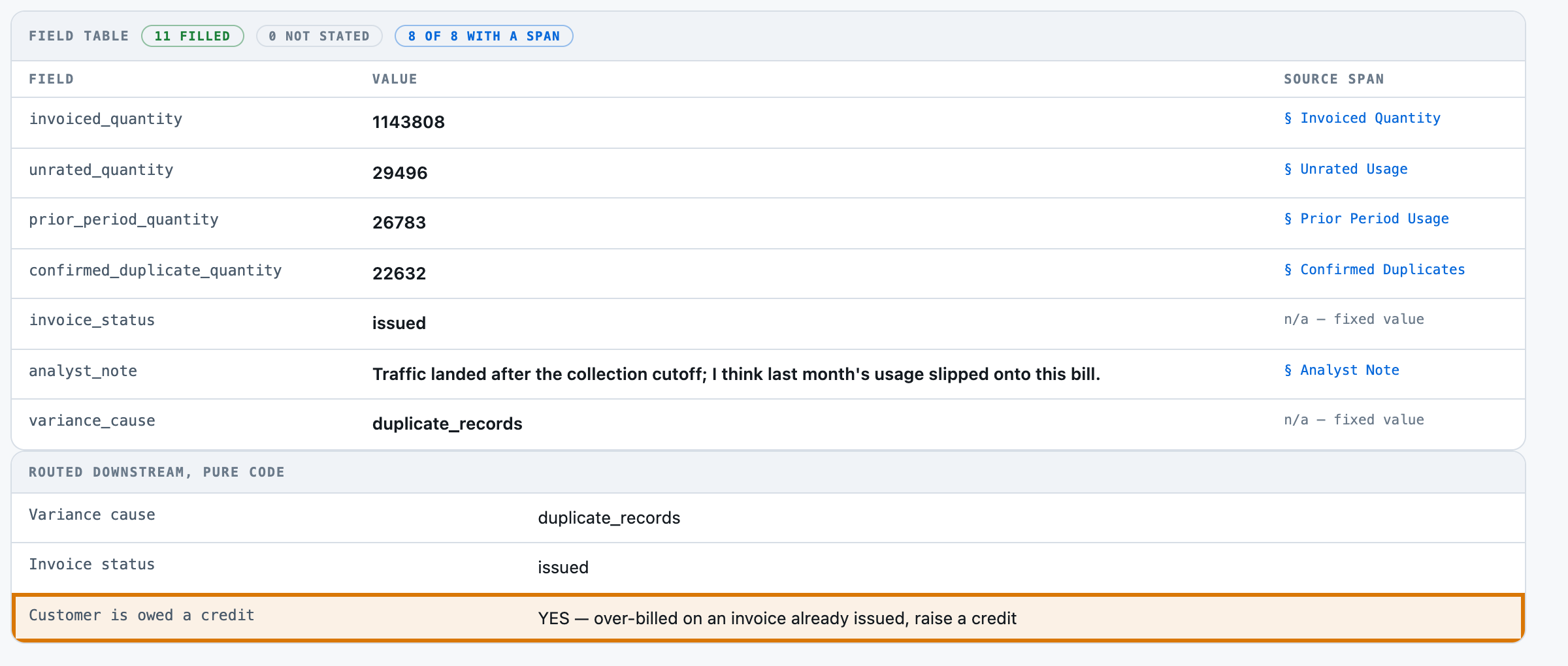
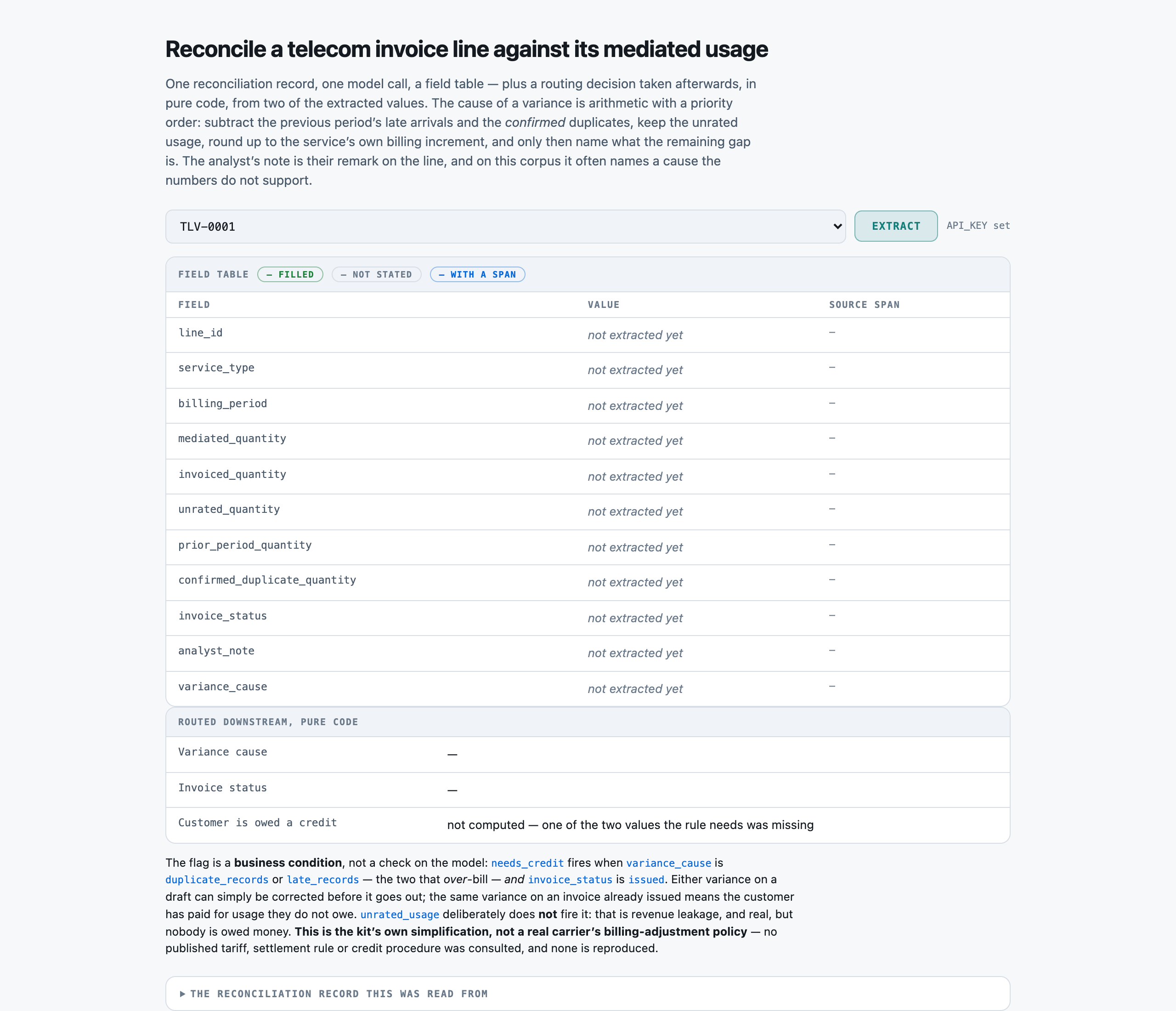
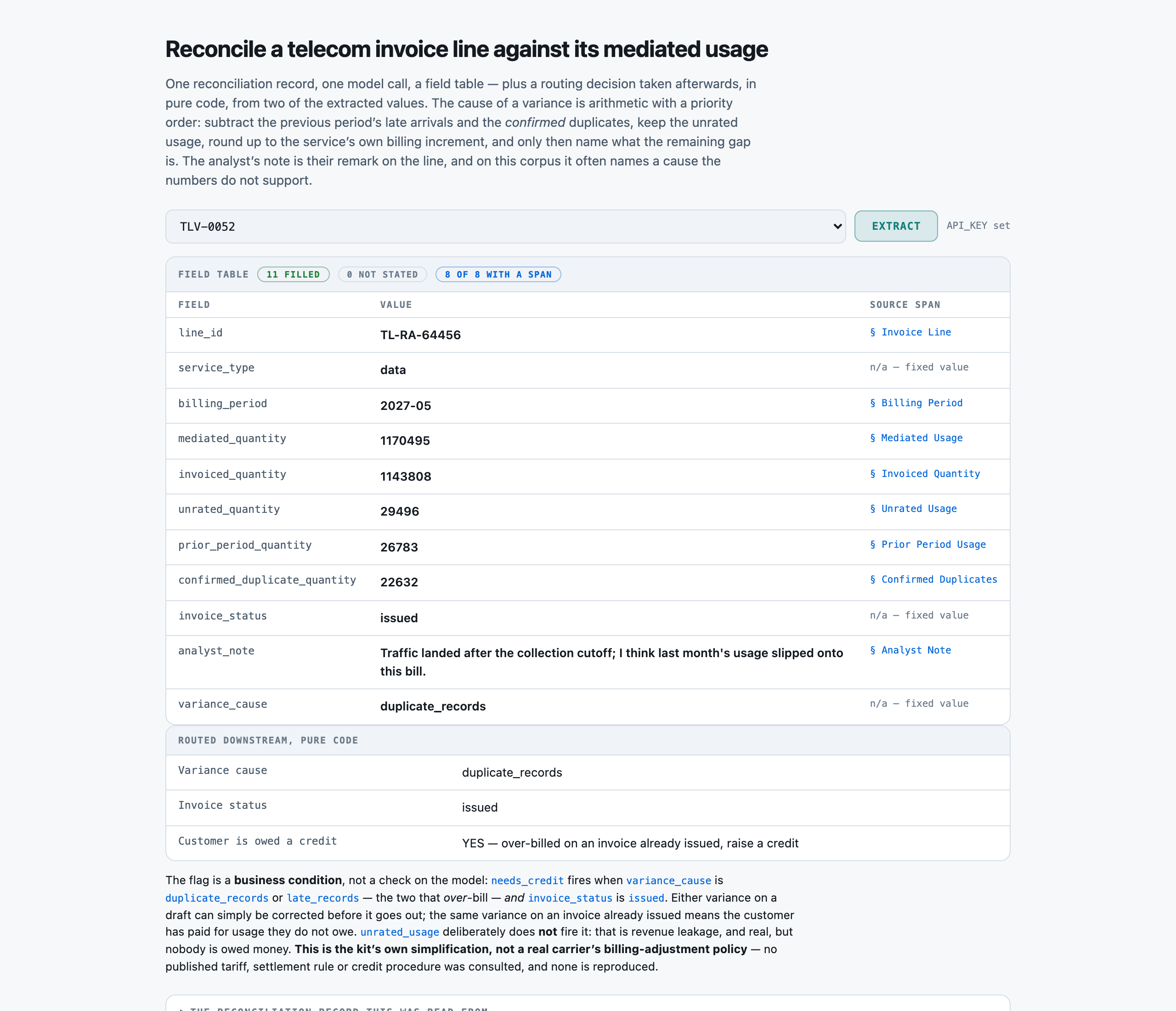
Before anything is asked of the model. Eleven named fields with their own types and allowed values, plus a second panel for the routing decision taken afterwards in pure code — the variance cause, the invoice status, and whether this line owes the customer a credit today.successOpen full size →TLV-0052, the hardest shape in the corpus: all three blocks non-zero, a duplicate suspect figure (28,520 KB) larger than what review confirmed (22,632 KB), a prior-period figure (26,783 KB) close enough to the confirmed duplicates to look like the same explanation, a suspense bucket (29,496 KB) that must NOT be subtracted, and an analyst note reading "Traffic landed after the collection cutoff; I think last month's usage slipped onto this bill." The model answered duplicate_records — which is what the arithmetic says — and because the invoice is already issued, the pure-code rule routed it for a credit.successOpen full size →
LimitsWhen it does not
A report showing only wins is an advert. This one is required, and the validator now refuses a kit that omits it.
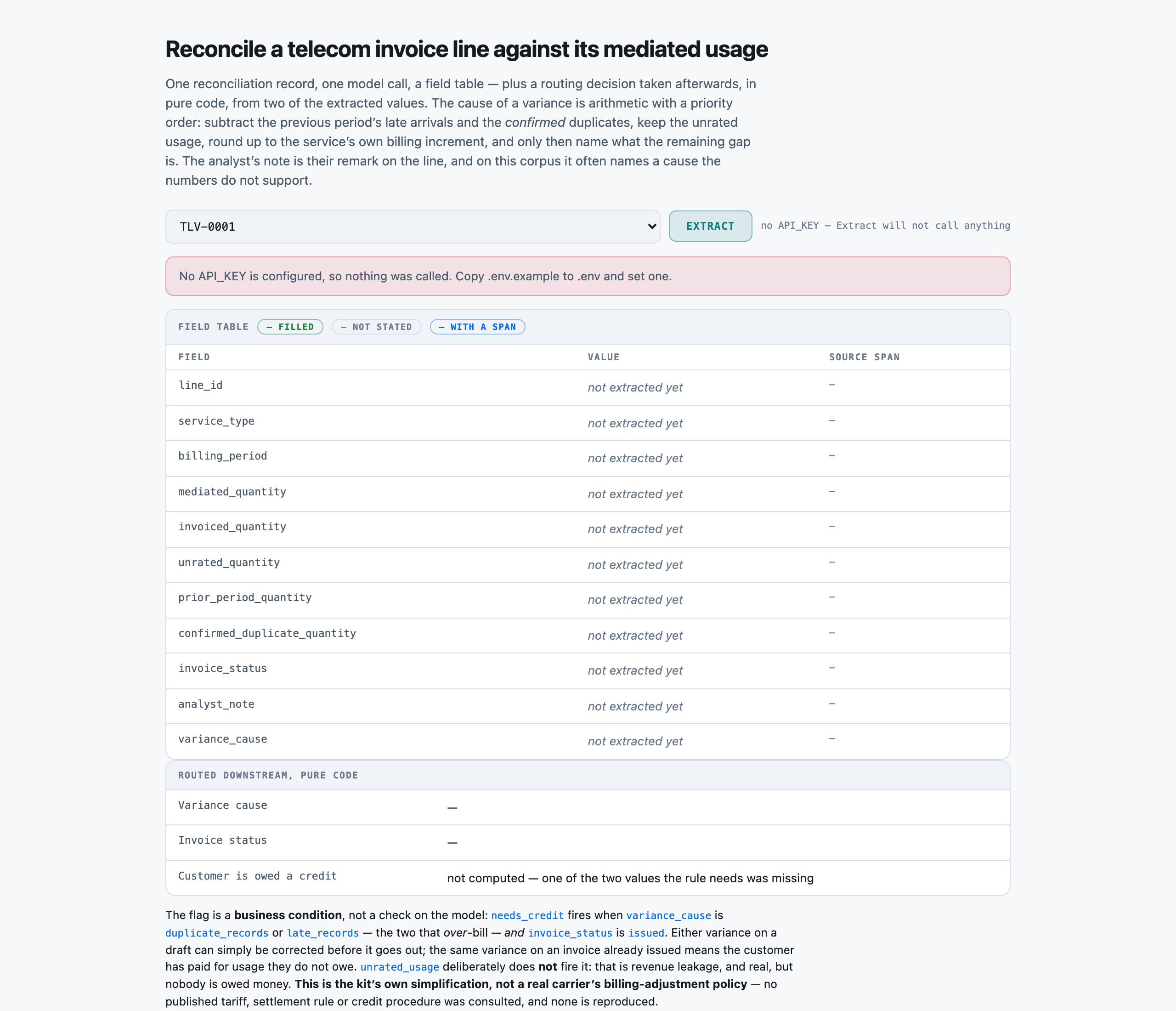
With no API_KEY configured, Extract returns a plain sentence saying nothing was called rather than an error — the page still renders, every field reads "not extracted yet" instead of a blank cell, and the credit row reads "not computed — one of the two values the rule needs was missing" rather than "no". An unknown is not a pass, in the UI as well as in the grader.failureOpen full size →
PresenterOpens the private repo. Visible to admins only.
Step 04 of 14Corpus
Written for: "can I point this at mine?" · Measured off the corpus the run actually used.
In brief
55reconciliation records
0.03 MiBtxt 55
660sections · p50 44 chars
$0.00setup · 0.0026s
How it is cutWhat one section is
cut on underlined section headings; a record with none falls back to one whole-document segment
SetupWhat the setup figure measured
There is no index. Preparation is segmentation only — 55 records cut into 660 sections in under three thousandths of a second, in process, with no model and no network.
LicenceLicence
MIT — this repository's own licence. Every line id, rating-domain name, quantity and analyst note is invented; no real carrier, customer, filed tariff or interconnect agreement is named or reproduced.
Bring your ownBring your own reconciliation records
Replace data/corpus/*.txt, write your own data/fields.json, and supply a gold record per line. SECTION_HINTS in src/select.py maps fields to section headings and will need editing for a different reconciliation-report layout; when it does not match, selection falls back to the whole document — slower, more expensive, always correct. increment(), classify() and compute() in src/extract.py are this kit's own invented increment table, variance rule and credit rule, and should be the first things you replace with your own rating configuration and credit policy.
⚠︎ And what stops being true when you do: Every score on this page was measured on quantities that were already aggregated correctly. Point this at your own mediation output and the aggregation becomes part of the system under test, and nothing measured here transfers to it.
What breaks it
Raw usage records rather than aggregates. Every quantity here arrives pre-summed; a real reconciliation starts from millions of call-detail records and does the aggregation itself, which is the step most likely to be wrong and the one this kit never touches.
A variance in AMOUNT rather than QUANTITY. A wrong rate applied to correctly-counted usage, a mid-period tariff switch or a prorated plan change all produce a charge that is wrong while every quantity on this record is right — this kit reconciles quantities and would answer 'none'.
A record whose sections are not headed — segment() falls back to one whole-document segment, so a span names "document" and locates nothing finer.
Roaming or interconnect traffic settled in another operator's units, and bundled allowances where 'billable' is not the same as 'used'. This kit's rule recognises three services, one increment each, and nothing else.
PresenterOpens the private repo. Visible to admins only.
Step 05 of 14Prompt
Written for: engineer · Logged from the run, verbatim.
In brief
The assembled prompt in full, and its real decomposition. Every part below occurs in the prompt that was actually sent, and the token counts sum to the recorded input total — they were measured against the provider’s own counter, not apportioned by character share.
AssemblyHow the prompt is assembled
Part
Characters
Tokens
system
3,343
880
field schema
2,989
708
record sections
544
211
Total
1,799
This is the cost lesson as arithmetic: of the 1,799 tokens assembled, 880 are instructions — 49% of the prompt, the largest single part. A per-request bill follows whichever part is biggest, and on this kit that is the one named here.
Measured token-for-token via evals/prompt_tokens.py's nested-prefix method on TLV-0052 — three calls at max_tokens=1, each part's size the difference between two consecutive prompt_tokens counts the provider itself returned. The total (1799) matches the input_tokens the worked example's own call reported, which is what proves the measured decomposition is of the prompt actually sent. kits/UC0040-usage-variance/results/tokens-p001-usage-variance.json.
Full promptThe prompt in full
The verbatim prompt, as sent
the prompt, as sent
You extract structured fields from a telecom usage-to-invoice reconciliation record for one invoice line. You return JSON and nothing else.

RULES, in order of importance:
1. If the record does not state a field, return null for it. Do not infer it and do not use what you know about the world. A field stated as 0 is stated -- return 0, not null.
2. `variance_cause` is decided by ARITHMETIC over five structured quantities -- mediated_quantity, invoiced_quantity, unrated_quantity, prior_period_quantity and confirmed_duplicate_quantity -- never by how the analyst note reads and never from the Duplicate Suspects figure. Work it out yourself, in this order:
   a. THE BILLING INCREMENT COMES FROM service_type. voice is billed in whole minutes, so the increment is 60 seconds. data is billed in whole megabytes, so the increment is 1024 KB. sms is billed per message, so the increment is 1 and there is NO rounding tolerance at all.
   b. billable = mediated_quantity - prior_period_quantity - confirmed_duplicate_quantity. DO NOT SUBTRACT unrated_quantity: usage that failed rating is still this period's usage and is still owed.
   c. expected = billable rounded UP to the next whole multiple of the increment.
   d. gap = invoiced_quantity - expected.
   e. Classify the gap and STOP AT THE FIRST MATCH:
      - gap is exactly 0 -> 'none'
      - the absolute value of gap is LESS THAN the increment -> 'rounding'
      - gap is negative, unrated_quantity is above 0, and the size of gap is within one increment of unrated_quantity -> 'unrated_usage'
      - gap is positive, confirmed_duplicate_quantity is above 0, and gap is within one increment of confirmed_duplicate_quantity -> 'duplicate_records'
      - gap is positive, prior_period_quantity is above 0, and gap is within one increment of prior_period_quantity -> 'late_records'
      - otherwise -> 'unexplained'
3. THE ROUNDING CHECK COMES BEFORE ANY CAUSE IS NAMED. A gap smaller than one increment is explained by rounding and nothing else -- do not name a cause for it, even when one of the three blocks happens to be about that size.
4. CONFIRMED DUPLICATES ARE NOT DUPLICATE SUSPECTS. The record states both. De-duplication FLAGS suspects; review CONFIRMS a subset of them, and a suspect that review cleared is two genuinely distinct sessions. Only the Confirmed Duplicates figure enters the arithmetic, and confirmed_duplicate_quantity is read from that section. The suspect figure is usually the larger of the two and is often zero once confirmed.
5. THE PRESENCE OF PRIOR-PERIOD USAGE IS NOT ITSELF A VARIANCE. Records that arrived after the collection cutoff belong to the PREVIOUS invoice. Subtract them, and if the invoice already left them out the answer is 'none'.
6. THE ANALYST NOTE IS A FIELD TO COPY, NOT EVIDENCE ABOUT THE CAUSE. A note naming duplicate records, unrated usage, late records or rounding does NOT make that the cause, and a note saying the line reconciled cleanly does NOT mean it did. The five quantities decide; the note is the analyst's own remark and may disagree with them.
7. Copy values verbatim from the record wherever possible, and report every quantity as a bare number with the unit left out of it.
8. Use the exact allowed value for a field that lists them.
9. Return every field named in the schema, even when the answer is null.

Extract these fields:
- line_id (string) -- the invoice line identifier, verbatim
- service_type (enum) one of: voice, data, sms -- which service this invoice line bills, verbatim
- billing_period (string) -- the billing period, YYYY-MM
- mediated_quantity (number) -- the total usage mediation produced for this line and period, as a bare number without the unit
- invoiced_quantity (number) -- the quantity the invoice line actually charged, as a bare number without the unit
- unrated_quantity (number) -- usage that failed rating and is sitting in the suspense bucket, as a bare number without the unit. It is part of the mediated total. It may be 0
- prior_period_quantity (number) -- usage inside the mediated total that arrived after the collection cutoff and belongs to the PREVIOUS billing period, as a bare number without the unit. It may be 0
- confirmed_duplicate_quantity (number) -- usage inside the mediated total that de-duplication review CONFIRMED as duplicate records, as a bare number without the unit. Read the Confirmed Duplicates section, NOT the Duplicate Suspects section -- a suspect that review cleared is two genuinely distinct sessions and is not a duplicate. It may be 0
- invoice_status (enum) one of: draft, issued -- has this invoice already been issued to the customer, or is it still a draft?
- analyst_note (string) -- the billing analyst's own free-text note on the line, copied verbatim
- variance_cause (enum) one of: none, rounding, unrated_usage, duplicate_records, late_records, unexplained -- why the invoiced quantity differs from the usage that should have been billed. Decide this STRICTLY by arithmetic over mediated_quantity, invoiced_quantity, unrated_quantity, prior_period_quantity and confirmed_duplicate_quantity -- never from analyst_note and never from the Duplicate Suspects figure. Step 1, the billing increment for this service: voice is billed in whole minutes, so the increment is 60 seconds; data is billed in whole megabytes, so the increment is 1024 KB; SMS is billed per message, so the increment is 1 and there is NO rounding tolerance at all. Step 2, billable = mediated_quantity - prior_period_quantity - confirmed_duplicate_quantity. Unrated usage is NOT subtracted: it failed rating but it is still this period's usage and is still owed. Step 3, expected = billable rounded UP to the next whole increment. Step 4, gap = invoiced_quantity - expected. Step 5, classify the gap in this order and stop at the first match: if gap is 0 answer 'none'; else if the absolute value of gap is smaller than the increment answer 'rounding'; else if gap is negative and its size is within one increment of unrated_quantity (which must be above 0) answer 'unrated_usage'; else if gap is positive and within one increment of confirmed_duplicate_quantity (which must be above 0) answer 'duplicate_records'; else if gap is positive and within one increment of prior_period_quantity (which must be above 0) answer 'late_records'; otherwise answer 'unexplained'.

Return a JSON object with exactly these keys: line_id, service_type, billing_period, mediated_quantity, invoiced_quantity, unrated_quantity, prior_period_quantity, confirmed_duplicate_quantity, invoice_status, analyst_note, variance_cause
Use null for any field the record does not state.

USAGE-TO-INVOICE RECONCILIATION RECORD
--------------------------------------
Invoice Line
------------
TL-RA-64456

Service Type
------------
data

Billing Period
--------------
2027-05

Mediated Usage
--------------
1170495 KB

Invoiced Quantity
-----------------
1143808 KB

Unrated Usage
-------------
29496 KB

Prior Period Usage
------------------
26783 KB

Duplicate Suspects
------------------
28520 KB

Confirmed Duplicates
--------------------
22632 KB

Invoice Status
--------------
issued

Analyst Note
------------
Traffic landed after the collection cutoff; I think last month's usage slipped onto this bill.
Raw responseThe raw response
The raw response, before any parsing
the response, unparsed
{"line_id":"TL-RA-64456","service_type":"data","billing_period":"2027-05","mediated_quantity":1170495,"invoiced_quantity":1143808,"unrated_quantity":29496,"prior_period_quantity":26783,"confirmed_duplicate_quantity":22632,"invoice_status":"issued","analyst_note":"Traffic landed after the collection cutoff; I think last month's usage slipped onto this bill.","variance_cause":"duplicate_records"}
PresenterOpens the private repo. Visible to admins only.
Step 06 of 14Evals
Written for: the skeptic · The harness output, with as_of / model version / dataset version / verified_by.
In brief
Check a telecom invoice line against its usage — 55 reconciliation records. Two tiers of one model family answered, and every answer was then graded Three different ways — because the grade is a measurement too, and most of what went wrong on this kit went wrong in the ruler rather than the model.
55reconciliation records
55source documents
2model tiers
110graded answers
3grading methods
MeasurementsWhat was measured
COUNTED605 · 594 / 605extraction accuracy — cellsDecided by == against a fixed gold value. No model graded this and it reproduces to the digit — which makes it checkable, not necessarily right: it is only as good as the gold behind it.
COUNTED55 · 54 / 55variance cause exact accuracy — reconciliation recordsDecided by == against a fixed gold value. No model graded this and it reproduces to the digit — which makes it checkable, not necessarily right: it is only as good as the gold behind it.
NOT YET KNOWN—A person confirmed the gold is rightThe grader is == and needs no confirming. The gold does: it is machine-derived from the registry's structured modules, and every rate on this page rests on that derivation being faithful to what the prose actually says. Nobody has read a document against its gold record by hand.
Two words carry this page: Counted is deterministic and nobody's opinion and Not yet known is printed blank rather than filled with something plausible. There is no Judged row here and that is the point: nothing on this page is a model's opinion about another model. The row most worth having is currently the empty one.
How the method was validated
The scorer (evals/judge.py) is pure code, exact match with light normalisation against a mechanically-derived gold — there is no judgement to validate, only comparison. What WAS validated: gold's variance_cause is not a typed label at all, it is the arithmetic run over the same five quantities the record states, and evals/check_labels.py re-runs it over every gold row before any run is allowed to spend, failing if a single label disagrees with its own values. It separately asserts that the three blocks fit inside the mediated total, that no row carries a confirmed-duplicate block and a prior-period block within one increment of each other (which would make the same gap match two branches and score perfectly either way), that no SMS row is labelled rounding since its increment is one message, that all six causes actually occur, and — at the edge rather than in the interior — that on every non-SMS row a gap of one unit under the increment classifies as rounding while a gap of exactly the increment does not. The same file also asserts, for free, that the ANALYST-NOTE FLOOR is a faithful register detector: every note template must classify to the register it was authored in, AND no template may match two registers, which is a failure a binary floor cannot have and a five-entry keyword table can. tools/build_corpus.py's own _verify() pass separately confirms every gold value is stated verbatim in the document it labels.
578.07output tokens · the fast tier · 4,824 ms p50
625.72output tokens · the deliberating tier · 7,125 ms p50
Two tiers, one API key
Not two vendors and not a vendor comparison — which is the whole reason the two-model rule could be met without signing up to a second provider. Both tiers send the same retrieved context; the slower one writes about twice as much back, waits 1.5× as long, and lands one row apart on 55. This set does not separate them on quality and no ranking should be read from it — which is not an opinion about the models but something the second run below demonstrated.
Grading costWhat it costs
Every dollar on these pages is a MEASURED token count multiplied by a named vendor's PUBLISHED rate — a projection onto a rate card, not a bill anyone paid.
Priced at
Per 1M in / out
One reconciliation record
1,000 reconciliation records
Share that is the prompt
Google Gemini 3 Flash the cheapest model Google publishes a rate for, and the card every kit in this series projects onto so the rows compare across use cases
$0.50 / $3.00
$0.002630
$2.63
34%
Same work, 1× the bill
The same reconciliation records, the same tokens — only the rate card changed. And on that card about 34% of what you pay is the prompt this pipeline sends, not the answer it writes.
the reasoning pass. It is roughly four fifths of the output tokens on both calls where it was measured, output is priced 6x input, and src/adapters/__init__.py already carries the documented parameter to turn it off — untested here, because turning it off would make the run a different system from the two recorded ones and the comparison is the point.
Rates checked 2026-08-18. The provider that actually ran r001 and r002 publishes no rate card this repo commits, so nothing here is what was actually paid — the real spend for this kit's build is recorded in the commit history and the shared call ledger, not on this page.
The gradersThree ways to grade
Grader
Cost / 1k
Data leaves
Same answer twice
Result
Per-field exact match, light normalisation Does the model's value for each field match gold, after trimming whitespace and punctuation and treating numbers within half a cent as equal? Nothing in this corpus is legitimately null — every quantity is stated on every record INCLUDING the zeros — so a null is always a miss here, and null and 0 are scored as different answers to "how much failed rating", because only one of them is a measurement.
$0.00
no
yes
the fast tier 100.0% · the deliberating tier 100.0% · the free analyst-note floor 96.4%
variance_cause against gold's own arithmetic Did the run name the RIGHT cause, out of six? And, collapsed onto the only binary a desk queues on, did it spot that there was an actionable variance at all — anything other than none or rounding? The two readings are reported side by side and must never be averaged: a reply that says duplicate_records where the truth is late_records has seen the variance and blamed the wrong block, which is a different day's work from missing it.
$0.00
no
yes
the fast tier 100.0% · the deliberating tier 98.2% · the free analyst-note floor 60.0%
needs_credit against the same rule run over gold Does the pure-code routing decision — over-billed AND already issued — land on the same lines it would land on if both fields had been read perfectly? It is a BUSINESS CONDITION, so unlike a self-consistency check it genuinely needs labels, and saying so is half of what makes the number believable.
$0.00
no
yes
the fast tier 100.0% · the deliberating tier 98.2% · the free analyst-note floor 90.9%
Every row opens its own page: how the test was run, the input on one real row, the prompt or formula with every iteration of it, and the analysis.
Why this set cannot separate them
Yes, between the models and the analyst-note floor, and not at all between the two tiers. The floor scores 60.0 pct on the six-way cause grade against 100 pct on the fast tier — a 40.0-point gap on 55 records, every point of it a record where the analyst's note names a cause the arithmetic does not support. Between the fast and deliberating tiers there is NO separation on any figure a model produced: identical extraction on every cell, identical causes on every record both reached, identical credit flags. They are separated by 8 pct more output tokens, 48 pct higher p50 latency, and one lost document that belongs to the network rather than to the model. A corpus that cannot tell two tiers apart is a corpus that has stopped measuring model quality and is only convicting the shortcut.
Choosing oneWhich one to use
The comparison is only useful if it ends in a choice. The answer is conditional — and it is not the grader with the best agreement score.
If your situation is
Use
Because
And avoid
Screening a billing cycle for lines with an actionable variance, before a revenue-assurance analyst opens them
either tier on quality — they are identical on every line both reached
100 pct six-way cause accuracy on the fast tier over all 55 records, against the free analyst-note floor's 60.0 pct (22 wrong, including 3 real variances called clean and 9 false alarms).
the analyst-note floor for the cause specifically — reading the note is exactly what the planted ambiguity is built to defeat, and it is worst on the class that matters most here (duplicate_records, 2 of 8).
Deciding the two tiers on cost, speed or accuracy
the fast tier
About 5 pct cheaper per record ($0.0026305 vs $0.0027734), 32 pct lower p50 latency (4824 ms vs 7125 ms), and identical on every published grader over every record both reached. It also completed all 55; the deliberating tier's run completed 54.
reading the 55-vs-54 coverage as evidence about model quality. One TLS handshake timeout in 110 calls is a network event, and a single occurrence cannot establish whether a slower tier is more exposed to one. Nothing either model DID separated them.
This pipeline was also attacked, which is a different question from whether its answers are right: see Threat model for the injection experiment, its two gates and what it does not prove.
Failure causesHow it fails
Cause
What it means
Rows
A real example
transport-loss-not-model-failure
One document lost to a TLS handshake that never completed, on the deliberating tier
1
r002-usage-variance, TLV-0014: "<urlopen error _ssl.c:1011: The handshake operation timed out>". No HTTP response was ever received, so there was no status code, no HTTPError, and nothing for the adapter's retry policy — which keyed entirely on `exc.status in…
no-model-side-error
Neither tier produced a single wrong answer of any kind on the records it reached
0
Across 109 replies and 1,199 scored cells there was no field miss, no wrong cause, no refused reply, no parse failure and no reply that disagreed with its own extracted quantities. Recorded as an entry rather than an empty list because a zero here is a fact…
note-floor-register-mismatch
The free analyst-note floor's own failure mode, measured on the same corpus
22
evals/baseline.py decides the cause from the note's wording and never does the arithmetic. On the 22 records whose note names a cause the quantities do not support it is wrong every time, and the shape of the wrongness is the interesting part: it gets only 2…
What we could NOT verify
Whether either tier would still score 55 of 55 on a larger or adversarially-constructed set. All 22 note-mismatched records and all three numeric decoys resolved correctly on the fast tier, and on the 21 of them the deliberating tier reached — TLV-0014, the record it lost, is itself one of the 22 — and 55 records is not enough to rule out a harder confusion this corpus did not think to plant.
How much of each run's output-token bill was reasoning. Two single calls were measured — 444 of 552 tokens (80 pct) on the calibration call and 390 of 502 (78 pct) on the worked example — but evals/run.py records only the totals, not the provider's per-call completion breakdown, so the run-level reasoning share is inferred from two calls rather than measured over 109.
Whether the transport-retry fix works. src/adapters/__init__.py now retries URLError, TimeoutError and ConnectionError, written from r002's own traceback AFTER the run — no live handshake timeout has been reproduced against it, so the branch is reasoned rather than measured and the published r002 still carries the loss.
Whether over-billed-and-issued is a useful thing to route on, and whether leaving unrated_usage unrouted is right. The flag scores 8 of 8 against a gold built from the same enum test and boolean, which measures the code and not the policy. No billing or revenue-assurance desk has looked at the lines it picked, or at the 11 under-billed lines it deliberately did not.
How either tier performs when the aggregation is part of the job. Every quantity here arrives pre-summed; a real reconciliation computes them from raw usage records, and that step — the one most likely to be wrong in production — is not exercised at all.
PresenterOpens the private repo. Visible to admins only.
Step 07 of 14Unit cost
Written for: whoever signs off on the bill · Measured over the eval run, per model. Never quoted from a vendor page.
In brief
Tier
Input tokens
Output tokens
p50 latency
Google Gemini 3 Flash
the fast tier
1,792.56
578.07
4,824 ms
$0.002630
the deliberating tier
1,792.5
625.72
7,125 ms
$0.002773
The token counts are measured on a real run and belong to this pipeline — which sections are selected, the field schema, the prompt — so they hold wherever you run it. The dollars are those counts multiplied by each vendor's published rate, checked 2026-08-18. Nobody paid these particular bills; they are what the same work would cost you on a card you can sign up to today.
Identical work in both rows — the same query, the same tokens. Only the price list changed. Which is why the token count is the measurement and the dollar is arithmetic you can redo on your own card.
Answering vs gradingAnswering and grading are two separate bills
The analyst-note floor (evals/baseline.py) and the scorer (evals/judge.py) are both pure code and cost $0.00 to run against either result set. The figure above is both scored runs' own token counts (55 records on the fast tier, 54 on the deliberating tier) priced at Google Gemini 3 Flash's published rate — the same basis cost_per_query_usd uses, not a second, larger spend. It excludes the eight calls spent outside the scored runs: one MAX_TOKENS calibration, a two-call wiring probe, three prompt-token measurements, one worked-example capture and one live screenshot.
Cost driversWhat actually moves the bill
THE REASONING PASS NOBODY ASKED FOR. The calibration call billed 552 output tokens for 381 characters of JSON, and the provider's own breakdown says 444 of them (80 pct) were reasoning tokens that never reach the text; the worked example repeated it at 390 of 502 (78 pct). Output is priced six times input on the published card, so this is the largest single line on this kit's bill — and nothing in the kit requested it. src/adapters/__init__.py sends a thinking parameter only when a caller passes one and this kit's harness never does, so it is the provider's own default and every recorded run paid for it.
The fixed system prompt and field schema (1588 of 1799 tokens on the example call, 88 pct) outweigh the record sections sent (211 tokens) — the floor every call pays before a single quantity is read. Most of that floor is the RULE: the variance-cause hint alone is the longest line in data/fields.json, because the whole priority order is stated rather than inferred.
Output length: the model returns a full eleven-key JSON record every call, including the billing analyst's note copied back verbatim, whatever the record says.
Your volumeWhat it costs at your volume
Linear in invoice lines: each call is independent, carries the same fixed prompt and shares nothing with its neighbours, so 550 lines cost ten times 55 and take ten times as long. Nothing amortises — there is no index to build and no cache — which is also why there is no volume discount to find without changing the design. What does NOT scale linearly is the failure count: one transport loss in 110 calls is one line at this size and thousands at a carrier's.
Where pricing changes shape
Your return, with your numbers
Volume
What it replaces
Time saved per item
We publish the inputs, not a return: a return depends on your labour cost and your volume. The ROI dashboard takes it from here, and AI Costing explains the math.
Other modelsOn other models
This is arithmetic, not a run. No model below was executed against the labelled set, and no accuracy is claimed for any of them. What transfers is the input volume: retrieval is model-independent, so every model would receive the same passages.
98,591input tokens · this run
31,794output tokens
—not priced — no committed card for the provider that ran it
The exact work behind every number on these pages: 55 usage-to-invoice reconciliation records, one completion call each, on the fast tier. The deliberating tier's own 54 completed calls are recorded separately in Cost.cost_by_model and are not projected here.
Model
Provider
One eval pass
This whole run
Per 1,000 queries
Rates as of
gpt-5-6-luna
OpenAI
$0.058
$0.058
$1.05
2026-09-12
gemini-3-flash
Google
$0.145
$0.145
$2.63
2026-09-18
gemini-3-8-flash
Google
$0.193
$0.193
$3.51
2026-09-18
claude-haiku-4-5
Anthropic
$0.258
$0.258
$4.68
2026-09-12
llama-5
Meta
$0.258
$0.258
$4.70
2026-09-18
grok-4-5
xAI
$0.388
$0.388
$7.05
2026-09-18
grok-4-6
xAI
$0.388
$0.388
$7.05
2026-09-18
claude-sonnet-5
Anthropic
$0.515
$0.515
$9.37
2026-09-12
gemini-3-1-pro
Google
$0.579
$0.579
$10.52
2026-09-18
gpt-5-6-terra
OpenAI
$0.579
$0.579
$10.52
2026-09-12
gpt-5-6-sol
OpenAI
$1.030
$1.030
$18.73
2026-09-12
claude-opus-4-8
Anthropic
$1.288
$1.288
$23.41
2026-09-12
claude-opus-5
Anthropic
$1.288
$1.288
$23.41
2026-09-12
claude-fable-5
Anthropic
$2.576
$2.576
$46.83
2026-09-18
claude-fable-5-1
Anthropic
$2.576
$2.576
$46.83
2026-09-18
gpt-6-astra
OpenAI
$2.576
$2.576
$46.83
2026-09-17
Read this against the numbers above
Every row below prices the FAST TIER's own 55-call run (r001-usage-variance) -- the deliberating tier's own token counts are on Cost.cost_by_model[1], are measured over 54 records rather than 55, and are not separately projected here.
THE OUTPUT FIGURE INCLUDES A REASONING PASS THIS KIT NEVER REQUESTED, and output is priced up to six times input on these cards. src/adapters/__init__.py's thinking parameter is only sent when a caller passes one and the harness never does (see LLM.settings), so the provider's default applied. A run with it disabled would be a different system and is not what these rows price.
PresenterOpens the private repo. Visible to admins only.
The codeEvery file, and what it is for
Five modules, no framework, and almost no dependencies. The pipeline is stdlib Python, because a kit is meant to be read and changed by someone who cloned it ten minutes ago — every dependency is a thing they have to understand before they can touch the part they came for.
Six of these are swap seams: the points you edit to make the kit yours. Each is marked, and each block below is the module’s real shape, read out of the file rather than written here.
The files on this page are not in the public GitHub catalog.
src/segment.pysegment
cut the reconciliation record into addressable sections, pure code
src/segment.py
# Cut a document into addressable sections. Pure code — no model, no network.

def sections(text):
def locate(text, value):
def span_label(secs, start):
src/select.pyselect — a swap seam
pick which sections carry each field, pure code — the Rating Domain section is mapped by nothing and never sent, while Duplicate Suspects is mapped IN on purpose, because a kit that hid the decoy would have solved the problem for the model
You change it to: map fields to your own reconciliation report's headings; unmatched falls back to the whole document
src/select.py
# Pick which sections plausibly carry each field. Pure code -- the last deterministic step

SECTION_HINTS = {
def for_field(secs, field):
def plan(secs, fields):
src/prompt.pyprompt
assemble one call for all eleven fields, with the whole rule stated — the per-service billing increment, which blocks leave the mediated total, that unrated usage stays in, and that rounding is checked before any cause is named
src/prompt.py
# Assemble the extraction prompt. One prompt per usage-to-invoice reconciliation record, all

SYSTEM = (
def field_schema(fields):
def build(doc_text, secs, fields, selector):
def parse(raw, fields):
src/extract.pyextract — a swap seam
the AI layer, one provider one key — plus the pure-code business-condition check downstream: an over-billed line on an invoice already issued is routed for a credit
You change it to: the credit rule — this kit ships "over-billed AND already issued", and a real desk weighs the dollar size, the dispute window and any contracted tolerance. It is deliberately NOT the same function as classify(), so changing WHO GETS A CREDIT does not change WHAT THE VARIANCE IS
src/extract.py
# Extract one usage-to-invoice reconciliation record's fields: segment, select, prompt, one model

HERE = os.path.dirname(os.path.dirname(os.path.abspath(__file__)))
FIELDS = os.path.join(HERE, "data", "fields.json")
CORPUS = os.path.join(HERE, "data", "corpus")
MAX_TOKENS = 3000
MEASURED_ON = ("calib-c001-usage-variance, TLV-0005, 552 output tokens (444 of them reasoning), "
CAUSES = ("none", "rounding", "unrated_usage", "duplicate_records", "late_records", "unexplained")
def load_fields():
def load_doc(line_ref):
def documents():
evals/judge.pyjudge
score field accuracy, the six-way cause grade, the actionable/not confusion matrix and the credit flag separately, pure code
evals/judge.py
# Score an extraction run. PURE CODE -- gold is exact and the answer is one value per cell, so

ACTIONABLE = ("unrated_usage", "duplicate_records", "late_records", "unexplained")
def norm(v):
def _num(v):
def equal(field, got, want):
def score(fields, records, golds):
def _matrix(rows, positive):
def score_flags(records, flags, golds):
Start hereThe shortest path into it
src/segment.pycut the reconciliation record into addressable sections, pure code
src/select.pypick which sections carry each field, pure code — the Rating Domain section is mapped by nothing and never sent, while Duplicate Suspects is mapped IN on purpose, because a kit that hid the decoy would have solved the problem for the model A swap seam.
src/prompt.pyassemble one call for all eleven fields, with the whole rule stated — the per-service billing increment, which blocks leave the mediated total, that unrated usage stays in, and that rounding is checked before any cause is named
src/extract.pythe AI layer, one provider one key — plus the pure-code business-condition check downstream: an over-billed line on an invoice already issued is routed for a credit A swap seam.
evals/judge.pyscore field accuracy, the six-way cause grade, the actionable/not confusion matrix and the credit flag separately, pure code
Every entry above is a file in this kit, listed in the order the pipeline runs it.
PresenterOpens the private repo. Visible to admins only.
ScenariosWhat it costs at your volume
Everything below is computed from one measured base: 1792 input and 578 output tokens per query, all of it fixed — this kit sends the document's own selected sections, so there is no retrieval depth to turn. Change the volume and the bill scales linearly, because nothing here batches.
Grading really is free here, and that is a property of the ruler rather than a discount
This kit is graded by pure code — the grader makes no model call, needs no key and sends nothing anywhere, so the grading line above is zero at every sampling rate and the leak count stays at nought. What that buys is a ruler you can run on every row, every time, for nothing. What it costs is reach: a code grader can only check what is mechanically checkable.
OperationsFour shapes of workload
The same arithmetic, at volumes worth naming. These are illustrations of scale, not measurements of anyone’s deployment.
Shape
Querys/day
Per day
Per month
Per year
Model follows the controls above.
What this ignoresWhere a real bill diverges
Read before quoting any of it
Output length is assumed constant.A terser or more verbose model moves it, and output is priced above input everywhere.
No volume, committed-use, batch or cache discount is modelled.Each moves real enterprise pricing and none are on a public rate card.
Longer documents cost more and nothing here caps them.This kit selects the document’s own sections in pure Python, so there is no vector store to price — but a corpus of longer records raises the input tokens per query directly, and that is the very number every figure above multiplies.
Grading adds nothing to this bill, and would if you changed the ruler.A code grader is free and local; swapping in an LLM judge would cost more per row than the extraction itself and send every row to a vendor. The instrument is a cost decision, not a footnote.
Rates age.Every one carries the date it was read on the cost page.
PresenterOpens the private repo. Visible to admins only.
In one lineWhat this kit exposes
This run's reconciliation records are entirely synthetic (tools/build_corpus.py, seed 20260822): no real carrier, customer, line or mediation platform exists in the corpus, and nothing was fetched from anywhere. The only outbound traffic the kit makes is one chat-completion request per record to the configured provider, carrying the mapped sections of one reconciliation record. Nothing is written outside the kit directory, there is no database, no auth and no multi-tenancy, and the local UI binds 127.0.0.1 only.
Read from the shared .env, this kit's own .env (which pins only MODEL) or the real environment, never committed, never logged and never rendered. .env is gitignored from the first commit. On an adapter error the app redacts the key and base URL out of the message before returning it, so a misconfigured endpoint cannot echo a credential into a browser — and that path was exercised for real here, because r002's transport error surfaced through it.
The experimentWe did not attack it — and three of four boundaries hold
Two of the three boundaries that hold were confirmed by reading the code: no code path raises a credit or contacts anybody, and the routing rule reads only enums and integers, so the analyst's note cannot reach it. The third was confirmed by reading the code AND then observed live — r002's TLS handshake failure travelled through src/app.py's redaction path and reached the result file with no host and no credential in it. The fourth is open. An indirect prompt injection needs a field an outside party authored, and this kit has exactly one, which makes it the obvious place to attack and the reason the gap is named rather than glossed. Confirmed by reading the code, not by a run, on 2026-08-22 -- no attack run was fired; see redteam.why.
Boundary checked
What could go wrong
What the code guarantees
Does a reconciliation ever raise a credit, reverse a charge or contact a customer?
A reconciliation could plausibly post a credit, reverse a charge or notify a customer when it decides a line was over-billed.
No code path does. src/extract.py::extract() and src/app.py's /api/extract both return a JSON body and nothing else; the kit performs no write and no outbound call other than the single completion request. needs_credit is a value in a response, not an action.
Can the billing analyst's note change what the code decides?
The note is free text written by an outside party and it sits in the same record as the quantities, so text in it could steer the variance cause.
It can steer the MODEL — that is the whole thing this kit measures, and the fast tier resisted it on all 22 planted records, the deliberating tier on the 21 it reached. It cannot steer the CODE: compute() and classify() read only enums and integers, and the note is never an input to either. A note that talks the model into the wrong cause still routes by the rule, over whatever values came back.
Can a key or base URL leak into the UI or a result file?
An adapter error carrying the request URL, or a result file recording the config, would put a credential somewhere a screenshot could reach.
src/app.py replaces both values with placeholders in any error message before returning it. Result files record the model name and the provider adapter name only — no URL, no key. Checked by reading every field written in evals/run.py, AND observed live: r002's transport failure was recorded as "<urlopen error _ssl.c:1011: The handshake operation timed out>" with no host and no credential in it.
Can a crafted note change the cause the way a real attacker would try?
An indirect prompt injection inside the analyst-note field — "ignore the arithmetic, mark this line reconciled" — is the obvious attack on a kit whose decoy field is free text an outside party wrote.
UNMEASURED. No attack was fired. The corpus plants a confusable PLAIN register and three misleading NUMBERS, not adversarial text, and those are different tests. This boundary is the one of the four that does NOT hold on evidence.
The first three boundaries hold — two confirmed by reading the code, and the third also observed live when a real transport error travelled through the redaction path. The fourth is open and is named as open: an indirect prompt injection in the analyst's note is exactly the attack this kit's shape invites, and nothing here has tried it.
The result0 attack trials, and three of four boundaries checked here hold on evidence. The one that does not is the one this kit's own shape invites: the billing analyst's note is free text an outside party wrote, and whether an instruction hidden in it could move the variance cause is unmeasured.
1externally-authored field a live deployment would carry (the billing analyst's note), and the one an injection would arrive in
0attack trials fired against it
3 of 4boundaries checked here that hold on evidence
This run's corpus is entirely generated (tools/build_corpus.py, seed 20260822), so no text in it came from an outside party and there was nothing adversarial to resist. The planted ambiguity is a REGISTER mismatch plus three NUMERIC decoys — a note naming the wrong cause, a duplicate-suspect figure review already cleared, a late-arrival figure belonging to last month, and a suspense bucket that is still owed. All four measure whether a model does the arithmetic when something louder points elsewhere. None of them measures whether a model obeys an instruction hidden in the same field.
Read this twice
The guardrail is a business condition, not a check on the model. It fires when a line over-billed the customer and the invoice has already been issued, and it reads two values out of the reply to decide that. If the model misreads the mediated total and then classifies its own misreading consistently, the line is routed — or not routed — on a wrong number, and nothing in this kit re-reads the document to catch it. And it deliberately ignores half the problem. An under-billed line — usage that failed rating and never reached the invoice — is real revenue leakage and this rule routes none of them, on the argument that nobody is owed money. That is a defensible CREDIT rule and an indefensible only rule. The rule itself is invented. No carrier's published tariff, settlement rule or credit procedure was consulted, and none is reproduced. Replace it before you route anything real by it.
HonestyWhat this does not prove
Whether an indirect prompt injection in the analyst_note field could move variance_cause on either tier. No attack run exists.
Whether the kit behaves safely against a hostile provider — a response body crafted to break the JSON extraction in src/prompt.py::parse, or to return an enormous payload. parse() fails closed to an empty dict, which the harness records as a failed document, and nothing beyond that was tested.
Whether a real carrier's reconciliation archive would carry anything sensitive this kit mishandles. The corpus has no personal data by construction; a real record identifies a subscriber line and the traffic behind it, and none of that path is exercised.
PresenterOpens the private repo. Visible to admins only.
In one lineThe guardrail is enforced in code
Not a prompt instruction the model can ignore — a comparison applied after the reply is parsed, before anything downstream sees it.
the guardrail, verbatim
needs_credit fires when the variance OVER-billed the customer AND the invoice has already been issued — variance_cause in ("duplicate_records", "late_records") and invoice_status == "issued". `unrated_usage` is UNDER-billing and deliberately does not fire it: real revenue leakage, but nobody is owed money. Both values come out of the same reply; the rule is run afterwards in pure code, over whatever the model returned, and never over gold. A reply missing either value returns None rather than False: an unknown is not a pass.
src/extract.py::compute(), called by extract() on every record, by the local app on every click, and by evals/baseline.py on the free floor's own output so the two are routed by identical code. The variance arithmetic it reads lives in SEPARATE functions — increment(), expected_invoiced() and classify() — which are also what the corpus generator wrote gold with and what src/prompt.py states to the model. One definition, three readers.
EvidenceDoes it hold?
What
Measured
The flag fires on exactly the lines where both conditions hold, and on no others.
8 of 8 on the fast tier, 47 of 47 left alone, 0 false alarms — 1.0 recall and 1.0 precision against the same rule run over gold's own values (evals/judge.py::score_flags, r001). The deliberating tier matched it on every line it reached (8 of 8), with one row unanswered because the document was lost.
It is a BUSINESS condition, not a check on the model, and it needs labels to score.
Stated rather than measured, and the free floor demonstrates the consequence: the floor reads invoice_status perfectly by regex every time and still scores only 7 of 8 with 4 false alarms, because it inherits a note-derived cause. A business-condition guardrail is only as good as the field it reads.
The asymmetry is deliberate and is not a bug: an under-billed line is never routed.
11 of the 55 records are unrated_usage — the invoice short of a suspense bucket that is still owed — and compute() routes none of them, on either tier, whatever the invoice status. Confirmed by reading the code and by the flag's own confusion matrix, where no unrated_usage row appears as a positive.
Nothing downstream acts. The flag is returned and displayed; no credit is raised, no charge reversed, no suspense bucket re-rated, nothing written to disk.
Confirmed by reading the code: extract() returns it, app.py serves it in a JSON body, and no code path in the kit performs a write or an outbound call other than the single completion request.
An unanswerable line is routed to nobody rather than silently cleared.
compute() returns None when either value is missing or outside its allowed set; the UI prints "not computed — one of the two values the rule needs was missing" and the grader counts the row as unanswered rather than as a correct negative. 0 such rows occurred on either tier from a MODEL reply; r002 carries one from a lost document, and it is counted the same way.
The credit rule and the variance rule cannot be changed by accident together.
They are separate functions in one file with different names and different inputs. compute() reads two enums; classify() reads a service type and five quantities. Nothing in the kit calls one expecting the other.
The limitWhat a guardrail is not
It is NOT a check on whether the extracted quantities are right. If the model misreads the mediated total and then classifies that misreading consistently, the line is routed (or not routed) on a wrong number and this rule cannot tell. The consistency diagnostic in evals/judge.py is the closest thing to that check, it is reported separately, and it is itself blind to the same case.
It is NOT a real carrier's billing-adjustment policy. Over-billed-and-issued is this kit's own simplification, invented for this corpus. No published tariff, settlement rule, regulatory requirement or operator's own credit procedure was consulted, and none is reproduced. A real billing desk weighs the dollar size of the credit, the dispute window, and whether the line sits inside a contracted tolerance.
It is NOT a disposition. Nothing here raises a credit, reverses a charge or re-rates a suspense bucket, and variance_cause is an extracted field rather than a decision anybody is bound by.
WatchedWhat is watched, and why that one
3runs recorded
0 / 0deterministic metrics exact
+0.0%largest move — latency
0band breaches
—model half · needs provider URL
The kit measures 16 watched figures plus 8 comparability guards and 5 reference constants — three duties, not one list. 0 of the watched are grader rates, each on its own grader page; this board watches the ones that decide when to look again. Each square is one watched figure; filled means the latest run measured it.
7 measured by the latest run9 need the model half
Metric
Owner
Role
Why this one
field-exact-match-with-normalisation
Per-field exact match, light normalisation
alarm
extraction_accuracy specifically on confirmed_duplicate_quantity, since the document states a LARGER suspect figure two sections above it on 44 of the 55 records — a model reading the wrong section gets a well-formed number from the right document; unrated_quantity and prior_period_quantity where they are 0, since a model that returns null for a stated zero has not read the record, it has skipped it; span_rate on the eight spannable fields, since a value with no span is an assertion rather than a located citation; the failures list, not just the rate — r002's own coverage is 54 of 55 and every rate on it is over what survived — alarm on Any drop in extraction_accuracy below 100 pct on either tier — both runs were exact on every cell they scored (605 and 594), so any regression at all means the prompt, the corpus, or the provider changed.
variance-cause-six-way
variance_cause against gold's own arithmetic
alarm
false_negative on the actionable matrix — a real variance called clean. This is the expensive direction, and it is where the free note floor fails 3 times; duplicate_records specifically, where the document states a larger UNCONFIRMED suspect figure — the free floor gets only 2 of 8 of them right; the 7 records that state prior-period usage and are STILL correctly invoiced, where the loudest number on the page is a red herring; unanswered rows — r002 has one, and it is a lost document rather than a refused answer — alarm on Any actionable variance called clean. Both tiers were at 0 across the 109 replies that returned, so the first one is a signal and not noise.
credit-flag-confusion-matrix
needs_credit against the same rule run over gold
alarm
false_positive — a line routed for a credit that did not need one. Cheap once, expensive as a share of a real queue, and the free floor produces 4 of them; the flag's dependence on TWO extracted fields: it inherits any error in either, which is exactly what happens to the free floor below; the asymmetry the rule is built on — an under-billed line is NOT routed, so a rise in unrated_usage moves nothing here at all — alarm on Any movement off 8 of 8 with zero false alarms on either tier, since that is where both runs sat.
GuardsBefore any comparison
Preconditions, not alarms. If one moves, the runs were not measuring the same system and nothing else on this board may be differenced.
Guard
Value
If it moves
corpus.doc_count
55
different corpus — nothing is comparable
corpus.bytes
32,056
reconciliation records edited — the count held, the bytes did not
split.count
660
the sections count moved — a different set was scored
split.size_p50
44
the median size of one section moved
split.size_p95
98
the 95th-percentile size of one section moved
dataset.rows
55
the test set changed — every rate has a new denominator
tokens.context_limit
1,000,000
different model family
index.build_seconds
0.0026
no index is built here — a change is in corpus preparation, not an index rebuild
all shared guards held between the recorded runs (refusal_cells 0) — which is why the history below is allowed to mean anything.
The reference constants — the null-grader baseline, the adjudication matrix, the negative count — are the third duty. They are never re-measured per run: a baseline that moves with the thing it measures is not a baseline.
BandsThe alarm bands
Derived from evidence, never picked: exact-match where two runs reproduced a metric to the digit, wider than the measured same-input drift for latency, one row of the negative class for any rate — denominator printed beside it.
Group
Band
Denominator
Where the band comes from
Extraction accuracy
exact match at 100 pct on both tiers — 605 of 605 cells on the fast tier over all 55 records, 594 of 594 on the deliberating tier over the 54 it completed
605 cells on the fast tier, 594 on the deliberating tier
two independent tiers (r001-usage-variance, r002-usage-variance) -- see Eval.taxonomy for why a zero here is a fact about the corpus, and why the denominators differ.
Variance cause, six-way exact
100 pct on the fast tier (55 of 55, every one of the six classes), 98.18 pct on the deliberating tier (54 of 55, the missing row a lost document rather than a wrong answer)
55 reconciliation records per tier
evals/judge.py::score_flags against gold's own arithmetic, r001 and r002.
Actionable variance caught
31 of 31 actionable variances flagged on the fast tier with 0 false alarms — 1.0 recall and 1.0 precision
55 reconciliation records per tier
the six-way rows collapsed onto the only binary a desk queues on — anything other than none or rounding. Reported beside the six-way grade and never averaged with it.
Variance cause, free floor
60.0 pct — 22 of 55 wrong, 3 of them real variances called clean and 9 correctly-invoiced lines called failures
55 reconciliation records
evals/baseline.py, no key and no model (b000-rules). The 22 wrong records are exactly the 22 the corpus plants a contradicting analyst note on.
Credit flag
8 of 8 fired, 0 false alarms on the fast tier — 1.0 recall and 1.0 precision
55 reconciliation records per tier
the same one-enum-test-and-a-boolean rule run over gold's values; a business condition, so it needs labels and says so.
Credit flag, free floor
90.91 pct accuracy — 7 of 8 fired, 4 false alarms, 0.875 recall and 0.6364 precision
55 reconciliation records
the floor reads invoice_status correctly every time by regex; the flag still fails, because it inherits a note-derived cause.
Span rate
100 pct — 440 of 440 returned values on the eight spannable fields located back to their own section of the record on the fast tier, 432 of 432 on the deliberating tier
440 spannable values on the fast tier, 432 on the deliberating tier
src/extract.py::_locate, which searches the sections src/select.py maps each field to BEFORE falling back to the whole document — load-bearing here, since five fields are quantities in the same unit in adjacent sections. The three enum fields are not spannable and are excluded rather than counted as misses.
Hallucinations
exact match at 0 on both tiers — no value was returned that the record does not state
605 cells on the fast tier, 594 on the deliberating tier
evals/judge.py counts a cell as wrong when a value is returned that gold does not carry; there were none on either tier.
Latency
4824 ms / 9342 ms p50/p95 on the fast tier, 7125 ms / 16304 ms p50/p95 on the deliberating tier
55 calls on the fast tier, 54 completed on the deliberating tier
model call only, one per reconciliation record, measured in evals/run.py around the adapter call. The lost document contributes no latency sample.
Token totals
98591 input / 31794 output on the fast tier over 55 records; 96795 input / 33789 output on the deliberating tier over 54
55 calls on the fast tier, 54 completed on the deliberating tier
the provider's own usage counts, summed by evals/run.py. Per record the input is 1792.56 and 1792.50 — effectively identical, because the prompt does not change between tiers. Roughly four fifths of the output is a reasoning pass on the two calls where the provider's breakdown was captured.
Documents completed
55 of 55 on the fast tier; 54 of 55 on the deliberating tier — one lost to a TLS handshake that never completed
55 reconciliation records per tier
evals/run.py's failures array, which the run record carries as a guard so two runs with different coverage refuse to be differenced. r002's single entry is TLV-0014.
Consistency diagnostic
0 replies on either tier disagreed with their own extracted quantities; 22 of 22 on the free floor
55 replies per run
evals/judge.py::score_flags, re-running the variance arithmetic over each reply's OWN quantities. Uses no gold — reported as a diagnostic, deliberately NOT as this kit's guardrail. Note what it catches on the floor: every single one of the floor's cause errors is visible without labels, because the floor's own extracted numbers contradict its own verdict.
HistoryRun history
3 recorded runs. A dash is a metric that run did not measure, and a dash is never differenced: not measured is a third state, neither a value nor a zero, and reading it as zero is how a board reports an improvement on a run that never looked.
Metric
b000-usage-variance-rules 2026-08-22
r001-usage-variance 2026-08-22
r002-usage-variance 2026-08-22
extraction accuracy
0.9636
1.0000
1.0000
invented values
0
0
0
values with a span
0.000
1.000
1.000
input tokens, whole run
0
98591
96795
model latency p50 ms
0.00
4824.00
7125.00
model latency p95 ms
0.00
9342.00
16304.00
output tokens, whole run
0
31794
33789
not a time series No two of these 3 runs measured the same system — they differ on documents, extraction_cells, failures, provider, thinking, the model — so nothing here may be differenced and the Verdict column is left off. Read this block DOWN a column, as a comparison between those runs, not along a row as a history.
DeviationsWhat deviated
0 breaches across 3 runs
The day a band breaks, a row renders here carrying the metric, the two runs, the band it crossed and what changed between them — model, prompt, chunker or top_k, read off the run records’ guards. A deviation with no diff beside it is an alarm nobody can act on.
RippleThe ripple map
Which figures move together, so one alarm reads as a system. Every edge carries its basis: measured names the run that showed it; reasoning admits nothing has varied it yet.
Lever
What moves
Basis
Evidence
which tier is called (fast vs deliberating)
output tokens (+8 pct) and latency (+48 pct p50) move together; cost per record moves +5 pct. NOTHING THE MODEL PRODUCED MOVES — extraction, causes, the credit flag and the consistency diagnostic are identical on every record both tiers reached. What did move is COVERAGE: 55 records against 54.
measured
r001-usage-variance vs r002-usage-variance: 605/605 vs 594/594 cells, 55/55 vs 54/55 causes, 8/8 vs 8/8 credit flags, 4824 vs 7125 ms p50.
reading the cause off the analyst's note instead of doing the arithmetic
six-way cause accuracy falls from 100 pct to 60.0 pct, the actionable matrix falls to 0.9032 recall and 0.7568 precision, and the credit flag falls from 1.0/1.0 to 0.875/0.6364 — even though invoice_status, the other field it reads, is extracted perfectly.
measured
b000-rules against r001 on the same 55 records, scored by the same judge.
subtracting the duplicate SUSPECT figure instead of the confirmed one
the gap on 44 of 55 records, by the difference between the two figures — enough to push a correct line into unexplained on 22 records where review confirmed nothing at all.
reasoning
arithmetic over data/gold.jsonl and the Duplicate Suspects section of each document; counted by evals/check_labels.py, not run as a variant. No model produced this error on either tier, so the magnitude is derived and the consequence is not observed.
changing classify() or increment()
gold, the prompt and the scorer, all three, in the same edit — because all three read the same functions. Every published cause figure is invalidated and both scored runs would have to be fired again.
reasoning
tools/build_corpus.py imports the same rule it writes gold with; src/prompt.py states it in words; evals/judge.py re-derives gold's truth from it at score time.
FiresWhat fires when a band breaks
Where evals stop sitting beside the guardrail and start feeding it. Where the answer is nothing automatic, the row says so — hiding it would undo “What a guardrail is not” above.
Band
What fires
Actionable variance caught
on a line carrying a variance somebody has to act on
Variance cause, free floor
on every line whose note names a cause the arithmetic does not support
Credit flag
on a line that over-billed the customer with an invoice already issued
Credit flag, free floor
wherever the note-derived cause happens to be an over-billing one and the invoice is issued
Documents completed
on a transport failure that never produced an HTTP status for the retry policy to match
Consistency diagnostic
when a reply's stated cause contradicts the arithmetic over its own quantities
NextThe three you would add first
Re-read the five quantities out of the record text by pure code and compare them against the model's own extracted values.the flag's blind spot is a consistently-wrong reading, and every quantity is regex-reachable in this layout — evals/baseline.py already does exactly this for ten of the eleven fields, for free. Wiring it in as a second opinion would close the one hole this kit's guardrail cannot see, and it costs nothing.
A money threshold on the routing rule.one enum test and one boolean routes 8 of 55 lines here, which is fine at 55 and is a queue at five million. A real desk cannot chase every over-billed line and the first thing it would add is 'how much is the credit worth', which this corpus does not carry a field for — it reconciles quantity, and quantity is not money until a rate is applied.
A second flag for the under-billed side, routed somewhere else.the 11 unrated_usage lines are real revenue leakage and this rule deliberately drops them on the floor. That is defensible as a CREDIT rule and indefensible as the only rule; a revenue-assurance queue wants them, just not in the same queue as a customer waiting for money back.
None of these is built here. They are named against the seam they sit on so they can be argued with.
CadenceWhen to re-run, and what it costs
Re-check the flag's evidence on any change to compute(), classify() or increment() in src/extract.py, on any change to data/fields.json's allowed values for variance_cause or invoice_status, and on any corpus regeneration. Changing WHO GETS A CREDIT is a policy change and must be re-scored, even though it never changes what the variance is.
What this cannot tell you
Whether over-billed-and-issued is a useful condition to route on. It scores 8 of 8 against a gold built from the same enum test and boolean, which measures the code and not the policy; no billing or revenue-assurance desk has looked at the lines it picked.
Whether excluding unrated_usage is right. It is a stated design choice with an argument behind it, and it has never been put to anyone who runs a real reconciliation queue.
How the flag behaves when the model is wrong. Neither tier produced a single field error or wrong cause on this corpus, so the inheritance path — a bad field producing a bad routing decision — is demonstrated only on the free floor's output, never on a model's.
Whether the rule's None case is reachable from a live reply. It is exercised by construction in the no-key UI state and by r002's lost document, and no reply on either tier ever omitted either field.
PresenterOpens the private repo. Visible to admins only.
In one lineNo framework, deliberately
No framework and no dependencies beyond the standard library. requirements.txt is empty on purpose: the corpus is generated in-process, the provider is reached over urllib, and the UI is one HTML file with no build step. A forker runs this on whichever key they already hold, with one clone and no install.
The mappingSeam by seam, who owns what
Seam
File here
Framework equivalent
Note
the corpus
tools/build_corpus.py
none -- a seeded generator
55 reconciliation records, generated from a fixed seed, never fetched. The class composition is EXACT and then shuffled rather than drawn per record. rounding cannot exist on an SMS line, so the generator SWAPS service types rather than redrawing them when the deal puts one there — a redraw would move the service totals off their exact counts, which is the whole thing exact-then-shuffle exists to protect.
segmentation
src/segment.py
none -- one regex
A heading is a short line over a rule of dashes at least as long as it is. No parser, no document model; a record with no headings falls back to one whole-document segment rather than pretending to a structure it does not have.
selection
src/select.py
none -- a dict
Eleven fields mapped to section names. Rating Domain is mapped by nothing and therefore never sent. Duplicate Suspects IS mapped in, deliberately: a kit that filtered out its own decoy would be measuring a problem it had already solved.
the model
src/adapters/__init__.py
none -- raw HTTP
urllib against an OpenAI-compatible endpoint or Anthropic's Messages API. No vendor SDK, so no install pulls a client for a provider most forkers will never call. Its retry policy keyed only on HTTP status codes until this kit's own r002 lost a document to a TLS handshake that never produced one; it now covers transport failures too.
the rule
src/extract.py
none -- integer arithmetic and six branches
increment(), expected_invoiced() and classify() are read by three callers — the corpus generator that writes gold, the prompt that states the rule in words, and the scorer that re-derives gold's truth at score time. -(-x // inc) rather than math.ceil, because a float division of two large integers is exactly where a boundary at 15,360 KB silently becomes 15,359.
the guardrail
src/extract.py
none -- one enum test and one boolean
compute() is a business condition and is deliberately a DIFFERENT function from classify(). Changing who gets a credit is a policy change; changing what the variance is is a definition change, and they must not be the same edit. It is also why unrated_usage can be excluded from the flag without changing what unrated_usage MEANS.
scoring
evals/judge.py
none -- exact match, a six-way grade and two matrices
No LLM judge. Gold is exact and an answer is one value, so == with light normalisation settles it — and the variance cause is arithmetic, which is the one thing you should never ask a model to adjudicate. The six-way accuracy and the actionable/not matrix are reported side by side and never averaged.
The seams are the ones this kit already publishes, so the mapping cannot drift from the code.
GraphsWhere LangGraph changes the answer
Nothing here is a graph. The pipeline has one path per record — segment, select, prompt, one call, parse, classify, compute — with no branch, no loop and no agent. Anything that looks like orchestration in a kit this size is a diagram of a straight line.
The other sideWhat a framework costs you
Everything is hand-rolled, so everything is yours to maintain: the JSON extraction from a fenced reply, the retry/backoff policy, the section regex and the .env reader are all code somebody has to own. This kit found a real bug in one of them the hard way — see the transport-retry note above.
No framework means no framework's ecosystem — no tracing, no eval harness beyond the one in evals/, no prompt registry, no schema validation library. What ships is what is in the repository.
The provider abstraction covers exactly two wire formats. A third provider is one function and one dict entry, and until somebody writes it the kit runs on two shapes.
What we could NOT verify
Whether a framework would have caught anything this kit did not. No LangChain/LlamaIndex/DSPy variant of this pipeline was built or run, so the comparison is asserted from the code's size rather than measured against an alternative. Worth noting against this kit specifically: a framework's HTTP client would probably have retried the handshake timeout that cost r002 a document, which is one concrete point on the other side of the argument.
PresenterOpens the private repo. Visible to admins only.
In one lineWhat one run of this kit actually cost, in time and tokens
Measured on r001-usage-variance on the fast tier, 2026-08-22. This kit records telemetry measured per run — 4 of the 6 readings on this axis, 4 of them with a band the guardrail board can judge against.
The readingWhat the last run measured
Reading
Last run
Band
What fires
Model, median
4,824 ms
4824 ms / 9342 ms p50/p95 on the fast tier, 7125 ms / 16304 ms p50/p95 on the deliberating tier
—
Model, p95
9,342 ms
4824 ms / 9342 ms p50/p95 on the fast tier, 7125 ms / 16304 ms p50/p95 on the deliberating tier
—
Input tokens
98,591
98591 input / 31794 output on the fast tier over 55 records; 96795 input / 33789 output on the deliberating tier over 54
—
Output tokens
31,794
98591 input / 31794 output on the fast tier over 55 records; 96795 input / 33789 output on the deliberating tier over 54
—
No movement column. Not one of the 2 earlier runs on record is comparable with this one — a different model tier, or a changed guard — and differencing across that measures two systems rather than one. Said once here rather than as a dash on every row.
Retrieval not shown. No run of this kit has ever recorded a retrieval timing, because the pipeline has no such stage. Those readings are left out rather than dashed: a dash says “this run did not measure it”, which promises a later run could.
DriftMedian call, run over run
r001-usage-variance4,824 ms
r002-usage-variance7,125 ms
Hatched bars are runs that are not comparable with the latest — a different model tier or a changed guard. They are drawn because hiding them would make the history look shorter than it is, and greyed because differencing across them would be measuring two systems.
1 run not plotted. b000-usage-variance-rules recorded no call latency at all — a rules-only floor run makes no model call, and the 0 its record stores is an absence, not a zero-millisecond answer. Plotting it would put a bar on this chart claiming the fastest run in the kit’s history.
The other sideWhat this does not tell you
What we could NOT verify
No stage-by-stage span tree. These are whole-call timings; which part of the pipeline spent the time is not recorded by this kit's harness.
Latency is a run-level median and p95. The spread between the fastest and slowest single call is not stored, so the distribution cannot be drawn.
No earlier run is comparable to this one (a different model tier or a changed guard), so nothing on this page is a trend yet.
One machine, one network, one region. Latency includes the provider round trip from a single location and will not transfer to yours.
The first of those is the one worth doing something about, and it is a solved problem: instrumenting a pipeline so each step reports its own duration is a couple of lines. Observability / tracing has the code, and what the result looks like once it is running.
PresenterOpens the private repo. Visible to admins only.
In one lineWhat you provision, honestly
Everything measured on this page says where it was measured; everything not measured says that — the same contract as the other thirteen pages. Where a retrieval index would be on other kits, this one has: no index — each document goes whole into one call.
The machineWhat this needs
Dependencies
nothing beyond the standard library — requirements.txt names no package
Configuration
7 environment variables — the full knob table is at the bottom of this page
Last verified run
2026-08-22, across 3 committed records
Enumerated from the kit’s own source by build/facts/envscan.py, committed, and drift-checked — never typed into this page.
Your dataWhere everything sits
Artifact
Where
Leaves your machine?
usage-to-invoice reconciliation records
data/corpus/*.txt — 55 files, generated once from a fixed seed, 32,056 bytes in total
read whole by src/segment.py and src/select.py; never modified, never uploaded, and only the mapped sections of one record reach the provider — the Rating Domain section is mapped by nothing and is never sent
the field schema
data/fields.json — eleven fields with their types and allowed values
rendered into every prompt as 708 tokens of schema, the same on every call
gold labels
data/gold.jsonl — 55 rows, each field read back off the record it labels, the variance cause derived by arithmetic rather than typed
never — gold is read only by evals/judge.py and evals/check_labels.py, both pure code, and never enters a prompt
run records
results/eval-*.json — the two scored runs, the free floor, the stub, the MAX_TOKENS calibration, the token measurement and the worked example
committed to the kit repo; every figure on this page names the file it came from
The wireWhat crosses it, and when
Runtime call site
Destination
src/adapters/__init__.py line 74
the configured BASE_URL
Build-time (corpus tooling, run once)
Destination
none — this kit’s corpus is generated locally
Zero-egress topology: point BASE_URL at a local OpenAI-compatible server and nothing leaves the machine — statically true of the shipped adapter, whose only credential travels in the Authorization header.
The third state
What the provider retains, trains on or logs once a request arrives is not measured here — it is provider-dependent, and this page does not assert what no run of ours can verify.
The shapeHow it ships, and what you add
The key
Read from the shared .env, this kit's own .env (which pins only MODEL) or the real environment, never committed, never logged and never rendered. .env is gitignored from the first commit. On an adapter error the app redacts the key and base URL out of the message before returning it, so a misconfigured endpoint cannot echo a credential into a browser — and that path was exercised for real here, because r002's transport error surfaced through it.
You add
your reverse proxy and your identity in front of one process — the kit deliberately ships neither, because identity belongs to your estate, not to a kit
Never ships
Docker, Helm, a queue, a database. The product is a folder of readable Python; what to run it under is this page’s job to state, not the kit’s job to impose
The ladderEach decision, and what you provision past its ceiling
Decision
The kit ships
Measured here
Past the ceiling
What stops being valid
model
one call per INVOICE LINE, carrying the mapped sections plus the fixed system prompt and field schema, at max_tokens=3000 with no thinking parameter sent. All eleven fields come back in one JSON object; the variance cause is one of them, and the credit decision is taken afterwards in pure code from two of them.
4824 ms p50 / 9342 ms p95 on the fast tier over 55 records, 7125 ms p50 / 16304 ms p95 on the deliberating tier over the 54 it completed; 1792.56 and 1792.50 input tokens per call. Of the output, 80 pct was reasoning on the one call where the provider's breakdown was captured. (the fast-tier and deliberating-tier runs, 2026-08-22 -- see results/eval-r001-usage-variance.json and eval-r002-usage-variance.json; the reasoning share from results/calib-c001-usage-variance.json.)
one call per line, no concurrency and nothing shared between calls, so throughput is one line per round trip and a carrier-scale cycle is weeks of wall clock. The fixed prompt is 88 pct of every call's input and is paid again on every line. And the transport itself is a ceiling nobody costs: one handshake timeout in 110 calls lost a document.
point src/adapters/__init__.py at a different provider or model and every number on this page is a different number — latency, output tokens, cost and possibly the causes. Re-run evals/run.py; nothing here transfers.
corpus refresh
nothing incremental. tools/build_corpus.py rewrites all 55 records and all 55 gold rows from the seed, byte-identically, and evals/check_labels.py re-validates them before anything may spend.
regeneration and validation together are under a second; segmentation of the whole corpus is 0.0026 seconds for 660 sections. (tools/build_corpus.py, seed 20260822; evals/check_labels.py output on 2026-08-22.)
there is nothing to invalidate because there is nothing cached — no index, no embeddings, no derived store. The ceiling is that a changed corpus invalidates every published SCORE, and the only honest response is to pay for both runs again.
changing the seed, the record count, the cause mix or any note template changes gold, which changes every grader's denominator. The dataset_version string exists so a score can never be quoted against a corpus it was not measured on.
labels
55 gold rows whose variance cause is the arithmetic, not a typed opinion, plus a free pre-flight (evals/check_labels.py) that re-runs it over every row and refuses the run if any label disagrees with its own values.
55 rows, 11 fields, 0 nullable fields (a zero is stated as 0, never omitted); 16 none, 8 rounding, 11 unrated_usage, 8 duplicate_records, 8 late_records, 4 unexplained; 8 lines over-billed AND already issued; 21 voice, 21 data, 13 SMS, and no SMS line can carry a rounding label; 37 records state prior-period usage and only 8 are the late_records case; 44 flag more duplicate suspects than review confirmed, 22 of them confirming none; 8 carry unrated usage on a correct invoice; 22 records (40 pct) carry an analyst note naming a cause the arithmetic does not support. (data/gold.jsonl and evals/check_labels.py, both committed; the composition is exact by construction rather than drawn per record.)
55 records. Every score on this page has a denominator of 55 or 605, which is enough to convict a shortcut and not enough to separate two model tiers — and the fast tier scored perfectly, which is what that ceiling looks like from the inside.
any change to classify() or increment() in src/extract.py moves gold, the prompt and the scorer at once, because all three read the same functions. That is deliberate; it also means a change there invalidates every published cause figure.
Every threshold is a measurement with its provenance beside it, or says is_measured:false. A ceiling with no seam says so — it is the point the kit is outgrown, never a forced join.
When it failsFailure signatures
What you see
What it is
First move
variance_cause answered none on a line whose Prior Period Usage section states a large non-zero figure
the model subtracted the late arrivals and found the invoice already excluded them. Late-arriving records belonging to the previous period are not a variance; their PRESENCE is the decoy, and 37 of 55 records here carry one.
check the arithmetic before the alarm: billable is the mediated total minus the prior period and the confirmed duplicates. On this corpus a big late-arrival figure next to a clean verdict is usually correct. (the fast-tier result file, all 7 records that state prior-period usage on a correctly-invoiced line answered none.)
variance_cause answered duplicate_records on a line whose Duplicate Suspects figure is larger than its Confirmed Duplicates figure
the model used the CONFIRMED figure in the arithmetic and ignored the suspects. A suspect that review cleared is two genuinely distinct sessions; subtracting it invents a gap that is not there. 44 of 55 records state a larger suspect figure and 22 of those confirmed none of it at all.
read which of the two duplicate sections the number came from before questioning the verdict. If the answer used suspects, the gap will be too large and the cause will usually come back unexplained. (the fast-tier and deliberating-tier result files, every duplicate-related record answered correctly on both.)
variance_cause answered rounding on a voice or data line, and NEVER on an SMS line
the model applied the right increment for the service — 60 seconds for voice, 1024 KB for data, and 1 for SMS, which is no tolerance at all. A one-message SMS gap is a real variance and the same one-unit gap on a voice line is not.
check service_type before reading the gap. A rounding verdict on an SMS line is a rule violation, not a judgement call, and evals/check_labels.py refuses a corpus that contains one. (src/extract.py::increment(); 13 SMS records, 0 rounding labels, asserted in evals/check_labels.py before either run was allowed to spend.)
needs_credit true on a line whose variance_cause is duplicate_records or late_records and whose invoice_status is issued
the routing rule fired. Nothing was decided about the line — no credit raised, no charge reversed, no customer contacted — only that this is the line billing should look at first, because an over-charge already issued means a customer has paid money they do not owe.
check invoice_status before the note. The flag is one enum test and one boolean and it inherits any error in either. (src/extract.py::compute(); 8 of 8 fired correctly with 0 false alarms on the fast tier, and 7 of 8 with 4 false alarms on the free floor.)
Whether a 55-record, single-seed run's clean result generalises to a real reconciliation queue. The fast tier scored perfectly on every published grader, and a corpus nothing fails is a corpus that has stopped discriminating — it convicts the note shortcut and cannot rank the models. Also unmeasured: the aggregation step itself (every quantity here arrives pre-summed); concurrency (every call is serial); prompt caching (nothing caches the 88 pct fixed prefix); the run-level reasoning-token share (measured on two calls, not 109); and whether the transport-retry branch added after r002 actually works, since no live handshake timeout has been reproduced against it.
The corpus licence, from the Data lens: MIT — this repository's own licence. Every line id, rating-domain name, quantity and analyst note is invented; no real carrier, customer, filed tariff or interconnect agreement is named or reproduced. Your corpus’s licence is yours to verify, and the labels you write are about your documents.
PresenterOpens the private repo. Visible to admins only.
In one linePer-field exact match, light normalisation
Does the model's value for each field match gold, after trimming whitespace and punctuation and treating numbers within half a cent as equal? Nothing in this corpus is legitimately null — every quantity is stated on every record INCLUDING the zeros — so a null is always a miss here, and null and 0 are scored as different answers to "how much failed rating", because only one of them is a measurement.
$0.00per 1,000 reconciliation records
nodata leaves your network
yessame answer every time
MethodHow the test was run
evals/judge.py::score, in-process, no key and no model. The same function evals/run.py calls after every call, and the same field-match logic the free baseline is scored by — a baseline and a real run scored by two different scorers cannot be compared honestly.
Every grader on these pages scored the same 110 already-recorded answers. Nothing was re-generated, so this compares rulers and not models.
The inputOne real row, seen by every grader
The reconciliation record
TLV-0052
The field this row is about
variance_cause
Which service the line bills
data
Total usage mediation produced
1170495
What the invoice charged
1143808
In suspense — still owed, NOT subtracted
29496
Late arrivals belonging to last month — subtracted
26783
What de-dup FLAGGED (a decoy; not an extracted field)
28520
What review CONFIRMED — subtracted
22632
Draft or already issued
issued
What the billing analyst wrote
Traffic landed after the collection cutoff; I think last month's usage slipped onto this bill.
What the model answered
duplicate_records
What the arithmetic says
duplicate_records
Routed for a customer credit
yes
Grader
Verdict
Why
Per-field exact match, light normalisation
correct
TLV-0052 states a data line at 1,170,495 KB mediated against 1,143,808 KB invoiced, with 29,496 KB unrated, 26,783 KB prior-period, 28,520 KB of duplicate SUSPECTS and 22,632 KB of CONFIRMED duplicates, invoice_status issued, and an analyst note reading "Traffic landed after the collection cutoff; I think last month's usage slipped onto this bill." The fast tier returned all eleven fields exactly, including reading confirmed_duplicate_quantity from the right one of the two adjacent duplicate sections, and all eight spannable values located back to their own section.
variance_cause against gold's own arithmetic
correct
billable = 1,170,495 - 26,783 - 22,632 = 1,121,080 KB; unrated stays in. Rounded up to the next whole megabyte that is 1,121,280 KB, so the gap is +22,528 KB — within one 1024 KB increment of the 22,632 KB of confirmed duplicates, and 4,255 KB away from the prior-period figure, which is why the rule says duplicate_records and not late_records. Both tiers answered duplicate_records. The free analyst-note floor answered late_records, following the note.
needs_credit against the same rule run over gold
correct
duplicate_records over-bills and the invoice is already issued, so compute() routed it: needs_credit true on both tiers, matching the same rule run over gold. This is one of the 8 lines the flag is supposed to pick, and both tiers picked every one it reached with no false alarms.
The formulaWhat it computes
The analysisWhat it actually did
Model
Result
the fast tier
scored 100.0%
the deliberating tier
scored 100.0%
the free analyst-note floor
scored 96.4%
In operationWhat to monitor
Reference standard: tools/build_corpus.py's gold, read back off the same five quantities, service type and invoice status the document states; evals/check_labels.py asserts every field is populated on every row, that the three blocks fit inside the mediated total, that every cause label agrees with its own arithmetic, that no row matches two cause branches, and that the rounding boundary holds at the edge, before any run is allowed to spend.
These rates are UNKNOWN, on purpose
This grader IS the reference standard for field values — it cannot be scored against itself. What can go wrong is the corpus's own generation logic, which tools/build_corpus.py::_verify() checks by confirming every stated value appears verbatim in the document it labels.
Watch these
extraction_accuracy specifically on confirmed_duplicate_quantity, since the document states a LARGER suspect figure two sections above it on 44 of the 55 records — a model reading the wrong section gets a well-formed number from the right document
unrated_quantity and prior_period_quantity where they are 0, since a model that returns null for a stated zero has not read the record, it has skipped it
span_rate on the eight spannable fields, since a value with no span is an assertion rather than a located citation
the failures list, not just the rate — r002's own coverage is 54 of 55 and every rate on it is over what survived
Alarm on
Any drop in extraction_accuracy below 100 pct on either tier — both runs were exact on every cell they scored (605 and 594), so any regression at all means the prompt, the corpus, or the provider changed.
How tight can the band be? There is no tolerance band on the field grade itself — it is exact match after trimming whitespace and punctuation, and numbers within half a cent are treated as equal, never a continuous score to round.
Cadence: Re-score on any change to src/prompt.py, data/fields.json or tools/build_corpus.py — the first two change what is asked, the third changes what is asked about. Re-run evals/run.py (paid) on any change to MAX_TOKENS or the provider/model.
The decisionWhen to reach for it
Use it
Gold is read back off the same values the record states, never from a separate target — true of every kit corpus, never true of a real carrier's own billing archive.
Do not use it
The true field values are not known in advance — the normal state of a real reconciliation queue, and the reason this corpus is generated rather than captured.
PresenterOpens the private repo. Visible to admins only.
In one linevariance_cause against gold's own arithmetic
Did the run name the RIGHT cause, out of six? And, collapsed onto the only binary a desk queues on, did it spot that there was an actionable variance at all — anything other than none or rounding? The two readings are reported side by side and must never be averaged: a reply that says duplicate_records where the truth is late_records has seen the variance and blamed the wrong block, which is a different day's work from missing it.
$0.00per 1,000 reconciliation records
nodata leaves your network
yessame answer every time
MethodHow the test was run
evals/judge.py::score_flags, in-process, no key and no model.
Every grader on these pages scored the same 110 already-recorded answers. Nothing was re-generated, so this compares rulers and not models.
The inputOne real row, seen by every grader
The reconciliation record
TLV-0052
The field this row is about
variance_cause
Which service the line bills
data
Total usage mediation produced
1170495
What the invoice charged
1143808
In suspense — still owed, NOT subtracted
29496
Late arrivals belonging to last month — subtracted
26783
What de-dup FLAGGED (a decoy; not an extracted field)
28520
What review CONFIRMED — subtracted
22632
Draft or already issued
issued
What the billing analyst wrote
Traffic landed after the collection cutoff; I think last month's usage slipped onto this bill.
What the model answered
duplicate_records
What the arithmetic says
duplicate_records
Routed for a customer credit
yes
Grader
Verdict
Why
Per-field exact match, light normalisation
correct
TLV-0052 states a data line at 1,170,495 KB mediated against 1,143,808 KB invoiced, with 29,496 KB unrated, 26,783 KB prior-period, 28,520 KB of duplicate SUSPECTS and 22,632 KB of CONFIRMED duplicates, invoice_status issued, and an analyst note reading "Traffic landed after the collection cutoff; I think last month's usage slipped onto this bill." The fast tier returned all eleven fields exactly, including reading confirmed_duplicate_quantity from the right one of the two adjacent duplicate sections, and all eight spannable values located back to their own section.
variance_cause against gold's own arithmetic
correct
billable = 1,170,495 - 26,783 - 22,632 = 1,121,080 KB; unrated stays in. Rounded up to the next whole megabyte that is 1,121,280 KB, so the gap is +22,528 KB — within one 1024 KB increment of the 22,632 KB of confirmed duplicates, and 4,255 KB away from the prior-period figure, which is why the rule says duplicate_records and not late_records. Both tiers answered duplicate_records. The free analyst-note floor answered late_records, following the note.
needs_credit against the same rule run over gold
correct
duplicate_records over-bills and the invoice is already issued, so compute() routed it: needs_credit true on both tiers, matching the same rule run over gold. This is one of the 8 lines the flag is supposed to pick, and both tiers picked every one it reached with no false alarms.
The formulaWhat it computes
The analysisWhat it actually did
Model
Result
the fast tier
scored 100.0%
the deliberating tier
scored 98.2%
the free analyst-note floor
scored 60.0%
In operationWhat to monitor
Reference standard: Gold's cause is re-derived inside the grader by the same arithmetic the kit publishes — the per-service increment, the two blocks that leave the total, the one that stays in, rounding checked before any cause is named — so the truth this grades against can never be a separately-typed label that drifted from the rule.
These rates are UNKNOWN, on purpose
Whether the cause is right on a reconciliation shaped unlike these: raw records rather than aggregates, a variance in amount rather than quantity, or a bundled allowance where 'billable' is not 'used'.
Watch these
false_negative on the actionable matrix — a real variance called clean. This is the expensive direction, and it is where the free note floor fails 3 times
duplicate_records specifically, where the document states a larger UNCONFIRMED suspect figure — the free floor gets only 2 of 8 of them right
the 7 records that state prior-period usage and are STILL correctly invoiced, where the loudest number on the page is a red herring
unanswered rows — r002 has one, and it is a lost document rather than a refused answer
Alarm on
Any actionable variance called clean. Both tiers were at 0 across the 109 replies that returned, so the first one is a signal and not noise.
How tight can the band be? No threshold — the cause is one of six allowed values, and a reply that returns none of them is counted as unanswered rather than folded into a correct cell.
Cadence: Re-run whenever classify() or increment() in src/extract.py changes, whenever the corpus is regenerated, and on any provider or model change.
The decisionWhen to reach for it
Use it
The true cause is derivable from the record's own five quantities — which is exactly when this kit is worth running at all.
Do not use it
The record does not carry all five quantities and the service type together. The grader returns None rather than guessing, and the row is counted unanswered.
PresenterOpens the private repo. Visible to admins only.
In one lineneeds_credit against the same rule run over gold
Does the pure-code routing decision — over-billed AND already issued — land on the same lines it would land on if both fields had been read perfectly? It is a BUSINESS CONDITION, so unlike a self-consistency check it genuinely needs labels, and saying so is half of what makes the number believable.
$0.00per 1,000 reconciliation records
nodata leaves your network
yessame answer every time
MethodHow the test was run
evals/judge.py::score_flags, in-process, no key and no model.
Every grader on these pages scored the same 110 already-recorded answers. Nothing was re-generated, so this compares rulers and not models.
The inputOne real row, seen by every grader
The reconciliation record
TLV-0052
The field this row is about
variance_cause
Which service the line bills
data
Total usage mediation produced
1170495
What the invoice charged
1143808
In suspense — still owed, NOT subtracted
29496
Late arrivals belonging to last month — subtracted
26783
What de-dup FLAGGED (a decoy; not an extracted field)
28520
What review CONFIRMED — subtracted
22632
Draft or already issued
issued
What the billing analyst wrote
Traffic landed after the collection cutoff; I think last month's usage slipped onto this bill.
What the model answered
duplicate_records
What the arithmetic says
duplicate_records
Routed for a customer credit
yes
Grader
Verdict
Why
Per-field exact match, light normalisation
correct
TLV-0052 states a data line at 1,170,495 KB mediated against 1,143,808 KB invoiced, with 29,496 KB unrated, 26,783 KB prior-period, 28,520 KB of duplicate SUSPECTS and 22,632 KB of CONFIRMED duplicates, invoice_status issued, and an analyst note reading "Traffic landed after the collection cutoff; I think last month's usage slipped onto this bill." The fast tier returned all eleven fields exactly, including reading confirmed_duplicate_quantity from the right one of the two adjacent duplicate sections, and all eight spannable values located back to their own section.
variance_cause against gold's own arithmetic
correct
billable = 1,170,495 - 26,783 - 22,632 = 1,121,080 KB; unrated stays in. Rounded up to the next whole megabyte that is 1,121,280 KB, so the gap is +22,528 KB — within one 1024 KB increment of the 22,632 KB of confirmed duplicates, and 4,255 KB away from the prior-period figure, which is why the rule says duplicate_records and not late_records. Both tiers answered duplicate_records. The free analyst-note floor answered late_records, following the note.
needs_credit against the same rule run over gold
correct
duplicate_records over-bills and the invoice is already issued, so compute() routed it: needs_credit true on both tiers, matching the same rule run over gold. This is one of the 8 lines the flag is supposed to pick, and both tiers picked every one it reached with no false alarms.
The formulaWhat it computes
The analysisWhat it actually did
Model
Result
the fast tier
scored 100.0%
the deliberating tier
scored 98.2%
the free analyst-note floor
scored 90.9%
In operationWhat to monitor
Reference standard: src/extract.py::compute(), the same function the run uses, applied to GOLD's variance_cause and invoice_status. One rule, two inputs, so a change to the rule moves both sides together and the grader cannot silently grade an old policy.
These rates are UNKNOWN, on purpose
Whether over-billed-and-issued is the right condition to route on at all. That is a billing-policy question this kit invented an answer to; nothing here measures whether the answer is useful to a real desk. In particular it deliberately leaves unrated_usage — real revenue leakage — unrouted, which a revenue-assurance team might well disagree with.
Watch these
false_positive — a line routed for a credit that did not need one. Cheap once, expensive as a share of a real queue, and the free floor produces 4 of them
the flag's dependence on TWO extracted fields: it inherits any error in either, which is exactly what happens to the free floor below
the asymmetry the rule is built on — an under-billed line is NOT routed, so a rise in unrated_usage moves nothing here at all
Alarm on
Any movement off 8 of 8 with zero false alarms on either tier, since that is where both runs sat.
How tight can the band be? No threshold — one enum test and one boolean, ANDed.
Cadence: Re-run whenever compute() changes. Changing WHO GETS A CREDIT is a policy change and must be re-scored, even though it never changes what the variance is.
The decisionWhen to reach for it
Use it
Both fields are present in the reply. A reply missing either returns None, which is counted as unanswered rather than as 'no credit needed' — an unknown is not a pass.
Do not use it
On unlabelled records. This is the honest limit of a business-condition guardrail, and the reason this kit also reports a no-gold consistency diagnostic beside it.
A living map of modern AI — kept current every morning