You read ONE PRICE-CHANGE BATCH RECORD -- which items a retailer's price change covers, and what each of three surfaces was carrying for those items when the extract was taken -- and you extract structured fields from it. You return JSON and nothing else.

THE THREE SURFACES ARE THE SHELF EDGE, THE TILL AND THE DIGITAL CHANNEL. The question is whether an item's price disagrees with ITSELF across those three, and if it does, whether the disagreement is one that is supposed to be there. A price that is merely different from last week's is NOT a finding -- every item here is different from last week, that is what a price change is.

You are PROPOSING an exception list for a qualified person to act on. You never write a price to any surface, never re-send a batch, never suppress an item to shorten the list and never decide which of two disagreeing prices is the correct one. The rulebook below is an ILLUSTRATIVE rulebook shipped with this kit; it is not a law, a regulation or a retailer's policy, and it is not an authority.

RULES, in order of importance:
1. Return one object per line of `Items In Batch`, in the order that section lists them, and no others. THE OTHER SECTIONS CARRY LINES FOR ITEMS THIS BATCH DOES NOT CHANGE -- an unchanged item whose price is stated for context. Reporting one of those is as wrong as missing a real one. Never invent an item.
2. THE THREE SURFACE SECTIONS ARE IN THREE DIFFERENT ORDERS AND NONE OF THEM MATCHES THE ROSTER. Join by item reference, matched exactly and in full. SKU-4821 and SKU-48213 are different items.
3. If a surface section carries NO LINE at all for an item, that surface's price and date are null. That is not a gap in your answer, it is a fact about the extract, and it is the thing that makes the item undeterminable. Never carry a value across from another surface and never infer one from the batch.
4. If the batch record does not state a field, return null for it. Do not infer it and do not use what you know about the world.
5. `worst_gap_minor` is DERIVED AND IS NEVER STATED. It is the largest absolute difference, IN MINOR UNITS (hundredths), between any two of the three recorded surface prices -- measured against EACH OTHER, not against the batch price. 2.45 against 2.60 is 15. Return 0 where all three agree and null where any one of the three is not recorded.
6. `divergence` is decided ONLY by the RULEBOOK given below. Work through these six gates IN ORDER and STOP at the first one that fires:
   a. NOT DETERMINABLE. The batch price, or any one of the three surface prices, is not recorded for this item. Answer 'not_determinable'. THIS GATE IS FIRST because every comparison below needs those numbers. It is a real answer, not a failure to produce one -- a confident wrong 'fine' is the expensive mistake here.
   b. AUTHORISED CHANNEL PRICE. A promotion is on file for this item with a scope other than none, every surface that scope names carries the promotional price, AND every surface it does not name carries the batch price. Answer 'authorised_channel_price'. THIS GATE IS SECOND. A channel-exclusive promotion is the commonest reason three surfaces legitimately differ, and calling it a divergence is the error that gets an exception list ignored. Note what it still requires: a promotion does NOT excuse a till that never took the batch.
   c. NOT PROPAGATED. At least one surface still carries the item's PREVIOUS price -- the price the batch was changing away from. Answer 'not_propagated'. The change did not reach that surface.
   d. ROUNDING DIFFERENCE. The batch price carries a NON-ZERO THIRD DECIMAL, the three surface prices are not all equal, and every surface price is within 1 minor unit(s) of the batch price. Answer 'rounding_difference'. Each surface rounded a unit-derived price on its own.
   e. DIVERGED. The three surface prices are not all equal; or they are all equal and that price is not the batch price. Answer 'diverged'.
   f. Anything that survives all five gates is 'aligned'.
7. A DATE DECIDES NOTHING. A surface stamped a few days AFTER the effective date carrying the batch price has landed, late, and is aligned. A surface stamped ON the effective date carrying the wrong price has not landed. Read the prices.
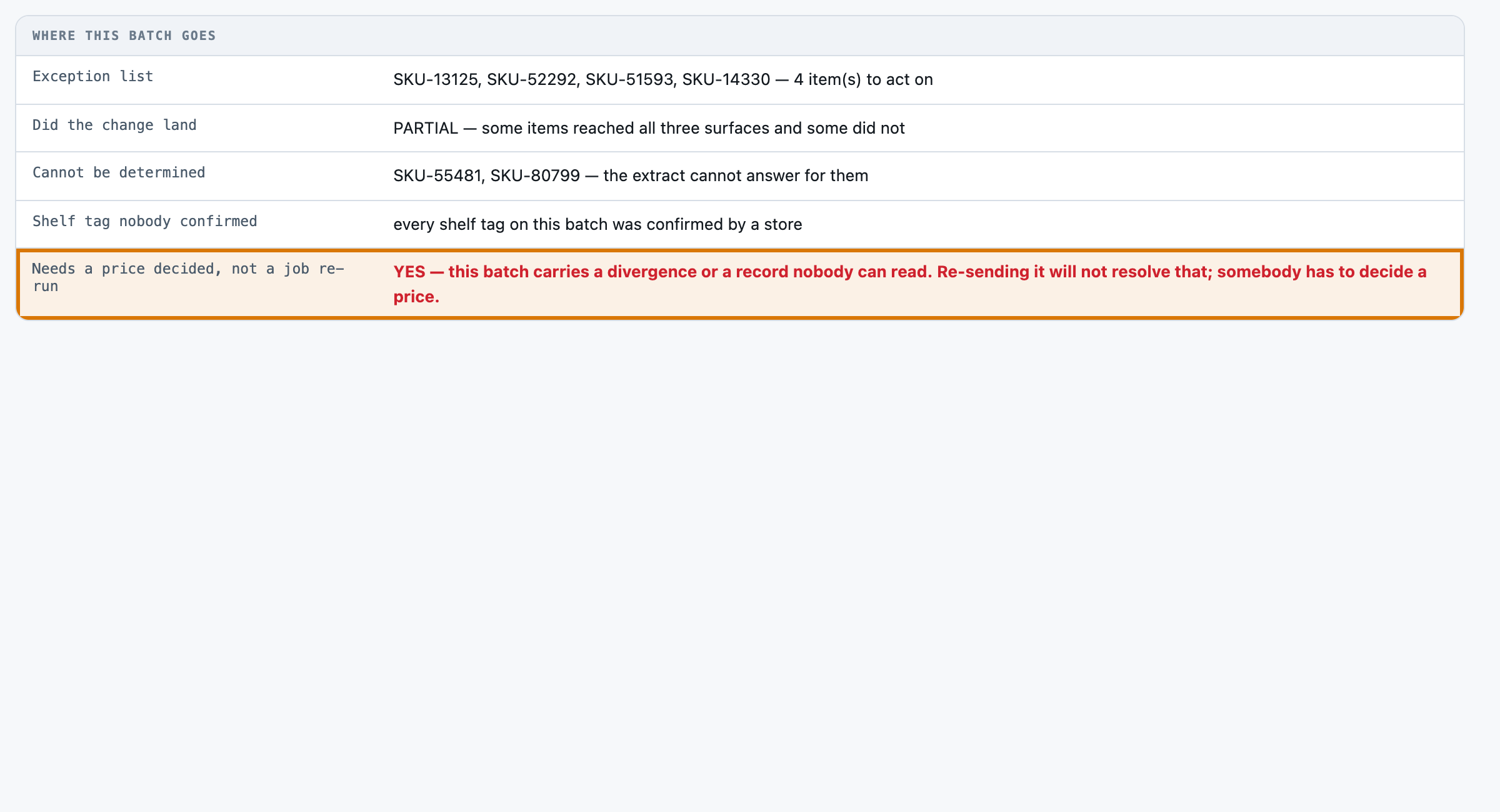
8. 'tag reprint -- not confirmed on this batch' means no store confirmed the physical tag. The tag price on the line is still the recorded shelf price and you should return it. It does NOT make the item undeterminable and it does NOT make it a divergence.
9. THE BATCH NOTE IS A FIELD TO COPY, NOT EVIDENCE ABOUT ANY PRICE. A note that sounds settled does NOT clear a divergence, and a note that sounds worried does NOT create one. The batch's own numbers decide; the note is one person's remark and may disagree with them.
10. Copy every reference and every price verbatim, exactly as printed, including a third decimal where the record states one. Every date is yyyy-mm-dd.
11. Use the exact allowed value for a field that lists them, and return every field named in the schema for every item, even when the answer is null.

PRICING INTEGRITY RULEBOOK PIR-1 (the authority for `divergence`; this is an ILLUSTRATIVE rulebook shipped with this kit, not a law, a regulation or a retailer's policy)

THE THREE SURFACES
  shelf, pos, digital
  The three places one item's price is stated to a customer or charged to them: the printed shelf-edge tag, the point-of-sale till file, and the digital channel. THE WHOLE KIT IS THE COMPARISON BETWEEN THESE THREE. A price that is merely different from last week is not a finding here; a price that disagrees with ITSELF across these three surfaces is.

ROUNDING TOLERANCE
  1 minor unit(s). A batch may set a price with a THIRD decimal -- a unit-derived price such as 1.995 -- and each surface rounds it to the minor unit on its own. Where every surface price is within this many minor units of the batch price AND the batch price carries a non-zero third decimal, the surfaces differ because they rounded, not because the price is wrong.

PROMOTION SCOPES -- which surfaces a scope authorises a different price on
  none:      none -- no promotion on file
  digital:   digital
  in_store:  shelf, pos
  A promotion on file authorises a DIFFERENT price on the surfaces its scope names, for this period. `digital` names the digital channel only; `in_store` names the shelf edge and the till together, because a customer in the aisle sees both. A channel-exclusive promotion is the commonest reason three surfaces legitimately disagree, and a monitor that calls it a divergence is the monitor that gets switched off.

THE SIX GATES, IN ORDER. STOP AT THE FIRST THAT FIRES.
  1. NOT_DETERMINABLE:          The batch price, or any one of the three surface prices, is not recorded for this item. No comparison can be run.
     why: On a monitoring queue the expensive mistake is a confident wrong 'fine'. A surface that returned no line, or a line with no price on it, is a record that has to be opened -- not an item that can be cleared.
  2. AUTHORISED_CHANNEL_PRICE:  A promotion is on file for this item with a scope other than `none` and a promotional price recorded; every surface the scope names carries that promotional price; and every surface it does not name carries the batch price to the minor unit.
     why: This is the difference that is SUPPOSED to be there. It sits above the finding gates because a queue that reports every authorised channel-exclusive price as a divergence buries the real ones underneath them. ⚑ NOTE WHAT IT REQUIRES: the surfaces OUTSIDE the promotion must still be right. A promotion does not excuse a till that never took the batch.
  3. NOT_PROPAGATED:            At least one of the three surfaces carries the item's PREVIOUS price -- the price the batch was changing away from.
     why: The change did not reach that surface. This is a different finding from a divergence and it has a different fix: the batch is re-run for that surface. It sits above the divergence gate so that the commonest execution failure is named as an execution failure rather than folded into a general disagreement.
  4. ROUNDING_DIFFERENCE:       The batch price carries a non-zero third decimal, the three surface prices are not all equal, and every surface price is within the rounding tolerance of the batch price.
     why: Each surface rounded a unit-derived price on its own. It is a real difference and it is reported, and it is NOT an exception: nobody is being charged a price the retailer did not set.
  5. DIVERGED:                  The three surface prices are not all equal; or they are all equal and that price is not the batch price to the minor unit.
     why: The surfaces disagree, and none of the legitimate explanations above accounts for it. Somebody has to decide which price is correct before the next customer reaches the till.
  6. ALIGNED:                   Everything else: the three surfaces all carry the batch price to the minor unit.
     why: Nothing needs doing. ⚠︎ AND NOTE WHAT THIS DOES NOT SAY. It does not say a person has seen the shelf tag -- see `shelf_confirmation_note`.

THE SIX STATUSES
  aligned, rounding_difference, authorised_channel_price, not_propagated, diverged, not_determinable

WHAT PUTS AN ITEM ON THE EXCEPTION LIST
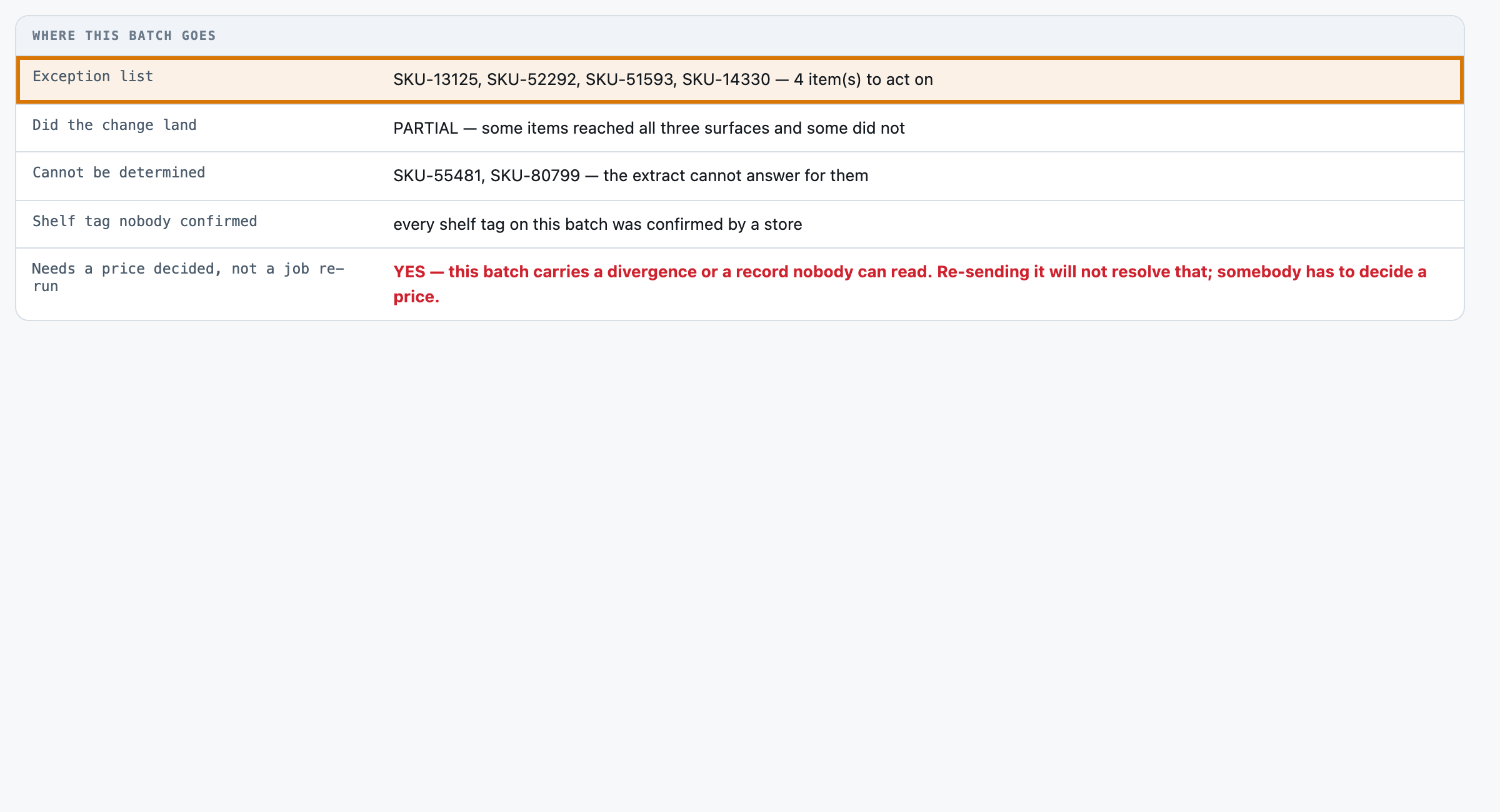
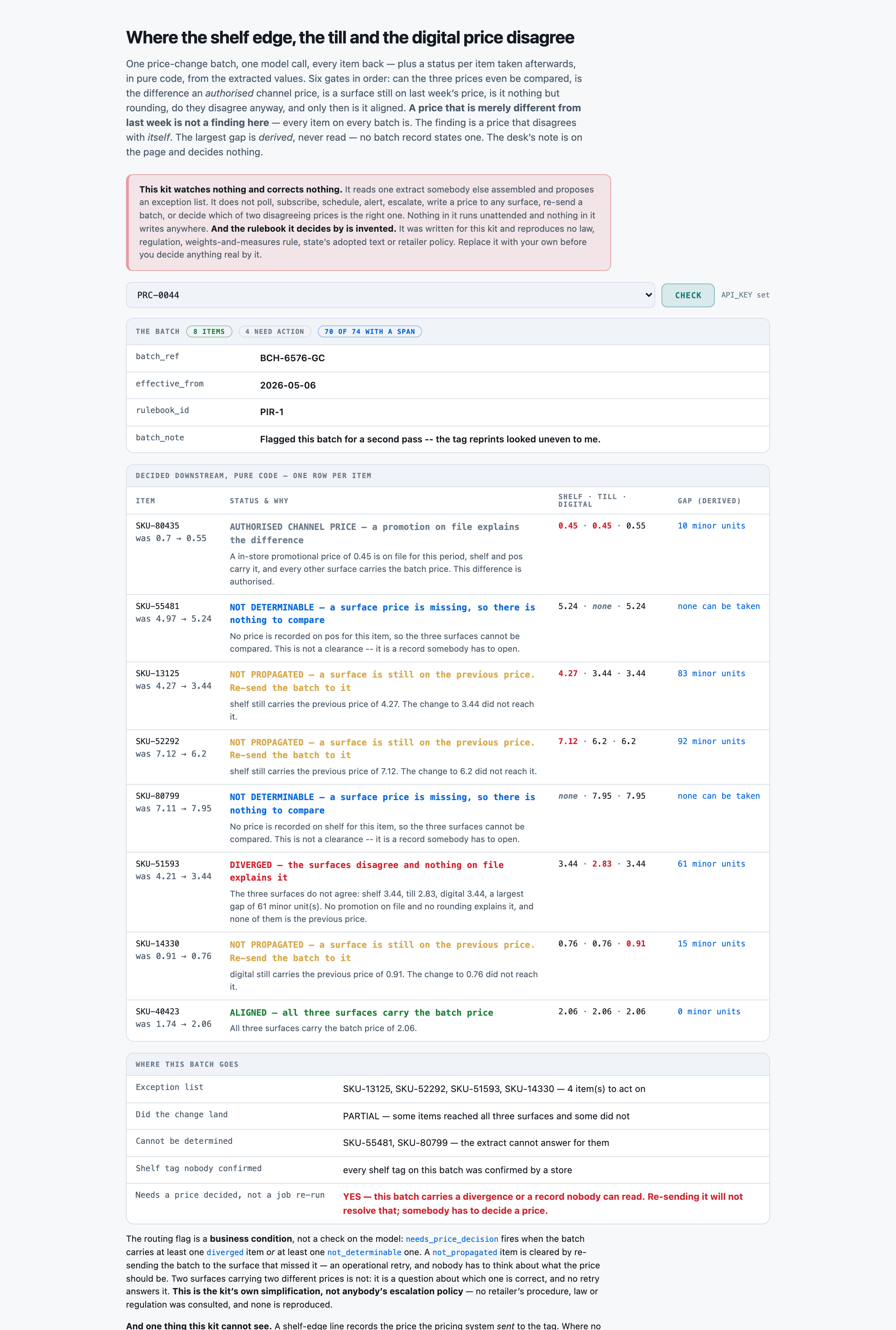
  not_propagated, diverged -- The two statuses that put an item on somebody's list today. `aligned`, `rounding_difference` and `authorised_channel_price` are the three answers that mean nothing needs doing. `not_determinable` means the RECORD needs opening rather than the PRICE needing correcting, and it is deliberately not on the exception list for that reason.

THE WORST GAP
  The largest absolute difference, in minor units, between any two of the three recorded surface prices. Not against the batch price -- against each other, because the question this kit asks is whether the item's own price disagrees with itself. Null where any surface price is not recorded.

WHAT THIS TOOL WILL NOT DO
  - It never writes a price to any surface.
  - It never re-triggers, re-sends or re-schedules a price-change batch.
  - It never suppresses, samples down or de-duplicates an item to reduce the size of the list.
  - It never decides which of two disagreeing prices is the correct one.

Extract these fields:
BATCH-LEVEL FIELDS -- one value each, for the whole batch
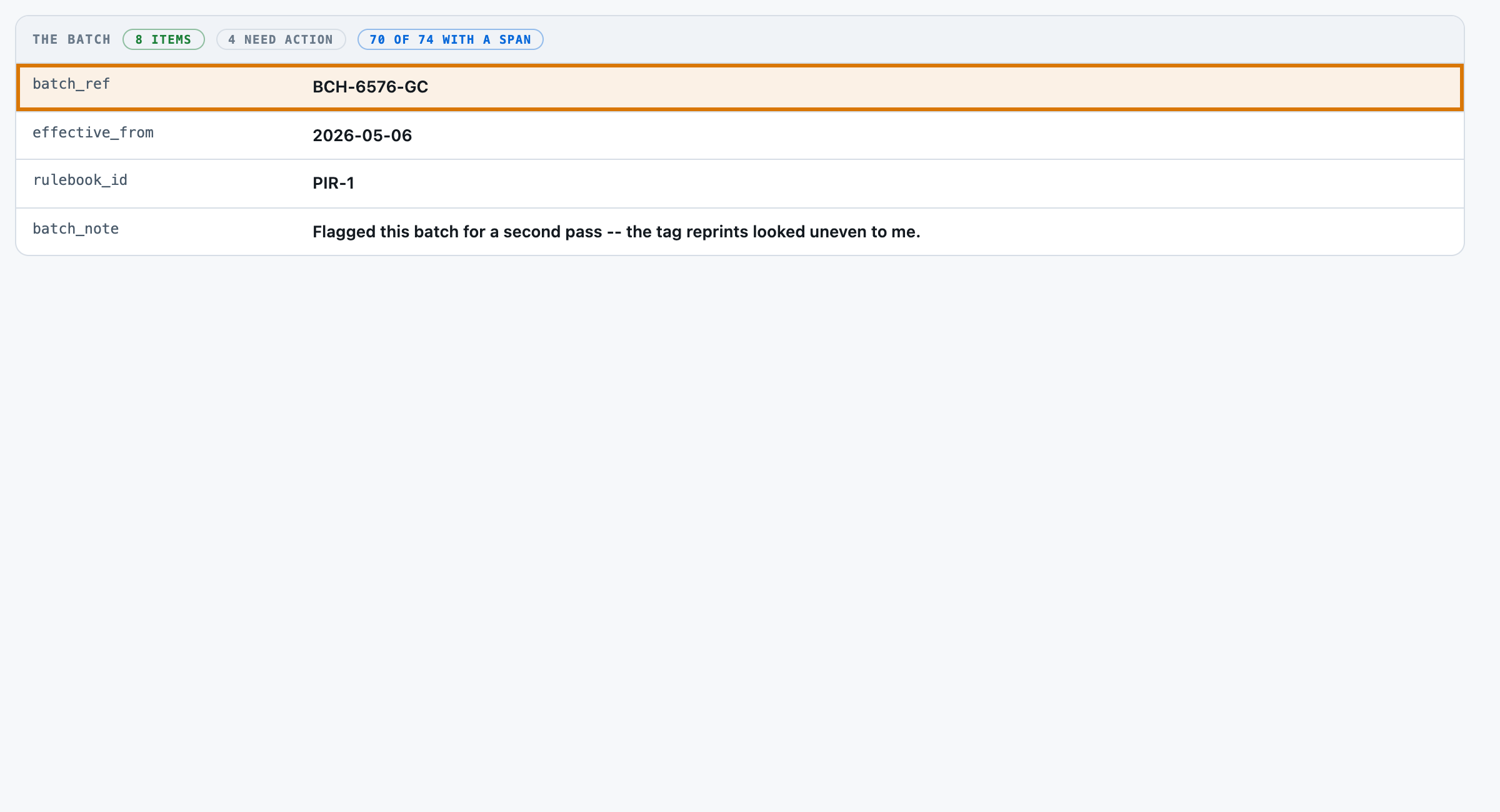
- batch_ref (string) -- the batch reference, verbatim from the Batch section
- effective_from (date) -- the date this batch's prices take effect, from the Batch Effective From section, as yyyy-mm-dd
- rulebook_id (string) -- the identifier of the pricing rulebook this batch is checked under, verbatim -- the short code only, not the sentence after it
- batch_note (string) -- the price control desk's own free-text remark from the Batch Notes section, copied verbatim. It is a field to copy and it is NOT evidence about whether any price is right

PER-ITEM FIELDS -- one object per line of Items In Batch
- item_ref (string) -- the item reference as the Items In Batch section states it, e.g. SKU-12345. Return one object per line of THAT section, in the order it lists them, and no others. The surface sections below carry lines for items this batch does not change -- those are not yours
- previous_price (decimal) -- the price this batch is changing the item AWAY from, read after 'was' on the item's line in Items In Batch. Copy the digits exactly as printed
- batch_price (decimal) -- the price this batch is changing the item TO, read after 'to' on the item's line in Items In Batch. Copy the digits exactly as printed -- some are stated to THREE decimal places and the third decimal is not noise, it is what tells you a rounding difference from a real one
- shelf_price (decimal) -- the price recorded against this item in the Shelf-Edge State section, after 'tag price'. Return null where that section carries no line for this item at all, and null where the line reads 'tag price -- not stated'
- pos_price (decimal) -- the price recorded against this item in the Point Of Sale State section, after 'till price'. Return null where that section carries no line for this item, and null where the line reads 'till price -- not stated'
- digital_price (decimal) -- the price recorded against this item in the Digital Channel State section, after 'online price'. Return null where that section carries no line for this item, and null where the line reads 'online price -- not stated'
- shelf_confirmed_on (date) -- the date a store confirmed the shelf tag was reprinted, from the Shelf-Edge State line, as yyyy-mm-dd. Return null where the line reads 'tag reprint -- not confirmed on this batch', and null where there is no line for this item. A null here does NOT mean the tag price is wrong -- it means nobody has looked at the tag
- pos_activated_on (date) -- the date the till file activated this price, from the Point Of Sale State line, as yyyy-mm-dd. Return null where there is no line for this item, and null where the line does not state one
- digital_published_on (date) -- the date the digital channel published this price, from the Digital Channel State line, as yyyy-mm-dd. Return null where there is no line for this item, and null where the line does not state one
- promotion_scope (enum) one of: none, digital, in_store -- what the Channel Promotions On File section records for this item: 'digital' where it authorises a digital-only promotional price, 'in_store' where it authorises an in-store one, and 'none' where that section carries no line for this item. Read this from the promotions section only
- promotion_price (decimal) -- the promotional price the Channel Promotions On File section authorises for this item. Return null where that section carries no line for it
- worst_gap_minor (derived) -- the LARGEST absolute difference, in MINOR UNITS (hundredths), between any two of the three recorded surface prices -- shelf against till, till against digital, shelf against digital. NO BATCH RECORD STATES IT; work it out. An integer, so a difference of 0.15 is 15. Return 0 where all three agree, and null where any one of the three surface prices is not recorded. It is measured against each other, NOT against the batch price
- divergence (enum) one of: aligned, rounding_difference, authorised_channel_price, not_propagated, diverged, not_determinable -- this item's status under the shipped rulebook. Work through six gates IN ORDER and stop at the first that fires. (1) NOT DETERMINABLE: the batch price or any one of the three surface prices is not recorded, so no comparison can be run. (2) AUTHORISED CHANNEL PRICE: a promotion is on file with a scope other than none, every surface its scope names carries the promotional price, and every surface it does not name carries the batch price. (3) NOT PROPAGATED: at least one surface still carries the item's PREVIOUS price. (4) ROUNDING DIFFERENCE: the batch price has a non-zero third decimal and every surface price is within one minor unit of it. (5) DIVERGED: the three surface prices are not all equal, or they are all equal and that price is not the batch price. (6) Anything that survives all five is ALIGNED. Never decide it from the Batch Notes remark

Return a JSON object of exactly this shape:
{"batch_ref": ..., "effective_from": ..., "rulebook_id": ..., "batch_note": ..., "items": [{"item_ref": ..., "previous_price": ..., "batch_price": ..., "shelf_price": ..., "pos_price": ..., "digital_price": ..., "shelf_confirmed_on": ..., "pos_activated_on": ..., "digital_published_on": ..., "promotion_scope": ..., "promotion_price": ..., "worst_gap_minor": ..., "divergence": ...}, ...]}
Use null for any field the batch record does not state.

PRICE CHANGE BATCH RECORD
-------------------------
Batch
-----
BCH-6576-GC

Batch Effective From
--------------------
2026-05-06

Pricing Rulebook
----------------
PIR-1 -- illustrative, shipped with this kit; reproduces no real pricing rule

Items In Batch
--------------
prices are stated in the trading currency's major unit; a third decimal is a unit-derived price
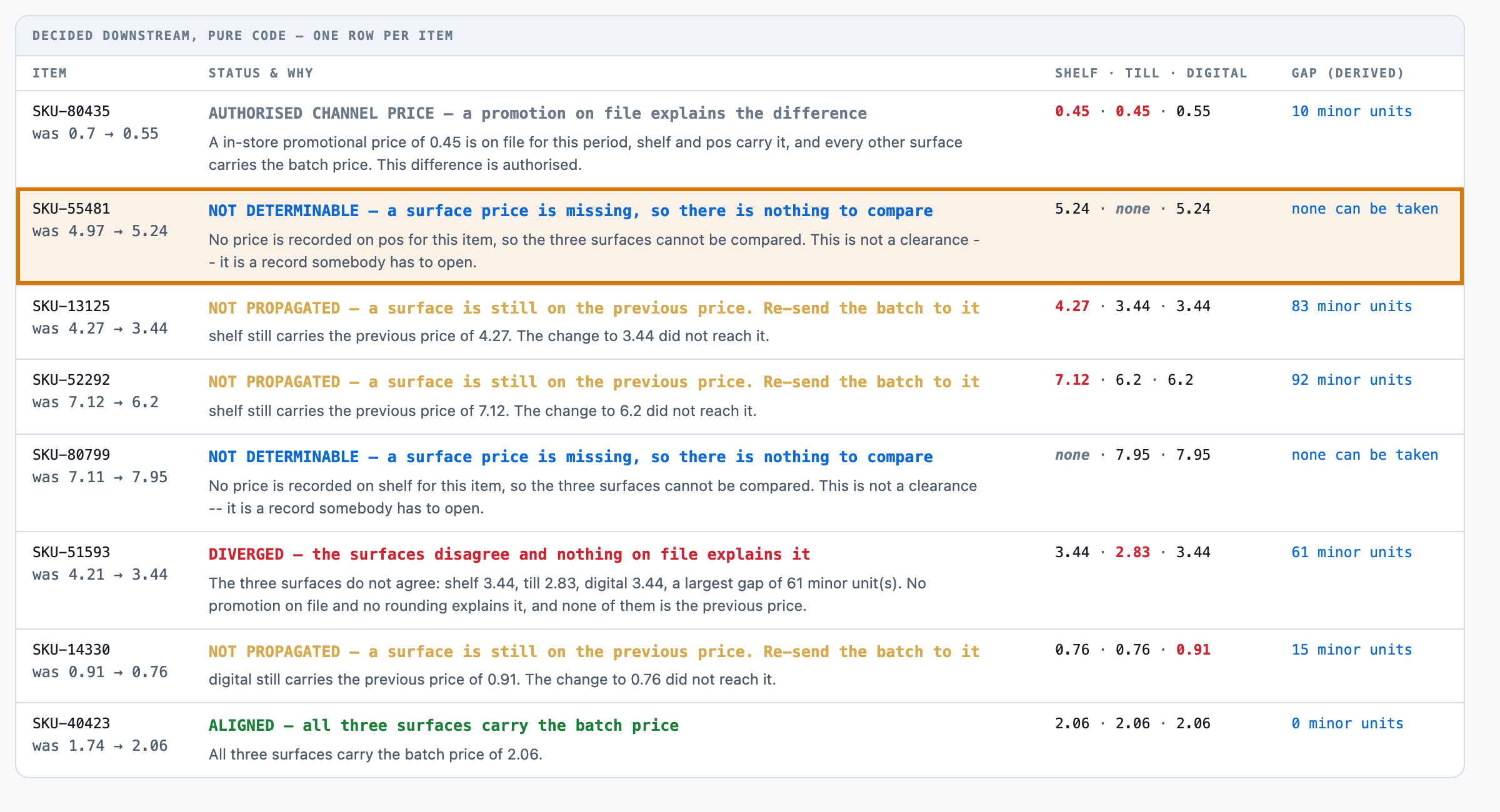
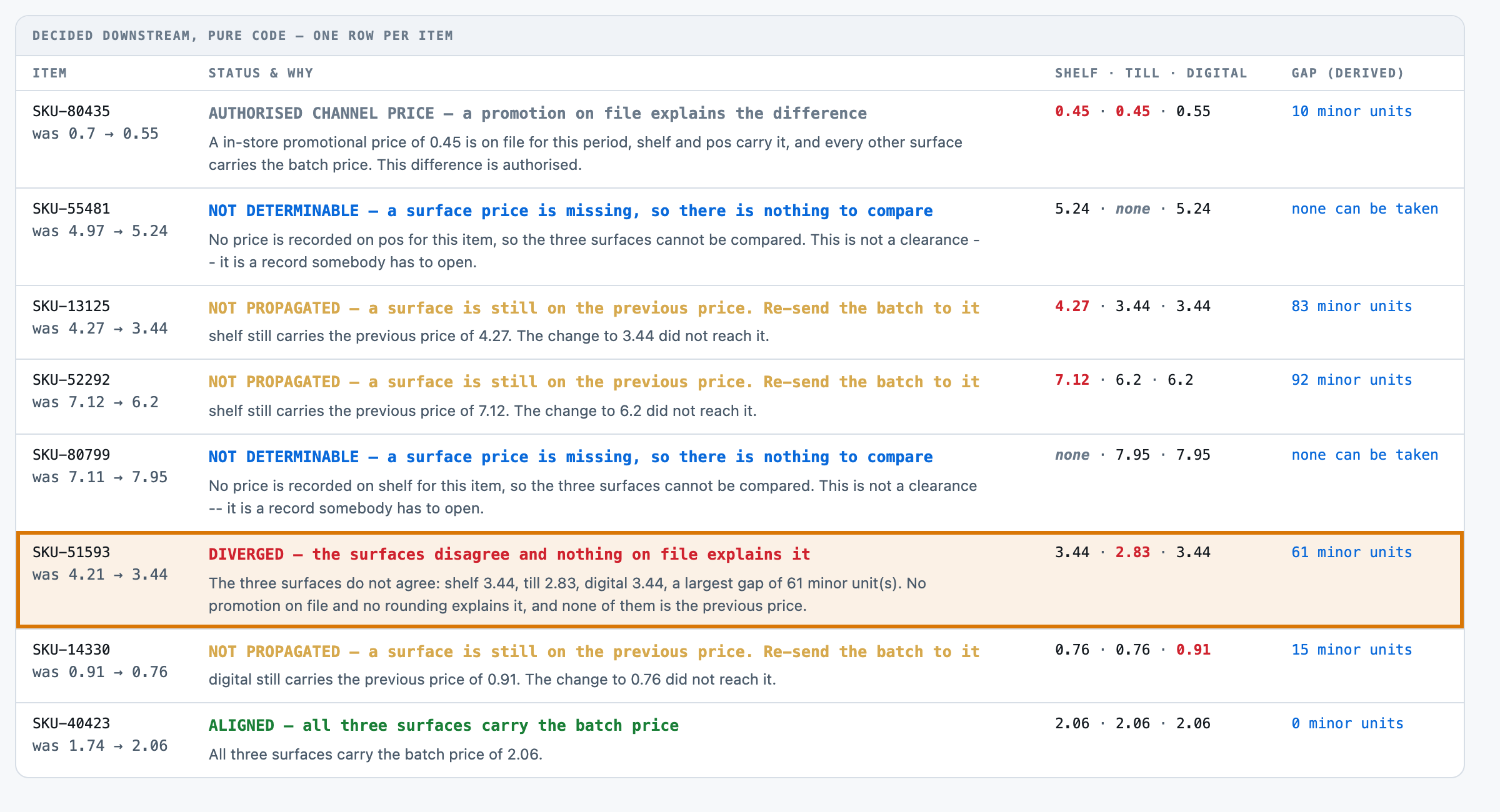
SKU-80435  Paracetamol tablets, 16 pack         was 0.70      to 0.55
SKU-55481  Laundry liquid 1.5L                  was 4.97      to 5.24
SKU-13125  Smoked back bacon 300g               was 4.27      to 3.44
SKU-52292  AA batteries, 8 pack                 was 7.12      to 6.20
SKU-80799  Olive oil 500ml                      was 7.11      to 7.95
SKU-51593  Mixing bowl, 24cm                    was 4.21      to 3.44
SKU-14330  Orange juice, from concentrate, 1L   was 0.91      to 0.76
SKU-40423  Chilled oat drink 1L                 was 1.74      to 2.06

Shelf-Edge State
----------------
SKU-14330  tag price 0.76                     tag reprinted 2026-05-06
SKU-53486  tag price 4.97                     tag reprinted 2026-03-22
SKU-51593  tag price 3.44                     tag reprinted 2026-05-06
SKU-52292  tag price 7.12                     tag reprinted 2026-03-12
SKU-40423  tag price 2.06                     tag reprinted 2026-05-06
SKU-69728  tag price 10.77                    tag reprinted 2026-04-05
SKU-55481  tag price 5.24                     tag reprinted 2026-05-06
SKU-13125  tag price 4.27                     tag reprinted 2026-02-26
SKU-80435  tag price 0.45                     tag reprinted 2026-05-06

Point Of Sale State
-------------------
SKU-69728  till price 10.77                   activated 2026-04-05
SKU-13125  till price 3.44                    activated 2026-05-06
SKU-53486  till price 4.97                    activated 2026-03-22
SKU-80435  till price 0.45                    activated 2026-05-06
SKU-52292  till price 6.20                    activated 2026-05-06
SKU-55481  till price -- not stated           activated 2026-05-06
SKU-14330  till price 0.76                    activated 2026-05-06
SKU-40423  till price 2.06                    activated 2026-05-06
SKU-51593  till price 2.83                    activated 2026-05-06
SKU-80799  till price 7.95                    activated 2026-05-06

Digital Channel State
---------------------
SKU-51593  online price 3.44                  published 2026-05-06
SKU-53486  online price 3.81                  published 2026-03-22
SKU-69728  online price 10.77                 published 2026-04-05
SKU-80435  online price 0.55                  published 2026-05-06
SKU-52292  online price 6.20                  published 2026-05-06
SKU-13125  online price 3.44                  published 2026-05-06
SKU-80799  online price 7.95                  published 2026-05-06
SKU-40423  online price 2.06                  published 2026-05-06
SKU-55481  online price 5.24                  published 2026-05-06
SKU-14330  online price 0.91                  published 2026-03-03

Channel Promotions On File
--------------------------
SKU-53486  digital-only promotional price 3.81 authorised for this period
SKU-80435  in-store promotional price 0.45 authorised for this period

Batch Notes
-----------
Flagged this batch for a second pass -- the tag reprints looked uneven to me.