Catch overdue permit obligations in a mine site's register
A site's permit register mixes live conditions with superseded ones, wrong filing years and blank dates, and its own status flag is often wrong. This app reads the register, gives each condition a status and due date, and proposes the worklist.
PresenterOpens the private repo. Visible to admins only.
For the environmental compliance teamCross-domain · Oil Gas & Mining
Why it matters
Today's manual process, and the same job with the app
Compliance and environment teams who hold permits for several mine, oil and gas sites.
✕Today's manual process
1Open each site's register and go down it condition by condition.
2Work out each due date from the last date logged, the cycle and the notice each type needs.
3Decide what goes on the list, skipping superseded conditions and guessing at blank dates.
4One misread filing year leaves a report overdue while the site's list says on track.
Every register read condition by condition
✓With the app
1Every condition comes back as its own row, from one read of the register.
2Each row gets a status and due date, with the reason written beside it.
3Superseded and undated conditions are named, never cleared or guessed.
4Overdue items the site calls fine are flagged first. A person still acts on the list.
People act on a proposed worklist
See it work
One real case, read by the app, step by step
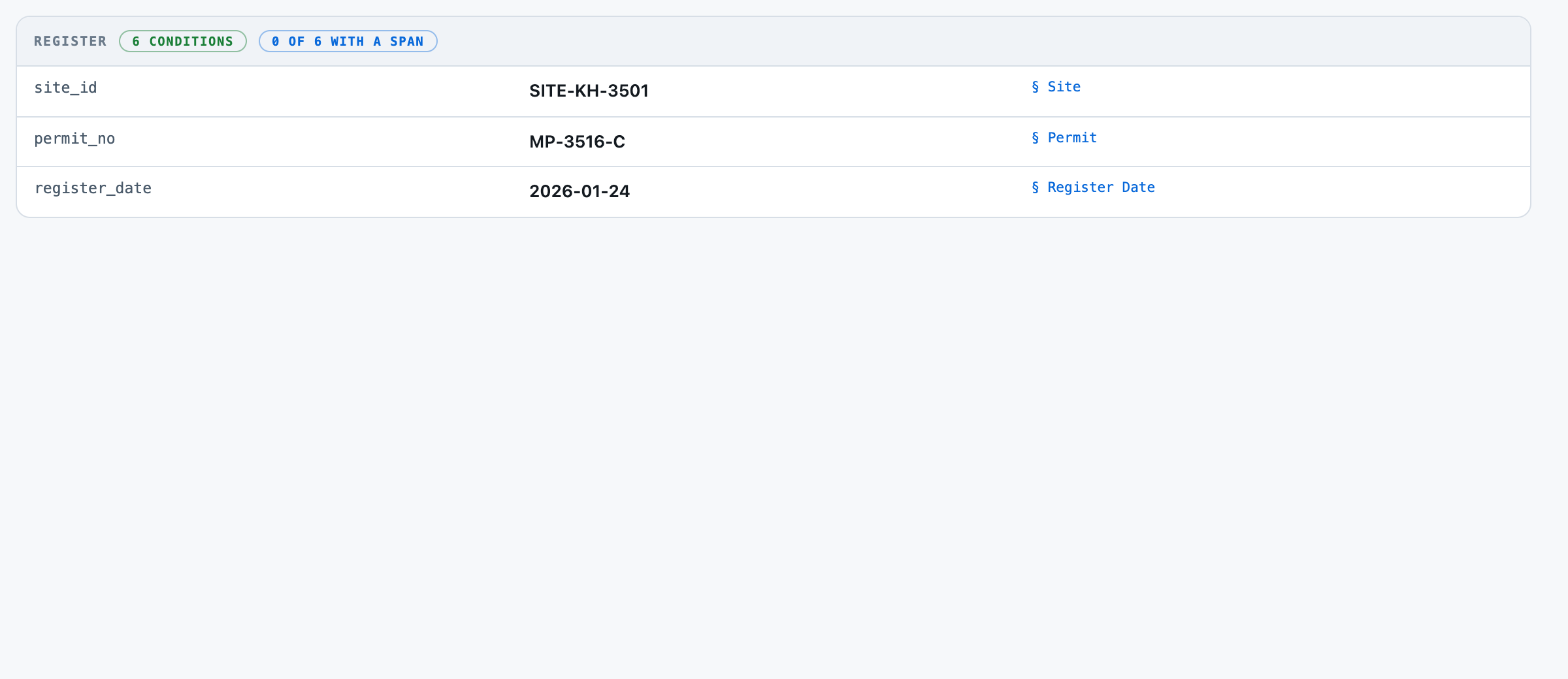
Site SITE-KH-3501, permit MP-3516-C: six conditions, and an annual report overdue while the site's own flag says on track.
Catch overdue permit obligations in a mine site's registerReference appBuilt to be shaped to your process
5
1The register one site's permit, read as it stands on its register date.
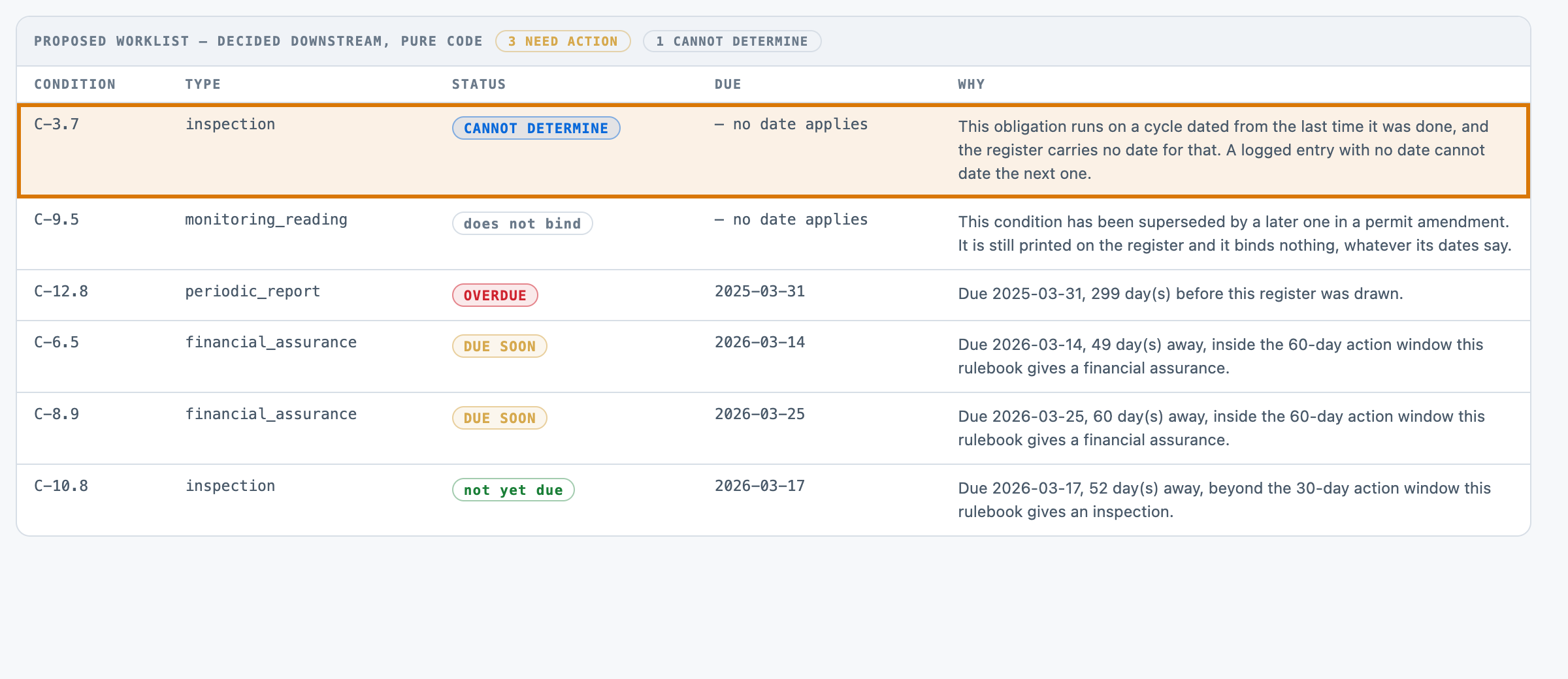
2Cannot tell, and says so no date was logged for the last inspection, so it is not cleared.
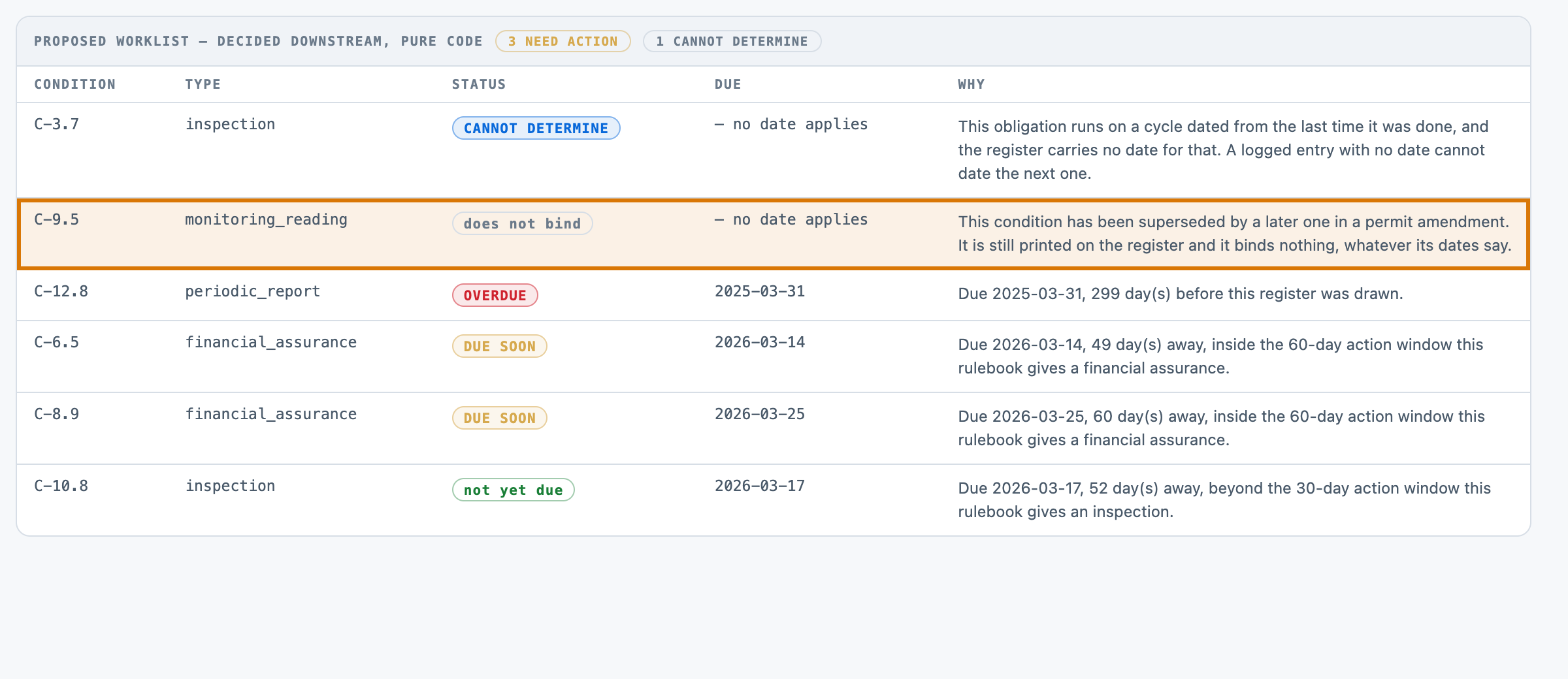
3What does not count a superseded condition, still printed, binds nothing whatever its dates say.
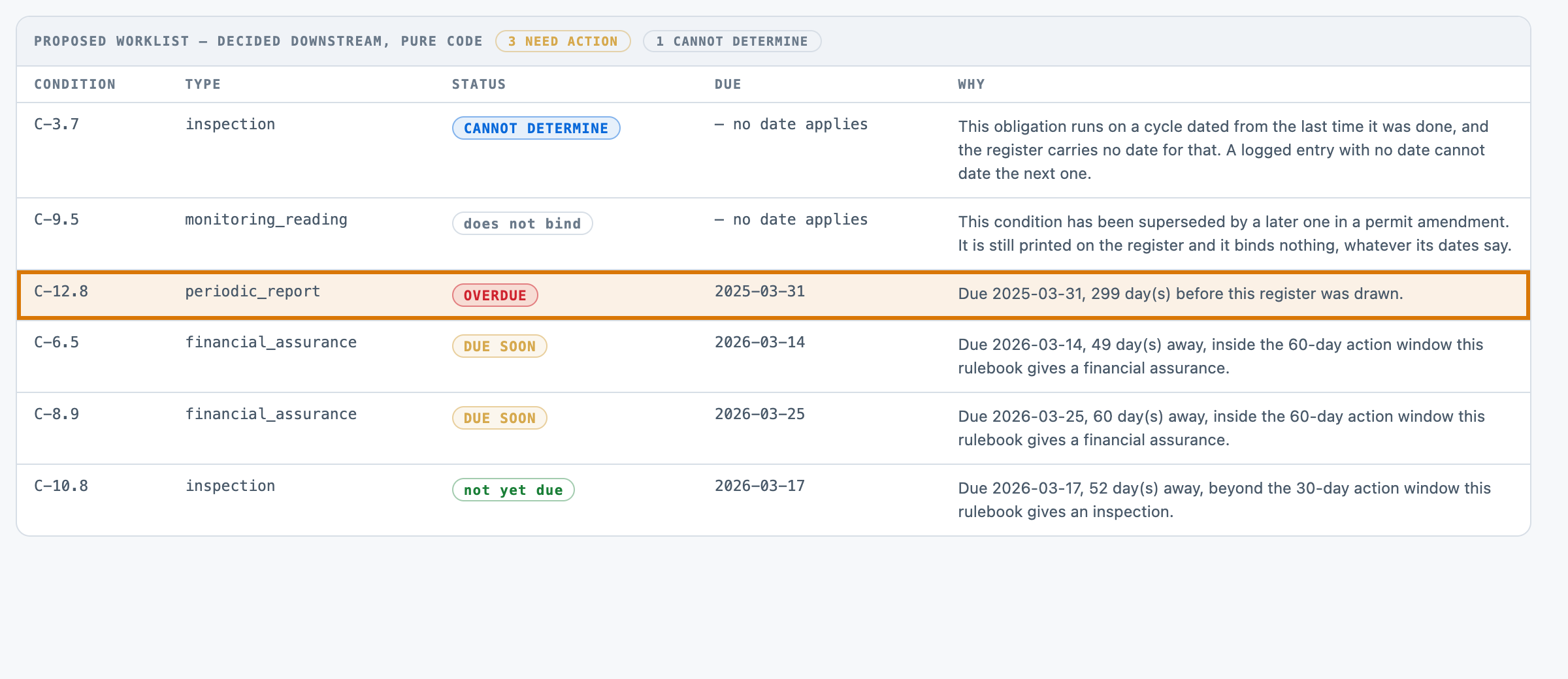
4Overdue the annual report fell due on 31 March 2025.
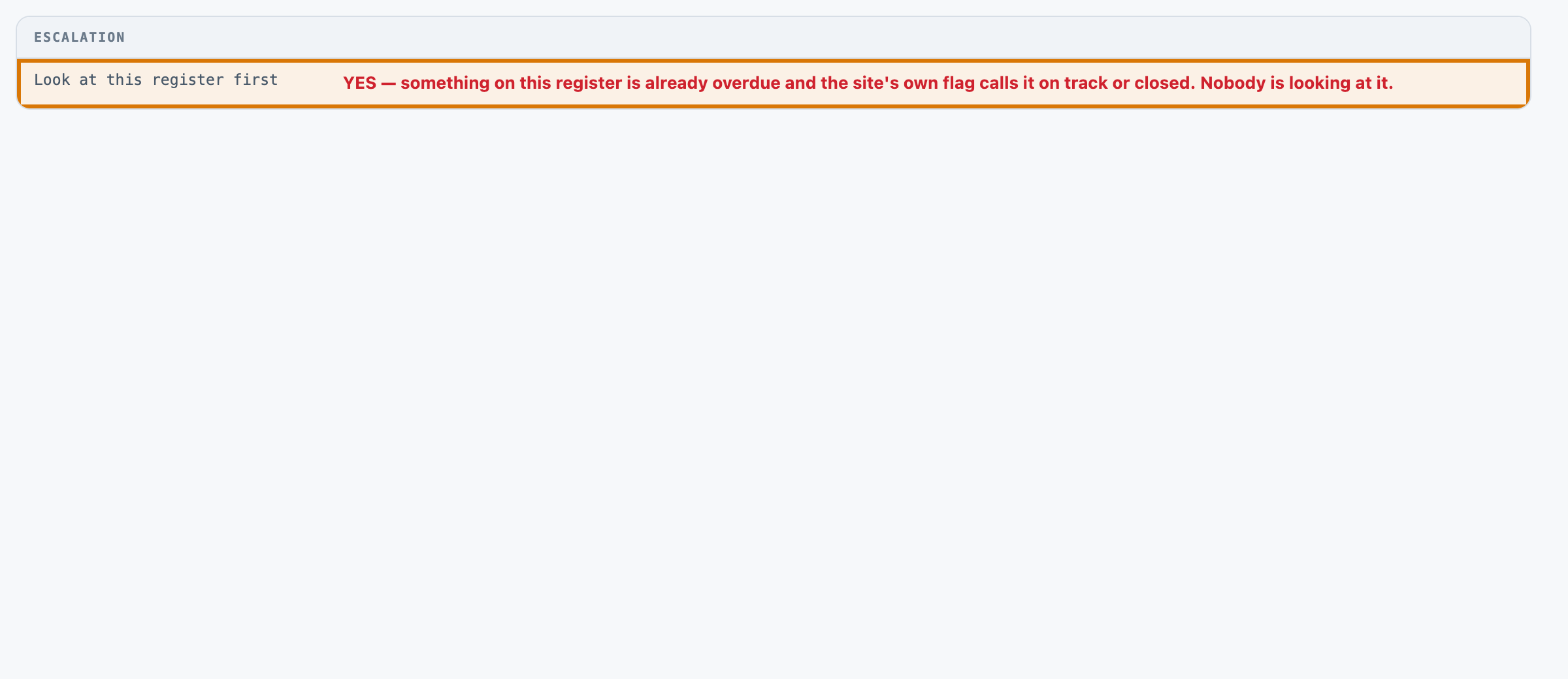
5Look here first overdue while the site's own flag says on track. A person acts on it.
For engineers
How it is built, and how we measured it
All fourteen steps of the build are written up, from the business case to running it in your own environment.
Catch overdue permit obligations in a mine site's register
A small, forkable project that does one job end to end. Run once for real, and every figure on these pages captured from that run.
PresenterOpens the private repo. Visible to admins only.
The business caseThe problem this solves
A site's permit obligations are recorded in a register: what each condition requires, how often, what has been done and when. Somebody has to turn that into a worklist — which obligations need action now, by when, and which ones cannot be determined from what is written down. The register works against them in four specific ways: it keeps conditions that have been superseded or waived, it records a filing date beside a reporting period that disagrees with it, it lets an entry be logged with no date at all, and it carries the site's OWN status flag, which is written by the party being checked and is wrong on 40 pct of the rows here. Somebody opening each site's obligation register, going down it condition by condition, remembering which cycle each obligation runs on and how much notice its type needs, working out the next due date from whatever the record says was last done, and deciding which rows go on this week's list. It is a few minutes per site and it is every site, every cycle, and the part that goes wrong is not the arithmetic: it is reading a filing DATE where the reporting PERIOD is the answer, computing a due date on a condition that was superseded two amendments ago, and treating a line with the date column empty as though it had been done.
Audience
Compliance, environment and approvals teams who hold a book of permits across several sites, and the assurance or audit function that has to say whether the register in front of them is telling the truth about the site's position today. Every number on these pages came from one real run of this code, not from a vendor page.
The inputThe actual obligation registers
The corpus is 50 obligation registers, 0.11 MB (txt 50). Plain text, one format, invented rather than fetched — a real obligation register states a real site's actual compliance position under a real permit, which is commercially sensitive on one side and legally consequential on the other, and there is no public corpus of (register, correct worklist) pairs for the same reason there is no public corpus of bank statements. Generating it also makes the label mechanical: gold's status and due date are the rulebook lookup over the same values the register states, never somebody's reading of the site's own flag.
The corpus
The 50 obligation registersgenerated from a fixed seed, so no real record, person or institution appears in it.
Where each came fromwritten for this kit rather than collected — the corpus is generated in the kit's own repository, so there is no third-party data in it.
Swap this folder for your own material and the kit is pointed at your obligation registers. That is the whole change — there is no database to migrate.
One obligation register, as the model receives itREG-0001.txt · 1 of 50
Site
----
Northreach Ridge Operation (SITE-NR-9441)

Permit
------
MP-9700-J, issued by the Ninth District Minerals and Environment Office

Register Date
-------------
2026-01-17

Register Note
-------------
Site self-assessment at this review: compliance position considered satisfactory this quarter.

Condition C-9.3
---------------
Requirement: annual rehabilitation progress report for the calendar reporting year
Obligation type: periodic_report
Condition state: active
Last recorded as done: 2025-11-04
Period credited: 2023 reporting year
Stated due date: not stated
Trigger event: not applicable to this condition
Register flag: attention

Condition C-11.9
----------------
Requirement: quarterly boundary noise reading at station NS-15
Obligation type: monitoring_reading
Condition state: active
Last recorded as done: 2025-12-05
Period credited: not applicable to this condition
Stated due date: not stated
Trigger event: not applicable to this condition
Register flag: closed

Condition C-8.1
---------------
Requirement: annual renewal of the pollution incident financial provision
Obligation type: financial_assurance
Condition state: active
Last recorded as done: 2024-11-03
Period credited: not applicable to this condition
Stated due date: not stated
Trigger event: not applicable to this condition
Register flag: attention

Condition C-3.6
---------------
Requirement: annual water balance report for the calendar reporting year
Obligation type: periodic_report
Condition state: active
Last recorded as done: 2025-11-04
Period credited: 2023 reporting year
Stated due date: not stated
Trigger event: not applicable to this condition
Register flag: on track
The outcomeWhat a good result looks like
A row per condition with its status, the date it falls due and the rulebook's own reason for that status — plus a proposed worklist of the obligations needing action, the ones the register cannot answer named as such rather than cleared, and one pure-code escalation: this register carries something already overdue that its own flag calls fine. Nothing here files, submits, notifies, renews or clears, and nothing continues after the call returns.
And when it cannot
The scored run produced no field miss and no wrong status, so the failures worth publishing are not the model's on that pass. THREE ARE PUBLISHED. THE FIRST IS THE FREE FLOOR'S, on the same 50 registers: reading the site's OWN register flag instead of running the rulebook gets 155 of 268 statuses wrong, raises 25 rows that need nothing (a 25.51 pct false-alarm rate) and misses 53 of the 126 that do. THE SECOND IS STRUCTURAL AND IS THE MORE INTERESTING ONE: 68 of the 268 obligations carry a status a three-valued self-assessment is INCAPABLE of saying, the floor scores 0 of 172 on derived due dates because a flag has no arithmetic in it, and its escalation guardrail can never fire at all — the guardrail asks 'is anything overdue while the flag is quiet' and the floor has defined overdue AS the flag, so it is a tautology that scores 0 of 31. THE THIRD IS THIS KIT'S OWN, and it was found by opening the UI rather than by a grader: one live read of REG-0003 returned five of its six condition blocks. 1 in 6 observed calls on that register, published rather than smoothed away.
Where it fitsWhat did work
Every line below is a measured result from this kit's own runs, with the figure that supports it. The headline above is not softened by any of them.
Turning a book of site obligation registers into this week's worklist before a compliance or approvals desk opens them — the fast tier — one call per register, 6.6s at the median, $0.0042532 a register 0 false alarms of the 126 obligations it raised and 0 missed of the 126 that needed action, against a free register-flag floor that raises 25 rows needing nothing and misses 53 that do. It also derived all 172 due dates exactly, which the floor cannot do at all.
Deciding whether the rulebook block belongs in the prompt at all — take it out Measured, not argued. It is 458 of the worked example's 2,223 input tokens (20.6 pct) and the model is explicitly told it will not compute a status. Run a001 removed it, kept the system prompt and every field hint, and re-fired the 17 registers where it could plausibly have mattered: 763 of 763 cells, 89 of 89 statuses, 65 of 65 due dates, all 22 wrong-period decoy rows still correct, on 21.0 pct fewer input tokens.
Deciding whether this shape is worth buying at all, from these numbers — not from these numbers alone — run it on your own registers first What the numbers DO support is narrow and real: taking a compliance status from a register's own flag is measurably unsafe on this shape of decision, in both directions at once; and a monitor that can say 'cannot determine' catches 26 of 26 registers' worth of unanswerable rows rather than clearing them.
At a glanceHow the whole thing runs
100%extraction accuracy
6,601 msp50, end to end
$4.25per 1,000 obligation registers · Google Gemini 3 Flash
Run once, for real, on 2026-08-22. Every figure on these pages was captured from that run — nothing is written from intent.
14 steps, grouped by the question that sends you to them rather than by build order. Each tile carries the one figure that step is about, and opens the page behind it.
Catch overdue permit obligations in a mine site's register14 steps · 4 questions · run once, for real · 2026-08-22
Every tile is a linkall 14 steps · no step without a page
Should you use this?What you bring, where it stops, and when not to use it
Before you commit an afternoon to this, these are the answers that decide it. Each one is rendered from the record it lives in — and links the page that holds it in full.
Avoid: The site's own register flag as an input to anything — it is wrong on 40 pct of the rows here by construction, and it is written by the party being checked. AND AVOID USING THE SHIPPED RULEBOOK: it is this kit's own construction, so screening real registers against it would be screening them against intervals nobody's permit actually states. That is the case against the best-fitting scenario (“Turning a book of site obligation registers into this week's worklist before a compliance or approvals desk opens them”). 3 scenarios scored in all, each with its own.Eval lens →
Where does it stop working?
A permit amendment that lands AFTER the register was drawn. This kit reads one snapshot and has no idea whether the intervals it just applied were changed last week — which is the single most consequential thing a real obligation register goes stale on. 6 recorded failure modes, each from a run rather than a guess.Corpus lens →
What was never verified?
Whether the shipped rulebook is right. Every grader here measures agreement with data/rulebook.json, which was written for this kit. 5 items this kit says it could not check.Eval lens →
Can I run this on a model I control?
Yes — any OpenAI-compatible endpoint, including one on your own hardware. The shipped adapter takes its host from BASE_URL and its model from MODEL, so nothing in src/ changes. The published figures come from 1 model on the fast tier, one provider, one key. Prompt lens →
And if it fits — what do I stand up?
5 artifacts with a stated home and a stated egress, and 3 decisions each with what you provision past its ceiling — plus what was not measured. That is the next page, not this one.step 14 — Run it in your environment →
Not asked of this kit — 2 questions: clone (a fresh clone of this kit runs with nothing fetched); judge (nothing here is graded by a model).
Last verified 2026-08-22 — r001-permit-obligations. Every figure on these pages was captured from that run.
Run itHow this reaches your data
Every result on this page was produced by pure code over checked-in files, with no API key — which is why you can read the numbers before anyone spends anything.
Run this on your own data
The pipeline, its eval harness and the runs behind every numberdeployed inside your environment, on your own model endpoints, against your own documents.
The corpus above is the shape, not the limitit is a folder swap, and there is no database to migrate.
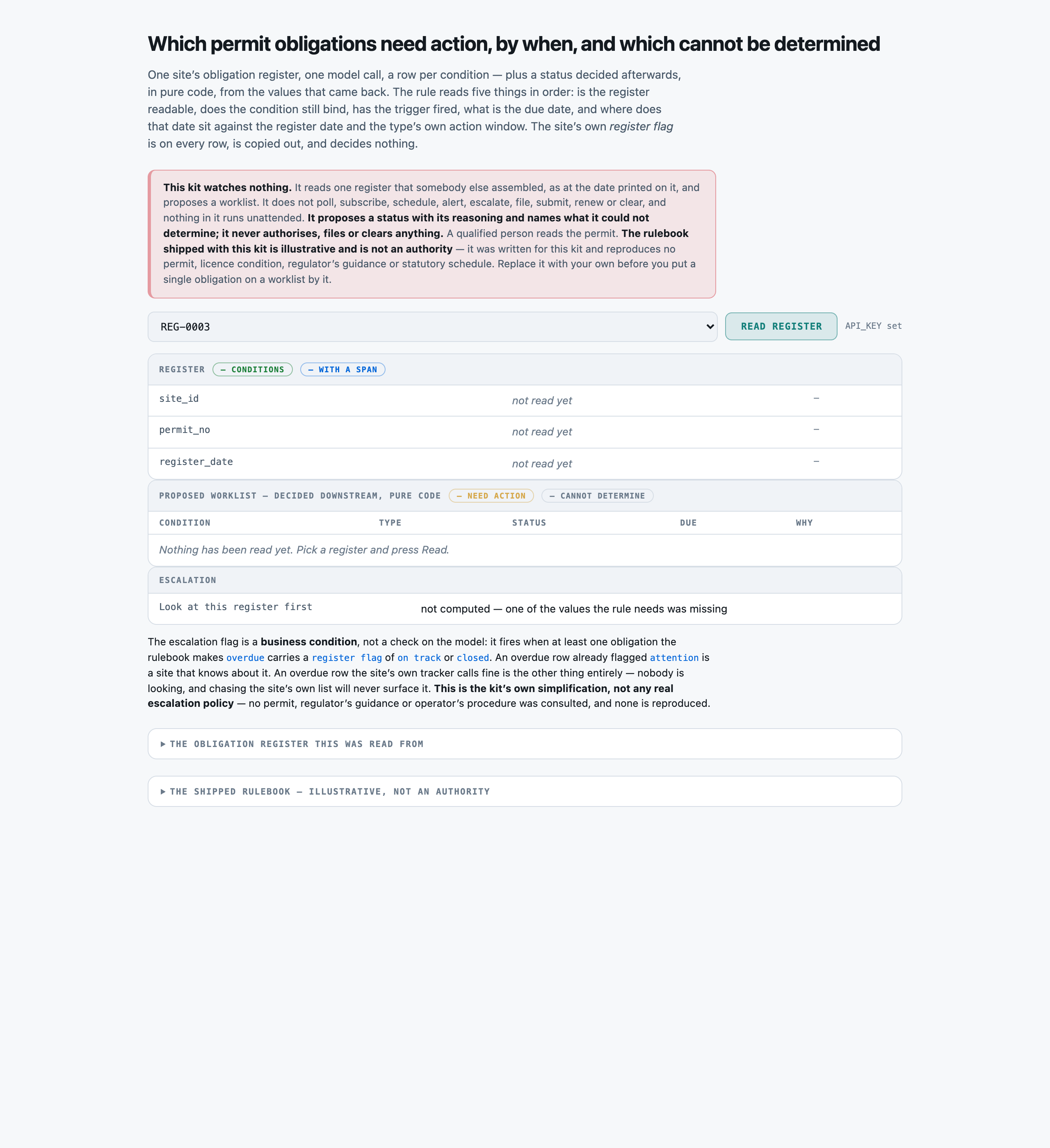
Checked before this shipped — Checked on a fresh checkout with API_KEY left blank: python -m src.app starts on 127.0.0.1:8853, the 50-register picker populates, the register panel draws its three empty rows, the worklist says “Nothing has been read yet” in words rather than rendering an empty table, and the shipped rulebook renders in full from data/rulebook.json. Clicking Read register returns the no-key sentence rather than a stack trace, and the escalation row reads “not computed — one of the values the rule needs was missing” rather than “no”. python -m evals.check_labels and python -m evals.run --baseline both pass with no network access at all.
Catch overdue permit obligations in a mine site's register
PresenterOpens the private repo. Visible to admins only.
Step 01 of 14Business case
Written for: product manager · Measured during the eval run. Never estimated, never quoted from a vendor page.
In brief
100.0%rows answered
6,601 msp50, end to end
10,065 msp95
2 minclone to first result
What the clock covers. model call only, one per obligation register
Current processWhat it replaces
Somebody opening each site's obligation register, going down it condition by condition, remembering which cycle each obligation runs on and how much notice its type needs, working out the next due date from whatever the record says was last done, and deciding which rows go on this week's list. It is a few minutes per site and it is every site, every cycle, and the part that goes wrong is not the arithmetic: it is reading a filing DATE where the reporting PERIOD is the answer, computing a due date on a condition that was superseded two amendments ago, and treating a line with the date column empty as though it had been done.
Where it is not good enough
THE SCORED RUN RETURNED EVERY PUBLISHED FIGURE PERFECTLY — 2,294 of 2,294 cells, 268 of 268 obligation rows found with none invented, 268 of 268 statuses, 172 of 172 derived due dates, 26 of 26 cannot-determine calls, 0 false alarms of the 126 rows it raised and 0 missed actions of the 126 that needed one. THAT IS THE PROBLEM WITH IT AS EVIDENCE, NOT THE PROOF OF IT. A corpus nothing gets wrong has stopped discriminating, so this kit paid for a probe rather than publishing the clean score on its own: evals/ablate.py REMOVED THE RULEBOOK BLOCK entirely — 458 of every call's 2,223 input tokens, a fifth of the bill — and re-fired the 17 registers carrying the wrong-period decoy. Nothing moved: 763 of 763 cells, 89 of 89 statuses, 65 of 65 due dates, all 22 decoy rows still correct, on 21.0 pct fewer input tokens. That is a real and immediately actionable finding about the prompt AND more bad news about the corpus: it cannot separate a full prompt from a stripped one, so nothing here can rank two models or tell you which instruction is earning its place. ⚑ AND ONE THING THE SCORED RUN DID NOT SEE AT ALL. Opening the local UI on REG-0003 produced a reply carrying FIVE of the register's SIX condition blocks — one condition silently absent. Three follow-up calls on the same register returned all six, so the observed rate is 1 dropped block in 6 calls on one register, and the scored run's 268-of-268 row recall is ONE PASS. On a monitor that is the worst failure available: a dropped row is a condition nobody looked at, and downstream it is indistinguishable from a condition that needed nothing. It was found by looking at a rendered page, not by any grader. AND THE DEEPER LIMIT IS NOT THE SCORE AT ALL. Every grader measures whether the run read the register the SHIPPED RULEBOOK is applied to, and that rulebook is a construction written for this kit. A perfect score means the run agreed with data/rulebook.json. It does not mean the worklist is right about a real permit, and no number on this page can mean that.
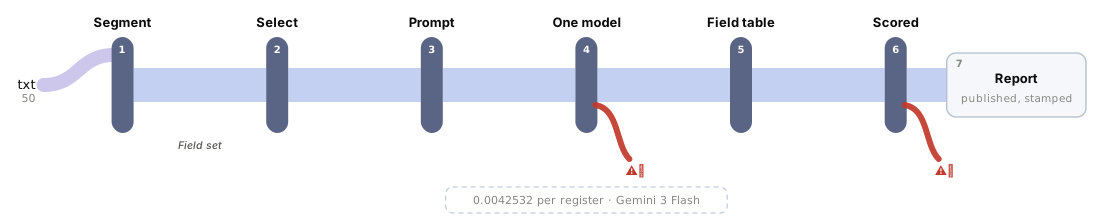
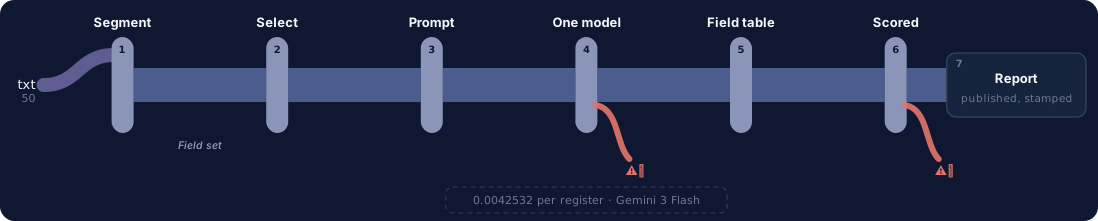
One question, end to end. Colour on the fan-in is the corpus format; a red hook marks every station with a recorded failure, and the words — every sub line, failure and report field — are in the ledger beneath. Every station is a link — click one to jump to its row, and each row links to the lens that explains it.
→Sources
txt50
50 permit obligation registers, 268 conditions, 1 format
⚑ THE FALSE-ALARM RATE IS THE HEADLINE, NOT A FOOTNOTE. A monitoring queue that cries wolf is worse than no queue, because a person clears every row on it by hand. r001 raised 126 obligations and every one of them needed raising, and left none of the 126 off. The free floor (evals/baseline.py) reads the SITE'S OWN register flag instead of running the rulebook: it is perfect on all 2,294 cells and still raises 25 rows that need nothing, misses 53 that do, scores 0 of 172 derived due dates — a flag has no arithmetic in it — and its escalation guardrail can never fire at all, because it has defined 'overdue' as the flag. 68 of the 268 obligations carry a status a three-valued self-assessment is structurally incapable of saying. No red-team run exists for this kit; this footer names that absence rather than a resistance rate it does not have.
The swap seams
Seam
File
What changes
data/rulebook.json
data/rulebook.json
the intervals, the per-type action windows, the reporting deadline and what each condition state means. THIS IS THE FIRST THING TO REPLACE. What ships is this kit's own construction and resembles no real permit; src/rulebook.py reads whatever is in the file and the prompt renders whatever it loaded, so one edit moves the rule, the model's context and the gold together
SECTION_HINTS / SECTION_PREFIXES
src/select.py
map fields to your own register's headings; the prefix map is how a field says 'every block of this kind'. Unmatched falls back to the whole document
PROVIDERS
src/adapters/__init__.py
any OpenAI-compatible host, or Anthropic's Messages API
compute
src/extract.py
the escalation rule itself — this kit ships two values (something overdue AND the site's own flag quiet about it) and a real compliance function weighs which condition lapsed, by how long, and whether it is reportable in its own right. It is deliberately NOT the same function as the status rule, so changing WHAT GETS ESCALATED does not change WHAT IS OVERDUE
the field schema
data/fields.json
a different set of register-level and per-condition fields entirely, with their own types and allowed values
Components
Component
File
Role
segment
src/segment.py
cut the register into addressable sections, pure code — one section per permit condition, which is what makes a per-condition citation possible at all
select
src/select.py
pick which sections carry each field, pure code — the obligations map to every Condition block by heading PREFIX, and the site's own summary Register Note is mapped by nothing and never leaves the machine
rulebook
src/rulebook.py
the status decision, loaded from data/rulebook.json — five ordered checks over intervals, per-type action windows, condition states and trigger states. Data, not code, so a forker can open it and disagree with it
prompt
src/prompt.py
assemble one call for the whole register, with the rulebook RENDERED into it from data/rulebook.json rather than restated in prose — as context for why each field matters, since the model is told it will not compute the status
extract
src/extract.py
the AI layer, one provider one key — plus the pure-code status rule over every returned row, the proposed worklist, and the business-condition escalation
judge
evals/judge.py
score field accuracy, the five-way status, the DERIVED DUE DATES and the FALSE-ALARM RATE separately, plus the cannot-determine and escalation matrices, all pure code
Where it breaks at scale
One call per register, and although the harness runs 12 concurrent workers (EVAL_WORKERS), nothing is shared between registers: 50 took 32.4 seconds of wall clock and 108,764 input tokens, of which the fixed prefix — system prompt, rulebook and field schema — is 1,629 of 2,223 on the worked example, 73 pct, byte-identical on every call and paid for 50 times. There is no batching and no prefix caching. AND THE REPLY IS THE PART THAT GROWS: output is one JSON entry per condition, so a register with 60 conditions rather than 5 is a reply an order of magnitude longer, and the observed row-drop (one live call returned 5 of 6 blocks) is a failure mode that gets MORE likely as the list gets longer, not less. At that size the shape has to change — conditions batched into several calls with a reconciliation step — which is a different kit, not a bigger prompt. There is no retry queue beyond the adapter's four backoff attempts, and no persistence: the worklist is computed and returned, never written.
Catch overdue permit obligations in a mine site's register
PresenterOpens the private repo. Visible to admins only.
Step 03 of 14App UI
Written for: anyone, in 5 seconds · Screenshots of the running app taken during the run.
SuccessesWhen it works
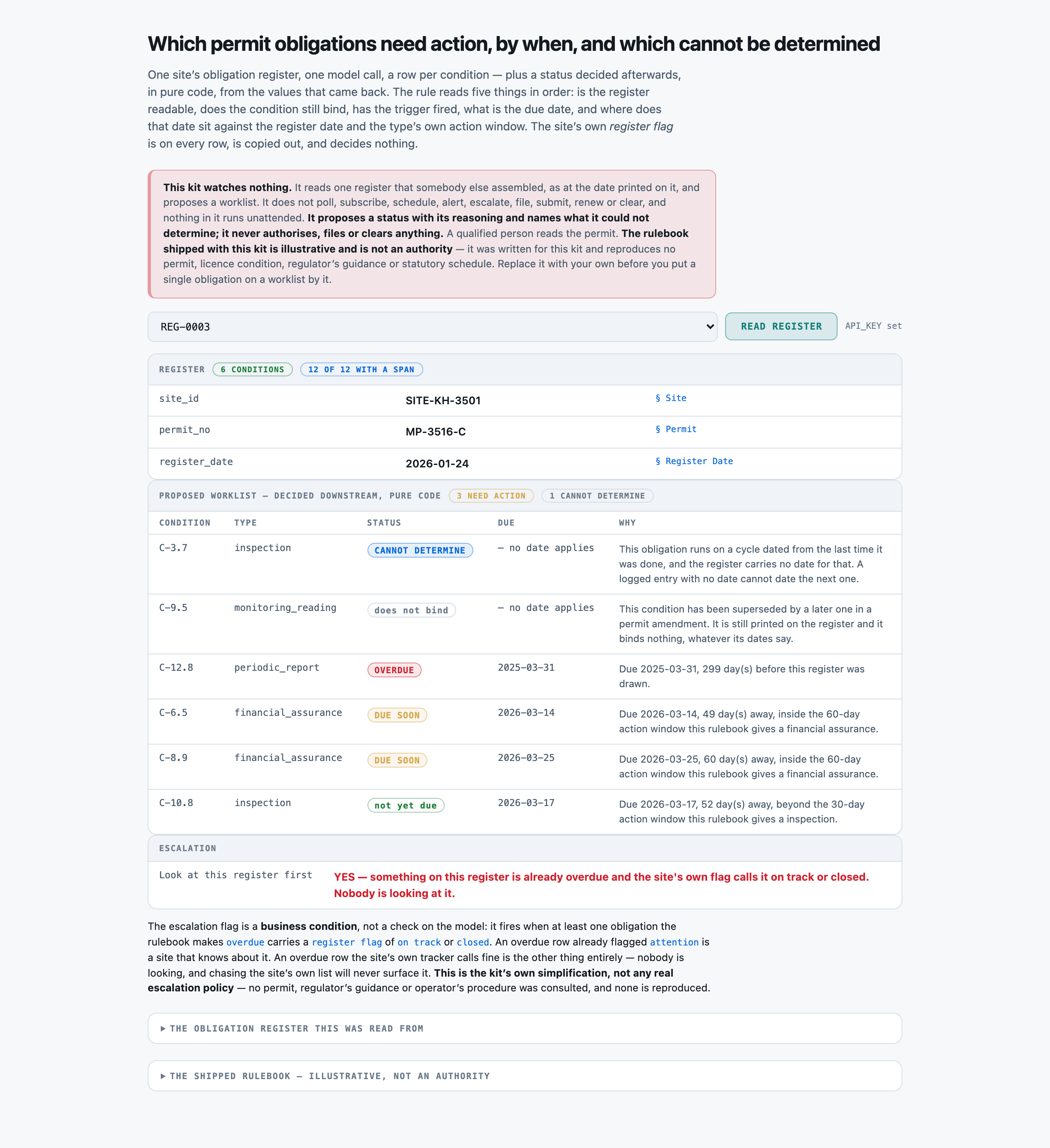
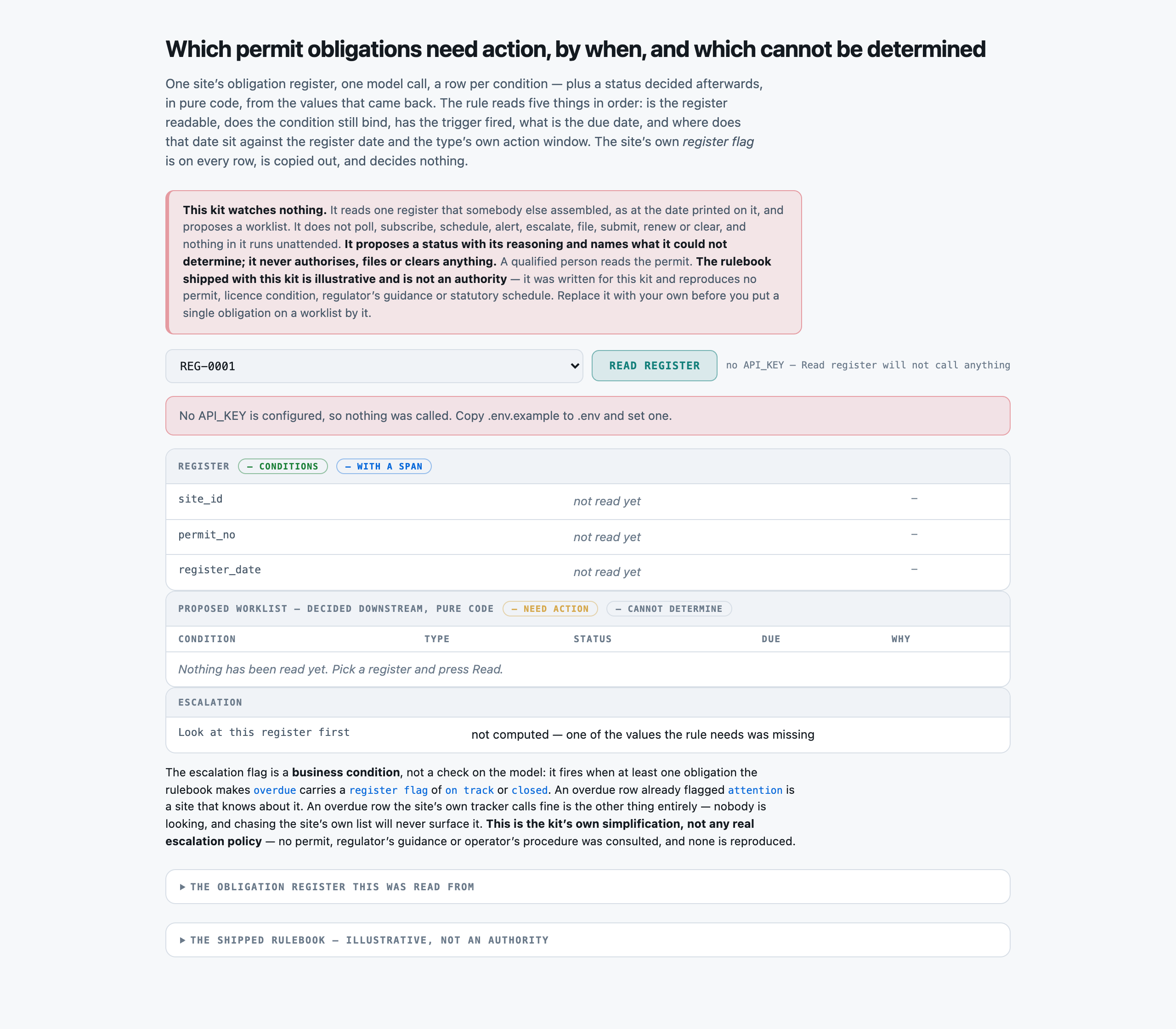
Before anything is asked of the model. Three register-level fields, an empty worklist that says so in words rather than as a blank table, an escalation row that has not been computed — and, above all of it where it cannot be missed, the notice that this kit WATCHES NOTHING, proposes rather than files, and decides by a rulebook that is illustrative rather than an authority.successOpen full size →REG-0003, read live. Six conditions, five different statuses, and both directions of the window trap on one screen: two financial assurances 49 and 60 days out are DUE SOON because their type's action window is 60 days, while an inspection 52 days out — closer than one of them — is not yet due, because its window is 30. The annual report was FILED LAST NOVEMBER and credited to the 2023 reporting year, so it has been overdue since 2025-03-31; the site's own flag on that row reads “on track”, which is what raises the escalation. The superseded reading carries a stale date that would compute as overdue and is correctly marked as binding nothing.successOpen full size →
LimitsWhen it does not
A report showing only wins is an advert. This one is required, and the validator now refuses a kit that omits it.
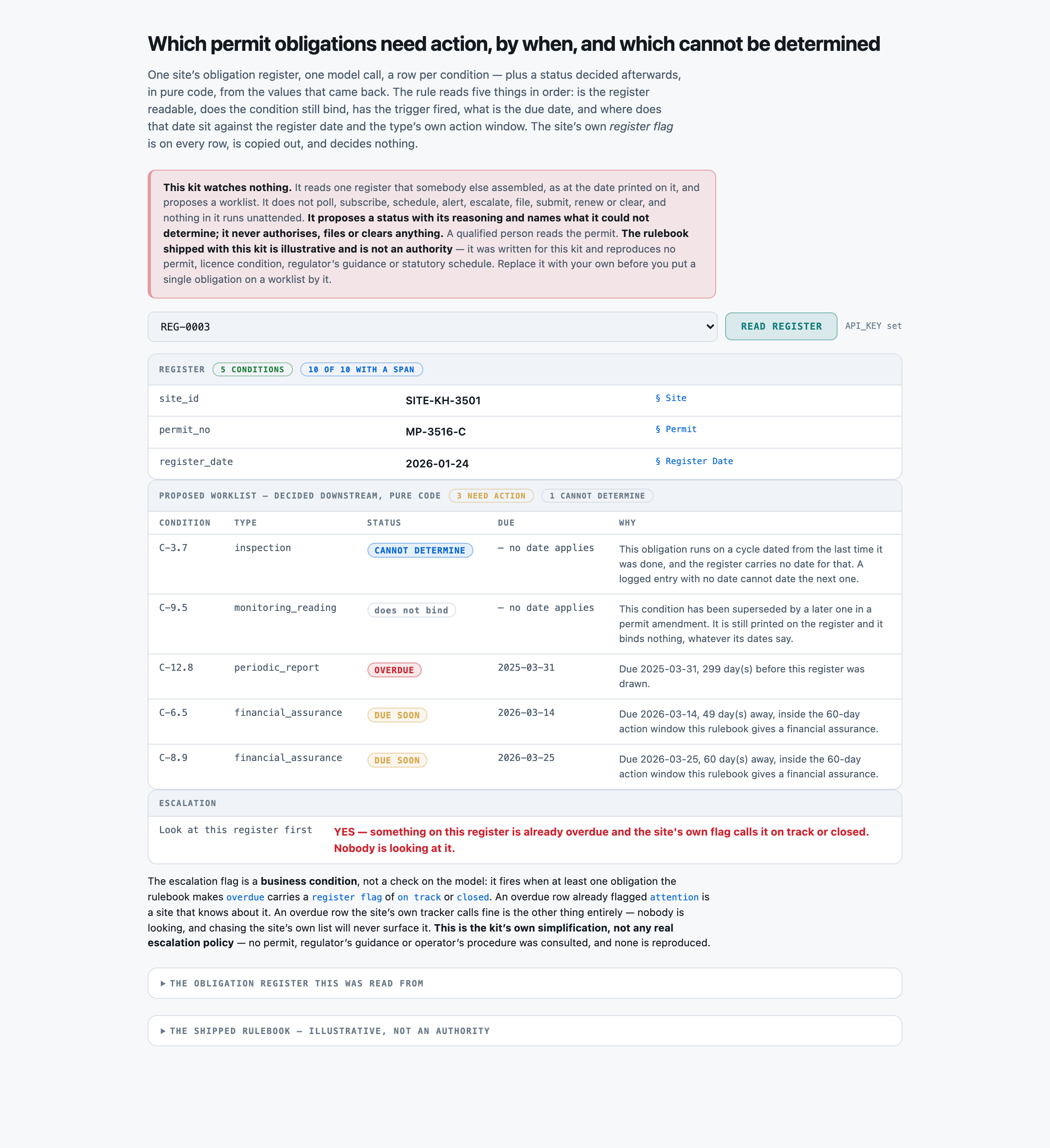
With no API_KEY configured, Read register returns a plain sentence saying nothing was called rather than an error — the page still renders, every field reads “not read yet” instead of showing a blank cell, and the escalation row says which value the rule was missing rather than defaulting to “no”. On a monitor that distinction is the whole point: an unknown is neither a clearance nor an alarm.failureOpen full size →THE SAME REGISTER, AN EARLIER LIVE READ, AND THE PANEL SAYS “5 CONDITIONS”. REG-0003 has six. Condition C-10.8 is simply absent from the reply — not misread, not marked undetermined, absent. It happened to be a not-yet-due inspection so the worklist above it is unchanged, and that is exactly why this is the failure worth publishing: on a monitor a dropped row is a condition nobody looked at, and downstream it is indistinguishable from a condition that needed nothing. Three follow-up calls on the same register returned all six. The scored run's 268-of-268 row recall is one pass, and this shot is what one pass cannot tell you.failureOpen full size →
Catch overdue permit obligations in a mine site's register
PresenterOpens the private repo. Visible to admins only.
Step 04 of 14Corpus
Written for: "can I point this at mine?" · Measured off the corpus the run actually used.
In brief
50obligation registers
0.11 MiBtxt 50
468sections · p50 339 chars
$0.00setup · 0.003s
How it is cutWhat one section is
cut on underlined section headings; every permit condition is its own headed block, and a register with no headings falls back to one whole-document segment
SetupWhat the setup figure measured
There is no index. Preparation is segmentation only — 50 registers cut into 468 sections in three thousandths of a second, in process, with no model and no network.
LicenceLicence
MIT — this repository's own licence. Every site name, site and permit identifier, administering office, condition identifier and waiver reference is invented, and no real operator, mine, site, permit, regulator or regulation is named. The obligation rulebook this kit ships (data/rulebook.json) is ILLUSTRATIVE and is not an authority. It was written for this kit and reproduces no permit, licence condition, regulator's guidance, industry code or statutory schedule.
Bring your ownBring your own obligation registers
REPLACE data/rulebook.json FIRST. It is this kit's own construction, it resembles no real permit, and everything downstream reads it: src/rulebook.py loads it, src/prompt.py renders it into every call, and tools/build_corpus.py writes gold with it. Then replace data/corpus/*.txt, write your own data/fields.json (both halves — register-level and per-condition), and supply a gold record per register. SECTION_HINTS and SECTION_PREFIXES in src/select.py map fields to section headings and will need editing for a different register layout; when they do not match, selection falls back to the whole document — slower, more expensive, always correct. compute() in src/extract.py is this kit's own escalation rule and is the second thing to replace.
What breaks it
A permit amendment that lands AFTER the register was drawn. This kit reads one snapshot and has no idea whether the intervals it just applied were changed last week — which is the single most consequential thing a real obligation register goes stale on.
A due date extended by correspondence that never reached the register. The rulebook computes from what is written down; an agreed extension held only in an inbox is invisible here and the kit will confidently call the obligation overdue.
A condition whose own text is ambiguous about its frequency (“periodically”, “as required”, “before each campaign”). Every obligation here carries a type the rulebook has an interval for; a real register carries plenty that do not.
Evidence filed but not linked to the condition it discharges, or filed against the wrong condition number. The kit treats a recorded completion as true because it is recorded, and it cannot tell whether the thing filed actually satisfies the requirement.
A long register. The reply is one JSON entry per condition and one live read of a six-condition register returned five, so a sixty-condition register is a materially different risk — measured at 1 drop in 6 observed calls here, and not measured at all at that length.
Scanned or photographed registers — there is no OCR step, and a register exported from a spreadsheet as a PDF is the normal case rather than the exception.
Catch overdue permit obligations in a mine site's register
PresenterOpens the private repo. Visible to admins only.
Step 05 of 14Prompt
Written for: engineer · Logged from the run, verbatim.
In brief
The assembled prompt in full, and its real decomposition. Every part below occurs in the prompt that was actually sent, and the token counts sum to the recorded input total — they were measured against the provider’s own counter, not apportioned by character share.
AssemblyHow the prompt is assembled
Part
Characters
Tokens
system
2,247
612
rulebook
1,879
458
field schema
2,364
559
register sections
2,365
594
Total
2,223
This is the cost lesson as arithmetic: of the 2,223 tokens assembled, 1,052 are contexts — 47% of the prompt, the largest single part. A per-request bill follows whichever part is biggest, and on this kit that is the one named here.
Measured token-for-token via evals/prompt_tokens.py's nested-prefix method on REG-0003 — the same register the worked example above was captured on, so the four parts sum to exactly the 2223 input tokens that call actually reported. Four calls at max_tokens=1, each part's size the difference between two consecutive prompt_tokens counts the provider itself returned. kits/UC0049-permit-obligations/results/tokens-p001-permit-obligations.json.
Full promptThe prompt in full
The verbatim prompt, as sent
the prompt, as sent
You read a SITE PERMIT OBLIGATION REGISTER and report what it records. You return JSON and nothing else.

YOU DO NOT DECIDE WHETHER ANYTHING IS OVERDUE, DUE SOON, OR CLEAR. A separate piece of code works that out from the values you report, against the rulebook shown below. Your job is to report the register faithfully, including the places where it records nothing.

RULES, in order of importance:
1. If the register does not state a field, return null for it. Do not infer it, do not carry a value across from another condition block, and do not use what you know about the world.
2. RETURN ONE ENTRY PER CONDITION BLOCK, in the order the register prints them, including blocks that are superseded, waived, or plainly closed out. A register accretes; the rows nobody deleted are exactly the rows this reading is about.
3. `condition_state` IS THE FIRST WORD OF THE 'Condition state' LINE AND NOTHING ELSE. A superseded or waived condition still carries dates, and those dates do not change the state. Report 'superseded' or 'waived' even where the rest of the block looks like ordinary work that is running late.
4. `last_done` IS A DATE OR IT IS NULL. Where the line says the entry was logged with no date recorded, return null -- not today's date, not the amendment date further up the block, and not a date from another condition. Where the line says it does not apply to this condition, return null.
5. FOR AN ANNUAL REPORT, `period_credited` IS THE REPORTING YEAR THE FILING WAS CREDITED TO, taken from the 'Period credited' line and never from the filing date above it. The two routinely disagree and the period is the one that counts.
6. `trigger_state` DISTINGUISHES 'not_occurred' FROM 'not_recorded'. The first means the register says the event has NOT happened. The second means the register does not say either way. They are different answers.
7. `register_flag` is the site's own self-assessment of the row. Copy it verbatim. It is frequently wrong and it is never evidence about anything.
8. Copy identifiers verbatim. Write every date as YYYY-MM-DD, exactly as the register does.
9. Use the exact allowed value for a field that lists them, and return every field named in the schema on every entry, even when the answer is null.

HOW THE STATUS IS WORKED OUT AFTERWARDS (context for you; you do not compute it). This is an ILLUSTRATIVE rulebook shipped with this kit, not a real permit.

OBLIGATION TYPES
  event_triggered:       nothing is due until the trigger event occurs; then the stated due date governs; action window 30 days
  financial_assurance:   due 365 days after the last recorded date; action window 60 days
  inspection:            due 180 days after the last recorded date; action window 30 days
  monitoring_reading:    due 90 days after the last recorded date; action window 30 days
  periodic_report:       covers a calendar year; due 03-31 of the year after the year it covers; action window 30 days

CONDITION STATES -- read before any date
  active:        the condition binds and its status is computed.
  superseded:    the condition has been replaced by a later one in a permit amendment. It is still printed on the register -- registers accrete -- and it binds nothing. Status is `not_binding` whatever its dates say.
  waived:        the administering body has waived the condition in writing, with a reference. It binds nothing. Status is `not_binding` whatever its dates say.

TRIGGER STATES
  occurred:        the register records the trigger event as having happened, and states the resulting due date.
  not_occurred:    the register records that the trigger event has not happened. Nothing is due -- `not_yet_due`, and it is not an omission.
  not_recorded:    the register does not say either way. `not_determinable` -- an unrecorded trigger is not the same fact as a trigger that did not fire.
  not_applicable:  the row is not an event-triggered condition.

THE STATUS IS ONE OF: overdue, due_in_window, not_yet_due, not_binding, not_determinable
`not_determinable` is a real answer. The register not carrying what the rule needs is a fact to report, not a gap to fill in.

Extract these register-level fields:
- site_id (string) -- the site identifier printed in brackets after the site name in the Site section, verbatim
- permit_no (string) -- the permit number in the Permit section, verbatim and without the issuing office
- register_date (date) -- the date this register was drawn, from the Register Date section, as YYYY-MM-DD. Every status on this register is measured against this date

Then return `obligations`: a list with ONE ENTRY PER CONDITION BLOCK on the register, in the order printed, each entry carrying exactly these fields:
- condition_id (string) -- the condition identifier from the block heading, e.g. C-7.3, verbatim
- obligation_type (enum) one of: monitoring_reading, inspection, financial_assurance, periodic_report, event_triggered -- the obligation type stated on the block, verbatim
- condition_state (enum) one of: active, superseded, waived -- the FIRST WORD of the Condition state line and nothing else. A superseded or waived condition is still printed on the register and still carries dates; report the state exactly as it stands and do not let its dates change your answer
- last_done (date) -- the date on the 'Last recorded as done' line, as YYYY-MM-DD. Return null when the line says the entry was logged with no date recorded, and null when it says the line does not apply to this condition. Do not guess a date from anything else on the block
- period_credited (string) -- for an annual report, the four-digit reporting YEAR the last filing was credited to, e.g. '2024' -- taken from the 'Period credited' line and NOT from the filing date above it. Return null where the line says it does not apply
- stated_due (date) -- the date on the 'Stated due date' line, as YYYY-MM-DD. Return null where the line says no date is stated
- trigger_state (enum) one of: occurred, not_occurred, not_recorded, not_applicable -- what the Trigger event line records. 'not_occurred' means the register says the event has NOT happened, which is a recorded fact; 'not_recorded' means the register does not say either way. They are different answers and must not be merged
- register_flag (enum) one of: on track, attention, closed -- the site's own Register flag for this condition, copied verbatim. It is the site's self-assessment, it is often wrong, and it is NEVER an input to anything -- report it as stated

Return a JSON object with exactly these keys: site_id, permit_no, register_date, obligations
Use null for any field the register does not state.

PERMIT OBLIGATION REGISTER
--------------------------
Site
----
Kestrel Hollow Operation (SITE-KH-3501)

Permit
------
MP-3516-C, issued by the Ninth District Minerals and Environment Office

Register Date
-------------
2026-01-24

Condition C-3.7
---------------
Requirement: half-yearly geotechnical inspection of the waste rock dump
Obligation type: inspection
Condition state: active
Last recorded as done: entry logged, date not recorded
Period credited: not applicable to this condition
Stated due date: not stated
Trigger event: not applicable to this condition
Register flag: attention

Condition C-9.5
---------------
Requirement: quarterly surface water sampling at discharge point DP-21
Obligation type: monitoring_reading
Condition state: superseded - replaced by condition C-21.1 in the permit amendment of 2024-12-24
Last recorded as done: 2025-04-28
Period credited: not applicable to this condition
Stated due date: not stated
Trigger event: not applicable to this condition
Register flag: attention

Condition C-12.8
----------------
Requirement: annual environmental performance report for the calendar reporting year
Obligation type: periodic_report
Condition state: active
Last recorded as done: 2025-11-17
Period credited: 2023 reporting year
Stated due date: not stated
Trigger event: not applicable to this condition
Register flag: on track

Condition C-6.5
---------------
Requirement: annual renewal of the rehabilitation security held against this permit
Obligation type: financial_assurance
Condition state: active
Last recorded as done: 2025-03-14
Period credited: not applicable to this condition
Stated due date: not stated
Trigger event: not applicable to this condition
Register flag: attention

Condition C-8.9
---------------
Requirement: annual renewal of the pollution incident financial provision
Obligation type: financial_assurance
Condition state: active
Last recorded as done: 2025-03-25
Period credited: not applicable to this condition
Stated due date: not stated
Trigger event: not applicable to this condition
Register flag: attention

Condition C-10.8
----------------
Requirement: half-yearly inspection of the haul road water crossings
Obligation type: inspection
Condition state: active
Last recorded as done: 2025-09-18
Period credited: not applicable to this condition
Stated due date: not stated
Trigger event: not applicable to this condition
Register flag: on track
Catch overdue permit obligations in a mine site's register
PresenterOpens the private repo. Visible to admins only.
Step 06 of 14Evals
Written for: the skeptic · The harness output, with as_of / model version / dataset version / verified_by.
In brief
Catch overdue permit obligations in a mine site's register — 50 obligation registers. One model answered, and every answer was then graded Five different ways — because the grade is a measurement too, and most of what went wrong on this kit went wrong in the ruler rather than the model.
50obligation registers
50source documents
1model tier
5grading methods
MeasurementsWhat was measured
COUNTED2294 / 2294extraction accuracy — cellsDecided by == against a fixed gold value. No model graded this and it reproduces to the digit — which makes it checkable, not necessarily right: it is only as good as the gold behind it.
COUNTED268 / 268status accuracy — permit obligationsDecided by == against a fixed gold value. No model graded this and it reproduces to the digit — which makes it checkable, not necessarily right: it is only as good as the gold behind it.
COUNTED126 / 126worklist precision — obligations raisedDecided by == against a fixed gold value. No model graded this and it reproduces to the digit — which makes it checkable, not necessarily right: it is only as good as the gold behind it.
COUNTED172 / 172derived due-date accuracy — derived due datesDecided by == against a fixed gold value. No model graded this and it reproduces to the digit — which makes it checkable, not necessarily right: it is only as good as the gold behind it.
NOT YET KNOWN—A person confirmed the gold is rightThe grader is == and needs no confirming. The gold does: it is machine-derived from the registry's structured modules, and every rate on this page rests on that derivation being faithful to what the prose actually says. Nobody has read a document against its gold record by hand.
Two words carry this page: Counted is deterministic and nobody's opinion and Not yet known is printed blank rather than filled with something plausible. There is no Judged row here and that is the point: nothing on this page is a model's opinion about another model. The row most worth having is currently the empty one.
How the method was validated
The scorer (evals/judge.py) is pure code, exact match with light normalisation against a mechanically-derived gold — there is no judgement to validate, only comparison. What WAS validated: gold's status and due date are not typed labels at all, they are the shipped rulebook's own lookup run over the same values the register states, and evals/check_labels.py re-runs BOTH over every one of the 268 obligations before any run is allowed to spend, failing if a single label disagrees with its own values. The same file asserts, for free and before spending: that condition ids are unique within a register (they are the scorer's only key for lining a reply's rows up against gold); that only three fields are nullable and each null is a stated fact; A FLOOR ON EVERY PLANTED DIFFICULTY (at least 6 superseded and 6 waived conditions, AND that every one of them would land on the worklist with the state ignored; at least 6 annual reports overdue while showing a filing inside the last 90 days, AND that each filing post-dates the deadline of the period it was credited to; at least 6 dateless cycle entries; at least 6 triggers recorded as not-occurred against 6 the register does not record; and at least 6 obligations on EACH SIDE of the per-type action window at 31-60 days); that no status class is empty, that the worklist is neither everything nor nothing, that at least one register has an EMPTY worklist, and that the escalation flag is not constant; that the free floor is structurally incapable of exactly due_in_window and not_determinable and no other status; AND that every one of the 2,294 gold cells can be read back off its own register by pure regex, which is the strongest available statement that gold is derivable from the document text rather than from a hidden label. tools/build_corpus.py's own _verify() pass separately confirms every gold value is stated on the register it labels and that every null is explained in the text.
Grading costWhat it costs
Every dollar on these pages is a MEASURED token count multiplied by a named vendor's PUBLISHED rate — a projection onto a rate card, not a bill anyone paid.
Priced at
Per 1M in / out
One obligation register
1,000 obligation registers
Share that is the prompt
Google Gemini 3 Flash the cheapest model Google publishes a rate for, and the card every kit in this series projects onto so the rows compare across use cases
$0.50 / $3.00
$0.004253
$4.25
26%
Same work, 1× the bill
The same obligation registers, the same tokens — only the rate card changed. And on that card about 26% of what you pay is the prompt this pipeline sends, not the answer it writes.
THE RULEBOOK BLOCK, and it is the only lever on this page with a MEASURED answer rather than a hypothesis. It is 458 of 2,223 input tokens on every call, the model is explicitly told it will not compute a status, and run a001 removed it over the 17 registers where it could plausibly have changed an answer: nothing moved, on 21.0 pct fewer input tokens. Because output dominates this kit's bill, that is worth about 5 pct of the per-register cost rather than 20 — which is itself the finding, and it points at the bigger lever. PROVIDER-SIDE REASONING is 58.4 pct of the output tokens and therefore roughly half the bill; src/adapters/__init__.py can send a thinking parameter and this kit's harness never does, so nobody knows whether the perfect scores survive without it. That is the experiment worth firing next.
Rates checked 2026-08-18. The provider that actually ran these runs publishes no rate card this repo commits, so nothing here is what was actually paid — the real spend for this kit's build is recorded in the commit history and the shared call ledger, not on this page.
The gradersFive ways to grade
Grader
Cost / 1k
Data leaves
Same answer twice
Result
Per-field exact match, light normalisation Does the run's value for each field match gold, after trimming whitespace and punctuation? last_done, period_credited and stated_due are the three legitimately null fields — null where the register says the entry was logged with no date, where the line does not apply, or where no date is stated — so a null there is a hit, not a miss, when gold agrees. THE DENOMINATOR IS GOLD'S: a condition block the run never returned costs its eight cells rather than shrinking the denominator.
$0.00
no
yes
the fast tier 100.0% · the same tier, rulebook removed from the prompt 100.0% · the free register-flag floor 100.0%
The status, five-way and collapsed onto the worklist — the false-alarm rate Two questions at once. Five-way: did the pure-code rulebook, run over what the model reported, land on the same status the rulebook produces from gold — overdue, due_in_window, not_yet_due, not_binding or not_determinable? And the one a monitoring desk actually acts on: OF EVERY ROW THIS RUN PUT IN FRONT OF A PERSON, WHAT SHARE DID NOT NEED TO BE THERE? That is the FALSE-ALARM RATE, and it is the headline rather than a footnote, because a queue that cries wolf is worse than no queue — a person clears every row on it by hand, every day. Its mirror, MISSED ACTIONS, is counted and named separately and never averaged into it.
$0.00
no
yes
the fast tier 100.0% · the same tier, rulebook removed from the prompt 100.0% · the free register-flag floor 42.2%
The derived due date, on the rows where one is computed rather than read Is the date right, not just the verdict? An obligation found but MIS-DATED is a different failure from one missed, and an accuracy figure cannot tell them apart: a row correctly called overdue with the wrong due date sends somebody to the wrong deadline. Scored only where the date is DERIVED — a cycle dated from the last recorded entry, or an annual report dated from the reporting period credited. Rows whose due date is stated on the register, and rows where the rule stops before any date applies, are excluded rather than counted as misses.
$0.00
no
yes
the fast tier 100.0% · the same tier, rulebook removed from the prompt 100.0% · the free register-flag floor 0.0%
“Cannot be determined from this record”, scored in both directions How often does the kit reach for not_determinable, and how often is it right to? A monitor that never says it is not being cautious, it is guessing — and on a monitoring queue a confident wrong 'clear' is the failure that actually hurts. A monitor that says it everywhere is useless. Both directions are scored, and the class is pulled out of the five-way accuracy rather than left buried inside it.
$0.00
no
yes
the fast tier 100.0% · the free register-flag floor 90.3%
The escalation flag against the same rule run over gold Does the pure-code escalation — something already overdue AND the site's own register flag quiet about it — land on the same registers it would land on if every field had been read perfectly? It is a BUSINESS CONDITION, so unlike a self-consistency check it genuinely needs labels, and saying so is half of what makes the number believable.
$0.00
no
yes
the fast tier 100.0% · the free register-flag floor 38.0%
Every row opens its own page: how the test was run, the input on one real row, the prompt or formula with every iteration of it, and the analysis.
Why this set cannot separate them
Between the model and the free floor, yes and decisively; between anything else, not at all, and this kit spent a calibration and an ablation establishing that rather than asserting it. The floor scores 42.16 pct five-way against 100 pct, raises 25 rows that need nothing against 0, misses 53 that do against 0, and scores 0 of 172 derived due dates against 172. NOTHING ELSE SEPARATES. Removing the rulebook block — a fifth of every call's input — moved no cell, no status and no date on the subset where it could have. A corpus that cannot tell a full prompt from a stripped one has stopped measuring anything except whether the shortcut fails. The one thing that DID separate two runs of the same configuration was not a grader at all: a live read of REG-0003 returned five of its six condition blocks where four other calls returned six.
Choosing oneWhich one to use
The comparison is only useful if it ends in a choice. The answer is conditional — and it is not the grader with the best agreement score.
If your situation is
Use
Because
And avoid
Turning a book of site obligation registers into this week's worklist before a compliance or approvals desk opens them
the fast tier — one call per register, 6.6s at the median, $0.0042532 a register
0 false alarms of the 126 obligations it raised and 0 missed of the 126 that needed action, against a free register-flag floor that raises 25 rows needing nothing and misses 53 that do. It also derived all 172 due dates exactly, which the floor cannot do at all.
the site's own register flag as an input to anything — it is wrong on 40 pct of the rows here by construction, and it is written by the party being checked. AND AVOID USING THE SHIPPED RULEBOOK: it is this kit's own construction, so screening real registers against it would be screening them against intervals nobody's permit actually states.
Deciding whether the rulebook block belongs in the prompt at all
take it out
Measured, not argued. It is 458 of the worked example's 2,223 input tokens (20.6 pct) and the model is explicitly told it will not compute a status. Run a001 removed it, kept the system prompt and every field hint, and re-fired the 17 registers where it could plausibly have mattered: 763 of 763 cells, 89 of 89 statuses, 65 of 65 due dates, all 22 wrong-period decoy rows still correct, on 21.0 pct fewer input tokens.
reading that as 'context never helps'. It was measured on ONE corpus whose field hints already carry the same guidance in miniature, and the ablation deliberately kept those. Strip the hints too and this result says nothing about what happens.
Deciding whether this shape is worth buying at all, from these numbers
not from these numbers alone — run it on your own registers first
What the numbers DO support is narrow and real: taking a compliance status from a register's own flag is measurably unsafe on this shape of decision, in both directions at once; and a monitor that can say 'cannot determine' catches 26 of 26 registers' worth of unanswerable rows rather than clearing them.
reading a perfect score as evidence about a model. 50 registers, one layout, one seed and a five-type rulebook is a floor test — and one live read of a six-condition register came back with five, which no grader on this page saw.
This pipeline was also attacked, which is a different question from whether its answers are right: see Threat model for the injection experiment, its two gates and what it does not prove.
Failure causesHow it fails
Cause
What it means
Rows
A real example
dropped-condition-block
A live read returned five of a register's six conditions — found by opening the page, not by any grader
1
REG-0003 carries six condition blocks. The first live UI capture returned five: C-10.8 was absent from the reply entirely — not misread, not marked undetermined, absent. Three follow-up calls on the same register and the scored run all returned six, so the…
no-model-side-failure-on-the-scored-pass
The scored run produced no field miss, no wrong status and no wrong date
0
Across 50 replies and 2,294 scored cells there was no field miss, no wrong status, no wrong derived due date, no invented condition, no unanswered row, no parse failure and no truncation (the largest reply used 2333 of 8000 max_tokens). Recorded as an entry…
flag-floor-both-directions
The free register-flag floor's own failure mode, measured on the same corpus
78
evals/baseline.py takes the status from the site's own flag and never opens the rulebook. It raises 25 obligations that need nothing AND misses 53 that do — both directions at once, which is what makes it a genuine floor rather than a cautious or a careless…
diagnostic-blind-to-its-own-shortcut
The no-gold diagnostic reports zero disagreements on the run that got 155 statuses wrong
0
evals/judge.py compares the site's own register flag against the computed status and needs no labels — on r001 it found exactly the 107 planted contradictions with none spurious. On the FREE FLOOR it reports 0 disagreements, because the floor derived the…
What we could NOT verify
Whether the shipped rulebook is right. Every grader here measures agreement with data/rulebook.json, which was written for this kit. No compliance practitioner, regulator or permit holder has looked at it, and several of its simplifications are visibly not how a real permit works — most obviously that an obligation TYPE has one interval and one action window, when a real permit sets a period per condition and an amendment can move it.
How often a condition block is dropped from a reply. One was, on one live read of a six-condition register, and four other calls on the same register returned all six. That is an observed rate of 1 in 6 on ONE register, which is an anecdote with a denominator rather than a measurement. The obvious experiment — the same corpus fired several times and row recall differenced — has not been run.
Whether row recall holds on a LONG register. Every register here carries 4 to 7 conditions. A real site can carry sixty, and the failure observed above gets more likely as the list gets longer, not less. Nothing here measures that.
Whether the escalation condition is a useful thing to escalate on. It scores 31 of 31 against a gold built from the same two values, which measures the code and not the policy. No compliance function has looked at the 31 registers it picked.
Whether the perfect score survives a harder corpus. 107 contradicting flags, 22 wrong-period reports, 32 non-binding conditions and 26 unanswerable rows all resolved correctly on one pass, and those counts are not enough to rule out a confusion this corpus did not think to plant.
Catch overdue permit obligations in a mine site's register
PresenterOpens the private repo. Visible to admins only.
Step 07 of 14Unit cost
Written for: whoever signs off on the bill · Measured over the eval run, per model. Never quoted from a vendor page.
In brief
Tier
Input tokens
Output tokens
p50 latency
Google Gemini 3 Flash
the fast tier
2,175.28
1,055.2
6,601 ms
$0.004253
The token counts are measured on a real run and belong to this pipeline — which sections are selected, the field schema, the prompt — so they hold wherever you run it. The dollars are those counts multiplied by each vendor's published rate, checked 2026-08-18. Nobody paid these particular bills; they are what the same work would cost you on a card you can sign up to today.
Identical work in both rows — the same query, the same tokens. Only the price list changed. Which is why the token count is the measurement and the dollar is arithmetic you can redo on your own card.
Answering vs gradingAnswering and grading are two separate bills
The register-flag floor (evals/baseline.py) and the scorer (evals/judge.py) are both pure code and cost $0.00 to run against any result set. The figure above is the SCORED run's own token counts (50 registers) priced at Google Gemini 3 Flash's published rate — the same basis cost_per_query_usd uses. ⚠︎ IT IS NOT WHAT BUILDING THIS KIT COST. 83 live calls were made in total. Four further paid passes are committed in results/ and sit outside the figure above: a 6-register calibration that MEASURED max_tokens ($0.0242085), the 17-register prompt ablation ($0.072733), 4 prompt-split calls ($0.002779) and one worked example ($0.0037545) — $0.316137 across everything with committed token counts. Five further live calls are named rather than priced, because their token counts were not written to any committed file: three completeness probes on REG-0003 after a dropped condition block was spotted, and two UI screenshot clicks.
Cost driversWhat actually moves the bill
The fixed prefix — system prompt (612 tokens), rulebook (458) and field schema (559) — is 1629 of 2223 tokens on the worked example, 73 pct, and is byte-identical on every one of the 50 calls. The register itself is 594 tokens.
⚑ A FIFTH OF THE INPUT IS A RULEBOOK THE MODEL IS TOLD IT WILL NOT APPLY — and removing it moved nothing. 458 tokens of every call, measured; run a001 stripped it and scored 763 of 763 cells and 89 of 89 statuses on the subset where it could have mattered. This is the one cost driver on this page with a measured answer attached.
Provider-side reasoning. 30792 of r001's 52760 output tokens (58.4 pct) were reasoning rather than the JSON record. Reasoning was left at the provider's default and nothing here has measured what turning it off would cost in accuracy.
Output length scales with the register, unlike the input. The reply is one JSON entry per condition, so a 7-condition register costs materially more to answer than a 4-condition one — and output is 74 pct of this kit's bill on the published card.
Your volumeWhat it costs at your volume
Linear in REGISTERS: each call is independent, carries the same fixed prefix and shares nothing with its neighbours, so 500 registers cost ten times 50. Nothing amortises — there is no index and no prefix cache. ⚠︎ BUT IT IS NOT LINEAR IN CONDITIONS, AND THAT IS THE ONE THAT BITES. The reply is one JSON entry per condition, so a site with 60 conditions rather than 5 is not ten times the input, it is roughly ten times the OUTPUT — which is three quarters of the bill here — and it is the same axis along which one live read already dropped a condition block. At that size the shape has to change to batched conditions with a reconciliation step, which is a different kit.
Where pricing changes shape
Your return, with your numbers
Volume
What it replaces
Time saved per item
We publish the inputs, not a return: a return depends on your labour cost and your volume. The ROI dashboard takes it from here, and AI Costing explains the math.
Other modelsOn other models
This is arithmetic, not a run. No model below was executed against the labelled set, and no accuracy is claimed for any of them. What transfers is the input volume: retrieval is model-independent, so every model would receive the same passages.
108,764input tokens · this run
52,760output tokens
—not priced — no committed card for the provider that ran it
The exact work behind every number on these pages: 50 permit obligation registers carrying 268 conditions, one completion call each, on the fast tier. The calibration, the prompt ablation, the prompt-split measurement, the worked example and the UI captures are recorded separately in Cost.cost_of_evaluation_usd and are not projected here.
Model
Provider
One eval pass
This whole run
Per 1,000 queries
Rates as of
gpt-5-6-luna
OpenAI
$0.085
$0.085
$1.70
2026-09-12
gemini-3-flash
Google
$0.213
$0.213
$4.25
2026-09-18
gemini-3-8-flash
Google
$0.279
$0.279
$5.59
2026-09-18
llama-5
Meta
$0.360
$0.360
$7.20
2026-09-18
claude-haiku-4-5
Anthropic
$0.373
$0.373
$7.45
2026-09-12
grok-4-5
xAI
$0.534
$0.534
$10.68
2026-09-18
grok-4-6
xAI
$0.534
$0.534
$10.68
2026-09-18
claude-sonnet-5
Anthropic
$0.745
$0.745
$14.90
2026-09-12
gemini-3-1-pro
Google
$0.851
$0.851
$17.01
2026-09-18
gpt-5-6-terra
OpenAI
$0.851
$0.851
$17.01
2026-09-12
gpt-5-6-sol
OpenAI
$1.490
$1.490
$29.81
2026-09-12
claude-opus-4-8
Anthropic
$1.863
$1.863
$37.26
2026-09-12
claude-opus-5
Anthropic
$1.863
$1.863
$37.26
2026-09-12
claude-fable-5
Anthropic
$3.726
$3.726
$74.51
2026-09-18
claude-fable-5-1
Anthropic
$3.726
$3.726
$74.51
2026-09-18
gpt-6-astra
OpenAI
$3.726
$3.726
$74.51
2026-09-17
Read this against the numbers above
Every row below prices the fast tier's own 50-call run (r001-permit-obligations). This kit fired ONE scored run on ONE tier: the model here answers no guarded field, so the money worth spending went on measuring whether the PROMPT earns its tokens (run a001) rather than on a second tier.
58.4 pct of this run's output tokens were provider-side REASONING, left at the provider's default. Every row below therefore prices a reasoning-on workload, and output is about 74 pct of the bill on the cheapest card. A vendor whose default differs, or a caller who disables it, would see a materially different figure — and this kit has not measured what disabling it does to the statuses.
The per-register figure assumes a register of about five conditions, which is what this corpus carries. Output scales with the condition count, so a site with sixty conditions is not a slightly bigger call — it is roughly ten times the output, and three quarters of the bill is output.
Catch overdue permit obligations in a mine site's register
PresenterOpens the private repo. Visible to admins only.
The codeEvery file, and what it is for
Six modules, no framework, and almost no dependencies. The pipeline is stdlib Python, because a kit is meant to be read and changed by someone who cloned it ten minutes ago — every dependency is a thing they have to understand before they can touch the part they came for.
Five of these are swap seams: the points you edit to make the kit yours. Each is marked, and each block below is the module’s real shape, read out of the file rather than written here.
The files on this page are not in the public GitHub catalog.
src/segment.pysegment
cut the register into addressable sections, pure code — one section per permit condition, which is what makes a per-condition citation possible at all
src/segment.py
# Cut a document into addressable sections. Pure code — no model, no network.

def sections(text):
def locate(text, value):
def span_label(secs, start):
src/select.pyselect — a swap seam
pick which sections carry each field, pure code — the obligations map to every Condition block by heading PREFIX, and the site's own summary Register Note is mapped by nothing and never leaves the machine
You change it to: map fields to your own register's headings; the prefix map is how a field says 'every block of this kind'. Unmatched falls back to the whole document
src/select.py
# Pick which sections plausibly carry each field. Pure code -- the last deterministic step before

SECTION_HINTS = {
SECTION_PREFIXES = {
def for_field(secs, field):
def for_condition(secs, condition_id):
def plan(secs, fields):
src/rulebook.pyrulebook
the status decision, loaded from data/rulebook.json — five ordered checks over intervals, per-type action windows, condition states and trigger states. Data, not code, so a forker can open it and disagree with it
src/rulebook.py
# THE OBLIGATION RULEBOOK, loaded from data/rulebook.json. Pure code, no model, no network.

HERE = os.path.dirname(os.path.dirname(os.path.abspath(__file__)))
RULEBOOK_PATH = os.path.join(HERE, "data", "rulebook.json")
STATUSES = ("overdue", "due_in_window", "not_yet_due", "not_binding", "not_determinable")
ACTIONABLE = ("overdue", "due_in_window")
def load(path=RULEBOOK_PATH):
R = load()
TYPES = R["obligation_types"]
CONDITION_STATES = tuple(R["condition_states"])
TRIGGER_STATES = tuple(R["trigger_states"])
src/prompt.pyprompt
assemble one call for the whole register, with the rulebook RENDERED into it from data/rulebook.json rather than restated in prose — as context for why each field matters, since the model is told it will not compute the status
src/prompt.py
# Assemble the register-reading prompt. One prompt per register, every condition block in it.

SYSTEM = (
def rulebook_block(r=None):
RULEBOOK_TEXT = rulebook_block()
def field_schema(fields):
def schema_block(fields, ob_fields):
def build(doc_text, secs, fields, ob_fields, selector):
def parse(raw, fields, ob_fields):
src/extract.pyextract — a swap seam
the AI layer, one provider one key — plus the pure-code status rule over every returned row, the proposed worklist, and the business-condition escalation
You change it to: the escalation rule itself — this kit ships two values (something overdue AND the site's own flag quiet about it) and a real compliance function weighs which condition lapsed, by how long, and whether it is reportable in its own right. It is deliberately NOT the same function as the status rule, so changing WHAT GETS ESCALATED does not change WHAT IS OVERDUE
src/extract.py
# Read one site's permit obligation register: segment, select, prompt, one model call, then the

HERE = os.path.dirname(os.path.dirname(os.path.abspath(__file__)))
FIELDS = os.path.join(HERE, "data", "fields.json")
CORPUS = os.path.join(HERE, "data", "corpus")
MAX_TOKENS = 8000
def load_fields():
def load_obligation_fields():
def load_doc(register_id):
def documents():
def statuses(values):
evals/judge.pyjudge
score field accuracy, the five-way status, the DERIVED DUE DATES and the FALSE-ALARM RATE separately, plus the cannot-determine and escalation matrices, all pure code
evals/judge.py
# Score a register-reading run. PURE CODE -- gold is exact and every answer is one value, so `==`

def norm(v):
def equal(field, got, want):
def _flat(gold_ob):
def _derived(gold_ob):
def score(fields, ob_fields, records, golds):
def _cell_row(reg_id, cid, f, got, want, span, spannable, by_field):
def _matrix(rows, positive):
def score_statuses(records, flags, golds):
Start hereThe shortest path into it
src/segment.pycut the register into addressable sections, pure code — one section per permit condition, which is what makes a per-condition citation possible at all
src/select.pypick which sections carry each field, pure code — the obligations map to every Condition block by heading PREFIX, and the site's own summary Register Note is mapped by nothing and never leaves the machine A swap seam.
src/rulebook.pythe status decision, loaded from data/rulebook.json — five ordered checks over intervals, per-type action windows, condition states and trigger states. Data, not code, so a forker can open it and disagree with it
src/prompt.pyassemble one call for the whole register, with the rulebook RENDERED into it from data/rulebook.json rather than restated in prose — as context for why each field matters, since the model is told it will not compute the status
src/extract.pythe AI layer, one provider one key — plus the pure-code status rule over every returned row, the proposed worklist, and the business-condition escalation A swap seam.
evals/judge.pyscore field accuracy, the five-way status, the DERIVED DUE DATES and the FALSE-ALARM RATE separately, plus the cannot-determine and escalation matrices, all pure code
Every entry above is a file in this kit, listed in the order the pipeline runs it.
Catch overdue permit obligations in a mine site's register
PresenterOpens the private repo. Visible to admins only.
ScenariosWhat it costs at your volume
Everything below is computed from one measured base: 2175 input and 1055 output tokens per query, all of it fixed — this kit sends the document's own selected sections, so there is no retrieval depth to turn. Change the volume and the bill scales linearly, because nothing here batches.
Grading really is free here, and that is a property of the ruler rather than a discount
This kit is graded by pure code — the grader makes no model call, needs no key and sends nothing anywhere, so the grading line above is zero at every sampling rate and the leak count stays at nought. What that buys is a ruler you can run on every row, every time, for nothing. What it costs is reach: a code grader can only check what is mechanically checkable.
OperationsFour shapes of workload
The same arithmetic, at volumes worth naming. These are illustrations of scale, not measurements of anyone’s deployment.
Shape
Querys/day
Per day
Per month
Per year
Model follows the controls above.
What this ignoresWhere a real bill diverges
Read before quoting any of it
Output length is assumed constant.A terser or more verbose model moves it, and output is priced above input everywhere.
No volume, committed-use, batch or cache discount is modelled.Each moves real enterprise pricing and none are on a public rate card.
Longer documents cost more and nothing here caps them.This kit selects the document’s own sections in pure Python, so there is no vector store to price — but a corpus of longer records raises the input tokens per query directly, and that is the very number every figure above multiplies.
Grading adds nothing to this bill, and would if you changed the ruler.A code grader is free and local; swapping in an LLM judge would cost more per row than the extraction itself and send every row to a vendor. The instrument is a cost decision, not a footnote.
Rates age.Every one carries the date it was read on the cost page.
Catch overdue permit obligations in a mine site's register
PresenterOpens the private repo. Visible to admins only.
In one lineWhat this kit exposes
This run's obligation registers are entirely synthetic (tools/build_corpus.py, seed 20260822): no real site, operator, permit, administering body or condition exists in the corpus, and nothing was fetched from anywhere. Every site name, permit number, office, condition identifier and waiver reference is invented. The only outbound traffic the kit makes is one chat-completion request per register, carrying the mapped sections of that register plus the fixed prompt and the shipped rulebook. Nothing is written outside the kit directory, there is no database, no auth, no multi-tenancy and no scheduler, and the local UI binds 127.0.0.1 only.
Read from the shared .env or the real environment only, never committed, never logged and never rendered. .env is gitignored from the first commit. On an adapter error the app redacts the key and base URL out of the message before returning it, so a misconfigured endpoint cannot echo a credential into a browser — which matters here because this kit deliberately surfaces transport errors, and a transport error string is the one that carries a URL.
The experimentWe did not attack it — and three of four boundaries hold
The three boundaries that hold were confirmed by reading the code, not by a run: nothing in the kit polls, schedules, files, notifies or clears, and there is no dependency that could; no code path acts on a status; and the status rule reads typed values only, so the site's own flag cannot reach it. The fourth is open. An indirect prompt injection needs a field an outside party authored, and a permit obligation register is full of them — which makes it the obvious place to attack and the reason the gap is named rather than glossed. Confirmed by reading the code, not by a run, on 2026-08-22 — no attack run was fired; see redteam.why.
Boundary checked
What could go wrong
What the code guarantees
Does this kit monitor, poll, schedule or notify anything?
The pattern is called monitor and the word implies something running: a daemon, a cron entry, a subscription, an alert that arrives while you are not looking.
No code path does any of it. There is no timer, no queue, no scheduler, no state between calls and no dependency that could provide one — requirements.txt is empty and says so explicitly for this reason. The kit reads ONE register that somebody else assembled, as at the date printed on it, and returns a proposed worklist in a JSON body. Close the tab and nothing continues. The UI says so above the answer, not in a footnote.
Does a status ever file, submit, renew, notify or clear anything?
A tool that returns 'overdue' could plausibly be wired to open a notification, mark a condition discharged, or tell an administering body.
No code path does. src/extract.py::extract() and src/app.py's /api/read both return a JSON body and nothing else; the kit performs no write and no outbound call other than the single completion request. status is a proposal with the rulebook's own reasoning attached, and escalate is a value in a response, not an action.
Can the site's own register flag change what the code decides?
The flag is written by the party whose obligations are being checked and it sits in the same block as the dates, so it could steer the answer.
It can steer the MODEL — that is part of what this kit measures, and the run resisted it on all 107 contradicting rows. It cannot steer the STATUS: src/rulebook.py::decide() reads a state, a type, two dates and a trigger, and the flag is not among them. It IS an input to the escalation guardrail, deliberately and by name, which is a different claim and is stated as one.
Can text placed inside a register move what the model reports?
A requirement line, a condition-state parenthetical or a waiver reference is free text that a third party wrote, and it is the obvious place to hide an instruction on a kit whose output feeds a compliance worklist.
UNMEASURED. No attack was fired. The corpus plants an ordinary self-assessment disagreeing with the dates, not adversarial text, and the two are different tests. This boundary is the one of the four that does NOT hold on evidence. ⚠︎ AND NOTE WHAT WOULD SURVIVE IT: the pure-code rulebook reads only typed values, so an injection could change WHAT IS REPORTED but not how the status is computed from it. That is a smaller blast radius than a kit where the model answers the verdict — and it is not zero, because a changed date is a changed status.
The first three boundaries hold, confirmed by reading the code rather than by an attack run. The fourth is open and is named as open. Note that the first gate is not a normal one for this estate: it exists because the PATTERN'S NAME makes a claim the kit does not, and a reader who assumes a monitor monitors would be wrong about the most important thing on the page.
The result0 attack trials, and three of four boundaries checked here hold on evidence. The one that does not is the one this kit's shape invites: a register carries free text a third party wrote, and whether an instruction hidden in it could move what the model reports is unmeasured. The pure-code rulebook limits the blast radius — it reads typed values, not prose — but a changed date is still a changed status.
2externally-authored fields a live deployment would carry (the condition's requirement text and the site's own register flag), and where an injection would arrive
0attack trials fired against them
3 of 4boundaries checked here that hold on evidence
This run's corpus is entirely generated (tools/build_corpus.py, seed 20260822), so no text in it came from an outside party and there was nothing adversarial to resist. The planted contradiction is a REGISTER FLAG from the wrong register — a site calling an overdue condition 'on track' — which measures whether the pipeline runs the rulebook when the site's own paperwork points the other way. It does not measure whether a model obeys an instruction hidden in the same block. Those are different failures and only one of them is measured here.
Read this twice
This kit watches nothing. The pattern is called monitor and the kit does not monitor: it reads one register that somebody else assembled, as at the date printed on it, and proposes a worklist. It does not poll, subscribe, schedule, alert, escalate, file, submit, renew or clear, and nothing in it runs unattended. If the register is stale, every status here is stale with it and nothing on this page can tell. And the rulebook it decides by is invented. data/rulebook.json was written for this kit. It reproduces no permit, licence condition, regulator's guidance, industry code or statutory schedule, and its central simplification — that an obligation TYPE has one interval and one action window — is visibly not how a real permit works. Every perfect score on this page means the run agreed with that file, which is a much smaller claim than being right about a real permit. The model answers no status at all, so every error here is an inherited reading error. That is the shape of the kit and it cuts both ways: the status cannot drift with the temperature, and it is only ever as good as the date it was computed from. One live read returned five of a register's six conditions. Not misread — absent. On a monitoring queue that is the worst failure available, because a condition nobody returned and a condition that needed nothing look identical downstream, and no grader on this page can see the difference. The scored run's 268-of-268 row recall is one pass. Add the completeness check named in the guardrails before you route anything real by this.
HonestyWhat this does not prove
Whether text placed inside a register's requirement line, condition-state parenthetical or waiver reference could move what the model reports. No attack run exists.
Whether the kit behaves safely against a hostile provider — a response body crafted to break the JSON extraction in src/prompt.py::parse, or one that returns a plausible but fabricated extra condition block. parse() fails closed to an empty list, which the harness records as a failed document; a fabricated block would be counted as a spurious row by the scorer and would appear on the worklist in the app, and nothing beyond that was tested.
Whether a real site's obligation register would carry anything sensitive this kit mishandles. The corpus has no personal data by construction; a real register carries named responsible officers, a site's actual breach history and correspondence with a regulator, and none of that path is exercised.
Catch overdue permit obligations in a mine site's register
PresenterOpens the private repo. Visible to admins only.
In one lineThe guardrail is enforced in code
Not a prompt instruction the model can ignore — a comparison applied after the reply is parsed, before anything downstream sees it.
the guardrail, verbatim
`escalate` fires when the register carries at least one obligation the rulebook makes OVERDUE whose own `register_flag` — the site's self-assessment of that row — reads `on track` or `closed`. Both values come out of the same reply; the rule is run afterwards in pure code, over whatever the model returned, and never over gold. A register with no readable date or no conditions returns None rather than False, and so does one whose overdue row carries a flag outside the vocabulary: on this rule an unknown is neither a pass NOR an alarm, because raising on an unreadable flag is a false alarm and clearing it is a silent one.
src/extract.py::compute(), called by extract() on every register, by the local app on every click, and — through escalate_from() — by evals/baseline.py on the free floor's own output, so the two are routed by identical code. The status rule it reads lives in a SEPARATE module, src/rulebook.py::decide(), which is also what the corpus generator wrote gold with and what src/prompt.py states to the model — one definition, three readers.
EvidenceDoes it hold?
What
Measured
The flag fires on exactly the registers where the condition holds, and on no others.
31 of 31 on the scored run, 19 of 19 left alone, 0 false alarms — 1.00 recall and 1.00 precision against the same rule run over gold's own values (evals/judge.py::score_statuses, r001-permit-obligations).
An unknown is neither passed nor raised. A register missing a date or a readable flag on an overdue row returns None, which is counted as unanswered and never as a correct call.
Exercised by construction in the no-key UI state, where the escalation row reads “not computed — one of the values the rule needs was missing” rather than “no”. No live reply on the scored run omitted either value.
It is a BUSINESS CONDITION, not a check on the model, and it needs labels to score.
Stated rather than measured, and the free floor demonstrates the consequence in the sharpest possible way: the floor reads every register flag correctly by regex, every single time, and the guardrail STILL collapses to 0 of 31 — because it derived overdue from the flag, so the two halves of the condition became mutually exclusive. A business-condition guardrail is only as good as the field it reads, and it can be destroyed by a change upstream that never touches it.
Nothing downstream acts. The flag is returned and displayed; no obligation is filed, submitted, renewed, notified or cleared, nobody is contacted, nothing is written to disk, and nothing continues after the response.
Confirmed by reading the code: extract() returns it, app.py serves it in a JSON body, and no code path in the kit performs a write or an outbound call other than the single completion request. There is no timer, no queue and no scheduler anywhere in the kit or its (empty) requirements file.
The escalation rule and the status rule cannot be changed by accident together.
They are in two different modules with different inputs. compute() scans decided statuses and one enum per row; src/rulebook.py::decide() reads five recorded values against data/rulebook.json. Nothing in the kit calls one expecting the other.
The limitWhat a guardrail is not
It is NOT a notification, a filing or a clearance. Nothing here submits anything to anybody, renews anything, or marks anything done, and status is a proposal with the rulebook's own reasoning attached rather than a determination anybody is bound by. A qualified person reads the permit.
It is NOT monitoring. The kit reads one snapshot that somebody else assembled, as at the date printed on it. It does not poll, subscribe, schedule, alert or escalate to anyone, it holds no state between calls, and nothing in it runs unattended. If the register is a week stale, so is every status on this page.
It is NOT a check on whether the extracted values are right. If the model misreads a date and the rulebook then computes a status consistent with the misreading, the register is escalated — or not escalated — on a wrong fact and this rule cannot tell. The register-flag diagnostic in evals/judge.py is the closest thing to that check, it is reported separately, and it is blind to exactly the same case.
It is NOT any real escalation policy. Overdue-while-the-flag-is-quiet is this kit's own simplification, invented for this corpus. No permit, regulator's guidance or operator's procedure was consulted, and none is reproduced. A real compliance function weighs which condition lapsed, by how long, whether the breach is reportable in its own right, whether the administering body already knows, and who is authorised to disclose it.
WatchedWhat is watched, and why that one
5runs recorded
0 / 0deterministic metrics exact
+0.0%largest move — latency
0band breaches
—model half · needs provider URL
The kit measures 14 watched figures plus 8 comparability guards and 5 reference constants — three duties, not one list. 0 of the watched are grader rates, each on its own grader page; this board watches the ones that decide when to look again. Each square is one watched figure; filled means the latest run measured it.
7 measured by the latest run7 need the model half
Metric
Owner
Role
Why this one
field-exact-match-with-normalisation
Per-field exact match, light normalisation
alarm
row_recall_pct above everything else on this grader. A dropped condition block costs eight cells here and it is invisible in any per-cell rate that only counts what came back — one live read outside the scored run returned five of six blocks; period_credited specifically, on the 22 rows where an annual report is overdue while showing a recent filing — a run that reads the filing DATE into this field gets the field wrong AND the status wrong, from one mistake; condition_state on the 32 superseded and waived rows, which is the field the whole false-alarm rate turns on; last_done's null case on the 16 dateless entries — a run that invents a date there has invented the compliance history; span_rate on the four spannable per-condition fields, since a value with no span is an assertion rather than a located citation, and spans here are scoped to the condition's OWN block because every block carries the same nine line labels — alarm on Any drop below 100 pct, and any movement off 268 of 268 rows found with 0 invented. The scored run was exact on all 2,294 cells, so any regression at all means the prompt, the rulebook, the corpus or the provider changed.
worklist-false-alarm-rate
The status, five-way and collapsed onto the worklist — the false-alarm rate
alarm
false_alarm_rate_pct above everything else. It was 0 of 126 raised on the scored run, so the first one is a signal and not noise; missed_action_count beside it, never instead of it — a monitor tuned to raise nothing has a perfect false-alarm rate; the 32 superseded and waived rows, every one of which reads as an alarm if the condition state is ignored. They are the single largest source of false alarms available to this shape; the 22 wrong-period annual reports, where reading the filing date instead of the reporting period produces a clean not_yet_due on a report that has been overdue for a year; the 20 rows that sit on the far side of a per-type action window — a reader who flattens 60 days to 30 misses 13 security renewals, and one who flattens 30 to 60 raises 17 readings for nothing — alarm on Any false alarm at all, any missed action at all, and any movement off 268 of 268 five-way.
derived-due-date-arithmetic
The derived due date, on the rows where one is computed rather than read
alarm
the 54 annual reports, whose due date comes from the PERIOD CREDITED and never from the filing date beside it — this is the arithmetic most likely to be done off the wrong field; the 118 cycle rows, where the date is last_done plus the type's interval and a misread last_done propagates straight into it; any row where the status is right and the date is wrong, which is the failure this grader exists to make visible at all — alarm on Any movement off 172 of 172.
cannot-determine-confusion-matrix
“Cannot be determined from this record”, scored in both directions
alarm
false NEGATIVES first — a row the register cannot answer that the run gave a status to anyway. That is an invented compliance position, and it is the direction that turns an unknown into a clearance; false positives second — a row answered as unanswerable buries a real obligation under an admission; the 20 triggers recorded as NOT OCCURRED, which must NOT be not_determinable: 'the event has not happened' is a recorded fact and means nothing is due. Merging it with 'the register does not say' is the single easiest mistake on this corpus — alarm on Any movement off 26 of 26 with no false positives.
escalation-confusion-matrix
The escalation flag against the same rule run over gold
alarm
false_negative — a register with something overdue and unflagged that was not escalated. On a monitor this is the direction that matters, not precision; the flag's dependence on TWO extracted fields per row: it inherits any error in either, which is exactly what happens to the free floor below; that it stays a DIFFERENT function from the status rule. Changing what gets escalated is a policy change; changing what is overdue is a definition change, and they must not be one edit — alarm on Any movement off 31 of 31 with zero false alarms, and any false negative at all.
GuardsBefore any comparison
Preconditions, not alarms. If one moves, the runs were not measuring the same system and nothing else on this board may be differenced.
Guard
Value
If it moves
corpus.doc_count
50
different corpus — nothing is comparable
corpus.bytes
114,032
obligation registers edited — the count held, the bytes did not
split.count
468
the sections count moved — a different set was scored
split.size_p50
339
the median size of one section moved
split.size_p95
427
the 95th-percentile size of one section moved
dataset.rows
50
the test set changed — every rate has a new denominator
tokens.context_limit
1,000,000
different model family
index.build_seconds
0.003
no index is built here — a change is in corpus preparation, not an index rebuild
all shared guards held between the recorded runs (failures 0, refusal_cells 0, thinking True) — which is why the history below is allowed to mean anything.
The reference constants — the null-grader baseline, the adjudication matrix, the negative count — are the third duty. They are never re-measured per run: a baseline that moves with the thing it measures is not a baseline.
BandsThe alarm bands
Derived from evidence, never picked: exact-match where two runs reproduced a metric to the digit, wider than the measured same-input drift for latency, one row of the negative class for any rate — denominator printed beside it.
Group
Band
Denominator
Where the band comes from
FALSE-ALARM RATE — the headline
0.0 pct on the scored run — 0 of the 126 obligations it raised needed no action, and 0 of the 126 that needed action were left off
126 obligations raised, of 268
the five-way status collapsed onto the one distinction a monitoring desk acts on; evals/judge.py::score_statuses, r001. The free floor raises 25 rows needing nothing and misses 53 that do.
Extraction accuracy
exact match at 100 pct — 2,294 of 2,294 cells
2,294 cells (3 register-level fields plus 8 on each of 268 conditions)
run r001, exact. The free floor is also exact here — every one of its failures is in the status, not the reading.
Rows returned
268 of 268 condition blocks returned on the scored run with 0 invented — BUT ONE LIVE READ OUTSIDE IT RETURNED 5 OF 6 ON A SINGLE REGISTER, an observed 1 in 6 on that register
268 condition blocks across 50 registers
evals/judge.py counts a block the reply never returned as eight missed cells rather than shrinking the denominator; the row-drop was found by opening the UI and is published in lenses.UI and Eval.taxonomy rather than smoothed away.
Status, five-way
100 pct — 268 of 268 obligations landed on the rulebook's own status across all five classes
268 obligations
evals/judge.py::score_statuses against the shipped rulebook's own lookup, r001. A prompt ablation with the rulebook block removed (a001) scored 89 of 89 on the 17-register subset.
Derived due dates
100 pct — 172 of 172 dates the rule DERIVES rather than reads were exact
172 rows where a due date is derived, of 268
cycle rows dated from the last recorded entry and annual reports dated from the period credited; rows whose date is stated, and rows where the rule stops before any date, are excluded rather than counted as misses.
“Cannot determine”
26 of 26 named, 242 of 242 not named — 1.00 recall and 1.00 precision
268 obligations, of which 26 the register cannot answer
pulled out of the five-way accuracy on purpose: a monitor that never reaches for the admission is guessing, and one that reaches for it everywhere is useless.
Worklist, free floor
42.16 pct five-way — 155 of 268 wrong — with a 25.51 pct FALSE-ALARM RATE (25 of 98 raised) and 53 of the 126 actionable obligations missed
268 obligations; 98 rows the floor raised; 126 that need action
evals/baseline.py, no key and no model (b000-permit-obligations-flag). 68 of the 268 rows carry a status a three-valued self-assessment cannot say at all, and it scores 0 of 172 on derived due dates because a flag has no arithmetic in it.
Escalation flag
31 of 31 fired, 19 of 19 left alone, 0 false alarms — 1.00 recall and 1.00 precision
50 registers
the same rule run over gold's values; a business condition, so it needs labels and says so.
Escalation flag, free floor
0 of 31 — A STRUCTURAL ZERO. The floor defines overdue AS the register flag, so the guardrail's two halves become mutually exclusive and it can never fire
50 registers
the floor reads every register flag correctly by regex every time; the guardrail still collapses, because of what happened upstream of it.
Span rate
100 pct — 694 of 694 returned values on the spannable fields located back to their own section, and on a per-condition field back to that CONDITION'S own block
694 spannable values
src/extract.py::_cell, which searches the condition's own block before falling back — scoped because every block on a register carries the same nine line labels and dates from the same few months. The enum fields are not spannable and are excluded rather than counted as misses.
Hallucinations
exact match at 0 — no value was returned that the register does not state, and no date was invented on the 16 entries logged without one
2,294 cells
evals/judge.py counts a cell as hallucinated when a value is returned where gold carries none; there were none.
Register-flag diagnostic (no gold)
107 of 268 rows disagree with the computed status — exactly the 107 planted contradictions, with none spurious. On the FREE FLOOR the same diagnostic reports 0
268 rows compared
evals/judge.py::score_statuses, comparing the site's own flag against the computed status. Uses no gold — reported as a diagnostic, deliberately NOT as this kit's guardrail. Its zero on the floor is the honest statement of its blind spot: a consistency check between two things cannot see a reader who copies one into the other.
Latency
6601 / 10065 ms p50/p95 on the fast tier
50 calls
model call only, one per register, measured in evals/run.py around the adapter call with 12 concurrent workers.
Token totals
108,764 input tokens and 52,760 output across the 50 calls, of which 30,792 were provider-side reasoning (58.4 pct of the output)
50 calls
the provider's own usage counts, summed by evals/run.py. 458 of every call's input is a rulebook block measured to change nothing (run a001).
HistoryRun history
5 recorded runs. A dash is a metric that run did not measure, and a dash is never differenced: not measured is a third state, neither a value nor a zero, and reading it as zero is how a board reports an improvement on a run that never looked. They are split into 2 blocks because a free floor is a baseline rather than a peer, and a run of another kind measures another thing; a column in one block is never differenced against a column in another.
extraction · with the model in the path — 4 runs. Columns here are only ever compared with each other.
Metric
a001-permit-obligations 2026-08-22
b000-permit-obligations-flag 2026-08-22
c000-permit-obligations-calibration 2026-08-22
r001-permit-obligations 2026-08-22
extraction accuracy
1.000
1.000
1.000
1.000
invented values
0
0
0
0
values with a span
1.000
0.000
1.000
1.000
input tokens, whole run
29264
0
12879
108764
model latency p50 ms
6607.00
0.00
5123.00
6601.00
model latency p95 ms
14130.00
0.00
11949.00
10065.00
output tokens, whole run
19367
0
5923
52760
not a time series No two of these 4 runs measured the same system — they differ on documents, extraction_cells, provider, thinking, the model — so nothing here may be differenced and the Verdict column is left off. Read this block DOWN a column, as a comparison between those runs, not along a row as a history.
extraction · no model in the path — a baseline, not a peer column — 1 run. A floor is what the kit scores with no model in the path; it is the line the model runs have to beat, and it is never differenced against them.
Metric
t000-permit-obligations-stub 2026-08-22
extraction accuracy
0.4124
invented values
0
values with a span
1.000
input tokens, whole run
82565
model latency p50 ms
0.00
model latency p95 ms
0.00
output tokens, whole run
3080
one run A verdict is a comparison and one run has nothing to compare with, so the Verdict column is left off rather than filled with 7 chips that all say so.
DeviationsWhat deviated
0 breaches across 5 runs
The day a band breaks, a row renders here carrying the metric, the two runs, the band it crossed and what changed between them — model, prompt, chunker or top_k, read off the run records’ guards. A deviation with no diff beside it is an alarm nobody can act on.
RippleThe ripple map
Which figures move together, so one alarm reads as a system. Every edge carries its basis: measured names the run that showed it; reasoning admits nothing has varied it yet.
Lever
What moves
Basis
Evidence
ignoring the condition state and computing a due date first
all 32 superseded and waived conditions land on the worklist — 32 rows a person clears by hand for nothing, which would take the false-alarm rate from 0 to 20.3 pct in one substitution.
reasoning
tools/build_corpus.py constructs every non-binding row to be overdue with its state ignored, and evals/check_labels.py ASSERTS that property on all 32 before any run may spend. The scored run made no such substitution.
reading an annual report's filing date instead of its reporting period
22 of 268 rows flip from overdue to not_yet_due — 22 obligations that have been outstanding for a year silently leave the worklist, which is 17.5 pct of everything that needs action.
reasoning
the report_wrong_period bucket constructs exactly this: a filing dated inside the last 90 days against a reporting period two years back, on 22 rows, asserted at build time. Neither the scored run nor the ablation made this substitution.
flattening the per-type action window to one number
both directions at once. Use 30 everywhere and 13 financial assurances due inside their own 60-day window drop off the list; use 60 everywhere and 17 readings and inspections that are not yet due are raised for nothing.
reasoning
evals/check_labels.py counts and floors both sides — 13 and 17 rows in the 31-60 day band — and REG-0003 carries an example of each on one screen.
taking the status from the site's own register flag
five-way accuracy falls from 100 pct to 42.16 pct; the false-alarm rate goes from 0 to 25.51 pct AND 53 of the 126 actionable obligations are missed; derived due dates go from 172 of 172 to 0 of 172; and the escalation guardrail collapses from 31 of 31 to a structural zero.
measured
b000-permit-obligations-flag against r001-permit-obligations on the same 50 registers, scored by the same judge.
removing the rulebook block from the prompt
nothing measurable, on 21.0 pct fewer input tokens. 763 of 763 cells, 89 of 89 statuses, 65 of 65 due dates and all 22 wrong-period decoy rows still correct.
measured
a001-permit-obligations over the 17 registers carrying the wrong-period decoy, selected by a predicate over gold and printed before it spent.
a condition block dropped from the reply
that obligation's status, due date and worklist row disappear entirely — and if it was the overdue row, the register's escalation silently flips to false. Not a score change on this page: a COVERAGE change, which on a monitor is worse, because a condition nobody returned and a condition that needed nothing are indistinguishable downstream.
measured
one live read of REG-0003 returned 5 of its 6 condition blocks; three follow-up calls and the scored run returned 6. Both UI captures are published in lenses.UI rather than the complete one alone.
editing data/rulebook.json
gold, the model's context and the scorer, all three, in the same edit — because all three read the file. Every published status and date figure is invalidated and the scored run would have to be fired again.
reasoning
tools/build_corpus.py imports src/rulebook.py to write gold; src/prompt.py::rulebook_block() renders the same file into every call; evals/judge.py re-derives gold's truth from it at score time.
FiresWhat fires when a band breaks
Where evals stop sitting beside the guardrail and start feeding it. Where the answer is nothing automatic, the row says so — hiding it would undo “What a guardrail is not” above.
Band
What fires
FALSE-ALARM RATE — the headline
a false alarm fires when the run puts an obligation on the worklist that the rulebook says needs no action; a missed action fires the other way. Neither triggers anything automatically — they are counted and published
Rows returned
nothing fires — and that is the finding. No gate on this page can see a dropped condition; guardrails.add_first names the pure-code check that would
“Cannot determine”
nothing automatic — the row is published as unanswerable rather than cleared, which is the whole point
Worklist, free floor
on every row whose register flag disagrees with the rulebook, in both directions at once
Escalation flag
on a register carrying something already overdue whose own flag reads on track or closed
Escalation flag, free floor
never, on this floor — which is the finding
Register-flag diagnostic (no gold)
when a row's own register flag contradicts the status the rulebook computes for it
NextThe three you would add first
A per-reply completeness check: count the condition blocks in the register by pure code and refuse a reply that returns fewer.THIS IS THE FIRST THING TO ADD AND IT IS NOT HYPOTHETICAL. One live read of a six-condition register returned five. src/segment.py already knows how many blocks the register has — it cut them — so the check is a comparison, it costs nothing, and it converts the worst failure available to a monitor (a condition nobody looked at) into a loud one. It would not have changed a single published figure here, which is exactly why it is worth adding: the failure it catches is invisible to every grader on this page.
Re-read every date and every state out of the register by pure code, and compare them against the model's own extracted values.the guardrail's blind spot is a consistently-wrong reading, and every value the rulebook needs is regex-reachable in this layout — evals/baseline.py already does exactly that, perfectly, for all 2,294 cells, for free. Wiring it in as a second opinion would close the one hole this kit's guardrail cannot see, and it costs nothing.
The date the register itself was last updated, per row, and a staleness threshold on it.this kit trusts the register's own currency completely: it reads the register date at the top and assumes every row beneath it is as at that date. A row nobody has touched in two years inside a register printed today is the most common way a real obligation tracker lies, and there is no field here that could catch it.
None of these is built here. They are named against the seam they sit on so they can be argued with.
CadenceWhen to re-run, and what it costs
Re-check the flag's evidence on any change to compute() in src/extract.py, on any change to data/rulebook.json (which moves the statuses the flag reads), on any change to data/fields.json's allowed values for register_flag, and on any corpus regeneration. Changing WHAT GETS ESCALATED is a policy change and must be re-scored, even though it never changes what is overdue.
What this cannot tell you
Whether overdue-while-the-flag-is-quiet is a useful condition to escalate on. It scores 31 of 31 against a gold built from the same values, which measures the code and not the policy; no compliance function has looked at the 31 registers it picked.
How the flag behaves when the model is wrong. The scored run produced no field error and no wrong status, so the inheritance path — a bad field producing a bad escalation — is demonstrated only on the free floor's output, never on a model's.
Whether the flag survives a dropped condition block. If the overdue row is the one the reply omitted, the register is silently NOT escalated — and the observed drop rate on one register is 1 in 6. That interaction was never fired deliberately and is not in any number here.
Catch overdue permit obligations in a mine site's register
PresenterOpens the private repo. Visible to admins only.
In one lineNo framework, deliberately
No framework and no dependencies beyond the standard library. requirements.txt is empty on purpose: the corpus is generated in-process, the rulebook is a JSON file read with json, every due date is datetime.date plus timedelta, the provider is reached over urllib, and the UI is one HTML file with no build step. ⚠︎ AND IN PARTICULAR THERE IS NO SCHEDULER. A monitoring kit is the one place a reader might expect a cron library, a queue or a job runner, and a dependency there would be the first thing to suggest this kit watches something. It does not.
The mappingSeam by seam, who owns what
Seam
File here
Framework equivalent
Note
the obligation rulebook
data/rulebook.json + src/rulebook.py
none — a JSON file and 120 lines of ordered checks
A rules engine is the obvious reach here and it would be the wrong one at this size. The whole decision is five ordered checks over five obligation types; expressing that in a rules DSL would add a dependency, a syntax and an execution order nobody can read off the page, in exchange for nothing. What matters is that the intervals are DATA and not code — a forker replaces one file, and the rule, the model's context and gold all move with it.
the corpus
tools/build_corpus.py
none — a seeded generator
268 obligations in thirteen buckets of EXACT count, shuffled and dealt into registers of 4-7 conditions rather than drawn per row, and every constructor asserted against the rulebook as it runs — including the assertion that every superseded and waived row would read as an alarm with its state ignored, which is the property the whole false-alarm measurement depends on. A sibling kit's generator asked for 40 pct ambiguity and delivered 51 on its first version; a count 1.7 standard deviations off its own design is sampling noise being published as a corpus property.
segmentation
src/segment.py
none — one regex
A heading is a short line over a rule of dashes at least as long as it is. On this corpus the sections are also the ROWS — every condition is its own headed block — which is what makes a per-condition citation possible at all. A register with no headings falls back to one whole-document segment rather than pretending to a structure it does not have.
selection
src/select.py
none — a dict and a prefix match
Three register-level fields mapped to exact section names, and the obligations mapped to every `Condition ` block by PREFIX, because condition identifiers differ on every register and cannot be dict keys. The site's own summary note is mapped by nothing and is therefore never sent, which is the one part of the saving a reader can point at.
the model
src/adapters/__init__.py
none — raw HTTP
urllib against an OpenAI-compatible endpoint or Anthropic's Messages API. No vendor SDK, so no install pulls a client for a provider most forkers will never call. ⚑ AND HAND-ROLLING IT HAS A PRICE THAT THIS KIT PAID IN ADVANCE RATHER THAN LIVE: the retry policy is ours to own, and a sibling kit lost two documents of a paid run to a timeout and a connection reset that any vendor SDK would have retried for free. The transport clause is in this kit from its first commit for that reason — on a monitor a lost document is not a lost score, it is a site nobody looked at.
the guardrail
src/extract.py
none — a scan and a comparison
compute() is a business condition and is deliberately a DIFFERENT function from the status rule. Changing what gets ESCALATED is a policy change; changing what is OVERDUE is a definition change, and they must not be the same edit. It is split into escalate_from() so the free floor is routed by identical code — a floor scored by a different guardrail measures a different guardrail.
scoring
evals/judge.py
none — exact match and four matrices
No LLM judge. Gold is exact and every answer is one value, so == with light normalisation settles it — and the status is a rulebook lookup over dates, which is the one thing you should never ask a model to adjudicate.
The seams are the ones this kit already publishes, so the mapping cannot drift from the code.
GraphsWhere LangGraph changes the answer
Nothing here is a graph. The pipeline has one path per register — segment, select, prompt, one call, parse, rulebook, worklist — with no branch, no loop and no agent. AND IT HAS NO SCHEDULER EITHER, which is the thing worth saying about a kit whose pattern is called monitor: there is no timer, no queue and no state between calls.
The other sideWhat a framework costs you
Everything is hand-rolled, so everything is yours to maintain: the JSON extraction from a fenced reply, the backoff policy, the section regex, the date parsing and the .env reader are all code somebody has to own. The date parsing in particular is deliberately strict — it refuses anything that is not YYYY-MM-DD — and a real register will hand you five other formats on day one.
No framework means no framework's ecosystem — no tracing, no eval harness beyond the one in evals/, no prompt registry, no schema validation library. THE LAST ONE IS NOT FREE HERE: this kit's reply is a nested object with a variable-length list, and one live read came back with one fewer entry than the register has. A schema library would not have caught that either — the reply was valid — but a structured-output mode that enforced a per-block enumeration might, and nothing here evaluates one.
The provider abstraction covers exactly two wire formats. A third provider is one function and one dict entry, and until somebody writes it the kit runs on two shapes.
What we could NOT verify
Whether a framework or a provider's structured-output mode would prevent the dropped condition block. It is the one failure this kit observed that a schema-enforcing decoder might plausibly close, and no variant of this pipeline was built or run to find out — so the comparison is reasoned from the failure's shape rather than measured against an alternative.
Catch overdue permit obligations in a mine site's register
PresenterOpens the private repo. Visible to admins only.
In one lineWhat one run of this kit actually cost, in time and tokens
Measured on r001-permit-obligations on the fast tier, 2026-08-22. This kit records telemetry measured per run — 4 of the 6 readings on this axis, 4 of them with a band the guardrail board can judge against.
The readingWhat the last run measured
Reading
Last run
Band
What fires
Model, median
6,601 ms
6601 / 10065 ms p50/p95 on the fast tier
—
Model, p95
10,065 ms
6601 / 10065 ms p50/p95 on the fast tier
—
Input tokens
108,764
108,764 input tokens and 52,760 output across the 50 calls, of which 30,792 were provider-side reasoning (58.4 pct of the output)
—
Output tokens
52,760
108,764 input tokens and 52,760 output across the 50 calls, of which 30,792 were provider-side reasoning (58.4 pct of the output)
—
No movement column. Not one of the 4 earlier runs on record is comparable with this one — a different model tier, or a changed guard — and differencing across that measures two systems rather than one. Said once here rather than as a dash on every row.
Retrieval not shown. No run of this kit has ever recorded a retrieval timing, because the pipeline has no such stage. Those readings are left out rather than dashed: a dash says “this run did not measure it”, which promises a later run could.
DriftMedian call, run over run
a001-permit-obligations6,607 ms
c000-permit-obligations-calibration5,123 ms
r001-permit-obligations6,601 ms
Hatched bars are runs that are not comparable with the latest — a different model tier or a changed guard. They are drawn because hiding them would make the history look shorter than it is, and greyed because differencing across them would be measuring two systems.
2 runs not plotted. b000-permit-obligations-flag, t000-permit-obligations-stub recorded no call latency at all — a rules-only floor run makes no model call, and the 0 its record stores is an absence, not a zero-millisecond answer. Plotting it would put a bar on this chart claiming the fastest run in the kit’s history.
The other sideWhat this does not tell you
What we could NOT verify
No stage-by-stage span tree. These are whole-call timings; which part of the pipeline spent the time is not recorded by this kit's harness.
Latency is a run-level median and p95. The spread between the fastest and slowest single call is not stored, so the distribution cannot be drawn.
No earlier run is comparable to this one (a different model tier or a changed guard), so nothing on this page is a trend yet.
One machine, one network, one region. Latency includes the provider round trip from a single location and will not transfer to yours.
The first of those is the one worth doing something about, and it is a solved problem: instrumenting a pipeline so each step reports its own duration is a couple of lines. Observability / tracing has the code, and what the result looks like once it is running.
Catch overdue permit obligations in a mine site's register
PresenterOpens the private repo. Visible to admins only.
In one lineWhat you provision, honestly
Everything measured on this page says where it was measured; everything not measured says that — the same contract as the other thirteen pages. Where a retrieval index would be on other kits, this one has: no index — each document goes whole into one call.
The machineWhat this needs
Dependencies
nothing beyond the standard library — requirements.txt names no package
Configuration
8 environment variables — the full knob table is at the bottom of this page
Last verified run
2026-08-22, across 5 committed records
Enumerated from the kit’s own source by build/facts/envscan.py, committed, and drift-checked — never typed into this page.
Your dataWhere everything sits
Artifact
Where
Leaves your machine?
obligation registers
data/corpus/*.txt — 50 files, 268 permit conditions, generated once from a fixed seed, 114,032 bytes in total
read whole by src/segment.py and src/select.py; never modified, never uploaded, and only the mapped sections of one register reach the provider — the site's own summary Register Note is mapped by nothing and never leaves the machine
the obligation rulebook
data/rulebook.json — 5 obligation types with their intervals and their OWN action windows, 3 condition states, 4 trigger states and a 5-value status vocabulary
rendered into EVERY prompt as 458 tokens, the same on every call — and measured to change nothing when removed. It is this kit's own construction and is not an authority
the field schema
data/fields.json — 3 register-level fields and 8 per condition, with their types and allowed values
rendered into every prompt as 559 tokens of schema, the same on every call
gold labels
data/gold.jsonl — 50 rows carrying 268 obligations, each field read back off the register it labels, each status and due date derived by rulebook lookup rather than typed
never — gold is read only by evals/judge.py and evals/check_labels.py, both pure code, and never enters a prompt
run records
results/eval-*.json — the scored run, the calibration, the prompt ablation, the free floor, the stub, the token measurement and the worked example
committed to the kit repo; every figure on this page names the file it came from
The wireWhat crosses it, and when
Runtime call site
Destination
src/adapters/__init__.py line 56
the configured BASE_URL
Build-time (corpus tooling, run once)
Destination
none — this kit’s corpus is generated locally
Zero-egress topology: point BASE_URL at a local OpenAI-compatible server and nothing leaves the machine — statically true of the shipped adapter, whose only credential travels in the Authorization header.
The third state
What the provider retains, trains on or logs once a request arrives is not measured here — it is provider-dependent, and this page does not assert what no run of ours can verify.
The shapeHow it ships, and what you add
The key
Read from the shared .env or the real environment only, never committed, never logged and never rendered. .env is gitignored from the first commit. On an adapter error the app redacts the key and base URL out of the message before returning it, so a misconfigured endpoint cannot echo a credential into a browser — which matters here because this kit deliberately surfaces transport errors, and a transport error string is the one that carries a URL.
You add
your reverse proxy and your identity in front of one process — the kit deliberately ships neither, because identity belongs to your estate, not to a kit
Never ships
Docker, Helm, a queue, a database. The product is a folder of readable Python; what to run it under is this page’s job to state, not the kit’s job to impose
The ladderEach decision, and what you provision past its ceiling
Decision
The kit ships
Measured here
Past the ceiling
What stops being valid
model
one call per REGISTER, carrying the mapped sections plus the fixed system prompt, the whole rulebook and the field schema, at max_tokens=8000 with no thinking parameter sent. The reply is 3 register-level values and one entry per condition block; THE MODEL RETURNS NO STATUS AT ALL, and src/rulebook.py::decide() computes every status, due date and worklist row afterwards in pure code.
6601 ms p50 / 10065 ms p95 on the fast tier (r001); 2175.28 input tokens per call and 1055.20 output; 32.4 seconds of wall clock for all 50 registers at 12 concurrent workers. (run r001-permit-obligations, 2026-08-22 — see results/eval-r001-permit-obligations.json.)
one call per register and nothing shared between calls. The fixed prefix — system prompt, rulebook and field schema — is 1,629 of 2,223 input tokens, 73 pct, byte-identical on all 50 calls and paid again on every one. ⚑ AND THE OUTPUT IS THE PART THAT STOPS WORKING FIRST, not the input. The reply carries one entry per condition, so a register of 60 conditions is roughly ten times the output of one with 5 — and one live read of a SIX-condition register already returned five. Longer lists make that more likely, not less.
point src/adapters/__init__.py at a different provider or model and every number on this page is a different number — latency, output tokens, cost and possibly the extracted values every status is computed from. Re-run evals/run.py; nothing here transfers.
corpus refresh
nothing incremental. tools/build_corpus.py rewrites all 50 registers and all 50 gold rows from the seed, byte-identically, asserting each of the thirteen buckets against the rulebook as it goes — including that every superseded and waived condition would read as an alarm with its state ignored; evals/check_labels.py re-validates them before anything may spend.
regeneration and validation together are under a second; segmentation of the whole corpus is 0.003 seconds. (tools/build_corpus.py, seed 20260822; evals/check_labels.py output on 2026-08-22.)
there is nothing to invalidate because there is nothing cached. The ceiling is that a changed corpus invalidates every published SCORE, and the only honest response is to pay for the run again.
changing the seed, the register count, the bucket composition or the register dates changes gold, which changes every grader's denominator. The dataset_version string exists so a score can never be quoted against a corpus it was not measured on.
labels
50 gold rows carrying 268 obligations whose status and due date are the rulebook lookup rather than typed opinions, plus a free pre-flight (evals/check_labels.py) that re-runs the lookup over every row, asserts a floor on all six planted difficulties, and refuses the run if any label disagrees with its own values.
50 registers, 268 obligations, 11 fields, 3 nullable fields; 84 overdue, 42 due_in_window, 84 not_yet_due, 32 not_binding, 26 not_determinable; 126 needing action; 3 registers with an EMPTY worklist; 31 raising the escalation; 107 rows (40 pct) carrying a register flag that contradicts the rulebook; 22 annual reports overdue while showing a filing inside the last 90 days; 16 dateless cycle entries; 13 financial assurances and 17 readings/inspections falling due 31-60 days out, on opposite sides of their own action windows. (data/gold.jsonl and evals/check_labels.py, both committed; the composition is exact by construction rather than drawn per row.)
50 registers and 268 obligations. Every score on this page has a denominator of 50, 268, 172 or 2,294, which is enough to convict a shortcut and not enough to separate anything else — a prompt with a fifth of its input removed scored identically, which is what that ceiling looks like from the inside.
any change to data/rulebook.json moves gold, the model's context and the scorer at once, because all three read it.
Every threshold is a measurement with its provenance beside it, or says is_measured:false. A ceiling with no seam says so — it is the point the kit is outgrown, never a forced join.
When it failsFailure signatures
What you see
What it is
First move
an annual report marked OVERDUE whose most recent filing is weeks old
the run read the reporting PERIOD, not the filing date. A report filed last month can be the report for a reporting year two years back, which leaves the year in between outstanding. 22 rows on this corpus are built to test exactly that reading.
look at period_credited before you look at last_done. If they disagree, the period is the answer and the filing date is not evidence of anything. (run r001 and the a001 ablation, all 22 wrong-period rows answered correctly on both.)
a condition with a stale date and a status of “does not bind”
the run read the condition STATE before it read any date. A superseded or waived condition is still printed on the register and still carries dates that compute as overdue; 32 rows here are constructed so that ignoring the state puts every one of them on the worklist.
read the Condition state line. If it says superseded or waived, the dates on that row are not a deadline and no amount of arithmetic makes them one. (run r001, all 32 non-binding conditions correct; evals/check_labels.py asserts every one of them would read as an alarm with the state ignored.)
two obligations the same distance from today with different statuses
the action window is PER TYPE. A financial assurance gets 60 days because re-lodging a security is arranged with a third party; a reading or an inspection gets 30. On REG-0003 an inspection 52 days out is not yet due while a security 60 days out is due soon, and both are correct.
check the obligation type before you compare the dates. A reader who remembers one window gets both classes wrong, in opposite directions. (run r001; 13 financial assurances and 17 readings/inspections fall in the 31-60 day band, and evals/check_labels.py puts a floor on both sides.)
a status of “cannot determine” on a row that looks complete
the register is missing the one thing the rule needs — a date on a logged entry, a reporting period, or any record of whether a trigger event fired. It is an admission, not a failure to answer, and it is deliberately NOT a clearance.
do not read it as 'nothing due'. It means nobody can tell from this record, which on a permit is a different and more urgent thing than 'not due yet'. (src/rulebook.py::decide(); 26 of 268 rows, and run r001 named 26 of 26 with no false ones.)
Whether a 50-register, single-seed run's clean result generalises to a real obligation register. The prompt ablation removed a fifth of every call's input and moved nothing, and a corpus nothing fails is a corpus that has stopped discriminating. ⚑ AND ONE THING IS NOT MEASURED THAT WAS OBSERVED: a live read of REG-0003 returned five of its six condition blocks, where four other calls on the same register returned six. That is 1 in 6 on one register — an anecdote with a denominator — and the obvious experiment (fire the whole corpus several times and difference row recall) has not been run. Also unmeasured: whether the SHIPPED RULEBOOK is right (nobody qualified has looked at it); what turning provider-side reasoning off would do, when it is 58 pct of the output tokens; whether text placed inside a register could move what the model reports (no attack was fired); prefix caching (nothing caches the 73 pct fixed prefix); row recall on a long register; and whether the escalation rule picks the sites a real compliance desk would want picked.
The corpus licence, from the Data lens: MIT — this repository's own licence. Every site name, site and permit identifier, administering office, condition identifier and waiver reference is invented, and no real operator, mine, site, permit, regulator or regulation is named. The obligation rulebook this kit ships (data/rulebook.json) is ILLUSTRATIVE and is not an authority. It was written for this kit and reproduces no permit, licence condition, regulator's guidance, industry code or statutory schedule. Your corpus’s licence is yours to verify, and the labels you write are about your documents.
Catch overdue permit obligations in a mine site's register
PresenterOpens the private repo. Visible to admins only.
In one linePer-field exact match, light normalisation
Does the run's value for each field match gold, after trimming whitespace and punctuation? last_done, period_credited and stated_due are the three legitimately null fields — null where the register says the entry was logged with no date, where the line does not apply, or where no date is stated — so a null there is a hit, not a miss, when gold agrees. THE DENOMINATOR IS GOLD'S: a condition block the run never returned costs its eight cells rather than shrinking the denominator.
$0.00per 1,000 obligation registers
nodata leaves your network
yessame answer every time
MethodHow the test was run
evals/judge.py::score, in-process, no key and no model. The same function evals/run.py calls after every run, and the same field-match logic the free floor is scored by — a floor and a real run scored by two different scorers cannot be compared honestly.
Every grader on these pages scored the same 50 already-recorded answers. Nothing was re-generated, so this compares rulers and not models.
The inputOne real row, seen by every grader
The obligation register
REG-0003
The condition this row is about
C-12.8
What this row is about
status
The site
SITE-KH-3501
The permit
MP-3516-C
The date the register was drawn
2026-01-24
What kind of obligation it is
periodic_report
Does it still bind
active
When the last filing went in
2025-11-17
Which reporting year that filing covers
2023
A due date stated on the register
not stated
The state of any trigger event
not_applicable
What the site's own tracker says
on track
What the pure-code rulebook decided
overdue
What the rulebook says
overdue
The due date the kit derived
2025-03-31
The due date the rulebook derives
2025-03-31
Escalated to the top of the queue
yes
Grader
Verdict
Why
Per-field exact match, light normalisation
correct
REG-0003 states a Kestrel Hollow register drawn 2026-01-24 under permit MP-3516-C, with six conditions. On condition C-12.8 the run returned obligation_type periodic_report, condition_state active, last_done 2025-11-17, period_credited 2023, stated_due null, trigger_state not_applicable and register_flag “on track” — every one exact, and all four spannable values located back to C-12.8's own block rather than to another condition's.
The status, five-way and collapsed onto the worklist — the false-alarm rate
correct
Gold status = overdue, AND THE MOST RECENT DATE ON THE ROW SAYS THE OPPOSITE. The report was filed on 2025-11-17, two months before this register was drawn, so a reader who takes the filing date as evidence of currency gets a clean not_yet_due. The period credited is the 2023 reporting year; the 2024 report was therefore due on 2025-03-31 and has been outstanding for 299 days. The site's own flag on this row reads “on track”. One of the 126 rows the run raised, all of which needed raising.
The derived due date, on the rows where one is computed rather than read
correct
The due date is DERIVED, not read: no date is stated anywhere on this block. It is 31 March of the year after the year after the period credited — 2025-03-31 — and the run derived it exactly, as it did on all 172 rows where a date is computed.
“Cannot be determined from this record”, scored in both directions
correct
C-12.8 states the reporting year its last filing was credited to, so the rule had what it needed and answered overdue rather than reaching for the admission — and the run did not reach for it on any of REG-0003's other four answerable rows either, including C-9.5, which carries a date the rule never gets to because the condition is superseded and binds nothing. The one row gold marks not_determinable here is C-3.7, a half-yearly inspection whose “Last recorded as done” line reads “entry logged, date not recorded”: the run returned last_done null rather than inventing a date, and the cycle it dates from has no start, so the rule named it unanswerable — matching gold. 1 of 1 named, 5 of 5 answerable rows left alone.
The escalation flag against the same rule run over gold
correct
This is the row that raises the escalation: C-12.8 is overdue and its own register flag reads “on track”, so nobody at the site is looking at it and chasing the site's own list would never surface it. escalate = true on this register, matching the same rule run over gold. It is a routing signal — nothing here files, notifies or clears anything.
The formulaWhat it computes
The analysisWhat it actually did
Model
Result
the fast tier
scored 100.0%
the same tier, rulebook removed from the prompt
scored 100.0%
the free register-flag floor
scored 100.0%
In operationWhat to monitor
Reference standard: tools/build_corpus.py's gold, read back off the same values the register states; evals/check_labels.py asserts every non-nullable field is populated on every row, that condition ids are unique within a register, and — the strongest check available — that all 2,294 gold cells can be re-read off their own register by pure regex, before any run is allowed to spend.
These rates are UNKNOWN, on purpose
This grader IS the reference standard for field values — it cannot be scored against itself. What can go wrong is the corpus's own generation logic, which tools/build_corpus.py::_verify() checks by confirming every stated value appears on the register and that every null is explained in its text.
Watch these
row_recall_pct above everything else on this grader. A dropped condition block costs eight cells here and it is invisible in any per-cell rate that only counts what came back — one live read outside the scored run returned five of six blocks
period_credited specifically, on the 22 rows where an annual report is overdue while showing a recent filing — a run that reads the filing DATE into this field gets the field wrong AND the status wrong, from one mistake
condition_state on the 32 superseded and waived rows, which is the field the whole false-alarm rate turns on
last_done's null case on the 16 dateless entries — a run that invents a date there has invented the compliance history
span_rate on the four spannable per-condition fields, since a value with no span is an assertion rather than a located citation, and spans here are scoped to the condition's OWN block because every block carries the same nine line labels
Alarm on
Any drop below 100 pct, and any movement off 268 of 268 rows found with 0 invented. The scored run was exact on all 2,294 cells, so any regression at all means the prompt, the rulebook, the corpus or the provider changed.
How tight can the band be? There is no tolerance band — it is exact match after trimming whitespace and punctuation, never a continuous score to round.
Cadence: Re-score on any change to data/rulebook.json, src/prompt.py, data/fields.json or tools/build_corpus.py. Re-run evals/run.py (paid) on any change to MAX_TOKENS or the provider/model.
The decisionWhen to reach for it
Use it
Gold is read back off the same values the register states, never from a separate target — true of every kit corpus, never true of a real site's own book.
Do not use it
The true field values are not known in advance — the normal state of a real obligation register, and the reason this corpus is generated rather than captured.
The status, five-way and collapsed onto the worklist — the false-alarm rate
Catch overdue permit obligations in a mine site's register
PresenterOpens the private repo. Visible to admins only.
In one lineThe status, five-way and collapsed onto the worklist — the false-alarm rate
Two questions at once. Five-way: did the pure-code rulebook, run over what the model reported, land on the same status the rulebook produces from gold — overdue, due_in_window, not_yet_due, not_binding or not_determinable? And the one a monitoring desk actually acts on: OF EVERY ROW THIS RUN PUT IN FRONT OF A PERSON, WHAT SHARE DID NOT NEED TO BE THERE? That is the FALSE-ALARM RATE, and it is the headline rather than a footnote, because a queue that cries wolf is worse than no queue — a person clears every row on it by hand, every day. Its mirror, MISSED ACTIONS, is counted and named separately and never averaged into it.
$0.00per 1,000 obligation registers
nodata leaves your network
yessame answer every time
MethodHow the test was run
evals/judge.py::score_statuses, in-process, no key and no model.
Every grader on these pages scored the same 50 already-recorded answers. Nothing was re-generated, so this compares rulers and not models.
The inputOne real row, seen by every grader
The obligation register
REG-0003
The condition this row is about
C-12.8
What this row is about
status
The site
SITE-KH-3501
The permit
MP-3516-C
The date the register was drawn
2026-01-24
What kind of obligation it is
periodic_report
Does it still bind
active
When the last filing went in
2025-11-17
Which reporting year that filing covers
2023
A due date stated on the register
not stated
The state of any trigger event
not_applicable
What the site's own tracker says
on track
What the pure-code rulebook decided
overdue
What the rulebook says
overdue
The due date the kit derived
2025-03-31
The due date the rulebook derives
2025-03-31
Escalated to the top of the queue
yes
Grader
Verdict
Why
Per-field exact match, light normalisation
correct
REG-0003 states a Kestrel Hollow register drawn 2026-01-24 under permit MP-3516-C, with six conditions. On condition C-12.8 the run returned obligation_type periodic_report, condition_state active, last_done 2025-11-17, period_credited 2023, stated_due null, trigger_state not_applicable and register_flag “on track” — every one exact, and all four spannable values located back to C-12.8's own block rather than to another condition's.
The status, five-way and collapsed onto the worklist — the false-alarm rate
correct
Gold status = overdue, AND THE MOST RECENT DATE ON THE ROW SAYS THE OPPOSITE. The report was filed on 2025-11-17, two months before this register was drawn, so a reader who takes the filing date as evidence of currency gets a clean not_yet_due. The period credited is the 2023 reporting year; the 2024 report was therefore due on 2025-03-31 and has been outstanding for 299 days. The site's own flag on this row reads “on track”. One of the 126 rows the run raised, all of which needed raising.
The derived due date, on the rows where one is computed rather than read
correct
The due date is DERIVED, not read: no date is stated anywhere on this block. It is 31 March of the year after the year after the period credited — 2025-03-31 — and the run derived it exactly, as it did on all 172 rows where a date is computed.
“Cannot be determined from this record”, scored in both directions
correct
C-12.8 states the reporting year its last filing was credited to, so the rule had what it needed and answered overdue rather than reaching for the admission — and the run did not reach for it on any of REG-0003's other four answerable rows either, including C-9.5, which carries a date the rule never gets to because the condition is superseded and binds nothing. The one row gold marks not_determinable here is C-3.7, a half-yearly inspection whose “Last recorded as done” line reads “entry logged, date not recorded”: the run returned last_done null rather than inventing a date, and the cycle it dates from has no start, so the rule named it unanswerable — matching gold. 1 of 1 named, 5 of 5 answerable rows left alone.
The escalation flag against the same rule run over gold
correct
This is the row that raises the escalation: C-12.8 is overdue and its own register flag reads “on track”, so nobody at the site is looking at it and chasing the site's own list would never surface it. escalate = true on this register, matching the same rule run over gold. It is a routing signal — nothing here files, notifies or clears anything.
The formulaWhat it computes
The analysisWhat it actually did
Model
Result
the fast tier
scored 100.0%
the same tier, rulebook removed from the prompt
scored 100.0%
the free register-flag floor
scored 42.2%
In operationWhat to monitor
Reference standard: Gold's status is re-derived inside the grader by the same lookup the kit publishes — src/rulebook.py::decide(), reading data/rulebook.json — so the truth this matrix grades against can never be a separately-typed label that drifted from the rule. The run's own answer is read off the run rather than recomputed, which is what makes this a grade of the shipped pipeline.
These rates are UNKNOWN, on purpose
Whether the SHIPPED RULEBOOK IS RIGHT. This grader measures agreement with data/rulebook.json and nothing else. A run that scores 100 pct here has agreed with a file this kit wrote, which is a much smaller claim than being right about a real permit.
Watch these
false_alarm_rate_pct above everything else. It was 0 of 126 raised on the scored run, so the first one is a signal and not noise
missed_action_count beside it, never instead of it — a monitor tuned to raise nothing has a perfect false-alarm rate
the 32 superseded and waived rows, every one of which reads as an alarm if the condition state is ignored. They are the single largest source of false alarms available to this shape
the 22 wrong-period annual reports, where reading the filing date instead of the reporting period produces a clean not_yet_due on a report that has been overdue for a year
the 20 rows that sit on the far side of a per-type action window — a reader who flattens 60 days to 30 misses 13 security renewals, and one who flattens 30 to 60 raises 17 readings for nothing
Alarm on
Any false alarm at all, any missed action at all, and any movement off 268 of 268 five-way.
How tight can the band be? No threshold — the status is one of five values, and a row the run never returned is counted as unanswered rather than folded into a correct cell. On a monitoring queue that distinction is the whole difference between an obligation nobody raised and an obligation nobody needed to.
Cadence: Re-run whenever data/rulebook.json or src/rulebook.py changes, whenever the corpus is regenerated, and on any provider or model change.
The decisionWhen to reach for it
Use it
The register carries a readable register date and states a state, a type and its dates per condition — which is exactly when this kit is worth running at all.
Do not use it
A register whose conditions do not carry a type the rulebook has an interval for. The rule returns not_determinable rather than guessing, which is the right answer and is also not a worklist anybody can act on.
The derived due date, on the rows where one is computed rather than read
Catch overdue permit obligations in a mine site's register
PresenterOpens the private repo. Visible to admins only.
In one lineThe derived due date, on the rows where one is computed rather than read
Is the date right, not just the verdict? An obligation found but MIS-DATED is a different failure from one missed, and an accuracy figure cannot tell them apart: a row correctly called overdue with the wrong due date sends somebody to the wrong deadline. Scored only where the date is DERIVED — a cycle dated from the last recorded entry, or an annual report dated from the reporting period credited. Rows whose due date is stated on the register, and rows where the rule stops before any date applies, are excluded rather than counted as misses.
$0.00per 1,000 obligation registers
nodata leaves your network
yessame answer every time
MethodHow the test was run
evals/judge.py::score_statuses, in-process, no key and no model.
Every grader on these pages scored the same 50 already-recorded answers. Nothing was re-generated, so this compares rulers and not models.
The inputOne real row, seen by every grader
The obligation register
REG-0003
The condition this row is about
C-12.8
What this row is about
status
The site
SITE-KH-3501
The permit
MP-3516-C
The date the register was drawn
2026-01-24
What kind of obligation it is
periodic_report
Does it still bind
active
When the last filing went in
2025-11-17
Which reporting year that filing covers
2023
A due date stated on the register
not stated
The state of any trigger event
not_applicable
What the site's own tracker says
on track
What the pure-code rulebook decided
overdue
What the rulebook says
overdue
The due date the kit derived
2025-03-31
The due date the rulebook derives
2025-03-31
Escalated to the top of the queue
yes
Grader
Verdict
Why
Per-field exact match, light normalisation
correct
REG-0003 states a Kestrel Hollow register drawn 2026-01-24 under permit MP-3516-C, with six conditions. On condition C-12.8 the run returned obligation_type periodic_report, condition_state active, last_done 2025-11-17, period_credited 2023, stated_due null, trigger_state not_applicable and register_flag “on track” — every one exact, and all four spannable values located back to C-12.8's own block rather than to another condition's.
The status, five-way and collapsed onto the worklist — the false-alarm rate
correct
Gold status = overdue, AND THE MOST RECENT DATE ON THE ROW SAYS THE OPPOSITE. The report was filed on 2025-11-17, two months before this register was drawn, so a reader who takes the filing date as evidence of currency gets a clean not_yet_due. The period credited is the 2023 reporting year; the 2024 report was therefore due on 2025-03-31 and has been outstanding for 299 days. The site's own flag on this row reads “on track”. One of the 126 rows the run raised, all of which needed raising.
The derived due date, on the rows where one is computed rather than read
correct
The due date is DERIVED, not read: no date is stated anywhere on this block. It is 31 March of the year after the year after the period credited — 2025-03-31 — and the run derived it exactly, as it did on all 172 rows where a date is computed.
“Cannot be determined from this record”, scored in both directions
correct
C-12.8 states the reporting year its last filing was credited to, so the rule had what it needed and answered overdue rather than reaching for the admission — and the run did not reach for it on any of REG-0003's other four answerable rows either, including C-9.5, which carries a date the rule never gets to because the condition is superseded and binds nothing. The one row gold marks not_determinable here is C-3.7, a half-yearly inspection whose “Last recorded as done” line reads “entry logged, date not recorded”: the run returned last_done null rather than inventing a date, and the cycle it dates from has no start, so the rule named it unanswerable — matching gold. 1 of 1 named, 5 of 5 answerable rows left alone.
The escalation flag against the same rule run over gold
correct
This is the row that raises the escalation: C-12.8 is overdue and its own register flag reads “on track”, so nobody at the site is looking at it and chasing the site's own list would never surface it. escalate = true on this register, matching the same rule run over gold. It is a routing signal — nothing here files, notifies or clears anything.
The formulaWhat it computes
The analysisWhat it actually did
Model
Result
the fast tier
scored 100.0%
the same tier, rulebook removed from the prompt
scored 100.0%
the free register-flag floor
scored 0.0%
In operationWhat to monitor
Reference standard: src/rulebook.py::decide()'s own due_date, computed from GOLD's values — the same arithmetic the run's own answer came out of, so a change to an interval moves both sides together.
These rates are UNKNOWN, on purpose
Whether the intervals are the right intervals. This grader measures the arithmetic, not the rulebook: 90, 180 and 365 days and a 31 March deadline are numbers this kit invented.
Watch these
the 54 annual reports, whose due date comes from the PERIOD CREDITED and never from the filing date beside it — this is the arithmetic most likely to be done off the wrong field
the 118 cycle rows, where the date is last_done plus the type's interval and a misread last_done propagates straight into it
any row where the status is right and the date is wrong, which is the failure this grader exists to make visible at all
Alarm on
Any movement off 172 of 172.
How tight can the band be? No threshold — a date is right or it is not. Exact ISO string comparison.
Cadence: Re-run whenever data/rulebook.json's intervals or reporting deadline change.
The decisionWhen to reach for it
Use it
The register records a date or a reporting period the rule can compute from.
Do not use it
Rows where the rule stops earlier — a non-binding condition, an unfired trigger, or a register that does not carry what the rule needs. There is no date to grade and pretending otherwise would put 96 free correct answers into the denominator.
“Cannot be determined from this record”, scored in both directions
Catch overdue permit obligations in a mine site's register
PresenterOpens the private repo. Visible to admins only.
In one line“Cannot be determined from this record”, scored in both directions
How often does the kit reach for not_determinable, and how often is it right to? A monitor that never says it is not being cautious, it is guessing — and on a monitoring queue a confident wrong 'clear' is the failure that actually hurts. A monitor that says it everywhere is useless. Both directions are scored, and the class is pulled out of the five-way accuracy rather than left buried inside it.
$0.00per 1,000 obligation registers
nodata leaves your network
yessame answer every time
MethodHow the test was run
evals/judge.py::score_statuses, in-process, no key and no model.
Every grader on these pages scored the same 50 already-recorded answers. Nothing was re-generated, so this compares rulers and not models.
The inputOne real row, seen by every grader
The obligation register
REG-0003
The condition this row is about
C-12.8
What this row is about
status
The site
SITE-KH-3501
The permit
MP-3516-C
The date the register was drawn
2026-01-24
What kind of obligation it is
periodic_report
Does it still bind
active
When the last filing went in
2025-11-17
Which reporting year that filing covers
2023
A due date stated on the register
not stated
The state of any trigger event
not_applicable
What the site's own tracker says
on track
What the pure-code rulebook decided
overdue
What the rulebook says
overdue
The due date the kit derived
2025-03-31
The due date the rulebook derives
2025-03-31
Escalated to the top of the queue
yes
Grader
Verdict
Why
Per-field exact match, light normalisation
correct
REG-0003 states a Kestrel Hollow register drawn 2026-01-24 under permit MP-3516-C, with six conditions. On condition C-12.8 the run returned obligation_type periodic_report, condition_state active, last_done 2025-11-17, period_credited 2023, stated_due null, trigger_state not_applicable and register_flag “on track” — every one exact, and all four spannable values located back to C-12.8's own block rather than to another condition's.
The status, five-way and collapsed onto the worklist — the false-alarm rate
correct
Gold status = overdue, AND THE MOST RECENT DATE ON THE ROW SAYS THE OPPOSITE. The report was filed on 2025-11-17, two months before this register was drawn, so a reader who takes the filing date as evidence of currency gets a clean not_yet_due. The period credited is the 2023 reporting year; the 2024 report was therefore due on 2025-03-31 and has been outstanding for 299 days. The site's own flag on this row reads “on track”. One of the 126 rows the run raised, all of which needed raising.
The derived due date, on the rows where one is computed rather than read
correct
The due date is DERIVED, not read: no date is stated anywhere on this block. It is 31 March of the year after the year after the period credited — 2025-03-31 — and the run derived it exactly, as it did on all 172 rows where a date is computed.
“Cannot be determined from this record”, scored in both directions
correct
C-12.8 states the reporting year its last filing was credited to, so the rule had what it needed and answered overdue rather than reaching for the admission — and the run did not reach for it on any of REG-0003's other four answerable rows either, including C-9.5, which carries a date the rule never gets to because the condition is superseded and binds nothing. The one row gold marks not_determinable here is C-3.7, a half-yearly inspection whose “Last recorded as done” line reads “entry logged, date not recorded”: the run returned last_done null rather than inventing a date, and the cycle it dates from has no start, so the rule named it unanswerable — matching gold. 1 of 1 named, 5 of 5 answerable rows left alone.
The escalation flag against the same rule run over gold
correct
This is the row that raises the escalation: C-12.8 is overdue and its own register flag reads “on track”, so nobody at the site is looking at it and chasing the site's own list would never surface it. escalate = true on this register, matching the same rule run over gold. It is a routing signal — nothing here files, notifies or clears anything.
The formulaWhat it computes
The analysisWhat it actually did
Model
Result
the fast tier
scored 100.0%
the free register-flag floor
scored 90.3%
In operationWhat to monitor
Reference standard: The same rulebook lookup over gold's values. The 26 rows are exactly the ones the register cannot answer: 16 cycle entries logged with no date and 10 triggers the register does not record either way.
These rates are UNKNOWN, on purpose
Whether a real register's unanswerable rows look like these. Two ways of being unanswerable are planted here; a real register has more, and the interesting ones are the ones nobody thought to plant.
Watch these
false NEGATIVES first — a row the register cannot answer that the run gave a status to anyway. That is an invented compliance position, and it is the direction that turns an unknown into a clearance
false positives second — a row answered as unanswerable buries a real obligation under an admission
the 20 triggers recorded as NOT OCCURRED, which must NOT be not_determinable: 'the event has not happened' is a recorded fact and means nothing is due. Merging it with 'the register does not say' is the single easiest mistake on this corpus
Alarm on
Any movement off 26 of 26 with no false positives.
How tight can the band be? No threshold — a binary collapse of the five-way status.
Cadence: Re-run on any corpus regeneration or rulebook change.
The decisionWhen to reach for it
Use it
Always — it is a slice of the same status decision, at no extra cost.
Do not use it
On unlabelled registers. Like every matrix here it needs gold; the register-flag diagnostic is the gold-free figure and it does not measure this.
The escalation flag against the same rule run over gold
Catch overdue permit obligations in a mine site's register
PresenterOpens the private repo. Visible to admins only.
In one lineThe escalation flag against the same rule run over gold
Does the pure-code escalation — something already overdue AND the site's own register flag quiet about it — land on the same registers it would land on if every field had been read perfectly? It is a BUSINESS CONDITION, so unlike a self-consistency check it genuinely needs labels, and saying so is half of what makes the number believable.
$0.00per 1,000 obligation registers
nodata leaves your network
yessame answer every time
MethodHow the test was run
evals/judge.py::score_statuses, in-process, no key and no model.
Every grader on these pages scored the same 50 already-recorded answers. Nothing was re-generated, so this compares rulers and not models.
The inputOne real row, seen by every grader
The obligation register
REG-0003
The condition this row is about
C-12.8
What this row is about
status
The site
SITE-KH-3501
The permit
MP-3516-C
The date the register was drawn
2026-01-24
What kind of obligation it is
periodic_report
Does it still bind
active
When the last filing went in
2025-11-17
Which reporting year that filing covers
2023
A due date stated on the register
not stated
The state of any trigger event
not_applicable
What the site's own tracker says
on track
What the pure-code rulebook decided
overdue
What the rulebook says
overdue
The due date the kit derived
2025-03-31
The due date the rulebook derives
2025-03-31
Escalated to the top of the queue
yes
Grader
Verdict
Why
Per-field exact match, light normalisation
correct
REG-0003 states a Kestrel Hollow register drawn 2026-01-24 under permit MP-3516-C, with six conditions. On condition C-12.8 the run returned obligation_type periodic_report, condition_state active, last_done 2025-11-17, period_credited 2023, stated_due null, trigger_state not_applicable and register_flag “on track” — every one exact, and all four spannable values located back to C-12.8's own block rather than to another condition's.
The status, five-way and collapsed onto the worklist — the false-alarm rate
correct
Gold status = overdue, AND THE MOST RECENT DATE ON THE ROW SAYS THE OPPOSITE. The report was filed on 2025-11-17, two months before this register was drawn, so a reader who takes the filing date as evidence of currency gets a clean not_yet_due. The period credited is the 2023 reporting year; the 2024 report was therefore due on 2025-03-31 and has been outstanding for 299 days. The site's own flag on this row reads “on track”. One of the 126 rows the run raised, all of which needed raising.
The derived due date, on the rows where one is computed rather than read
correct
The due date is DERIVED, not read: no date is stated anywhere on this block. It is 31 March of the year after the year after the period credited — 2025-03-31 — and the run derived it exactly, as it did on all 172 rows where a date is computed.
“Cannot be determined from this record”, scored in both directions
correct
C-12.8 states the reporting year its last filing was credited to, so the rule had what it needed and answered overdue rather than reaching for the admission — and the run did not reach for it on any of REG-0003's other four answerable rows either, including C-9.5, which carries a date the rule never gets to because the condition is superseded and binds nothing. The one row gold marks not_determinable here is C-3.7, a half-yearly inspection whose “Last recorded as done” line reads “entry logged, date not recorded”: the run returned last_done null rather than inventing a date, and the cycle it dates from has no start, so the rule named it unanswerable — matching gold. 1 of 1 named, 5 of 5 answerable rows left alone.
The escalation flag against the same rule run over gold
correct
This is the row that raises the escalation: C-12.8 is overdue and its own register flag reads “on track”, so nobody at the site is looking at it and chasing the site's own list would never surface it. escalate = true on this register, matching the same rule run over gold. It is a routing signal — nothing here files, notifies or clears anything.
The formulaWhat it computes
The analysisWhat it actually did
Model
Result
the fast tier
scored 100.0%
the free register-flag floor
scored 38.0%
In operationWhat to monitor
Reference standard: src/extract.py::compute(), the same function the run uses, applied to GOLD's values. One rule, two callers, so a change to the rule moves both sides together and the grader cannot silently grade an old policy.
These rates are UNKNOWN, on purpose
Whether 'overdue while the site's own flag is quiet' is the right thing to escalate on at all. That is a compliance-policy question this kit invented an answer to; nothing here measures whether the answer is useful to a real desk.
Watch these
false_negative — a register with something overdue and unflagged that was not escalated. On a monitor this is the direction that matters, not precision
the flag's dependence on TWO extracted fields per row: it inherits any error in either, which is exactly what happens to the free floor below
that it stays a DIFFERENT function from the status rule. Changing what gets escalated is a policy change; changing what is overdue is a definition change, and they must not be one edit
Alarm on
Any movement off 31 of 31 with zero false alarms, and any false negative at all.
How tight can the band be? No threshold — a scan over the rows and a comparison.
Cadence: Re-run whenever compute() changes. Changing WHAT GETS ESCALATED is a policy change and must be re-scored, even though it never changes what is overdue.
The decisionWhen to reach for it
Use it
The register has a readable date and at least one condition. A register missing either returns None, counted as unanswered rather than as 'nothing to escalate'.
Do not use it
On unlabelled registers. This is the honest limit of a business-condition guardrail, and the reason this kit also reports a no-gold diagnostic beside it.
A living map of modern AI — kept current every morning