You read a SCHEDULING ORDER and return, for every paragraph that sets a deadline, the structured facts of that deadline and the calendar date it falls due. You return JSON and nothing else.

You are PROPOSING a calendar for a person to check. You do not file, serve, docket, waive or extend anything, and nothing you return is legal advice or a substitute for the file and the rules that actually govern it.

RULES, in order of importance:
1. If the Order does not state a value, return null for it. Do not infer it and do not use what you know about how courts usually count.
2. RETURN A ROW ONLY FOR A PARAGRAPH THAT SETS A DEADLINE. A paragraph that merely mentions a date, sets a page limit, vacates a trial date, supersedes an earlier order, or states a deadline and then STRIKES, WITHDRAWS or disapplies it, sets no date and gets NO row. A row for one of those is a diary entry nobody owes.
3. `due_date` is computed ONLY by the COUNTING RULES given below, applied to the paragraph's own basis, its period and the date it runs from. Work through it in this order:
   a. EXPLICIT. If the paragraph names a date ('on or before', 'no later than'), that date IS the answer. It is NEVER moved, not even when it falls on a weekend or a court holiday.
   b. WHAT IT RUNS FROM. 'the date of this Order' is the Order date. Anything else named after 'after' is a triggering event, and its date comes from the RECORDED EVENTS table. If that table says the event is not recorded, STOP: `due_date` is null and `trigger_event_date` is null. Never substitute the Order date for an event the Order does not date.
   c. COUNT. The day it runs from is DAY ZERO and is not counted; counting starts the next day. A period stated in DAYS counts every day including weekends and court holidays. A period stated in BUSINESS DAYS counts only business days -- Monday to Friday, excluding every court holiday on the list below.
   d. ROLL. If a period counted in DAYS ends on a day that is not a business day, move it FORWARD to the next business day, and keep moving until you reach one. A period counted in BUSINESS days cannot end on a non-business day, so it never rolls.
4. THE PARTY'S OWN CALCULATION IS A FIELD, NOT EVIDENCE. A parenthetical such as "(counsel's calendar: 19 March 2027)" is copied into `party_calculated_date` and is NEVER copied into `due_date`. It is somebody's arithmetic and on these orders it is sometimes wrong.
5. Every date you return is ISO, YYYY-MM-DD. The Order writes dates in words.
6. Copy `item` and `trigger_event` verbatim from the Order, in the lower case it states them.
7. Use the exact allowed value for a field that lists them, and return every field named in the schema, even when the answer is null.

COUNTING RULES (MV-CR-1, the authority for `due_date`; this is an ILLUSTRATIVE rulebook written for this kit, not any real jurisdiction's rules)

BUSINESS DAY
  Monday to Friday, excluding every court holiday listed below.
  Saturday and Sunday are not business days.

WHEN COUNTING STARTS
  THE DAY THE PERIOD RUNS FROM IS DAY ZERO. The day this Order was entered, or the day the triggering event occurred, is not counted. Counting begins on the following day. A period of 1 day from a Monday ends on the Tuesday.

HOW EACH BASIS IS COUNTED
  explicit_date:             nothing is counted — the Order names the day
                             wording: on or before <date> / no later than <date>
                             rolls to the next business day: NO
  calendar_days_from_order:  every day, including weekends and court holidays, from the day after the Order date
                             wording: within N days of (or after) the date of this Order
                             rolls to the next business day: YES
  calendar_days_from_event:  every day, including weekends and court holidays, from the day after the event
                             wording: within N days after <a recorded event>
                             rolls to the next business day: YES
  business_days_from_order:  business days only, from the day after the Order date
                             wording: within N business days of (or after) the date of this Order
                             rolls to the next business day: NO
  business_days_from_event:  business days only, from the day after the event
                             wording: within N business days after <a recorded event>
                             rolls to the next business day: NO

ROLLING
  A period counted in CALENDAR days that ends on a day which is not a business day moves FORWARD to the next business day, and keeps moving until it reaches one — so a period ending on a Saturday before a Monday holiday moves to the Tuesday. A period counted in BUSINESS days cannot end on a non-business day, so nothing rolls. ⚑ A DATE THIS ORDER STATES IN WORDS IS THE DATE IT STATES, AND IS NEVER ROLLED, even when it falls on a weekend or a court holiday. The Court is taken to have meant the day it wrote.

WHEN NO DATE CAN BE COMPUTED
  A period that runs from a triggering event the Order does not date CANNOT be calendared from the four corners of the Order. It is not zero days and it is not the Order date — it has no date yet, and the honest answer is to say so and route it to somebody who can find out when the event happened.

COURT HOLIDAYS -- not business days, and they are counted through by a period stated in DAYS and skipped by a period stated in BUSINESS DAYS
  2027-01-12  Founders' Rest
  2027-02-01  Vale Charter Day
  2027-03-04  Spring Assize Recess
  2027-04-22  Chancery Rest
  2027-05-03  Vale Common Day
  2027-06-16  Meridian Day
  2027-07-02  Midsummer Adjournment
  2027-08-05  Harvest Rest
  2027-09-23  Michaelmas Recess
  2027-10-01  Vale Records Day
  2027-11-10  Assize Rest
  2027-12-29  Winter Adjournment
  2028-01-11  Founders' Rest
  2028-02-04  Vale Charter Day
  2028-03-02  Spring Assize Recess
  2028-04-20  Chancery Rest
  2028-05-01  Vale Common Day
  2028-06-14  Meridian Day
  2028-07-07  Midsummer Adjournment
  2028-08-03  Harvest Rest
  2028-09-21  Michaelmas Recess
  2028-10-02  Vale Records Day
  2028-11-08  Assize Rest
  2028-12-27  Winter Adjournment

Extract these fields:
- matter_number (string) -- the matter number, verbatim from the Matter Number section
- order_date (date) -- the date this Order was entered, from the Order Date section, converted to YYYY-MM-DD. The Order writes dates in words ('11 February 2027'); every date you return is ISO
- deadlines (array) -- one object per numbered paragraph that SETS A DEADLINE. Do NOT return an object for a paragraph that merely mentions a date, sets a page limit, or states a deadline and then strikes, withdraws, vacates or supersedes it — those set no date and produce no row. Return the objects in paragraph order
    - paragraph (integer) -- the paragraph's own number in the Deadlines Ordered section. This is the join key — copy it exactly
    - item (string) -- what must be done, verbatim and in the lower case the paragraph states it — for example 'initial disclosures', 'the joint status report'. Do not add words the paragraph does not use
    - basis (enum) one of: explicit_date, calendar_days_from_order, calendar_days_from_event, business_days_from_order, business_days_from_event -- how this paragraph fixes its date. 'on or before <date>' or 'no later than <date>' is explicit_date. 'within N days of/after the date of this Order' is calendar_days_from_order. 'within N days after <a recorded event>' is calendar_days_from_event. The same two with 'business days' are the business_ variants
    - period_days (integer) -- N, the number of days the paragraph counts — null for explicit_date. Return the number only, not the unit; the unit is already in `basis`
    - trigger_event (string) -- the triggering event the period runs from, copied verbatim from the Recorded Events table — null for explicit_date and for anything counted from the date of this Order. 'the date of this Order' is NOT an event and is never this value
    - trigger_event_date (date) -- the date the Recorded Events table gives for that event, as YYYY-MM-DD. Null when the table says 'not recorded', and null when there is no trigger event. NEVER substitute the Order date for a missing event date
    - stated_date (date) -- the date the paragraph names in words, as YYYY-MM-DD — only for explicit_date, null otherwise
    - party_calculated_date (date) -- the date in the parenthetical a party wrote next to the obligation ('counsel's calendar: 19 March 2027'), as YYYY-MM-DD, or null when the paragraph carries none. Copy it as a field. IT IS NOT THE ANSWER and it is wrong on some of these orders
    - due_date (date) -- the calendar date this obligation actually falls due, as YYYY-MM-DD, computed by the COUNTING RULES given above and by nothing else. Null — and only null — when the period runs from a triggering event the Order does not date. Never copy party_calculated_date into this field, and never fall back to the Order date for an undated event

Return a JSON object with exactly these keys: matter_number, order_date, deadlines
`deadlines` is an ARRAY. Each element is an object with exactly these keys: paragraph, item, basis, period_days, trigger_event, trigger_event_date, stated_date, party_calculated_date, due_date
Return an empty array only if the Order sets no deadline at all.
Use null for any value the Order does not state.

SCHEDULING ORDER
----------------
Matter Number
-------------
MVC-27-64660

Order Date
----------
29 March 2027

Recorded Events
---------------
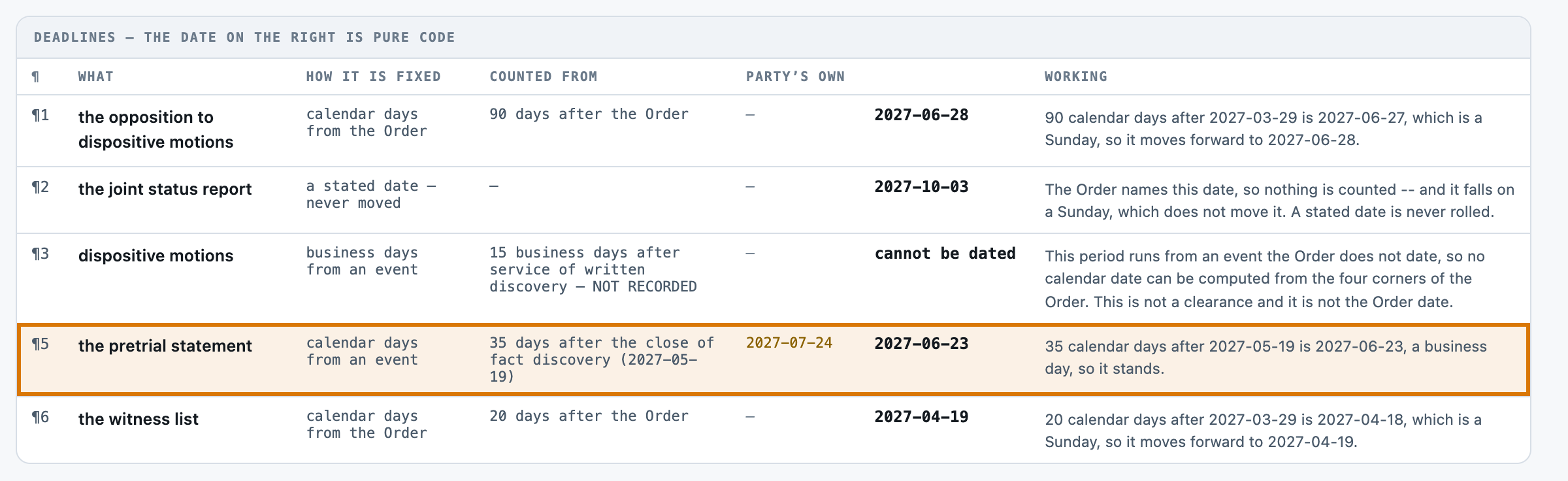
the close of fact discovery    19 May 2027
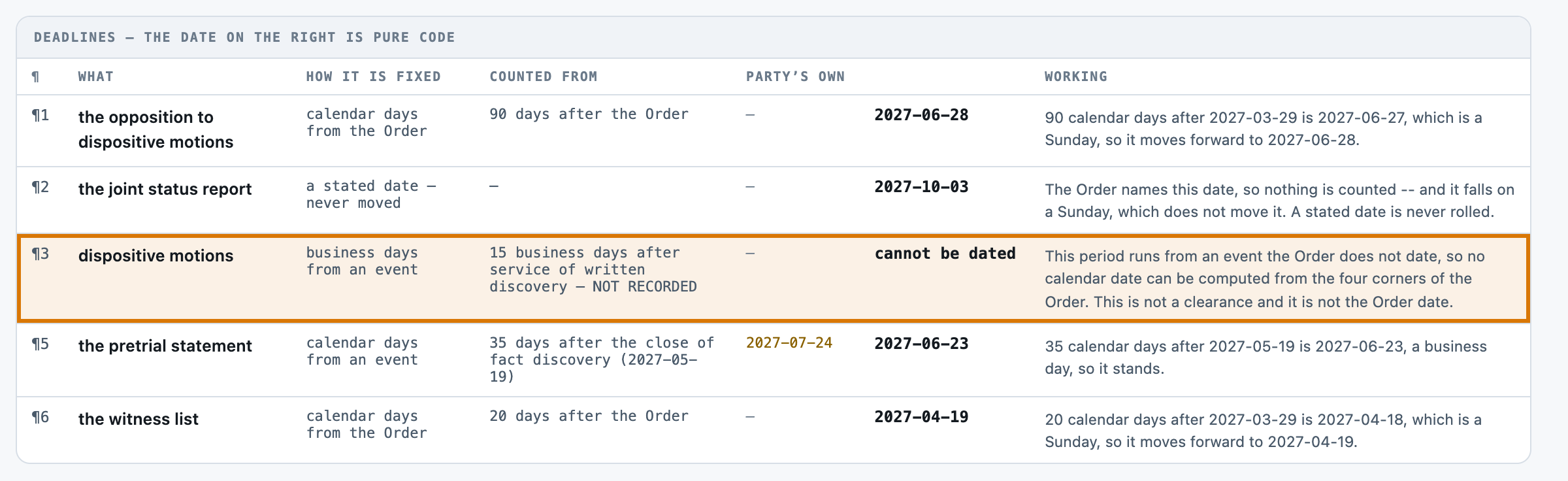
service of written discovery   not recorded

Deadlines Ordered
-----------------
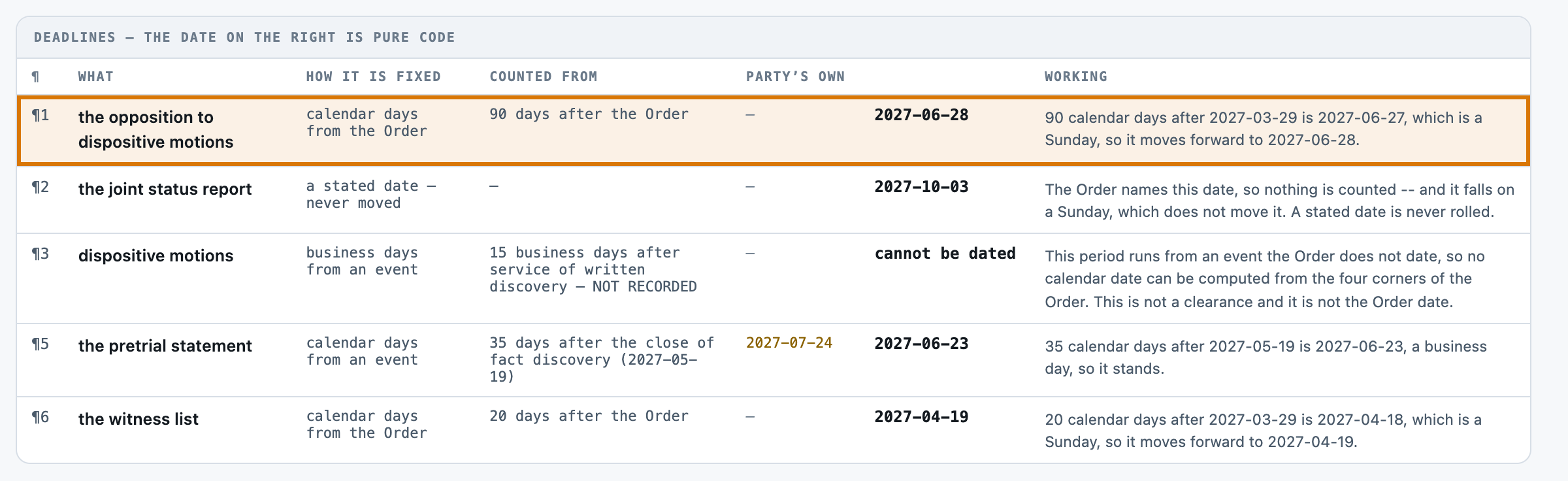
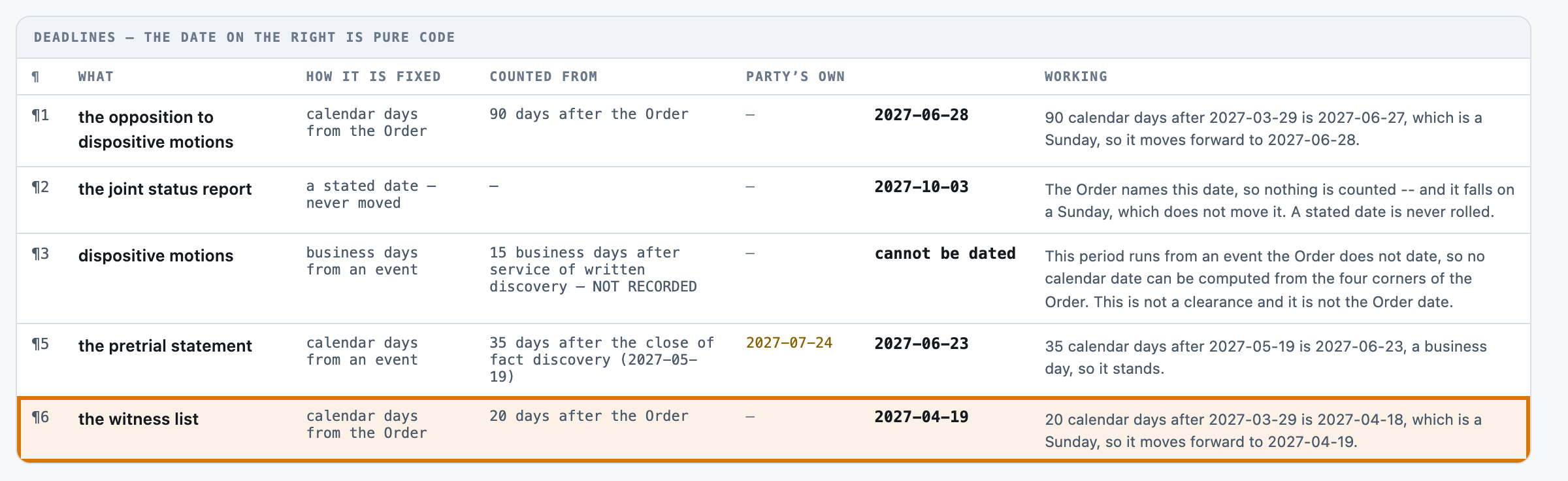
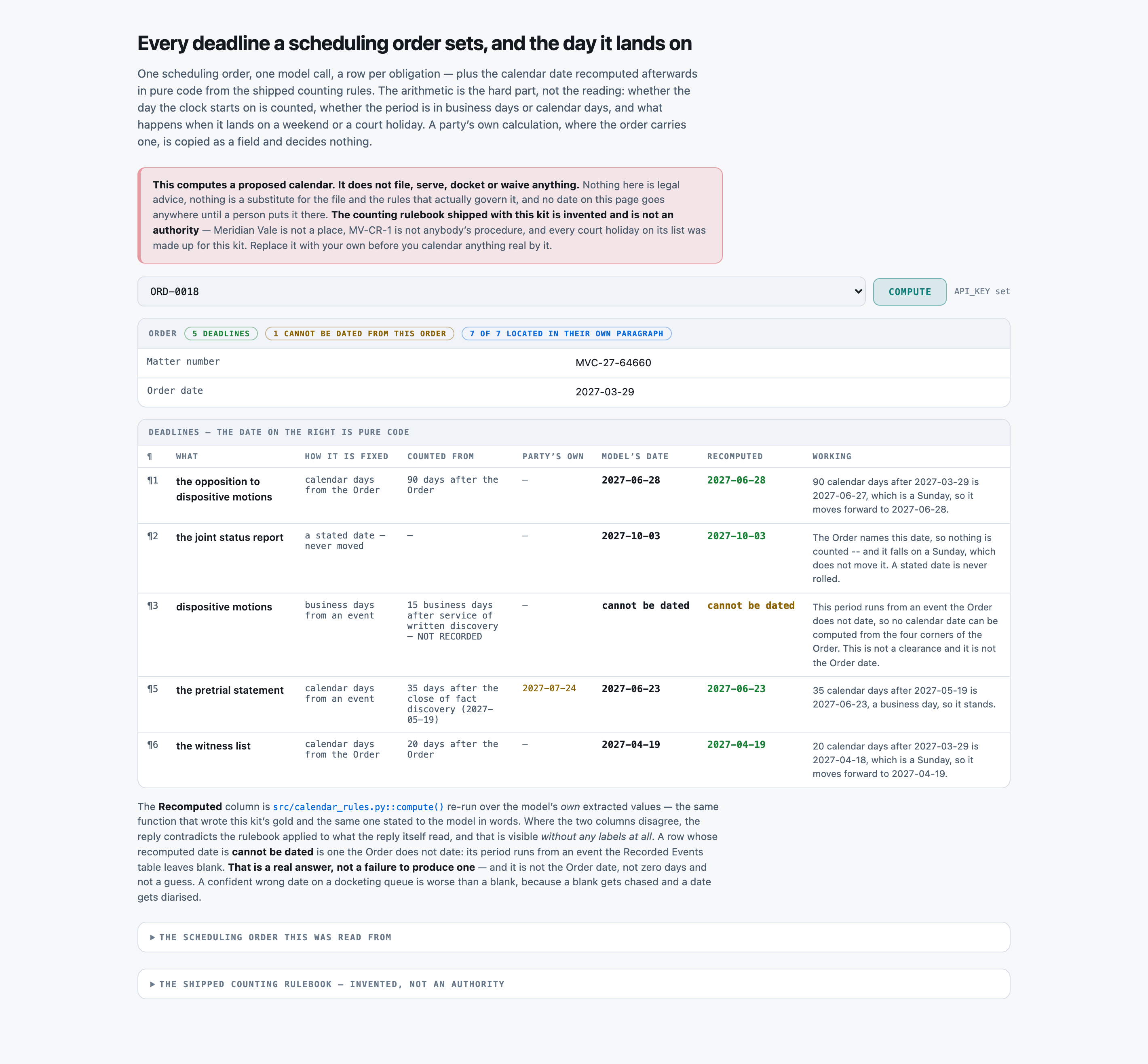
1. Each party shall serve the opposition to dispositive motions within 90 days of the date of this Order.

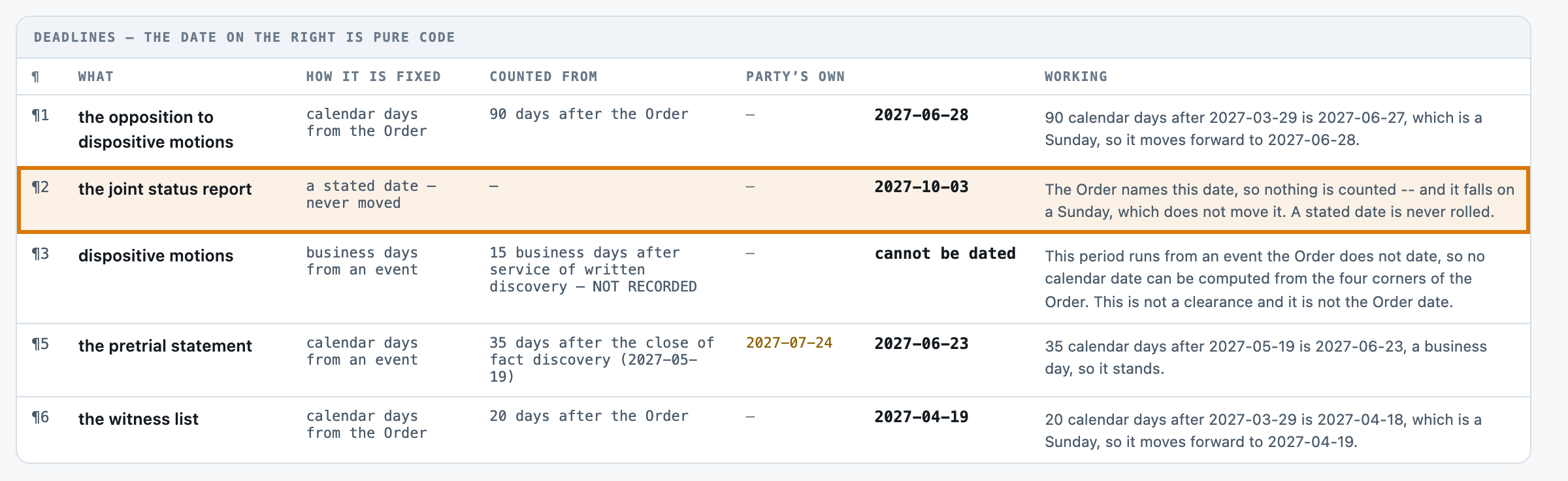
2. Each party shall file the joint status report no later than 3 October 2027.

3. Within 15 business days after service of written discovery, the parties shall file dispositive motions.

4. The requirement that the pretrial statement be served within 14 business days after the case management conference is WITHDRAWN and sets no date here.

5. The parties shall serve the pretrial statement within 35 days after the close of fact discovery. (the parties calculate this as 24 July 2027)

6. Within 20 days of the date of this Order, the parties shall exchange the witness list.