The business caseThe problem this solves
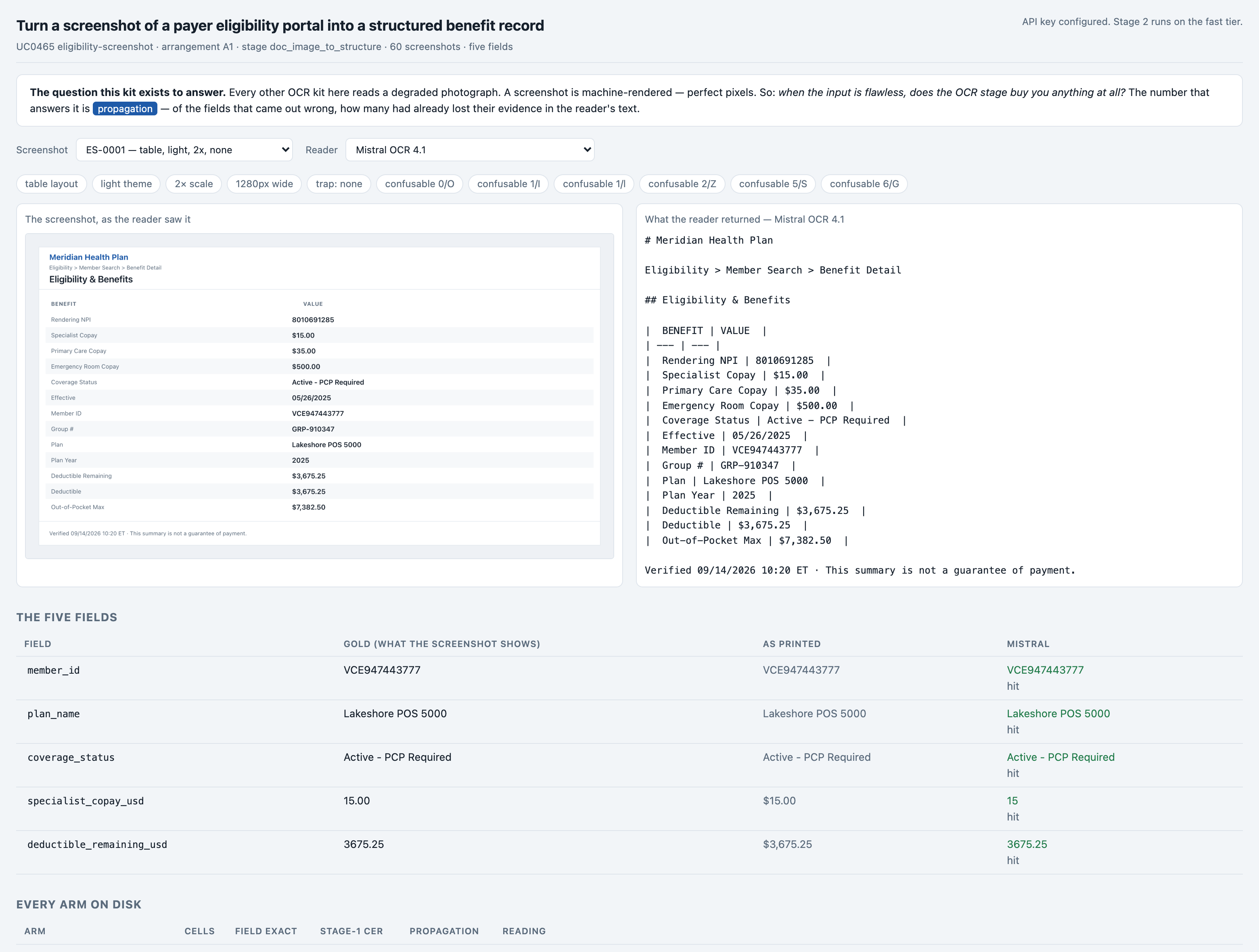
A claims clerk or a front-desk coordinator opens a payer's eligibility portal, reads five things off the screen -- the member id, the plan, whether cover is active, the specialist copay and what is left on the deductible -- and types them into something else. Every payer's portal lays them out differently, none of them offers an export, and a copay typed one row out is quoted to a patient at the desk. reading five fields off a payer's eligibility screen and re-typing them by hand
Audience
Whoever is deciding whether an OCR engine is worth buying in front of a model, and whoever signs off the bill. The answer here is specific and counter-intuitive: the cheaper engine reads the characters far better and produces the worse record. Every number on these pages came from one real run of this code, not from a vendor page.
The inputThe actual screenshots
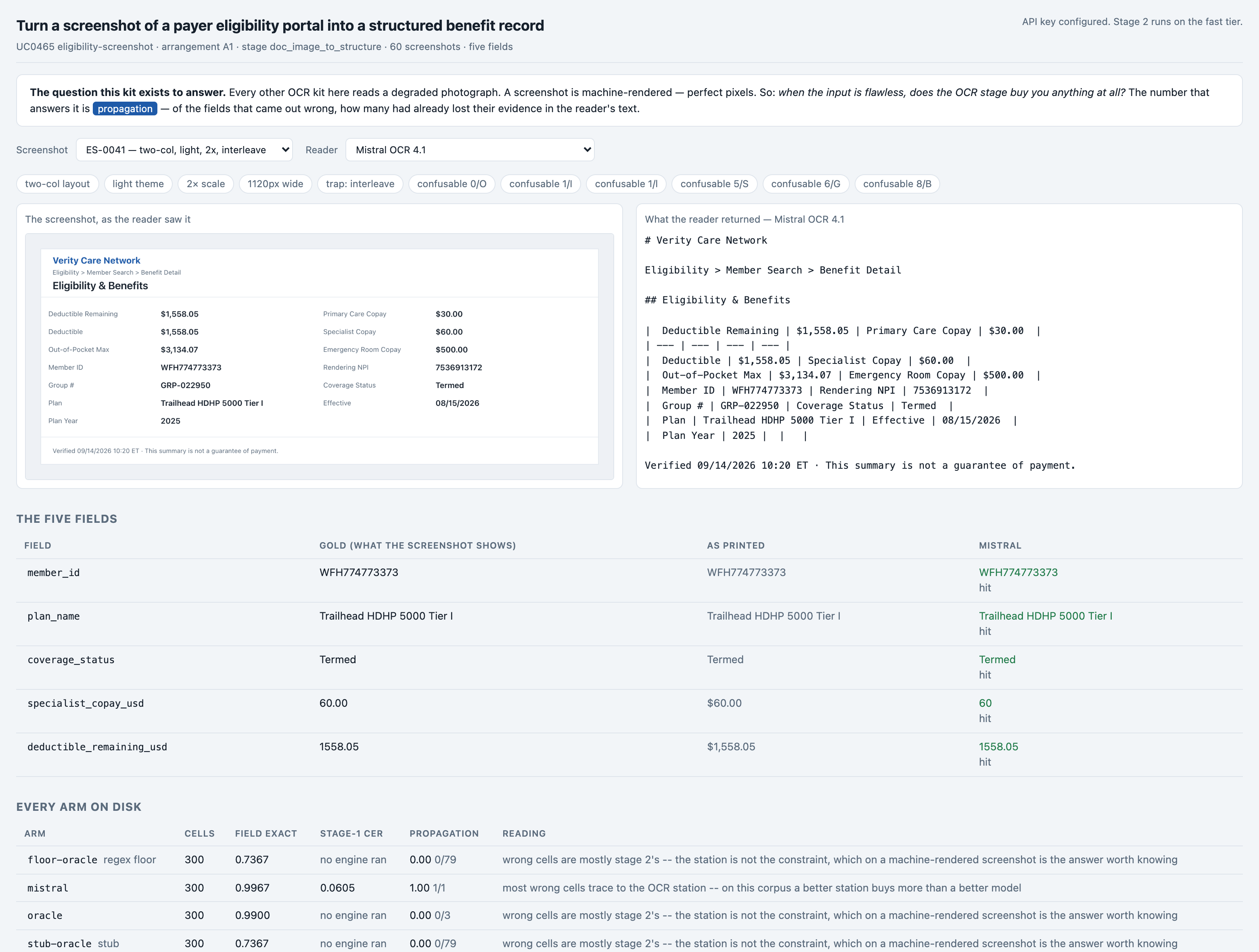
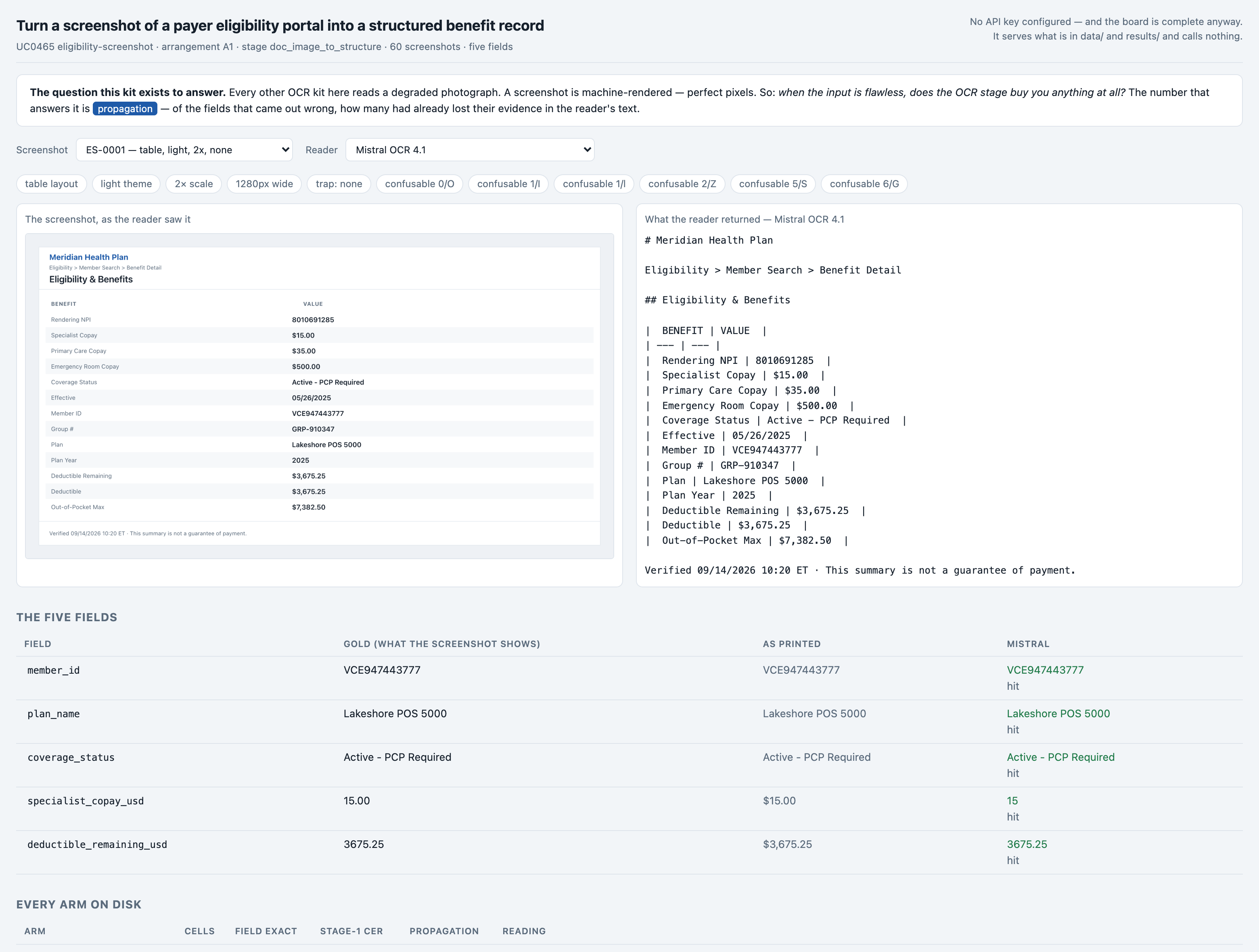
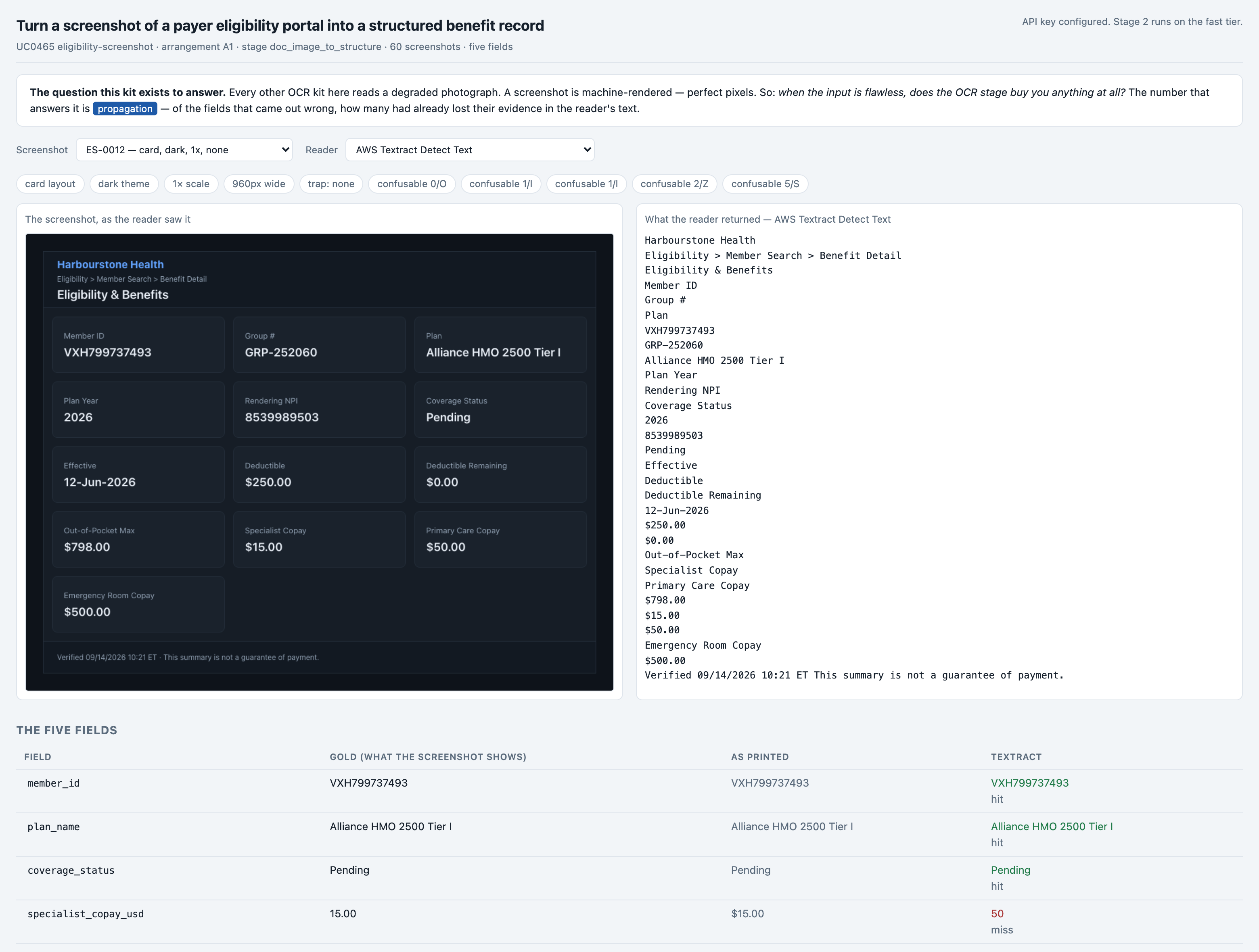
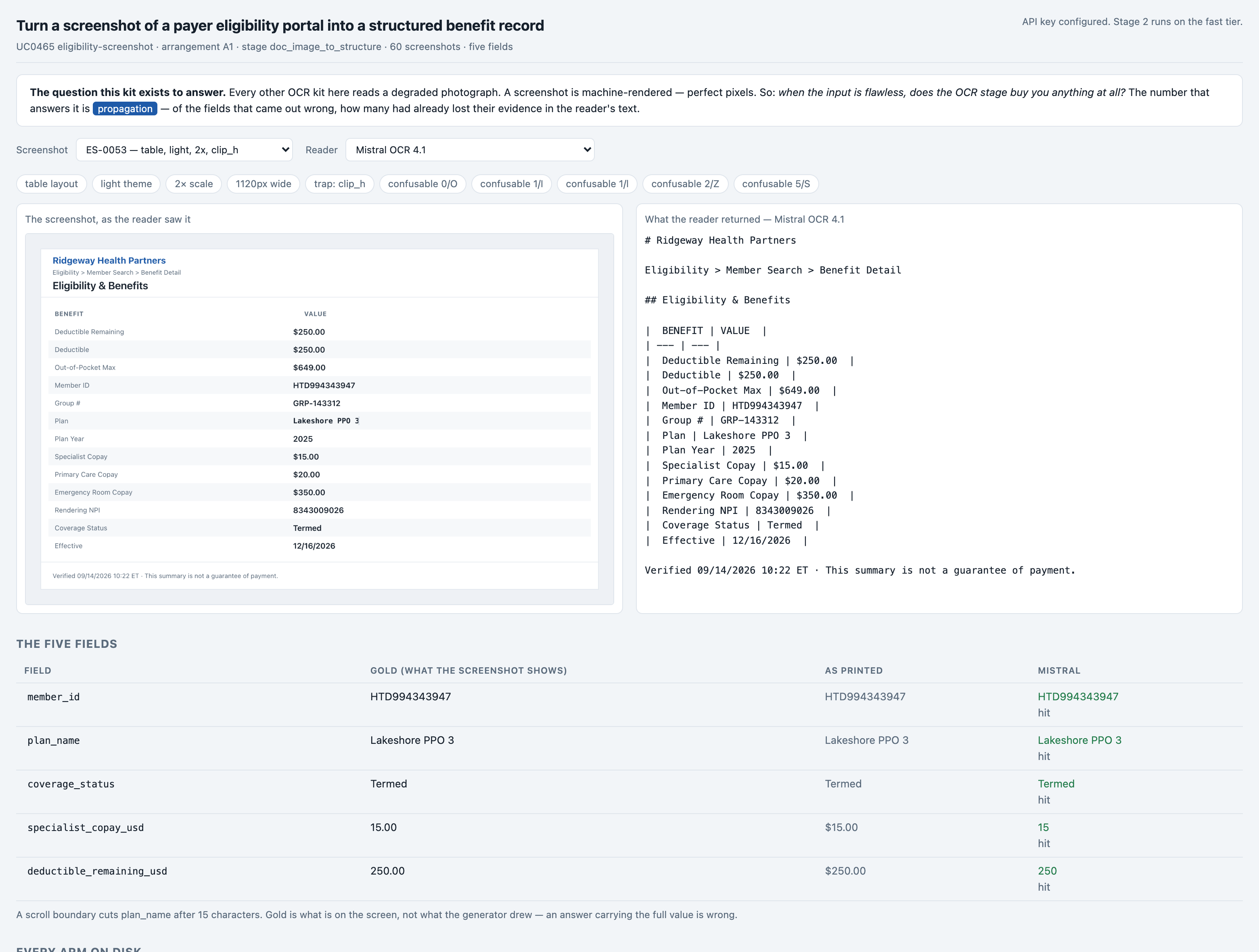
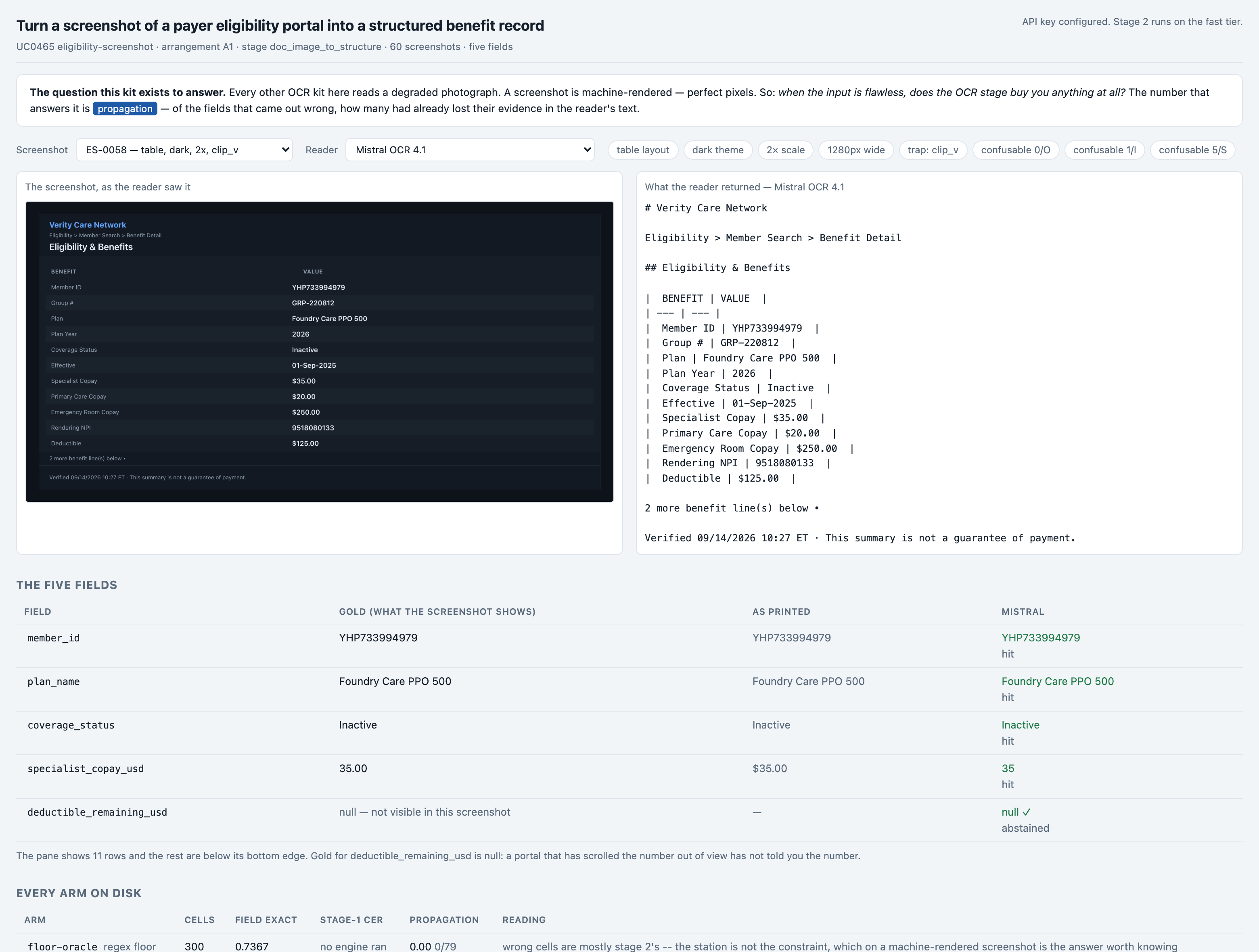
The corpus is 60 screenshots, 6.10 MB (json 1 · jsonl 1 · md 1 · png 60). Every other OCR kit in this series reads a DEGRADED image -- a cheque photographed on a desk, a meter in bad light, a scan. A screenshot is machine-rendered: perfect pixels, no blur, no skew, no shadow, no sensor noise. That is the whole point of choosing it. It lets the kit ask a question none of the others can -- when the input is flawless, does the OCR stage buy you anything at all? -- and the answer turns out not to be about character accuracy at all. There is no added noise and no synthetic damage anywhere, because a screenshot with grain added is not a screenshot any more. The difficulty is real to screenshots instead: four layouts, two themes, three widths, two device scale factors, seven traps and eight cases where a scroll boundary cuts a value off.
The corpus
- The 60 screenshotsgenerated from a fixed seed, so no real record, person or institution appears in it.
- Where each came fromwritten for this kit rather than collected — the corpus is generated in the kit's own repository, so there is no third-party data in it.
Swap this folder for your own material and the kit is pointed at your screenshots. That is the whole change — there is no database to migrate.
The corpus is 60 screenshots, and it is not text — there is no clip to show you here. The pipeline reads these files directly; the folder swap above is still the whole change.
The outcomeWhat a good result looks like
a five-field benefit record -- member id, plan name, coverage status, specialist copay and deductible remaining -- with a value the screen does not show left empty rather than filled in
And when it cannot
It quotes a benefit the screen never showed. On 1 of 300 cells the best path is wrong, and the one that matters most is the other direction: on ES-0059 the coverage status is scrolled out of the pane, and both the cheaper engine's path AND the perfect-reading arm answer "Verified" -- a word lifted off the page footer. The winning path is the only one of the three that correctly answers nothing.
Where it fitsWhat did work
Every line below is a measured result from this kit's own runs, with the figure that supports it. The headline above is not softened by any of them.
- You need a benefit record you can file without a person re-reading it — Mistral OCR 4.1 in front of the model
99.67% of cells, indistinguishable from a perfect reading on this corpus, and it is the only one of the three arms that correctly leaves a scrolled-out value empty instead of lifting a word off the footer. - Your portals are tables and definition lists, not cards — AWS Textract Detect Text
its character accuracy is roughly 17x better and on table and deflist layouts it scores 0.9625 and 0.9857 against Mistral's 1.0000 and 0.9857 -- a difference of a cell or two, at less than half the price. - You want to know whether to buy an OCR engine at all — run the free floor and the oracle arm first -- both cost nothing
they bracket the question. The floor (0.7367) is what pure code gets; the oracle (0.9900) is what the model gets given a flawless reading. If your floor is already close to your oracle, no engine will earn its price. - You are choosing an engine on its published character error rate — don't -- score the records, not the text
this kit is a counter-example measured end to end: the engine with roughly 17x the character error rate wins by 17 cells to 1, p=0.0001.
At a glanceHow the whole thing runs
Run once, for real, on 2026-09-15. Every figure on these pages was captured from that run — nothing is written from intent.
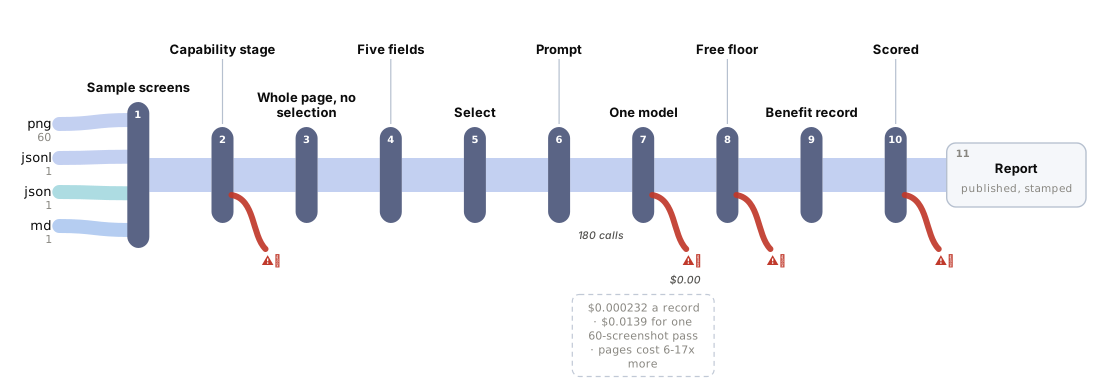
14 steps, grouped by the question that sends you to them rather than by build order. Each tile carries the one figure that step is about, and opens the page behind it.
Should you use this?What you bring, where it stops, and when not to use it
Before you commit an afternoon to this, these are the answers that decide it. Each one is rendered from the record it lives in — and links the page that holds it in full.
| What do I have to bring? | Drop your own PNGs in data/corpus/ named <case_id>.png and write one line per case into data/gold.jsonl carrying fields (the five answers, with null where the screen does not show one), printed (the same values AS PRINTED, with currency symbols and separators -- this is what the propagation grader searches the reader's text for), reference_text (what a perfect reader would return) and a capture block naming layout, theme and trap so the slices still cut. reference_text is the field a real corpus cannot honestly supply, and it is the one every number in this kit's headline depends on. Corpus lens → |
| When is this the wrong choice? | Avoid: It costs 2.7x the cheaper engine per page and this corpus is 60 synthetic screenshots from one invented payer. If your portals are mostly two-column or table layouts -- where the two engines are within a point of each other -- you are paying that multiple for nothing. That is the case against the best-fitting scenario (“You need a benefit record you can file without a person re-reading it”). 4 scenarios scored in all, each with its own. Eval lens → |
| Where does it stop working? | A screenshot that needs scrolling to show all five fields. Nothing here stitches two captures together; the eight clipped cases exist to prove the pipeline reports what it cannot see as ABSENT, not to show it can recover it. 5 recorded failure modes, each from a run rather than a guess. Corpus lens → |
| What was never verified? | Anything on a real portal screenshot. All 60 are machine-rendered by this kit's own builder at a resolution it chose; there is no blur, no JPEG artefact, no cursor, no overlapping dialog and no fractional browser zoom anywhere in the corpus. 7 items this kit says it could not check. Eval lens → |
| Can I run this on a model I control? | Yes — any OpenAI-compatible endpoint, including one on your own hardware. The shipped adapter takes its host from BASE_URL and its model from MODEL, so nothing in src/ changes. The published figures come from 1 model on the fast tier, one provider, one key. Prompt lens → |
| And if it fits — what do I stand up? | 5 artifacts with a stated home and a stated egress, and 3 decisions each with what you provision past its ceiling — plus what was not measured. That is the next page, not this one. step 14 — Run it in your environment → |
Not asked of this kit — 2 questions: clone (a fresh clone of this kit runs with nothing fetched); judge (nothing here is graded by a model).
Last verified 2026-09-15 — r003-eligibility-screenshot-mistral. Every figure on these pages was captured from that run.
Run itHow this reaches your data
Every result on this page was produced by pure code over checked-in files, with no API key — which is why you can read the numbers before anyone spends anything.
Run this on your own data
- The pipeline, its eval harness and the runs behind every numberdeployed inside your environment, on your own model endpoints, against your own documents.
- The corpus above is the shape, not the limitit is a folder swap, and there is no database to migrate.
Checked before this shipped — Observed on this machine: a checkout with no .env and no key configured runs python3 -m evals.run and prints the whole five-arm table in about 1.4 seconds, because the screenshots, the answer key, the perfect-reading text, both engines' committed readings and every scored row are in the repository. python3 -m evals.score --self-test and python3 -m evals.run --self-test both pass with no key. The board serves the same committed run on port 9465 and is complete without a provider -- the 'empty' screenshot above is that state. What a clean checkout CANNOT do is buy a new reading: that needs a vendor credential, and re-rendering the corpus needs Chrome.