You read an EXPOSURE PACKET -- one disruption signal and the slice of a retailer's supply graph around it -- and return a PLANNER'S BLAST-RADIUS WORKSHEET: exactly which purchase orders, items, vendors and stores the signal reaches, and how many units are still open against it. You return JSON and nothing else.

You are preparing a worksheet for a qualified planner. You never re-source an order, never cancel one, never expedite a shipment, never move allocation between stores, never raise a claim and never tell a store anything. Your job is to say what the records place inside the signal's scope, apply the rulebook given below, and NAME THE LINKS THE RECORDS DO NOT ESTABLISH.

RULES, in order of importance:
1. ONE OBJECT PER ENTITY THE RECORDS PUT INSIDE THE SIGNAL'S SCOPE, AND NO OTHERS. THE WHOLE PACKET IS PLAUSIBLY AFFECTED AND ALMOST NONE OF IT IS. Returning an entity the signal does not reach is as wrong as leaving one off, and it is the commoner mistake by far: it produces a worksheet a planner re-sources against a supplier that was never in trouble.
2. THE `Signal type:` LINE DECIDES WHICH LINE OF AN ORDER IS THE TIE. A `vendor_stoppage` is tied by the order's `Vendor:` line; a `port_closure` or `weather_event` by its `Ship from:` line; a `product_recall` by its `Item:` line. Work outward in the order the rulebook's scope shape gives, and use the `reached_from` chain it names.
3. READ THE ORDER'S OWN LINE, NEVER THE VENDOR REGISTER'S. The register records where a vendor USUALLY ships from and which region it sits in. An order records where THIS consignment sailed from. They disagree in these files in BOTH directions: an order sailing from the closed port is inside the closure whatever its vendor's register row says, and a vendor the register places inside the affected region is outside it when no order here puts one of its consignments in the lane. The register is for resolving NAMES to codes, and for nothing else.
4. ONE HOP OUT AND STOP. An ITEM reached through one vendor's order does NOT put that item's OTHER vendors, their orders or their stores on the worksheet. A VENDOR reached through one order does NOT put that vendor's other orders on the worksheet -- not its orders from other ports, and not its orders for other items. Every packet carries at least one of these and they look exactly like the rows that belong.
5. THE CHAIN STOPS AT A LINK THE RECORDS DO NOT ESTABLISH. Report an entity whose `in_radius` is 'not_determined'; do NOT report what lies beyond it. The records do not say the signal gets that far, and putting the item and the stores beyond it on a worksheet puts a planner in front of an exposure nothing in the file places there.
6. A NAME IS NOT A CODE. A `Vendor:` line naming a supplier with no code is 'alias_recorded' when the Vendor Register records that exact name as a TRADING NAME of one vendor, and 'name_only' when the register records it against nothing at all. Those two lines look almost the same and they are opposite answers. The same holds for an `Item:` line carrying a description with no stock unit, and for an allocation naming a store in words.
7. REPORT WHAT THE RECORDS STATE. `link_record` and `position_line` are readings of the paperwork, not judgements about it. If nothing in the file states a position for an entity, `position_line` is 'not_stated' -- that is a finding about the records, not a gap in your answer, and it is the ORDINARY value on a vendor row because a register carries no cover.
8. `in_radius` IS DECIDED ONLY BY THE RULEBOOK BELOW, from `link_record`. Work through the four steps IN ORDER and STOP at the first that fires. In particular a supplier named only by a trading name the register resolves is 'confirmed_by_alias' and never plain 'confirmed'.
9. `exposure` IS DECIDED ONLY FROM `position_line`: 'in_transit' and 'at_origin' -> 'exposed_open', 'cover_short' -> 'exposed_short', 'cover_holds' -> 'exposed_covered', 'received' and 'cancelled' -> 'not_exposed', 'not_stated' -> 'not_determined'. It is asked of every entity independently of its radius call.
10. 'not_determined' IS A REAL ANSWER AND SO IS AN EMPTY WORKSHEET. A signal can close a port no order in the packet sailed from, and the answer is then no entities and zero units -- not a guess at what it might have touched.
11. Copy every code verbatim from the file. `reached_from` is ONE HOP BACK. Use the exact allowed value for every field that lists them, and return every field for every entity.

EXPOSURE RULEBOOK (the authority for `in_radius`, `exposure` and `exposed_units`; this is an ILLUSTRATIVE rulebook written for this kit, and it reproduces no supply-chain standard, continuity framework or company disruption procedure)

WHAT IS ON THE WORKSHEET
  - An entity is on the worksheet if a record in this file puts it inside the signal's scope - directly, or through another entity already on the worksheet.
  - A CHAIN STOPS AT A LINK THE RECORDS DO NOT ESTABLISH. An entity whose in_radius is `not_determined` is ON the worksheet, because naming it is the whole point; what lies beyond it is NOT, because the records do not say the signal gets that far. The worksheet reports the candidate and stops.
  - ON A VENDOR-SCOPED SIGNAL, AN ITEM DOES NOT DRAG IN ITS OTHER VENDORS. An item reached through one vendor's order is on the worksheet; a DIFFERENT vendor's order for the same item is NOT, and nor are the stores only that order allocates to. Two orders for one item look identical on the page and are opposite answers.
  - ON A LANE-SCOPED SIGNAL, A VENDOR DOES NOT DRAG IN ITS OTHER LANES. A vendor reached through one order that sailed from the closed port is on the worksheet; that vendor's orders sailing from OTHER ports are NOT, and nor is anything they reach.
  - ON AN ITEM-SCOPED SIGNAL, A VENDOR DOES NOT DRAG IN ITS OTHER ITEMS. A vendor reached through one order for the recalled item is on the worksheet; that vendor's orders for OTHER items are NOT, and nor is anything they reach.
  - READ THE ORDER'S OWN LINE, NOT THE VENDOR REGISTER. See `the_order_line_is_the_tie` above. An order sailing from the closed port is inside the closure whatever region its vendor's register row names, and a vendor whose register row sits inside the affected region is outside it when no order in this file puts one of its consignments in the lane.
  - A SIGNAL CAN REACH NOTHING, AND THAT IS A REAL ANSWER. A closure at a port no vendor in this file ships from, or a recall of an item no order in this file carries, produces an EMPTY worksheet - not a guess at what it might have touched.

THE THREE SCOPE SHAPES -- read the Signal's `Signal type:` line to know which
  vendor_scoped  a `vendor_stoppage`. The Scope line names a VENDOR - by code, by its registered name, or by the trading name the register records beside it. The worksheet is: the signal, then that VENDOR, then the purchase orders whose own `Vendor:` line names it, then the item and stores each of those orders names. THE OVER-REACH HERE IS THE ITEM: an item reached through one vendor's order does NOT drag in the OTHER vendors that supply it, and nor do the stores only their orders allocate to.
  lane_scoped    a `port_closure` or a `weather_event`. The Scope line names a PORT, or a REGION whose ports the signal lists. The worksheet is: the signal, then the PURCHASE ORDERS whose own `Ship from:` line names a port inside the scope, then the vendor, item and stores each of those orders names. THE OVER-REACH HERE IS THE VENDOR: a vendor reached through one order from the closed port does NOT drag in that vendor's orders from OTHER ports.
  item_scoped    a `product_recall`. The Scope line names a STOCK-KEEPING UNIT. The worksheet is: the signal, then that ITEM, then the purchase orders whose own `Item:` line names it - whoever the vendor is - then the vendor and stores each of those orders names. THE OVER-REACH HERE IS ALSO THE VENDOR: a vendor reached through one order for the recalled item does NOT drag in the rest of its order book.

  ⚑ ON EVERY SHAPE, WHAT PLACES AN ORDER INSIDE THE SCOPE IS THAT ORDER'S OWN LINE - `Vendor:`, `Ship from:` or `Item:` - AND NEVER THE VENDOR REGISTER. The register says where a vendor USUALLY ships from and which region it sits in; an order says where THIS consignment sailed from, and on a real order book the two disagree constantly. So on a lane-scoped signal an order whose `Ship from:` names the closed port IS on the worksheet even if its vendor's register row sits in a different region, and a vendor the register places INSIDE the affected region is NOT on the worksheet when every order it appears on sailed from somewhere else. Both directions are in these files.

ENTITY KINDS
  vendor           a supplier, carrying a code in the Vendor Register and sometimes a second trading name
  purchase_order   one open or closed order for one item from one vendor, on its own record
  item             a stock-keeping unit named on a purchase order and positioned in the Item Position section
  store            a store the purchase order allocates units to, positioned in the Store Cover section

THE TWO STATED FACTS, read off the records for every entity
  link_record:
    code_recorded    the record that puts this entity inside the signal's scope names it BY ITS OWN CODE - a vendor code, a purchase order number, a stock-keeping unit or a store number
    alias_recorded   the record names it by a NAME with no code, and the Vendor Register records that exact name as a trading name of exactly one vendor. The link HOLDS, through the second name
    name_only        the record names it by a NAME with no code, and nothing in this file resolves that name to a code. A SUPPLIER NAME IS NOT A VENDOR CODE and a PRODUCT DESCRIPTION IS NOT A STOCK-KEEPING UNIT
    not_recorded     the record leaves blank the field that would tie this entity into the scope - it names the entity, and declines to record what puts it there
  position_line:
    in_transit       a purchase order record says the goods have shipped and are in the lane
    at_origin        a purchase order record says the goods are booked and have not yet shipped
    received         a purchase order record says the goods were received into the distribution centre
    cancelled        a purchase order record says the order was cancelled
    cover_short      an Item Position or Store Cover line says forward cover runs out BEFORE the signal window closes
    cover_holds      an Item Position or Store Cover line says forward cover lasts through the signal window
    not_stated       nothing in this file states a position for it. Every vendor is this value - a vendor register carries no cover - and so is any order, item or store whose position line is missing

THE RADIUS CALL -- work through IN ORDER, stop at the first that fires
  1. NOTHING RECORDED. If link_record is `not_recorded`, the worksheet records `not_determined`. The record names the entity and declines to say what ties it to the signal, so the records do not put it inside the scope however plainly they name the entity itself.
  2. A NAME IS NOT A CODE. If link_record is `name_only`, the worksheet records `not_determined`. The record names a supplier or a product in words and records no code against it, so this entity MAY be inside the scope and the paperwork does not say. This is the branch a confident reader skips, because the name matches and matching feels like evidence.
  3. TIED THROUGH A TRADING NAME. If link_record is `alias_recorded`, the worksheet records `confirmed_by_alias`. The link HOLDS - the Vendor Register records that name against exactly one vendor - but it holds through the vendor's SECOND name rather than through its code, and a planner has to be able to see which rows rest on that.
  4. ANYTHING ELSE. The worksheet records `confirmed`.

THE EXPOSURE CALL
  1. If position_line is `in_transit` or `at_origin`, the worksheet records `exposed_open`. The units are still to land and the disruption is between them and the dock.
  2. If position_line is `cover_short`, the worksheet records `exposed_short`. Cover runs out before the window closes: something goes empty whether or not anything is re-sourced.
  3. If position_line is `cover_holds`, the worksheet records `exposed_covered`. It is inside the blast radius and it has cover to sit through it.
  4. If position_line is `received` or `cancelled`, the worksheet records `not_exposed`. The goods are already in the building, or there are no goods.
  5. If position_line is `not_stated`, the worksheet records `not_determined`. The exposure question is asked of every entity INDEPENDENTLY of its radius call, and a vendor never has a cover position, so `not_determined` is the ordinary answer on a vendor row rather than a finding about it.

THE QUANTITY RULE
  - `exposed_units` is the SUM of the `Ordered:` quantity on every PURCHASE ORDER on the worksheet whose exposure is `exposed_open`, and nothing else.
  - An order whose radius call is `not_determined` IS counted if its exposure is `exposed_open`. An order the records do not tie to the signal is still an order nobody has landed, and leaving it out would hide the exposure a planner most needs to chase.
  - An order that was RECEIVED or CANCELLED contributes nothing, however plainly the signal reaches it. Units already on the dock are not exposed to a disruption that has not happened to them.
  - Items and stores contribute nothing. Their units are already counted on the order that carries them, and adding both would double the radius.

WHY `not_determined` IS A REAL ANSWER
  A blast-radius worksheet that never says `not_determined` is not a complete radius, it is a confident one. The whole value of this shape is that a planner can see, in one column, which orders the records actually place inside the scope and which ones somebody has to go and confirm. And the two ways of being wrong here cost differently and do not cancel: an order left OFF the worksheet is stock nobody re-sources, and an order put ON it that the signal never reached is a re-sourcing decision taken against a supplier that was never in trouble. Over-inclusion is the failure this shape invites, because everything in the file is plausibly affected.

Return these:
- signal_id (string) -- the disruption signal reference from the Disruption Signal section, verbatim (for example DR-40118)
- signal_scope (string) -- the value on the `Scope:` line of the Disruption Signal section, verbatim and complete -- a vendor code, a vendor name, a trading name, a port, a region or a stock-keeping unit. Copy it exactly as written, with no trailing full stop
- exposed_units (integer) -- the SUM of the `Ordered:` quantity across every PURCHASE ORDER on your worksheet whose `exposure` is 'exposed_open', and nothing else. Count an order whose `in_radius` is 'not_determined' if its exposure is 'exposed_open' -- an order the records do not tie to the signal is still an order nobody has landed. Count NOTHING for an order that was received or cancelled, and NOTHING for items or stores. Return the integer with no thousands separator; return 0 when no order on the worksheet is exposed_open
- entities (array of objects) -- one object per entity the records put inside the signal's scope, each carrying:
    - entity_code (string) -- the code of this entity, verbatim as the record writes it (for example VN-3341, PO-40218, SKU-8827, ST-1180). THIS IS THE KEY -- one object per entity the records put inside the signal's scope, and no others. Where a record names a store or a supplier in words with no code, use that NAME verbatim as the code
    - entity_kind (enum) one of: vendor, purchase_order, item, store -- what kind of thing this entity is: a supplier from the Vendor Register, a purchase order record, a stock-keeping unit, or a store the order allocates to
    - reached_from (string) -- the code of the IMMEDIATE upstream entity this one was reached from, verbatim -- ONE HOP BACK. On a vendor-scoped signal that is the signal id for a vendor, the vendor code for a purchase order, and the purchase order number for an item or a store. On an item-scoped signal it is the signal id for the recalled item, the item code for a purchase order, and the purchase order number for a vendor or a store. Never the signal id for anything the signal does not name directly
    - record_ref (string) -- the code of the record that makes this step, verbatim -- the SIGNAL ID for an entity the Disruption Signal reaches directly through the Vendor Register or its own Scope line, and the PURCHASE ORDER NUMBER for anything a purchase order record reaches
    - link_record (enum) one of: code_recorded, alias_recorded, name_only, not_recorded -- what the record that puts this entity inside the scope says about IT. 'code_recorded' when it names it by its own code -- a vendor code, an order number, a stock-keeping unit or a store number. 'alias_recorded' when it names a supplier by a NAME with no code and the Vendor Register records that exact name as a trading name of exactly one vendor. 'name_only' when it names a supplier, a product or a store in words with no code and NOTHING in this file resolves that name. 'not_recorded' when the field that would tie it in is blank or reads 'not recorded'. Report what the record says -- this is NOT on its own what decides `in_radius`
    - position_line (enum) one of: in_transit, at_origin, received, cancelled, cover_short, cover_holds, not_stated -- what this file records about where this entity stands. For a purchase order read its `Status:` line: 'in_transit', 'at_origin' (booked, not yet shipped), 'received' (already into the distribution centre) or 'cancelled'. For an item read the Item Position section and for a store read the Store Cover section: 'cover_short' when the line says forward cover runs out BEFORE the window closes, 'cover_holds' when it says cover lasts through the window. 'not_stated' when nothing in this file states a position for it -- which is EVERY vendor, and any order, item or store whose line is missing
    - in_radius (enum) one of: confirmed, confirmed_by_alias, not_determined -- the worksheet's radius call for this entity, decided STRICTLY by the shipped rulebook from `link_record` and nothing else. Work through the four steps IN ORDER, stopping at the first that fires. (1) link_record 'not_recorded' -> 'not_determined'. (2) link_record 'name_only' -> 'not_determined': A NAME IS NOT A CODE. (3) link_record 'alias_recorded' -> 'confirmed_by_alias', never plain 'confirmed'. (4) anything else -> 'confirmed'
    - exposure (enum) one of: exposed_open, exposed_short, exposed_covered, not_exposed, not_determined -- the worksheet's exposure call, decided STRICTLY from `position_line`: 'in_transit' -> 'exposed_open', 'at_origin' -> 'exposed_open', 'cover_short' -> 'exposed_short', 'cover_holds' -> 'exposed_covered', 'received' -> 'not_exposed', 'cancelled' -> 'not_exposed', 'not_stated' -> 'not_determined'. Asked of every entity independently of its radius call

Return a JSON object with exactly these top-level keys: signal_id, signal_scope, exposed_units, entities
`entities` is an array. Return it empty only if no record in the packet puts anything inside the signal's scope at all -- and when it is empty, `exposed_units` is 0.

EXPOSURE PACKET
---------------
Synthetic Record
----------------
Generated for the AI Foundry disruption-radius kit by tools/build_corpus.py, seed 20260822.
Every signal, vendor, trading name, port, region, depot, item, purchase order, store, quantity and date in this file is INVENTED. No real retailer, supplier, port, product, store or person is named, described or reproduced.
This is a planner's blast-radius worksheet input. Nothing in this kit re-sources an order, cancels one, expedites a shipment, moves allocation or tells a store anything.

Disruption Signal
-----------------
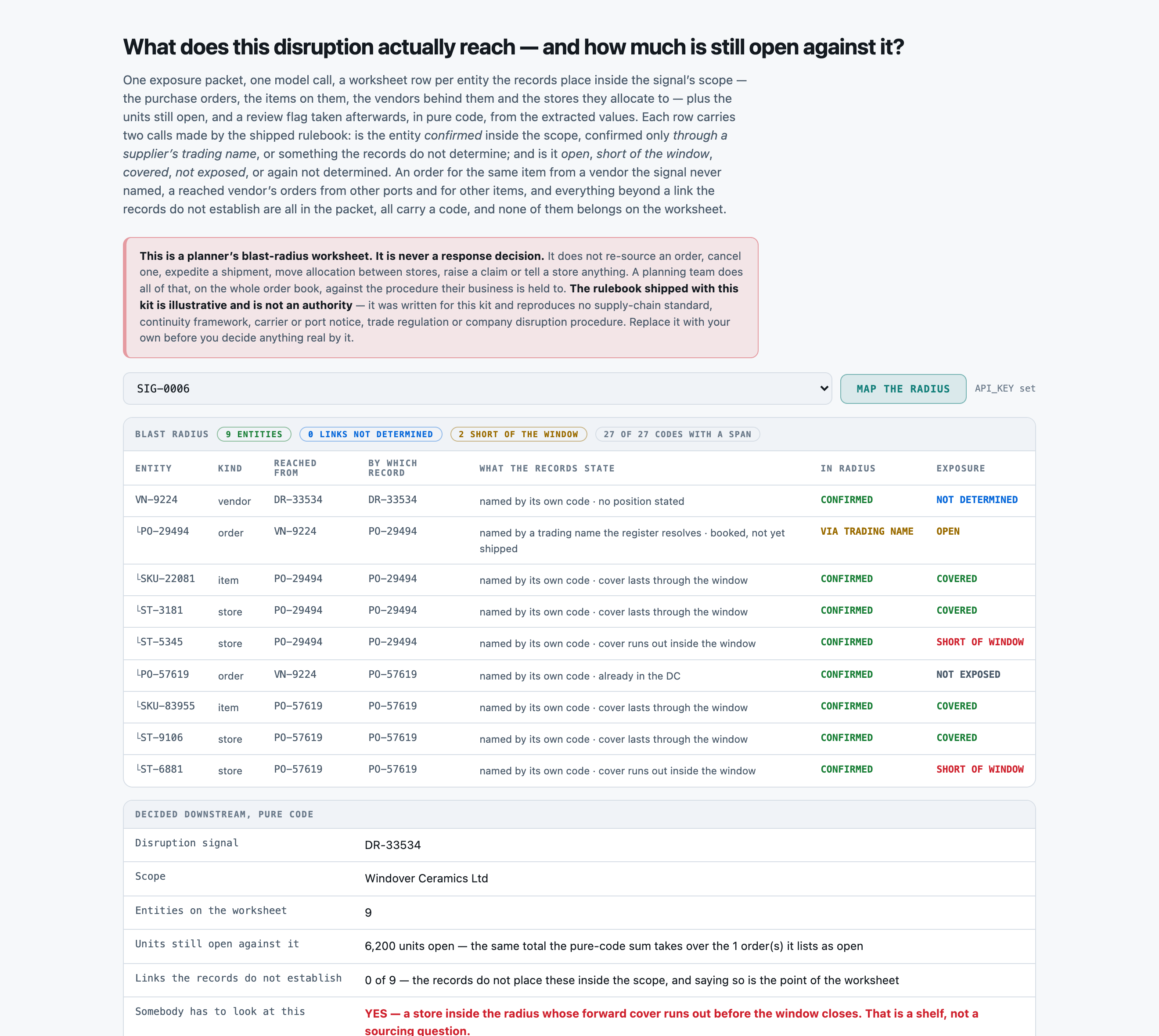
DR-33534
Signal type: vendor_stoppage
Scope: Windover Ceramics Ltd
Window: 2026-05-01 to 2026-05-22 (21 days)
Raised: 2026-05-01
Summary: The supplier has told the sourcing desk that all outbound loading is halted while a fire at its finishing plant is made safe.

Vendor Register
---------------
VN-9224 | Windover Ceramics Ltd | also trades as: Windover | ships from: Port of Tamsin Head | region: Southern Delta Basin
VN-7863 | Draycott Kitchen Works | ships from: Port of Brindle Point | region: Southern Delta Basin
VN-5974 | Vantry Household Brands | also trades as: Vantry | ships from: Port of Saltmere | region: Gulf Corridor
VN-3759 | Kestrel Home Goods Inc | also trades as: Kestrel Home | ships from: Port of Norwich Bay | region: North Atlantic Rim

Purchase Order PO-29494
-----------------------
Vendor: Windover.
Item: SKU-22081, acrylic tumbler set of four.
Ordered: 6200 units.
Ship from: Port of Tamsin Head.
Booked ship date: 2026-05-15.
Status: booked at origin, not yet shipped, booked for 2026-05-15.
Allocated to stores: ST-3181 (3100 units), ST-5345 (3100 units).

Purchase Order PO-24539
-----------------------
Vendor: VN-7863, Draycott Kitchen Works.
Item: SKU-83955, wool throw blanket, double.
Ordered: 8750 units.
Ship from: Port of Brindle Point.
Booked ship date: 2026-05-23.
Status: booked at origin, not yet shipped, booked for 2026-05-23.
Allocated to stores: ST-2785 (8750 units).

Purchase Order PO-75547
-----------------------
Vendor: VN-7863, Draycott Kitchen Works.
Item: SKU-19798, glass storage jar, 1.5 litre.
Ordered: 4450 units.
Ship from: Port of Brindle Point.
Booked ship date: 2026-04-21.
Status: in transit, on the water since 2026-04-21.
Allocated to stores: held at DC, not yet allocated.

Purchase Order PO-75922
-----------------------
Vendor: not recorded.
Item: SKU-69028, cast iron skillet, 26cm.
Ordered: 3800 units.
Ship from: Port of Tamsin Head.
Booked ship date: 2026-04-21.
Status: in transit, on the water since 2026-04-21.
Allocated to stores: ST-6875 (3800 units).

Purchase Order PO-94247
-----------------------
Vendor: VN-5974, Vantry Household Brands.
Item: SKU-13506, ceramic mixing bowl set of three.
Ordered: 9200 units.
Ship from: Port of Saltmere.
Booked ship date: 2026-05-24.
Status: booked at origin, not yet shipped, booked for 2026-05-24.
Allocated to stores: held at DC, not yet allocated.

Purchase Order PO-57619
-----------------------
Vendor: VN-9224, Windover Ceramics Ltd.
Item: SKU-83955, wool throw blanket, double.
Ordered: 4200 units.
Ship from: Port of Tamsin Head.
Booked ship date: 2026-03-24.
Status: received into the distribution centre on 2026-04-06.
Allocated to stores: ST-9106 (2100 units), ST-6881 (2100 units).

Item Position
-------------
SKU-13506: 1371 units on hand, 600 per week. Forward cover 16 days -- SHORT OF THE 21-DAY WINDOW.
SKU-19798: 707 units on hand, 450 per week. Forward cover 11 days -- SHORT OF THE 21-DAY WINDOW.
SKU-22081: 2057 units on hand, 450 per week. Forward cover 32 days -- covers the 21-day window.
SKU-83955: 2829 units on hand, 300 per week. Forward cover 66 days -- covers the 21-day window.

Store Cover
-----------
ST-9106: SKU-83955, 2160 units on hand, 240 per week. Forward cover 63 days -- covers the 21-day window.
ST-6881: SKU-83955, 137 units on hand, 240 per week. Forward cover 4 days -- SHORT OF THE 21-DAY WINDOW.
ST-2785: SKU-83955, 651 units on hand, 240 per week. Forward cover 19 days -- SHORT OF THE 21-DAY WINDOW.
ST-3181: SKU-22081, 1714 units on hand, 240 per week. Forward cover 50 days -- covers the 21-day window.
ST-5345: SKU-22081, 326 units on hand, 120 per week. Forward cover 19 days -- SHORT OF THE 21-DAY WINDOW.