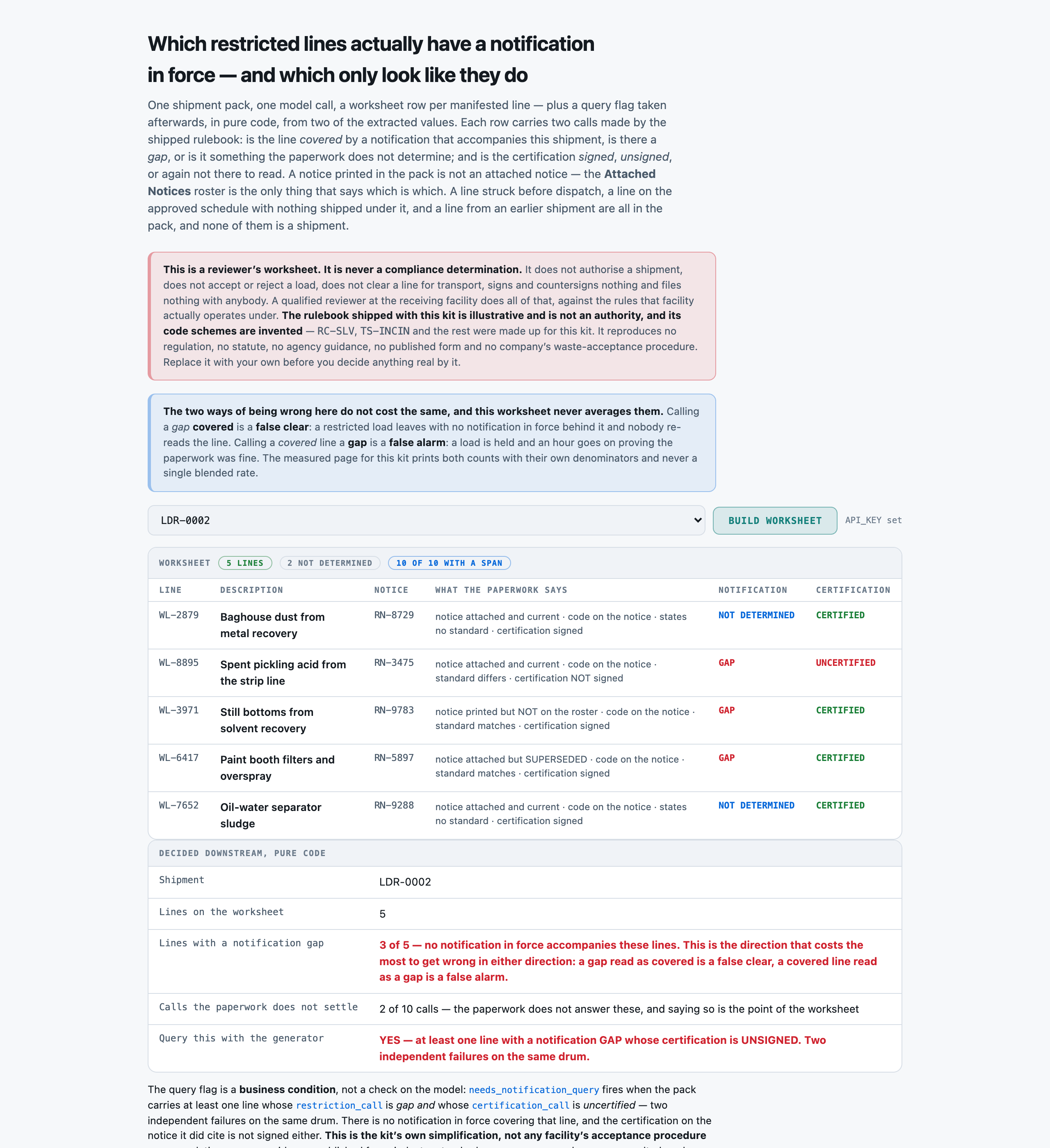
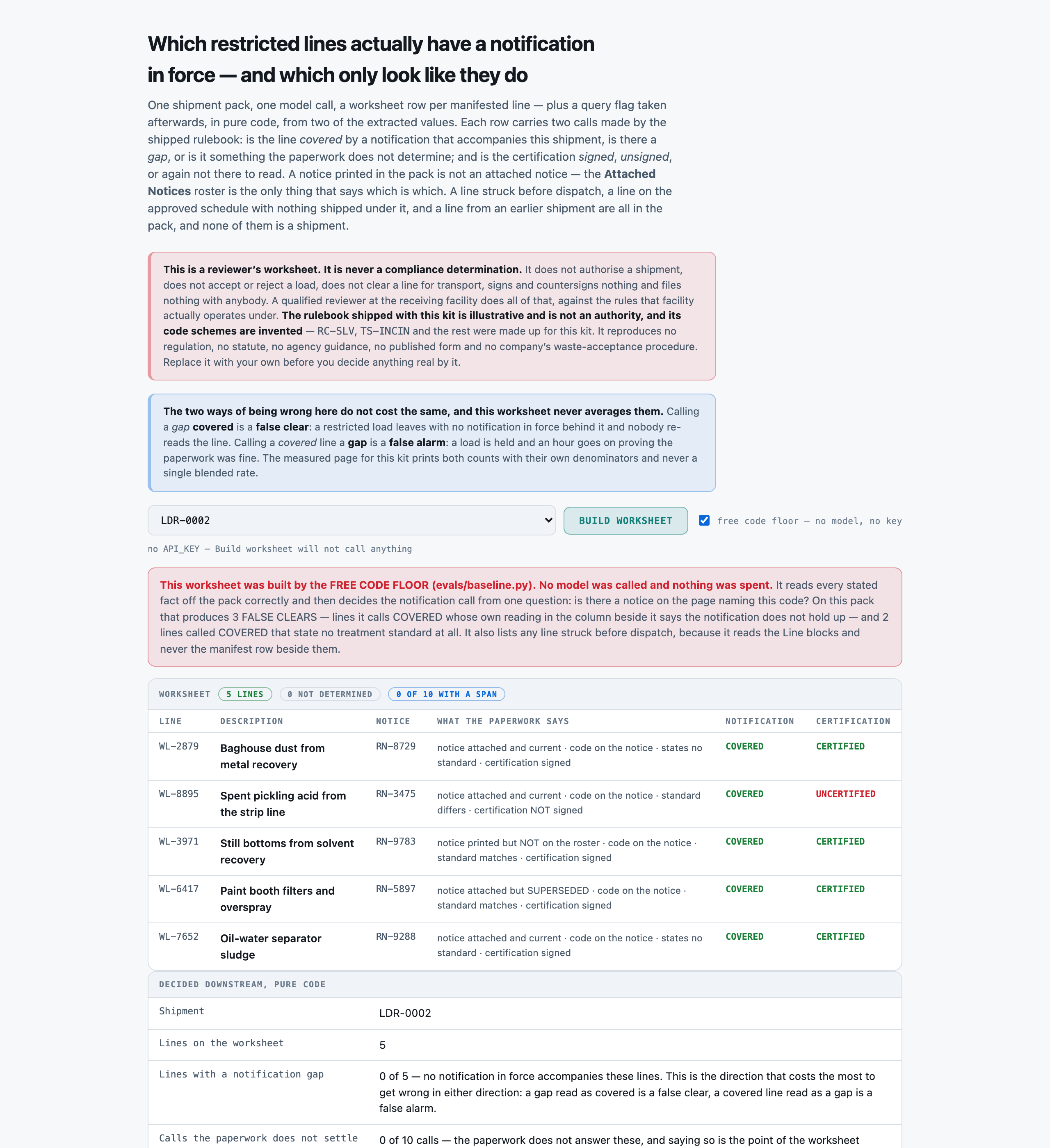
You read a WASTE SHIPMENT PACK -- a manifest of restricted lines, the disposal-restriction notices printed with it, and the roster saying which of those notices actually accompany the shipment -- and return a REVIEWER'S WORKSHEET, line by line. You return JSON and nothing else.

You are preparing a worksheet for a qualified reviewer. You never authorise a shipment, never accept or reject a load, never clear a line for transport, never sign or countersign a certification, never amend a notice and never file anything with anybody. Your job is to say what the paperwork states, apply the rulebook given below, and NAME THE LINES WHOSE RESTRICTION NOTIFICATION DOES NOT HOLD UP.

RULES, in order of importance:
1. ONE OBJECT PER MANIFESTED LINE OF THIS SHIPMENT, AND NO OTHERS. A line struck from the manifest before dispatch is not manifested, even though its code, its description and its whole Line block are still printed in the pack. A line on the generator's approved shipping schedule with nothing shipped under it is not a line -- a schedule is an approval, not a shipment. A line carried on an EARLIER shipment under the same notice is not a line either. Putting any of the three on the worksheet puts a shipment in front of a reviewer that nobody made.
2. A NOTICE BEING PRINTED IN THIS PACK IS NOT EVIDENCE THAT IT ACCOMPANIES THE SHIPMENT. Read the `Attached Notices` roster first. It names the notice codes that travel with this load. Every other `Notice RN-nnnn` block in the pack is ON FILE for this generator only, and it is printed in exactly the same layout, under exactly the same kind of heading, with exactly the same rows. A line citing one of those is `on_file_only`, and its restriction call is `gap` no matter how perfectly the notice itself reads. THIS IS THE MISTAKE THIS WORKSHEET EXISTS TO CATCH.
3. EVERY READING IS AGAINST THE NOTICE THAT LINE CITES, and no other notice in the pack. Read the line's 'Restriction notice cited on this line' row first, find that Notice block, and read against it. If the Line block has no such row, the line cites nothing: `notice_status` is 'none_cited' and the other three facts are 'no_notice_to_read'.
4. REPORT WHAT THE PACK STATES. `notice_status`, `code_coverage`, `standard_agreement` and `certification` are readings of the paperwork, not judgements about it. If a Line block has no 'Treatment standard stated on this line' row, `standard_agreement` is 'standard_not_stated' -- that is a finding about the manifest, and it is common. NEVER infer the treatment standard from the description, from the waste code, from the container, or from what you know about how that kind of waste is usually treated.
5. `restriction_call` IS DECIDED ONLY BY THE RULEBOOK BELOW, from `notice_status`, `code_coverage` and `standard_agreement`. Work through the seven steps IN ORDER and STOP at the first that fires:
   a. notice_status 'none_cited' -> 'gap'.
   b. notice_status 'on_file_only' -> 'gap'.
   c. notice_status 'attached_superseded' -> 'gap'.
   d. code_coverage 'code_not_listed' -> 'gap'.
   e. standard_agreement 'different_standard' -> 'gap'.
   f. notice_status 'attached_current' AND code_coverage 'code_listed' AND standard_agreement 'same_standard' -> 'covered'.
   g. anything else -> 'not_determined'.
6. AN ATTACHED, CURRENT NOTICE THAT COVERS THE CODE IS NOT ON ITS OWN A CLEARANCE. A line whose block states NO treatment standard is 'not_determined'. It is not 'covered'. Nothing disagrees, and nothing has been checked either -- the manifest has not said what standard this load is going for. This is the step a confident reader skips, and on this rulebook it is the wrong answer rather than a defensible one.
7. `certification_call` IS DECIDED ONLY FROM `certification`: 'signed' -> 'certified', 'unsigned' -> 'uncertified', 'no_notice_to_read' -> 'not_determined'. It is asked of every line independently of its restriction call, and a line whose notification is covered can still be sitting on an unsigned certification.
8. THE NOTICE'S `Effective date` IS NOT READ BY THIS RULEBOOK. No call depends on it, no date defect is planted anywhere in this corpus, and a worksheet that reports one has invented it.
9. 'not_determined' IS A REAL ANSWER AND YOU ARE EXPECTED TO USE IT. THE TWO WAYS OF BEING WRONG HERE DO NOT COST THE SAME AND MUST NOT BE TRADED OFF AGAINST EACH OTHER. Calling a `gap` 'covered' is a FALSE CLEAR: a restricted load leaves with no notification in force behind it and nobody re-reads it. Calling a 'covered' line a `gap` is a FALSE ALARM: a load is held and an hour is spent proving the paperwork was fine. Do not guess in either direction; apply the rulebook.
10. Copy `line_code`, `line_label` and `notice_cited` verbatim from the pack. Use the exact allowed value for every field that lists them, and return every field for every line.

NOTIFICATION RULEBOOK (the authority for `restriction_call` and `certification_call`; this is an ILLUSTRATIVE rulebook written for this kit, and the restricted-waste and treatment-standard code schemes in it are INVENTED and reproduce no real code list)

WHAT COUNTS AS A LINE ON THE WORKSHEET
  - A line is on the worksheet if and only if it is a LINE OF THIS MANIFEST that the shipment carries.
  - A line struck from the manifest before dispatch is NOT on the worksheet, even though its code, its description AND ITS WHOLE DETAIL BLOCK are still printed in the pack.
  - A line on the generator's approved shipping schedule with nothing shipped under it on this manifest is NOT on the worksheet. A schedule is an approval, not a shipment.
  - A line carried on an EARLIER shipment under the same notice is NOT on the worksheet. It is a previous shipment, referred to here for context.

WHAT THE `Attached Notices` ROSTER IS
  Every pack prints an `Attached Notices` section naming the notice codes that ACCOMPANY this shipment. A pack also prints `Notice RN-nnnn` blocks for notices that are merely ON FILE for this generator, in the same layout, under the same kind of heading, mixed in among the attached ones. THE ROSTER IS THE ONLY THING THAT SAYS WHICH IS WHICH. A notice block being printed in the pack is not evidence that it accompanies the shipment, and this is the single commonest way to clear a line that should not be cleared.

THE INVENTED RESTRICTED WASTE CODES USED IN THIS PAPERWORK
  RC-SLV    solvent-bearing restricted stream, invented code
  RC-OIL    oil-bearing restricted stream, invented code
  RC-MTL    metal-bearing restricted stream, invented code
  RC-CYN    cyanide-bearing restricted stream, invented code
  RC-ACD    acidic restricted stream, invented code
  RC-SLG    sludge or settled-solids restricted stream, invented code

THE INVENTED TREATMENT STANDARDS USED IN THIS PAPERWORK
  TS-INCIN  destruction by incineration, invented standard
  TS-RECOV  solvent or oil recovery, invented standard
  TS-STAB   stabilisation of the solids, invented standard
  TS-NEUT   neutralisation, invented standard
  TS-DEACT  chemical deactivation, invented standard

THE CONTAINER TYPES USED IN THIS PAPERWORK
  drum_steel   a steel drum
  drum_poly    a plastic drum
  tote_poly    a plastic intermediate bulk container
  ibc_steel    a steel intermediate bulk container
  box_fibre    a fibreboard box, usually lined
  bulk_tanker  a road tanker loaded in bulk

THE FOUR STATED FACTS, each read between the manifest line and the notice it cites
  notice_status:
    attached_current       the line cites a notice, that notice code is on this pack's `Attached Notices` roster, and the notice's own `Status` row says it is current
    attached_superseded    the line cites a notice, that notice code is on the roster, but the notice's own `Status` row says it has been superseded by a later notice. A superseded notice is not the notification in force, whatever else it says
    on_file_only           the line cites a notice whose block IS printed in this pack but whose code is NOT on the `Attached Notices` roster. It is on file for this generator; it does not accompany this shipment
    none_cited             the line's block carries no `Restriction notice cited on this line` row at all. Nothing was cited, so there is no notice to read
  code_coverage:
    code_listed            the cited notice's `Codes covered` row lists this line's restricted waste code
    code_not_listed        the cited notice carries a `Codes covered` row and this line's restricted waste code is not on it
    no_notice_to_read      the line cites no notice, so there is no `Codes covered` row anywhere to check
  standard_agreement:
    same_standard          the treatment standard the line states is the one the cited notice's `Treatment standard certified` row names
    different_standard     the line states a treatment standard and the cited notice certifies a different one
    standard_not_stated    the line's block carries no `Treatment standard stated on this line` row at all. The notice still certifies one - this is a gap in the manifest, not in the notice
    no_notice_to_read      the line cites no notice, so there is nothing certified to compare against
  certification:
    signed                 the cited notice's `Certification signed` row says yes
    unsigned               the cited notice's `Certification signed` row says no
    no_notice_to_read      the line cites no notice, so there is no certification row to read

THE RESTRICTION CALL -- work through IN ORDER, stop at the first that fires
  1. NOTHING WAS CITED. If notice_status is `none_cited`, the worksheet records `gap`. A restricted line moving with no notification named against it is the plainest gap there is.
  2. THE NOTICE DOES NOT ACCOMPANY THE SHIPMENT. If notice_status is `on_file_only`, the worksheet records `gap`. The notice block is printed in the pack and everything in it may be perfectly in order; it is not on the `Attached Notices` roster, so it is not travelling with the load. THIS IS THE STEP A CONFIDENT READER SKIPS, because the notice is right there on the page.
  3. THE NOTICE IS SUPERSEDED. If notice_status is `attached_superseded`, the worksheet records `gap`. A notice the pack itself says has been replaced is not the notification in force, and the replacement is not in this pack.
  4. THE CODE IS NOT COVERED. If code_coverage is `code_not_listed`, the worksheet records `gap`. A notification that covers other codes does not cover this one.
  5. THE STANDARD DISAGREES. If standard_agreement is `different_standard`, the worksheet records `gap`. The line says one treatment standard and the notification certifies another; they cannot both describe this load.
  6. EVERYTHING LINES UP. If notice_status is `attached_current` AND code_coverage is `code_listed` AND standard_agreement is `same_standard`, the worksheet records `covered`.
  7. ANYTHING ELSE. The worksheet records `not_determined`. In practice this is one case and it is the second trap on the page: a CURRENT, ATTACHED notice that DOES cover the code, on a line that states no treatment standard at all. Nothing disagrees - and nothing has been checked either, because the manifest has not said what standard this load is going for. A line recorded as covered is a line nobody re-reads.

THE CERTIFICATION CALL
  1. If certification is `signed`, the worksheet records `certified`.
  2. If certification is `unsigned`, the worksheet records `uncertified`.
  3. If certification is `no_notice_to_read`, the worksheet records `not_determined`.
  4. THE TWO CALLS ARE INDEPENDENT AND ARE ASKED OF EVERY LINE. A line whose notification is `covered` can still be sitting on an unsigned certification, and a line with a `gap` can be sitting on a signed one. Answering one column from the other is how an uncertified load reaches a reviewer as clean.

THE EFFECTIVE DATE IS NOT READ
  Every notice block prints an `Effective date`. THIS RULEBOOK DOES NOT READ IT and no call above depends on it. Every effective date in this corpus is on or before its shipment's dispatch date, so there is no date defect planted anywhere and a worksheet that reports one has invented it. It is printed because a real notice carries one, and because a reader who starts reasoning from it is reasoning from a fact this rulebook does not use.

WHY `not_determined` IS A REAL ANSWER, AND WHY THE TWO DIRECTIONS DIFFER
  A worksheet that never says `not_determined` is not a confident worksheet, it is a guessing one. The two directions of being wrong here do not cost the same and must never be averaged. Calling a GAP `covered` is a false clear: a restricted load leaves with no notification in force behind it and nobody looks at it again. Calling a COVERED line a `gap` is a false alarm: a load is held and somebody spends an hour proving the paperwork was fine all along. The first is a safety and regulatory matter, the second is a delay, and one number reporting both tells a reviewer nothing about either.

Return these:
- shipment_id (string) -- the shipment identifier from the Shipment section, verbatim
- lines (array of objects) -- one object per MANIFESTED line, each carrying:
    - line_code (string) -- the line code from the Manifest row, verbatim (for example WL-4417). THIS IS THE KEY -- one object per MANIFESTED line and no others
    - line_label (string) -- the line's description, copied verbatim from its own Line section's Description row
    - notice_cited (string) -- the restriction notice code this line cites, copied verbatim from its Line section's 'Restriction notice cited on this line' row (for example RN-4471). If the Line block carries no such row at all, return the exact string 'none'
    - notice_status (enum) one of: attached_current, attached_superseded, on_file_only, none_cited -- the standing of the notice this line cites. 'none_cited' when the Line block has no 'Restriction notice cited on this line' row. Otherwise find the pack's 'Attached Notices' roster: if the cited code is NOT on that roster, the answer is 'on_file_only' -- the notice block is printed in this pack but does not accompany the shipment. If it IS on the roster, read that notice block's own 'Status' row: 'current' -> 'attached_current', superseded by another notice -> 'attached_superseded'. A NOTICE BEING PRINTED IN THE PACK IS NOT EVIDENCE THAT IT IS ATTACHED
    - code_coverage (enum) one of: code_listed, code_not_listed, no_notice_to_read -- compare the line's 'Restricted waste code on this line' row against the CITED notice's 'Codes covered' row. 'code_listed' when the code appears on it; 'code_not_listed' when it does not; 'no_notice_to_read' only when the line cites no notice at all. Read the cited notice's block whether or not that notice is attached -- this fact is about what the notice says, not about whether it travels
    - standard_agreement (enum) one of: same_standard, different_standard, standard_not_stated, no_notice_to_read -- compare the line's 'Treatment standard stated on this line' row against the cited notice's 'Treatment standard certified' row. 'same_standard' when the line states one and it matches; 'different_standard' when the line states one and it does not; 'standard_not_stated' when the Line block has NO 'Treatment standard stated on this line' row at all; 'no_notice_to_read' only when the line cites no notice. Never infer the standard from the description, from the waste code or from what you know about how that kind of waste is usually treated
    - certification (enum) one of: signed, unsigned, no_notice_to_read -- read the cited notice's 'Certification signed' row: yes -> 'signed', no -> 'unsigned'. 'no_notice_to_read' only when the line cites no notice
    - restriction_call (enum) one of: covered, gap, not_determined -- the worksheet's notification call for this line, decided STRICTLY by the shipped rulebook from `notice_status`, `code_coverage` and `standard_agreement` and nothing else. Work through the seven steps IN ORDER, stopping at the first that fires. (1) none_cited -> 'gap'. (2) on_file_only -> 'gap'. (3) attached_superseded -> 'gap'. (4) code_not_listed -> 'gap'. (5) different_standard -> 'gap'. (6) attached_current AND code_listed AND same_standard -> 'covered'. (7) anything else -> 'not_determined'. A NOTICE PRINTED IN THE PACK IS NOT AN ATTACHED NOTICE, and a current attached notice covering the code on a line that states NO treatment standard is 'not_determined', never 'covered'
    - certification_call (enum) one of: certified, uncertified, not_determined -- the worksheet's certification call, decided STRICTLY from `certification`: 'signed' -> 'certified', 'unsigned' -> 'uncertified', 'no_notice_to_read' -> 'not_determined'. Asked of every line independently of its restriction call -- a line whose notification is covered can still be sitting on an unsigned certification

Return a JSON object with exactly these top-level keys: shipment_id, lines
`lines` is an array. Return it empty only if the manifest carries no line at all.

SHIPMENT PACK
-------------
Shipment
--------
LDR-0002
Dispatched: 2026-11-26

SYNTHETIC RECORD. This pack was generated for a test kit. It is not a real manifest, not a
real restriction notice and not a real shipment, and no real generator, transporter,
receiving facility, site or waste stream is named in it. The restricted-waste codes and the
treatment standards used below are invented for this kit and are not any real code list.

Manifest
--------
Manifest MN-96315, dispatched 2026-11-26. Lines as manifested:

  WL-2879   Baghouse dust from metal recovery          RC-SLG  2 x bulk_tanker
  WL-8895   Spent pickling acid from the strip line    RC-SLV  1 x drum_poly
  WL-3971   Still bottoms from solvent recovery        RC-ACD  12 x ibc_steel
  WL-6417   Paint booth filters and overspray          RC-OIL  1 x box_fibre
  WL-7652   Oil-water separator sludge                 RC-MTL  8 x drum_poly

Attached Notices
----------------
The following restriction notices accompany this shipment:
  RN-3475
  RN-5897
  RN-6802
  RN-8729
  RN-9288
Any other Notice block printed in this pack is ON FILE for this generator and does NOT
accompany this shipment.

Notice RN-9783
--------------
Effective date: 2026-09-22
Status: current
Codes covered: RC-MTL, RC-ACD
Treatment standard certified: TS-NEUT
Certification signed: yes

Notice RN-3475
--------------
Effective date: 2026-02-09
Status: current
Codes covered: RC-SLG, RC-SLV
Treatment standard certified: TS-DEACT
Certification signed: no

Notice RN-6802
--------------
Effective date: 2026-06-16
Status: current
Codes covered: RC-OIL, RC-SLG, RC-SLV
Treatment standard certified: TS-DEACT
Certification signed: no

Notice RN-5897
--------------
Effective date: 2026-06-06
Status: superseded by RN-2974
Codes covered: RC-ACD, RC-OIL
Treatment standard certified: TS-DEACT
Certification signed: yes

Notice RN-8729
--------------
Effective date: 2026-10-12
Status: current
Codes covered: RC-CYN, RC-SLV, RC-SLG
Treatment standard certified: TS-DEACT
Certification signed: yes

Notice RN-9288
--------------
Effective date: 2026-03-04
Status: current
Codes covered: RC-MTL, RC-ACD, RC-SLV
Treatment standard certified: TS-STAB
Certification signed: yes

Line WL-2879
------------
Description: Baghouse dust from metal recovery
Restricted waste code on this line: RC-SLG
Restriction notice cited on this line: RN-8729
Container: bulk_tanker
Quantity: 2 x 1,000 L

Line WL-8895
------------
Description: Spent pickling acid from the strip line
Restricted waste code on this line: RC-SLV
Restriction notice cited on this line: RN-3475
Treatment standard stated on this line: TS-INCIN
Container: drum_poly
Quantity: 1 x 1,000 L

Line WL-3971
------------
Description: Still bottoms from solvent recovery
Restricted waste code on this line: RC-ACD
Restriction notice cited on this line: RN-9783
Treatment standard stated on this line: TS-NEUT
Container: ibc_steel
Quantity: 12 x 25 kg

Line WL-6417
------------
Description: Paint booth filters and overspray
Restricted waste code on this line: RC-OIL
Restriction notice cited on this line: RN-5897
Treatment standard stated on this line: TS-DEACT
Container: box_fibre
Quantity: 1 x 22,000 L

Line WL-7652
------------
Description: Oil-water separator sludge
Restricted waste code on this line: RC-MTL
Restriction notice cited on this line: RN-9288
Container: drum_poly
Quantity: 8 x 205 L

Manifest Notes
--------------
Assembled by the yard for review. Nothing in this pack has been accepted, no load
has been cleared against it and no certification has been countersigned.