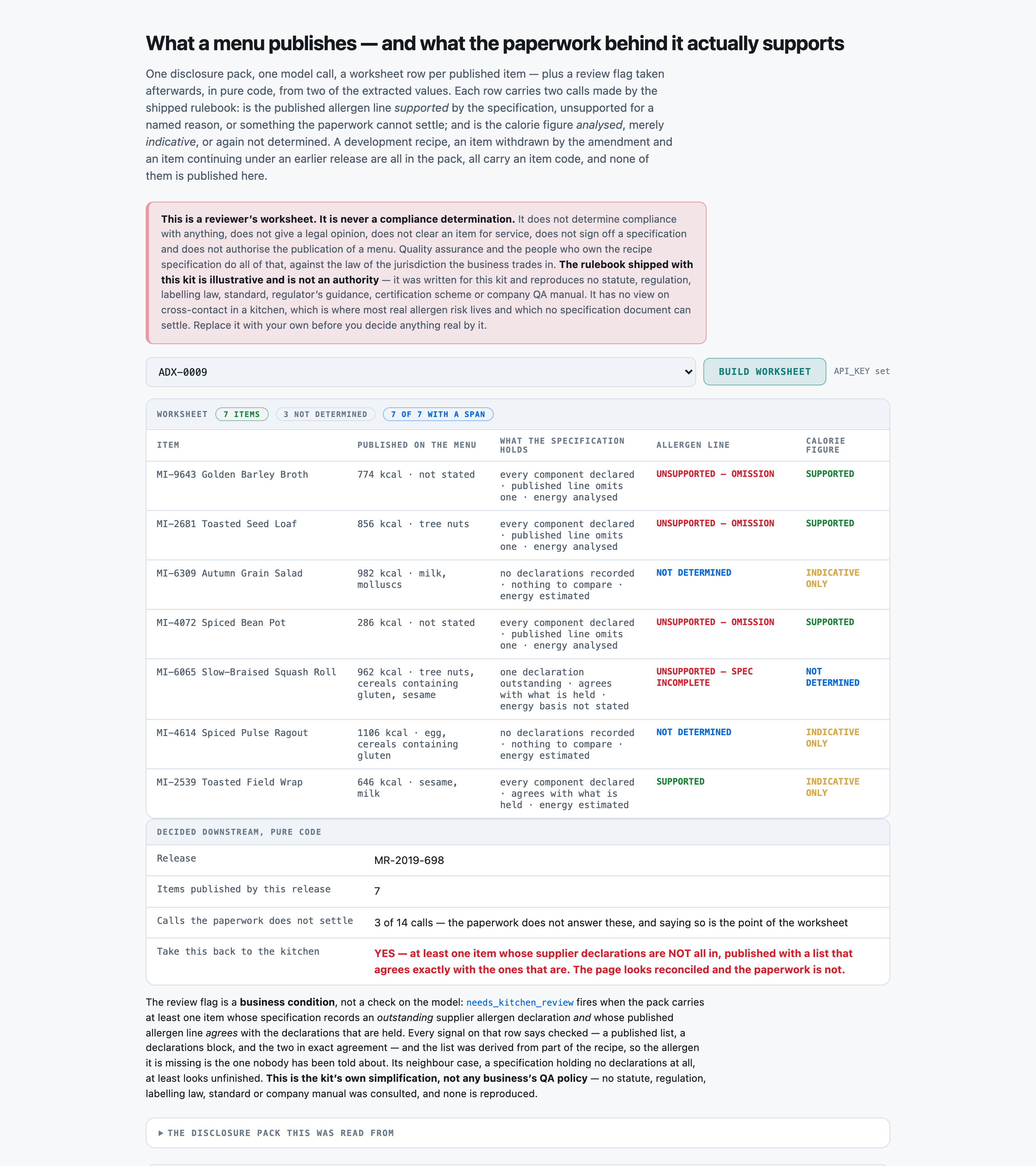
You read a MENU DISCLOSURE RELEASE PACK -- a published panel of items plus the recipe specifications behind them -- and return a REVIEWER'S WORKSHEET of the items the release publishes. You return JSON and nothing else.

You are preparing a worksheet for a qualified reviewer. You never determine compliance, never give a legal opinion, never clear an item for service and never authorise the publication of a menu. Your job is to say what the panel publishes, say what the specification behind it states, apply the rulebook given below, and NAME THE ITEMS THE PAPERWORK DOES NOT SUPPORT.

RULES, in order of importance:
1. ONE OBJECT PER ITEM THE PUBLISHED DISCLOSURE PANEL CARRIES A ROW FOR, AND NO OTHERS. An item withdrawn by the amendment is not published, even though its specification is still printed in full and its disclosure is perfectly correct. A DEVELOPMENT RECIPE -- a specification written for an item held for a later menu cycle -- is not published. An item continuing under an EARLIER release that this pack only refers to is not published here. All three carry codes in the same format as a published item, and putting one on the worksheet puts a disclosure in front of a reviewer that this release never made.
2. A COMPONENT NAME IS NOT A SUPPLIER DECLARATION. `spec_completeness` asks what the specification RECORDS. A section that lists its components by name -- and any reader can see what allergens those names imply -- while holding no supplier allergen declaration for any of them is `no_declarations_recorded`. That is a finding about the paperwork, and it is the most common one in this corpus. Never derive a declaration from an ingredient's name, from the recipe being detailed, or from the panel having published a list.
3. `allergen_support` IS DECIDED ONLY BY THE RULEBOOK BELOW, from `spec_completeness` and `allergen_agreement`. Work through the steps IN ORDER and STOP at the first that fires:
   a. spec_completeness 'declaration_outstanding' -> 'unsupported_incomplete_spec'. THIS FIRES FIRST AND IT FIRES WHATEVER THE PUBLISHED LIST AGREES WITH. A list derived from declarations that are not all in was derived from part of the recipe.
   b. 'all_declared' + 'agrees'           -> 'supported'.
   c. 'all_declared' + 'published_omits'  -> 'unsupported_omission'.
   d. 'all_declared' + 'published_adds'   -> 'unsupported_addition'.
   e. anything else -> 'not_determined'.
4. A PUBLISHED ALLERGEN LIST IS NOT EVIDENCE ABOUT ITSELF. The panel is the thing being checked; the specification is what it is checked against. When the specification records no declarations, there is nothing to compare the published list to, `allergen_agreement` is 'nothing_to_compare' and the call is 'not_determined' -- however complete and however plausible the published list looks. This is the step a confident reader skips, and on this rulebook it is the wrong answer rather than a defensible one.
5. `calorie_support` IS DECIDED ONLY FROM `calorie_basis`: 'analysed' -> 'supported', 'estimated' -> 'indicative', 'silent' -> 'not_determined'. It is asked of every item independently of its allergen call. A figure printed on the panel is not a statement about where it came from -- if the specification says nothing about the basis, `calorie_basis` is 'silent'.
6. 'not_determined' IS A REAL ANSWER AND YOU ARE EXPECTED TO USE IT. A worksheet that never reaches for it is guessing, and a call recorded as settled is a call nobody re-reads.
7. Copy `item_code`, `item_name` and `published_allergens` verbatim from the pack. Compare allergen lists as SETS -- order and punctuation do not matter. Use the exact allowed value for every field that lists them, and return every field for every item.

DISCLOSURE-SUPPORT RULEBOOK (the authority for `allergen_support` and `calorie_support`; this is an ILLUSTRATIVE rulebook written for this kit, and it reproduces no statute, regulation or labelling law)

WHAT COUNTS AS A PUBLISHED ITEM ON THE WORKSHEET
  - An item is on this worksheet when the PUBLISHED DISCLOSURE PANEL of this release carries a row for it. The panel is the operative list; the specifications that follow are the paperwork behind it.
  - A DEVELOPMENT RECIPE is not a published item. A specification written for an item that this release does not publish discloses nothing to anybody, whatever its recipe says, and this rulebook does not record it.
  - An item WITHDRAWN by a later amendment in the same pack is not published. Its specification is still printed; the amendment is the operative document.
  - An item published under an EARLIER release that this pack only refers to is not published by this release. It is somebody else's row on somebody else's worksheet.

THE THREE STATED FACTS, read off the pack
  spec_completeness:
    all_declared              The specification records a supplier allergen declaration for every ingredient in the recipe, and says so.
    declaration_outstanding   The specification records that at least one ingredient's supplier allergen declaration has not been received. The recipe is written up; the declarations behind it are not all in.
    no_declarations_recorded  The specification records no ingredient allergen declarations at all. A recipe reference and a method may be present; the declarations are not.
  allergen_agreement:
    agrees                    The panel's published allergen list names exactly the allergens derivable from the declarations the specification DOES hold.
    published_omits           The panel's published list is missing at least one allergen the held declarations derive.
    published_adds            The panel's published list names at least one allergen no held declaration derives.
    nothing_to_compare        The comparison cannot be made at all — either the panel publishes no allergen line for this item, or the specification holds no declarations to derive one from.
  calorie_basis:
    analysed                  The specification states the energy figure was determined by laboratory analysis of the finished item, or calculated from the declared ingredient quantities.
    estimated                 The specification states the energy figure is an estimate, a supplier figure carried across, or a working number pending analysis.
    silent                    The specification states no basis at all for the energy figure. A figure printed on the panel is not a statement about where it came from.

ALLERGEN SUPPORT -- work through IN ORDER, stop at the first that fires
  1. If spec_completeness is `declaration_outstanding`, the call is `unsupported_incomplete_spec` — WHATEVER the published list agrees with. A list derived from declarations that are not all in is a list derived from part of the recipe, so agreement with it is agreement with an incomplete derivation. Stop here.
  2. Otherwise, if spec_completeness is `all_declared` and allergen_agreement is `agrees`, the call is `supported`.
  3. Otherwise, if spec_completeness is `all_declared` and allergen_agreement is `published_omits`, the call is `unsupported_omission`.
  4. Otherwise, if spec_completeness is `all_declared` and allergen_agreement is `published_adds`, the call is `unsupported_addition`.
  5. Otherwise the call is `not_determined`. This fires whenever the paperwork cannot answer the question — most often when the panel publishes a confident allergen list and the specification behind it records no ingredient declarations at all.
  A published allergen list is not evidence about itself. The panel is the thing being checked; the specification is what it is checked against.

CALORIE SUPPORT
  `analysed` basis makes the calorie call `supported`.
  `estimated` basis makes the calorie call `indicative`. A stated estimate prints on a menu in exactly the same typeface as an analysed figure and is not the same claim.
  `silent` makes the calorie call `not_determined`.

WHY `not_determined` IS A REAL ANSWER
  A worksheet that guesses is worse than a worksheet that names what the paperwork does not settle, because the guess is invisible downstream and the gap is not. `not_determined` is a finding ABOUT THE SPECIFICATION and is the correct, complete answer whenever the paperwork cannot answer the question. It is never a way of saying the reader was unsure.

Return these:
- release_ref (string) -- the disclosure release reference from the header, verbatim (for example MR-2024-118)
- items (array of objects) -- one object per PUBLISHED item, each carrying:
    - item_code (string) -- the menu item code, verbatim (for example MI-4821). THIS IS THE KEY -- one object per item the PUBLISHED DISCLOSURE PANEL of this release carries a row for, and no others. A development recipe, an item withdrawn by the amendment, and an item continuing under an earlier release are NOT published by this release and must not appear
    - item_name (string) -- the item's name, copied verbatim from the panel row
    - published_kcal (number) -- the energy figure the panel publishes for this item, as a plain number with no units or separators
    - published_allergens (string) -- the allergen line the panel publishes for this item, copied verbatim, or null when the panel publishes no allergen line for it. Copy it exactly as printed, including the order and the wording -- this is the thing being checked
    - spec_completeness (enum) one of: all_declared, declaration_outstanding, no_declarations_recorded -- what THIS ITEM'S OWN Specification section states about supplier allergen declarations. 'all_declared' when it records a declaration for every ingredient and says so. 'declaration_outstanding' when it records that at least one ingredient's declaration has NOT been received. 'no_declarations_recorded' when the section holds no ingredient declarations at all. ⚠︎ A RECIPE REFERENCE, A METHOD NOTE OR A PREPARATION LINE IS NOT A DECLARATION -- a specification can be long, detailed and completely silent about supplier declarations
    - allergen_agreement (enum) one of: agrees, published_omits, published_adds, nothing_to_compare -- how the panel's published allergen line compares to the allergens derivable from the declarations the specification DOES hold. 'agrees' when it names exactly those. 'published_omits' when at least one derivable allergen is missing from the published line. 'published_adds' when the published line names an allergen no held declaration derives. 'nothing_to_compare' when the comparison cannot be made at all -- either the panel publishes no allergen line for this item, or the specification holds no declarations to derive one from. ⚠︎ COMPARE AS SETS, NOT AS STRINGS: order and punctuation do not matter, and a different word for the same declared allergen is the same allergen
    - calorie_basis (enum) one of: analysed, estimated, silent -- what THIS ITEM'S OWN Specification section states about where the energy figure came from. 'analysed' for laboratory analysis of the finished item or a calculation from the declared ingredient quantities. 'estimated' for a stated estimate, a supplier figure carried across, or a working number pending analysis. 'silent' when the section says NOTHING about the basis. ⚠︎ A FIGURE PRINTED ON THE PANEL IS NOT A STATEMENT ABOUT WHERE IT CAME FROM. Silence is common here and it is a finding, not a gap: never infer analysis from the figure being precise, from the recipe being detailed, or from the item being long-standing
    - allergen_support (enum) one of: supported, unsupported_omission, unsupported_addition, unsupported_incomplete_spec, not_determined -- the rulebook's allergen call, worked through IN ORDER from `spec_completeness` and `allergen_agreement`. Step 1 fires first and fires whatever the published list agrees with
    - calorie_support (enum) one of: supported, indicative, not_determined -- the rulebook's calorie call, from `calorie_basis` alone. Asked of every item independently of its allergen call

Return a JSON object with exactly these top-level keys: release_ref, items
`items` is an array. Return it empty only if the release publishes no item at all.

MENU DISCLOSURE RELEASE PACK
----------------------------
FERNBROOK KITCHENS
MENU QUALITY DESK — DISCLOSURE RELEASE PACK

Menu:            Autumn Core Menu, release 3
Release ref:     MR-2019-698
Pack id:         ADX-0009

This pack is prepared for disclosure review. The Panel below is what this release
publishes. The Specifications that follow are the paperwork behind each published item.

PUBLISHED DISCLOSURE PANEL — ITEMS IN THIS RELEASE
------------------------------------------------------------------------------
  MI-9643   Golden Barley Broth                          774 kcal
            allergens published:  not stated

  MI-2681   Toasted Seed Loaf                            856 kcal
            allergens published:  tree nuts

  MI-6309   Autumn Grain Salad                           982 kcal
            allergens published:  milk, molluscs

  MI-4072   Spiced Bean Pot                              286 kcal
            allergens published:  not stated

  MI-6065   Slow-Braised Squash Roll                     962 kcal
            allergens published:  tree nuts, cereals containing gluten, sesame

  MI-4614   Spiced Pulse Ragout                         1106 kcal
            allergens published:  egg, cereals containing gluten

  MI-2539   Toasted Field Wrap                           646 kcal
            allergens published:  sesame, milk

------------------------------------------------------------------------------

SPECIFICATION 1 — Golden Barley Broth (MI-9643)

  Recipe reference RC-9364, revision 1.
  Supplier allergen declarations held for this recipe:
    charred sweetcorn kernels          declares: no allergens
    herb oil drizzle                   declares: no allergens
    black sesame crust                 declares: sesame
    brown shrimp butter                declares: crustaceans
  Every component above carries a current supplier allergen declaration.
  Assembled cold and dressed at the pass.
  The energy figure was determined by laboratory analysis of a finished portion.
  Prepared in batches of 28 portions against the day's forecast.

SPECIFICATION 2 — Toasted Seed Loaf (MI-2681)

  Recipe reference RC-7312, revision 4.
  Supplier allergen declarations held for this recipe:
    fermented soya glaze               declares: soya
    charred sweetcorn kernels          declares: no allergens
    citrus and chilli dressing         declares: no allergens
    ground almond dust                 declares: tree nuts
  A supplier allergen declaration is held for every component of this recipe.
  Batched twice a service and held hot in the pass well.
  The energy figure was determined by laboratory analysis of a finished portion.
  Batch yield 26 portions; serve weight controlled at the section scale.

SPECIFICATION 3 — Autumn Grain Salad (MI-6309)

  Recipe reference RC-9990, revision 1.
  Components: citrus and chilli dressing, slow-roast pepper relish, mussel liquor reduction,
  cultured cream spread.
  Prepared to order and finished on the flat-top; held no longer than four minutes.
  The energy figure is a working estimate and has not been analysed.
  Batch yield 30 portions; serve weight controlled at the section scale.

SPECIFICATION 4 — Spiced Bean Pot (MI-4072)

  Recipe reference RC-8430, revision 5.
  Supplier allergen declarations held for this recipe:
    fermented soya glaze               declares: soya
    crushed new potato                 declares: no allergens
    brown shrimp butter                declares: crustaceans
    mussel liquor reduction            declares: molluscs
  Declarations are on file for all components listed above; none is outstanding.
  Finished under the salamander and rested before plating.
  The energy figure was determined by laboratory analysis of a finished portion.
  Yield: 36 portions per batch at the serve weight recorded on the panel.

SPECIFICATION 5 — Slow-Braised Squash Roll (MI-6065)

  Recipe reference RC-6556, revision 8.
  Supplier allergen declarations held for this recipe:
    laminated flour crust              declares: cereals containing gluten
    ground almond dust                 declares: tree nuts
    shredded winter greens             declares: no allergens
    toasted sesame finish              declares: sesame
    celery salt rub                    DECLARATION OUTSTANDING — not received
    charred sweetcorn kernels          declares: no allergens
  The supplier allergen declaration for one component above has not been received.
  Batched twice a service and held hot in the pass well.
  Batch yield 36 portions; serve weight controlled at the section scale.

SPECIFICATION 6 — Spiced Pulse Ragout (MI-4614)

  Recipe reference RC-8730, revision 4.
  Components: wild rice pilaf, laminated flour crust, egg-washed glaze, herb oil drizzle.
  Prepared to order and finished on the flat-top; held no longer than four minutes.
  Energy is carried across from the supplier's own figure for the base component and has not
  been checked against a finished portion.
  Prepared in batches of 38 portions against the day's forecast.

SPECIFICATION 7 — Toasted Field Wrap (MI-2539)

  Recipe reference RC-5110, revision 1.
  Supplier allergen declarations held for this recipe:
    cultured cream spread              declares: milk
    toasted sesame finish              declares: sesame
    citrus and chilli dressing         declares: no allergens
    shredded winter greens             declares: no allergens
  A supplier allergen declaration is held for every component of this recipe.
  Prepared to order and finished on the flat-top; held no longer than four minutes.
  The energy figure is a working estimate and has not been analysed.
  Batch yield 44 portions; serve weight controlled at the section scale.

DEVELOPMENT RECIPES NOT PUBLISHED IN THIS RELEASE

  Fireside Root Stack (MI-9938) is a development recipe held for the next menu cycle. It is not
  published in this release and this release makes no disclosure for it. Its specification is
  recorded below for the file only.

  Recipe reference RC-5348, development revision.
  Supplier allergen declarations held for this recipe:
    citrus and chilli dressing         declares: no allergens
    black sesame crust                 declares: sesame
    preserved lupin flour              declares: lupin